1. Okwu mmalite
The ZEUS Ranger SC Anti-Bark Collar is designed to assist in curbing undesirable barking behaviors in dogs. This device utilizes a combination of sound, vibration, and static correction to provide a safe and effective training experience. It is intended to startle your pet, not to cause harm, and offers seven adjustable levels of correction and sensitivity to suit individual dog needs.
This manual provides essential information for the proper setup, operation, and maintenance of your ZEUS Ranger SC Anti-Bark Collar.
2. Ihe ngwugwu
Chọpụta na ihe niile dị na ngwugwu gị:
- ZEUS Ranger SC Anti-Bark Collar Unit
- Adjustable Nylon Strap
- eriri USB chaja
- Long Hair Probes
- Short Hair Probes
- Probe Tool / Tester
- Akwụkwọ ntuziaka onye ọrụ

Nyocha 1: N'eluview of the ZEUS Ranger SC Anti-Bark Collar and its included components.
3. Ozi nchekwa
- Ọ bụghị maka nkịta na-eme ihe ike: Do not use this product on aggressive dogs.
- Kwesịrị ekwesị: Ensure the collar fits snugly but comfortably. It should not be too tight to restrict breathing or cause skin irritation, nor too loose to move around excessively.
- Limited Wear Time: Avoid leaving the collar on your dog for more than 12 consecutive hours per day to prevent pressure necrosis or skin irritation.
- Nlele anya mgbe niile: Inspect your dog's neck daily for any signs of rash or sores. If irritation is found, discontinue use until the skin heals.
- Nlekọta: Always supervise your dog when the collar is in use, especially during initial training phases.
- Static Correction: The static correction feature is designed to startle, not to punish. Use the lowest effective setting.
- Ihe mgbochi mmiri: The collar is waterproof, but ensure the charging port cover is securely closed before exposure to water.
4. Nhazi
4.1 Ịchaji olu
Before first use, fully charge the collar. Connect the USB charger cable to the collar's charging port and a suitable USB power source. The indicator light will show charging status. A full charge typically takes approximately 2 hours.
4.2 Attaching the Collar Strap
Thread the adjustable nylon strap through the collar unit. Ensure the unit is positioned centrally on the strap.
4.3 Selecting and Installing Contact Probes
Choose the appropriate contact probes (long or short) based on your dog's coat length. For dogs with shorter coats, use the short probes. For dogs with longer or thicker coats, use the long probes to ensure proper contact with the skin. Screw the chosen probes firmly onto the collar unit.

Figure 2: The ZEUS Ranger SC Anti-Bark Collar unit, showing the contact probes and strap attachment points.
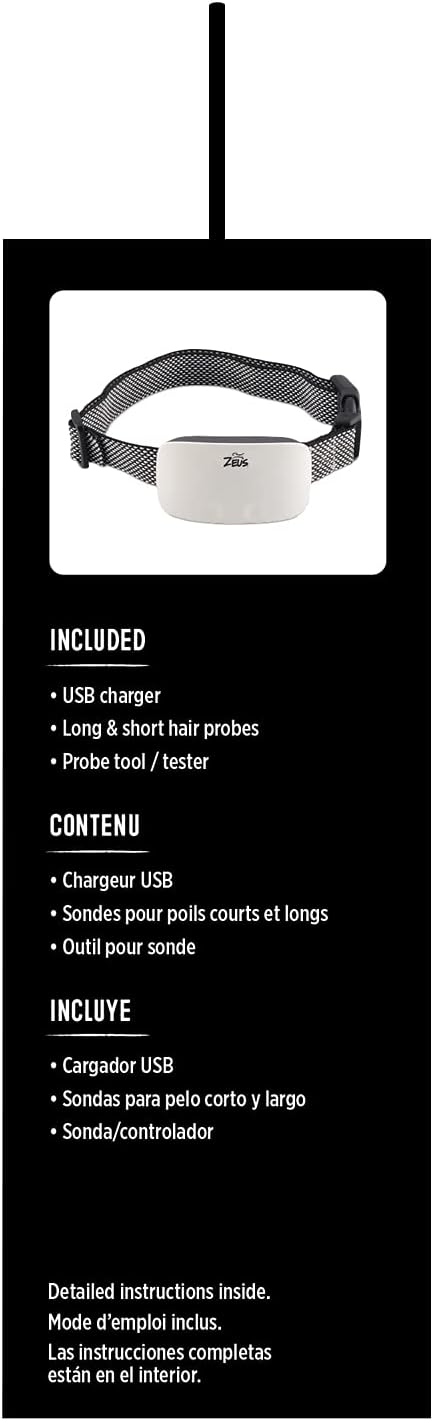
Figure 3: The USB charger, long and short hair probes, and probe tool included with the collar.
5. Ntuziaka ọrụ
5.1 Gbanyụọ / gbanyụọ
To turn the collar ON, press and hold the power button until the indicator light illuminates. To turn OFF, press and hold the power button again until the light extinguishes.
5.2 Adjusting Sensitivity Levels
The collar features 7 levels of sensitivity. Higher sensitivity levels mean the collar will activate with less intense barking. Adjust the sensitivity to an appropriate level for your dog and environment. Start with a lower sensitivity and increase if necessary.
5.3 Selecting Correction Modes
The ZEUS Ranger SC offers three correction modes: sound, vibration, and static correction. You can select the desired mode or combination of modes. It is recommended to start with sound and/or vibration before introducing static correction, and always use the lowest effective static level.
Video 1: Demonstration of a smart bark collar's modes (sound, vibration, sound+vibration) and sensitivity levels. This video illustrates similar functionality to the ZEUS Ranger SC collar.
Vidiyo nke 2: Mwepuview of a bark collar's features, including sound, vibration, and static correction modes, and how to adjust sensitivity. This demonstrates similar operational principles to the ZEUS Ranger SC.
Video 3: A demonstration of a bark collar's display, showing battery level, sensitivity, and mode selection. This is relevant to understanding the visual feedback of the ZEUS Ranger SC.
Video 4: This video shows the display and button functions of a bark collar, including sensitivity adjustment and mode selection, which are comparable to the ZEUS Ranger SC.
6. Nlekọta
- Nhicha: Clean the collar unit and strap regularly with a damp akwa . Zere kemịkalụ siri ike.
- Probe Inspection: Periodically check the contact probes for wear or damage. Replace if necessary.
- Strap Condition: Ensure the strap is not frayed or damaged. A damaged strap may compromise the collar's effectiveness or safety.
- Nchekwa: Store the collar in a dry place at room temperature when not in use.
7. Nchọpụta nsogbu
7.1 Collar Not Activating
- Ọkwa batrị: Ensure the collar is fully charged.
- Mmetụta ọnọdụ: Increase the sensitivity level if your dog's barking is not being detected.
- Probe Contact: Verify that the contact probes are making proper contact with your dog's skin. Adjust the strap or use longer probes if needed.
7.2 Collar Over-Activating
- Mmetụta ọnọdụ: Decrease the sensitivity level. The collar may be picking up other sounds or vibrations.
- dabara: Ensure the collar is not too loose, which can cause false triggers from movement.
7.3 Iwe iwe
- Remove Collar: Immediately remove the collar if you notice any skin irritation.
- Ịdị ọcha: Ensure the collar and your dog's neck are clean and dry.
- Oge eyi: Limit collar wear to a maximum of 12 hours per day.
- Ndozigharị: Periodically reposition the collar on your dog's neck to prevent prolonged pressure on one area.
8. Nkọwapụta
| Nọmba nlereanya | 96104 |
| Ụdị | Zeus |
| Ụdị mmezi | Sound, Vibration, Static Correction |
| Ọkwa mmetụta | Ọkwa 7 |
| Nha eriri na-agbanwe agbanwe | 8 to 21.5 inches (20-55 cm) |
| Ibu Nkịta akwadoro | Over 11 pounds (5 kg) |
| Isi Iyi Ike | USB enwere ike ịchaji |
| Ihe onwunwe | Naịlọn |
| Agba | White (Collar Unit) |
| Onye nrụpụta | Ụlọ ọrụ Rolf C. Hagen (USA) CORP. |
9. Akwụkwọ ikike na nkwado
For warranty information or technical support, please refer to the documentation included in your product packaging or contact the manufacturer directly. Keep your purchase receipt as proof of purchase.


