1. Okwu mmalite
The Energizer Connect Smart WiFi Plug allows you to control your electronic devices remotely using a mobile application or voice commands. This smart plug connects directly to your home's 2.4GHz Wi-Fi network, eliminating the need for a separate hub. It is compatible with Amazon Alexa, Google Assistant, and Siri for convenient voice control. This manual provides detailed instructions for setting up, operating, maintaining, and troubleshooting your smart plug.
2. Ozi nchekwa
Please read and understand all safety instructions before using this product. Failure to follow these instructions may result in electric shock, fire, or property damage.
- Maka naanị ime ụlọ.
- Agafela ibu kacha nke 15 Amps (120 Volts).
- Do not immerse the plug in water or expose it to moisture.
- Anwala ịkwasa ma ọ bụ gbanwee ngwaọrụ ahụ.
- Debe ebe ụmụaka na-apụghị iru.
- Gbaa mbọ hụ na etinyere plọg ahụ n'ụzọ zuru ezu n'ime oghere mgbidi.
- Kwụpụ ihe nkwụnye ahụ na ihe nkwụnye tupu ị hichaa ya.
3. Ihe ngwugwu
- 1 x Energizer Connect Smart WiFi Plug
- Akwụkwọ ntuziaka onye ọrụ 1 x (akwụkwọ a)
4. Ngwaahịa gafereview
The Energizer Connect Smart WiFi Plug features a compact design that allows access to the second outlet. It includes a power button and an LED indicator for status.

Foto nke 4.1: The Energizer Connect Smart WiFi Plug shown with its retail packaging, highlighting key features like 15 Amps of power, grouping, voice control, and Wi-Fi connectivity. The plug itself is white and compact.

Foto nke 4.2: A close-up front view of the Energizer Connect Smart WiFi Plug, showing the standard Type B electrical outlet configuration (two vertical slots and a round ground hole).

Foto nke 4.3: This image displays the compact dimensions of the Energizer Connect Smart WiFi Plug. The side view shows a depth of 1.0625 inches, and the front view indicates a diameter of 1.125 inches, illustrating its mini size.
4.1. Akụrụngwa
- Bọtịnụ ike: Press to manually turn the connected device on or off. Press and hold for 5 seconds to initiate pairing mode (LED will blink rapidly).
- Ihe ngosi LED:
- Blue siri ike: Agbanyere ngwaọrụ.
- Gbanyụọ: Agbanyụrụ ngwaọrụ
- Rapidly Blinking Blue: Ụdị njikọ.
- Acha anụnụ anụnụ na-agba nwayọọ nwayọọ: Akwụsịla na Wi-Fi.
5. Nhazi ntuziaka
Follow these steps to set up your Energizer Connect Smart WiFi Plug.
5.1. System chọrọ
- A stable 2.4GHz Wi-Fi network (5GHz networks are not supported).
- A smartphone or tablet running iOS 10.0 or higher, or Android 6.0 or higher.
- Access to the Apple App Store or Google Play Store.
5.2. Ngwa nbudata na nwụnye
- Budata ya Energizer Connect App site na Apple App Store ma ọ bụ Google Play Store. Chọọ maka "Energizer Connect".
- Mepee ngwa ahụ ma soro ntuziaka na ihuenyo ka ịmepụta akaụntụ ma ọ bụ banye.

Foto nke 5.1: A smartphone displaying the Energizer Connect App interface, showing the smart plug in an "ON" state. The image also includes the physical smart plug and icons for downloading the app from the App Store and Google Play.
5.3. Pairing the Smart Plug
- Plug the Energizer Connect Smart WiFi Plug into a standard 120V wall outlet.
- The LED indicator on the plug should begin blinking rapidly, indicating it is in pairing mode. If not, press and hold the power button on the side of the plug for 5 seconds until it blinks rapidly.
- Open the Energizer Connect App.
- Tap the "+" icon (or "Add Device") to add a new device.
- Họrọ "Ọkpọkọ Eletriki" ma ọ bụ "Smart Plug" site na ndepụta ngwaọrụ.
- Confirm that the indicator light is blinking rapidly in the app.
- Enter your 2.4GHz Wi-Fi network name and password. Ensure your phone is connected to the same 2.4GHz network.
- The app will attempt to connect to the smart plug. This may take a few moments.
- Once successfully paired, the LED indicator on the plug will turn solid blue, and the app will confirm the connection.
- You can then rename your smart plug within the app for easier identification (e.g., "Living Room Lamp"," "Onye Na-eme Kọfị").

Foto nke 5.2: A visual guide showing the three easy steps for setting up the Energizer Connect Smart WiFi Plug: download the app, install the device, and set up and control via the app or voice assistants. The image also features the Energizer bunny mascot.
6. Ntuziaka ọrụ
Control your smart plug using the Energizer Connect App or compatible voice assistants.
6.1. Njikwa akwụkwọ ntuziaka
Press the power button on the side of the smart plug to manually turn the connected device on or off.
6.2. Njikwa ngwa
- Gbanyụọ/ Gbanyụọ: Open the Energizer Connect App, select your smart plug, and tap the power icon to toggle its state.
- Ịhazi oge: Set custom schedules for your plug to turn on or off automatically at specific times or days. This is useful for lights, coffee makers, or other appliances.
- Ndị na-agụ oge: Set countdown timers for the plug to turn off after a set duration.
- Nnweta dị anya: Control your smart plug from anywhere with an internet connection, even when you are away from home.
- Ịchịkọta: Group multiple Energizer Connect smart plugs together to control them simultaneously with a single command.
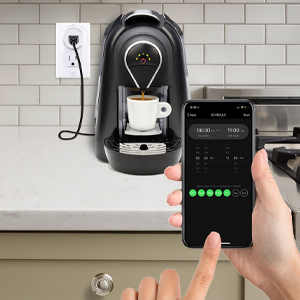
Foto nke 6.1: A hand holding a smartphone displaying the Energizer Connect App's scheduling interface, set to turn on a coffee maker at a specific time. The smart plug is visible in the background, connected to the coffee machine.

Foto nke 6.2: A person using a smartphone to remotely control a smart plug, demonstrating the ability to turn devices on or off from any location. The image shows a split view of the person and a living room with a lamp connected to a smart plug.
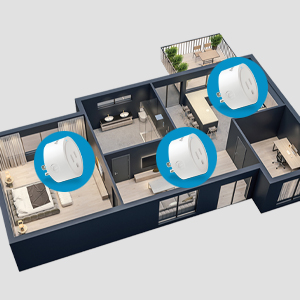
Foto nke 6.3: An overhead diagram of a home showing multiple Energizer Connect Smart WiFi Plugs placed in different rooms, illustrating the concept of grouping and controlling several devices simultaneously.
6.3. Njikwa olu
The Energizer Connect Smart WiFi Plug is compatible with Amazon Alexa, Google Assistant, and Siri. To enable voice control:
- Ensure your smart plug is successfully paired with the Energizer Connect App.
- Open your Amazon Alexa, Google Home, or Apple Home app.
- Follow the app's instructions to link the "Energizer Connect" skill or service. You will need to log in with your Energizer Connect account credentials.
- Once linked, you can use voice commands such as:
- "Alexa, turn on [Plug Name]."
- "Hey Google, turn off [Plug Name]."
- "Hey Siri, turn on [Plug Name]." (Requires setting up Siri Shortcuts in the Energizer Connect App)

Foto nke 6.4: A living room scene demonstrating voice control capabilities. The image shows a smart plug connected to a fan, with icons for Google Assistant, Alexa, and Siri Shortcuts, indicating compatibility with these voice assistants.
7. Nlekọta
Iji hụ na arụmọrụ kachasị mma na ogologo oge nke plọg smart gị:
- Nhicha: Disconnect the smart plug from the power outlet before cleaning. Use a soft, dry cloth to wipe the surface. Do not use liquid cleaners or aerosols.
- Nchekwa: When not in use, store the smart plug in a cool, dry place away from direct sunlight and moisture.
- Ọnọdụ gburugburu: Avoid exposing the plug to extreme temperatures or humidity.
8. Nchọpụta nsogbu
If you encounter issues with your Energizer Connect Smart WiFi Plug, refer to the following solutions:
| Nsogbu | Ihe nwere ike ime | Ngwọta |
|---|---|---|
| Plug not connecting to Wi-Fi / LED blinking slowly | Incorrect Wi-Fi password, 5GHz network selected, plug too far from router, network interference. |
|
| App cannot find the plug during pairing | Plug not in pairing mode, incorrect app used, network issues. |
|
| Njikwa olu anaghị arụ ọrụ | Voice assistant not linked, incorrect device name, internet connectivity issues. |
|
| Plug unresponsive | Ike gitage, ngwaọrụ adịghị arụ ọrụ. |
|
9. Nkọwapụta
| Njirimara | Nkọwa |
|---|---|
| Nọmba nlereanya | B0929DFGZY |
| UPC | 805106871352 |
| Ntinye Voltage | 120 volts |
| Ibu Ibu ugbu a | 15 Amps |
| Ugboro Wi-Fi | 2.4GHz (IEEE 802.11 b/g/n) |
| Ndakọrịta | Amazon Alexa, Google Assistant, Siri (via Shortcuts) |
| Asambodo | FCC Certified, ETL Certified |
| Ihe onwunwe | Plastic, rọba |
| Agba | Ọcha |
| Ibu Ibu | 2.89 ounces |
| Dimensions (Approx. Plug Body) | 1.125" (Diameter) x 1.0625" (Depth from outlet face) |
10. Akwụkwọ ikike na nkwado
For warranty information and technical support, please contact the manufacturer or seller directly. The manufacturer of this product is Jem Accessories, and the brand is Energizer Connect (distributed by XTREME DIGITAL LIFESTYLE ACCESSORIES).
Biko dowe ihe akaebe nke ịzụrụ ihe maka akwụkwọ ikike.
For further assistance, visit the Energizer Connect websaịtị ma ọ bụ rụtụ aka na ozi kọntaktị enyere na nkwakọ ngwaahịa gị.


