Okwu mmalite
Thank you for choosing the Opal Selfie Stick OP-Sel-BT-01. This manual provides essential information for the safe and effective use of your device. Please read it thoroughly before operation and retain it for future reference.
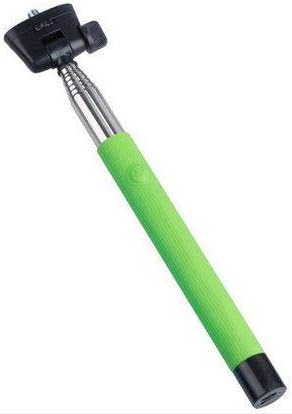
Foto 1: The Opal Selfie Stick OP-Sel-BT-01 in green, showing its extendable arm, phone holder, and comfortable grip.
Njirimara ngwaahịa
- Agba: Akwụkwọ ndụ akwụkwọ ndụ
- Isi ihe: Igwe igwe
- Oke ibu ike: 500 g
- Njikọta: Ikuku (Bluetooth)
- Sistemu dakọtara: Android 3.0 na n'elu, iOS 4.0 na n'elu
Melite
- Unfold the Selfie Stick: Gently pull the phone holder section upwards to extend the stick.
- Adjust Phone Holder: Mepee ekwentị clamp and securely place your smartphone within it. Ensure the phone is centered and stable. The clamp is designed to hold various phone sizes.
- Ike Na: Locate the power button (if applicable, usually on the handle) and press it to turn on the selfie stick. An indicator light may illuminate.
Ntuziaka ọrụ
Njikọ Bluetooth
- Ensure the selfie stick is powered on and in pairing mode (indicator light may flash rapidly).
- On your smartphone, go to Ntọala > Bluetooth.
- Turn on Bluetooth and search for available devices.
- Select "Opal OP-Sel-BT-01" or a similar name from the list of devices.
- Once paired, the indicator light on the selfie stick may turn solid or turn off, indicating a successful connection.
Na-ewere foto/ihe onyonyo
- Mepee ngwa igwefoto nke ekwentị gị.
- Gbatịa mkpanaka selfie n'ogologo nke ịchọrọ.
- Debe ekwentị gị maka foto ịchọrọ.
- Press the shutter button on the selfie stick handle to capture a photo or start/stop video recording.
Nlekọta
- Nhicha: Wipe the selfie stick with a soft, dry cloth. Do not use abrasive cleaners or solvents.
- Nchekwa: Store the device in a cool, dry place away from direct sunlight and extreme temperatures. Retract the stick fully before storage.
- Nlekọta batrị: If the selfie stick has a rechargeable battery, ensure it is charged periodically even when not in use to maintain battery health.
Nchọpụta nsogbu
| Nsogbu | Ihe nwere ike ime | Ngwọta |
|---|---|---|
| Enweghị ike ijikọ ya na ekwentị | Selfie stick not in pairing mode; Bluetooth off on phone; battery low. | Ensure stick is on and in pairing mode. Turn phone's Bluetooth off/on. Charge the selfie stick. |
| Shutter button not working | Not paired; camera app settings. | Verify successful Bluetooth pairing. Check camera app settings for volume button shutter control. |
| Phone not stable in clamp | Phone not centered; clamp not fully secured. | Re-position phone to be centered. Ensure clamp is firmly gripping the phone. |
Nkọwapụta
- Ụdị: OP-Sel-BT-01
- Akara: Opal
- Agba: Akwụkwọ ndụ akwụkwọ ndụ
- Isi ihe: Igwe igwe
- Oke ibu ike: 500 g
- Njikọta: Ikuku (Bluetooth)
- Sistemu eji arụ ọrụ akwadoro: Android 3.0+, iOS 4.0+
- ASIN: B091DBB122
- Ụbọchị mbụ enwere: Maachị 30, 2021
Akwụkwọ ikike na nkwado
For information regarding warranty coverage or technical support, please refer to the documentation included with your purchase or visit the official Opal webEbe nrụọrụ weebụ. Usoro nkwa akọwapụtara nwere ike ịdị iche site na mpaghara na onye na-ere ahịa.
Ozi nchekwa
- Do not expose the device to extreme temperatures, moisture, or direct sunlight for prolonged periods.
- Debe ebe ụmụaka na-apụghị iru.
- Agbalịla ịgbasa ma ọ bụ gbanwee ngwaọrụ ahụ. Nke a nwere ike imebi akwụkwọ ikike ahụ ma kpatara mmebi.
- Ensure your phone is securely fastened in the clamp before extending the stick.


