1. Okwu mmalite
Thank you for choosing the LB-Link BL-WN150AH Long-Range USB Adapter. This device is designed to provide your desktop computer with high-speed wireless connectivity, extending your Wi-Fi range and improving signal stability. This manual will guide you through the installation, operation, and maintenance of your new adapter.
2. Ihe ngwugwu
Please check the package carefully to ensure all items are present. If any item is missing or damaged, please contact your retailer.
- LB-Link BL-WN150AH Long-Range USB Adapter
- Detachable High-Gain Antenna (5dBi)
- Resource CD (Drivers and User Manual)
- Ntuziaka nwụnye ngwa ngwa
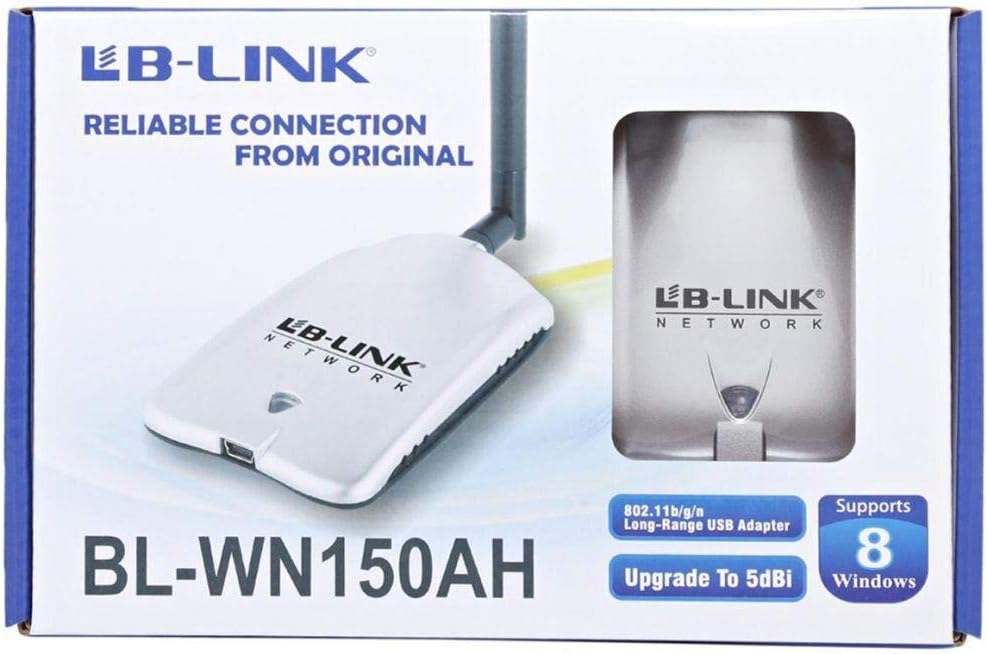
Figure 2.1: Product packaging showing the adapter and its features.
3. Ngwaahịa gafereview
The BL-WN150AH is a compact USB adapter with an external antenna for enhanced signal reception. Familiarize yourself with its components:
- Njikọ USB: Used to connect the adapter to your computer's USB port.
- Njikọ antenna: For attaching the detachable high-gain antenna.
- Ihe ngosi LED: Lights up when the adapter is powered on and blinks during data transmission.
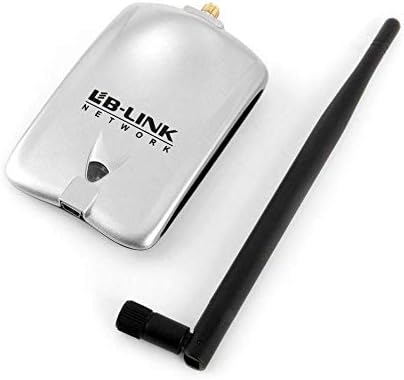
Figure 3.1: The BL-WN150AH adapter and its detachable antenna.
4. Nhazi
4.1 Nwụnye ọkwọ ụgbọala
Before connecting the adapter, install the necessary drivers from the provided Resource CD or download the latest drivers from the official LB-Link websaịtị.
- Fanye CD akụrụngwa n'ime draịva CD/DVD nke kọmputa gị.
- Follow the on-screen instructions to run the setup wizard.
- Select the appropriate driver for your operating system (Windows XP/Vista/7/8, Mac OSX, Linux).
- Complete the installation process. You may be prompted to restart your computer.

Figure 4.1: Supported operating systems including Windows XP, Vista, 7, 8, Mac OSX, and Linux.
4.2 Njikọ Hardware
- Attach the detachable antenna to the antenna connector on the adapter by screwing it clockwise until secure.
- Plug the LB-Link BL-WN150AH USB Adapter into an available USB port on your desktop computer.
- The LED indicator on the adapter should light up, indicating it is powered on.
4.3 Jikọọ na netwọk Wi-Fi
- Once the drivers are installed and the adapter is connected, your computer should detect the new wireless adapter.
- Open your computer's wireless network settings (e.g., Wi-Fi icon in the system tray for Windows).
- Họrọ netwọk Wi-Fi nke ịchọrọ site na listi netwọk dịnụ.
- Tinye igodo nchekwa netwọkụ (paswọọdụ) ma ọ bụrụ kpaliri.
- Click 'Connect'. The adapter's LED will blink rapidly during data transmission.
5. Ntuziaka ọrụ
After successful connection, the adapter will automatically maintain the wireless link. You can monitor the connection status through your operating system's network utility.
- Ike mgbaama: The network utility will display the current signal strength, which is influenced by distance from the router and obstacles.
- Ọsọ netwọkụ: The adapter supports up to 150Mbps wireless N speeds. Actual speeds may vary based on network conditions.
6. Nlekọta
To ensure optimal performance and longevity of your LB-Link BL-WN150AH USB Adapter, follow these maintenance guidelines:
- Nhicha: Jiri ákwà dị nro ma kpọọ nkụ hichaa ihe nkwụnye ahụ. Ejila ihe nhicha mmiri ma ọ bụ ihe nhicha aerosol.
- Nchekwa: Chekwaa ihe nkwụnye ọkụ n'ebe dị jụụ, kpọrọ nkụ pụọ na ìhè anyanwụ kpọmkwem na oke okpomọkụ.
- Ijikwa: Zere ịda ma ọ bụ itinye ihe nkwụnye ahụ n'ọnọdụ siri ike.
- Nlekọta Antenna: Ensure the antenna is securely attached but do not overtighten. Avoid bending or forcing the antenna.
7. Nchọpụta nsogbu
If you encounter issues with your LB-Link BL-WN150AH USB Adapter, refer to the following common problems and solutions:
- Enweghị netwọk Wi-Fi ahụrụ:
Ngwọta: Ensure the adapter is properly plugged into a USB port. Verify that the drivers are correctly installed. Check if your router is powered on and broadcasting a Wi-Fi signal. - Cannot Connect to a Network:
Ngwọta: Double-check the Wi-Fi password. Ensure your router's security settings (WPA/WPA2) are compatible. Try restarting your computer and router. - Ọsọ njikọ dị nwayọ:
Ngwọta: Move closer to your wireless router. Ensure there are no major obstructions (e.g., thick walls, metal objects) between the adapter and the router. Update the adapter's drivers to the latest version. - Adapter Not Recognized by Computer:
Ngwọta: Try plugging the adapter into a different USB port. Reinstall the drivers. Check Device Manager (Windows) to see if the adapter is listed without errors.
8. Nkọwapụta
Detailed technical specifications for the LB-Link BL-WN150AH Long-Range USB Adapter:
| Njirimara | Nkọwa |
|---|---|
| Nlereanya | BL-WN150AH |
| Ụdị | LB-Link |
| Ngwaọrụ Akụrụngwa | USB |
| Ụkpụrụ ikuku | IEEE 802.11b/g/n |
| Ọnụego data | Up to 150Mbps (802.11n) |
| Ụdị antenna | Detachable 5dBi Omni-directional Antenna |
| Ngwa dakọtara | Desktọpụ PC |
| Sistemu eji arụ ọrụ akwadoro | Windows XP, Windows Vista, Windows 7, Windows 8, Mac OSX, Linux |
| Onye nrụpụta | LB-Link |

Figure 8.1: Product specifications listed on the side of the packaging.
9. Akwụkwọ ikike na nkwado
LB-Link products are designed for reliability and performance. This product comes with a standard manufacturer's warranty. Please refer to the warranty card included in your package for specific terms and conditions.
For technical support, driver updates, or further assistance, please visit the official LB-Link websaịtị ma ọ bụ kpọtụrụ ndị ahịa ha ọrụ. Debe akwụkwọ nnata ịzụrụ maka akwụkwọ ikike.
UPC: 7966241501344


