Okwu mmalite
This manual provides essential information for the safe and proper assembly, operation, maintenance, and troubleshooting of your Arcade1Up Outrun Stand Up Edition arcade game. Please read this manual thoroughly before assembly and retain it for future reference.
The Arcade1Up Outrun cabinet includes four classic racing games: Ọpụpụ, Turbo Outrun, Outrunners, na Power Drift. It features a steering wheel, gas pedal, and brake pedal for an authentic arcade experience.
Ozi nchekwa
Always follow basic safety precautions when assembling and operating this product to reduce the risk of fire, electric shock, or injury.
- Debe mmiri na mmiri mmiri.
- Anwala ịkwasa ma ọ bụ gbanwee unit ahụ.
- Gbaa mbọ hụ na etinyere unit ahụ n'elu kwụsiri ike, dịkwa larịị.
- Unplug the unit from the power outlet before cleaning or maintenance.
- Ezubere ngwaahịa a maka naanị ime ụlọ.
Ihe ngwugwu
Verify that all components are present before beginning assembly. If any parts are missing or damaged, contact Arcade1Up customer support.
- Arcade Cabinet Panels
- Control Panel Assembly (Steering Wheel, Buttons)
- Gas and Brake Pedal Assembly
- Light-Up Marquee
- Nyochaa
- Ihe nkwụnye ọkụ
- Hardware Pack (Screws, Bolts, etc.)
- Akwụkwọ ntuziaka
Ntọala na Mgbakọ
Assembly typically requires two adults. Follow the numbered steps carefully. Tools required (not included): Phillips head screwdriver.
- Wepu akụrụngwa: Jiri nlezianya wepụ akụkụ niile na nkwakọ ngwaahịa ma dobe ha n'elu dị ọcha ma dị nro iji gbochie ncha.
- Kpọkọta akụkụ akụkụ: Attach the base and back panels to the main side panels using the provided hardware. Ensure all connections are secure.
- Install Monitor: Mount the monitor into the designated slot within the cabinet structure. Connect the necessary video and power cables.
- Tinye Ogwe njikwa: Secure the control panel, including the steering wheel and buttons, to the front of the cabinet. Connect the control panel wiring to the main board.
- Install Pedal Assembly: Place the gas and brake pedal assembly at the base of the cabinet and connect its cable to the main board.
- Mount Light-Up Marquee: Attach the light-up marquee to the top of the cabinet and connect its power cable.
- Nyocha ikpeazụ: Before powering on, double-check all connections and ensure all screws are tightened.

Figure 1: Fully assembled Arcade1Up Outrun cabinet.

Figure 2: Close-up of the control panel and screen displaying game options.
Ntuziaka ọrụ
Once assembled and plugged in, the unit is ready for operation.
- Ike Na: Locate the power switch, typically on the back or side of the cabinet, and switch it to the 'ON' position. The marquee will light up and the screen will display the game selection menu.
- Select Game: Use the steering wheel or directional buttons (if present) and the 'SELECT' or 'ENTER' button to navigate through the available games: Ọpụpụ, Turbo Outrun, Outrunners, na Power Drift.
- Malite egwuregwu: Press the 'START' button to begin playing the selected game.
- Gameplay Controls:
- Ụgbọ ala: Turn left or right to control your vehicle's direction.
- Gas Pedal: Press down to accelerate.
- Pedal breeki: Press down to decelerate or stop.
- Shift Lever (if applicable): Use to change gears (High/Low).
- Exiting a Game: To return to the main game selection menu, press and hold the 'PLAYER 1 START' button for approximately 5 seconds.
- Gbanyụọ: When finished playing, switch the power button to the 'OFF' position.
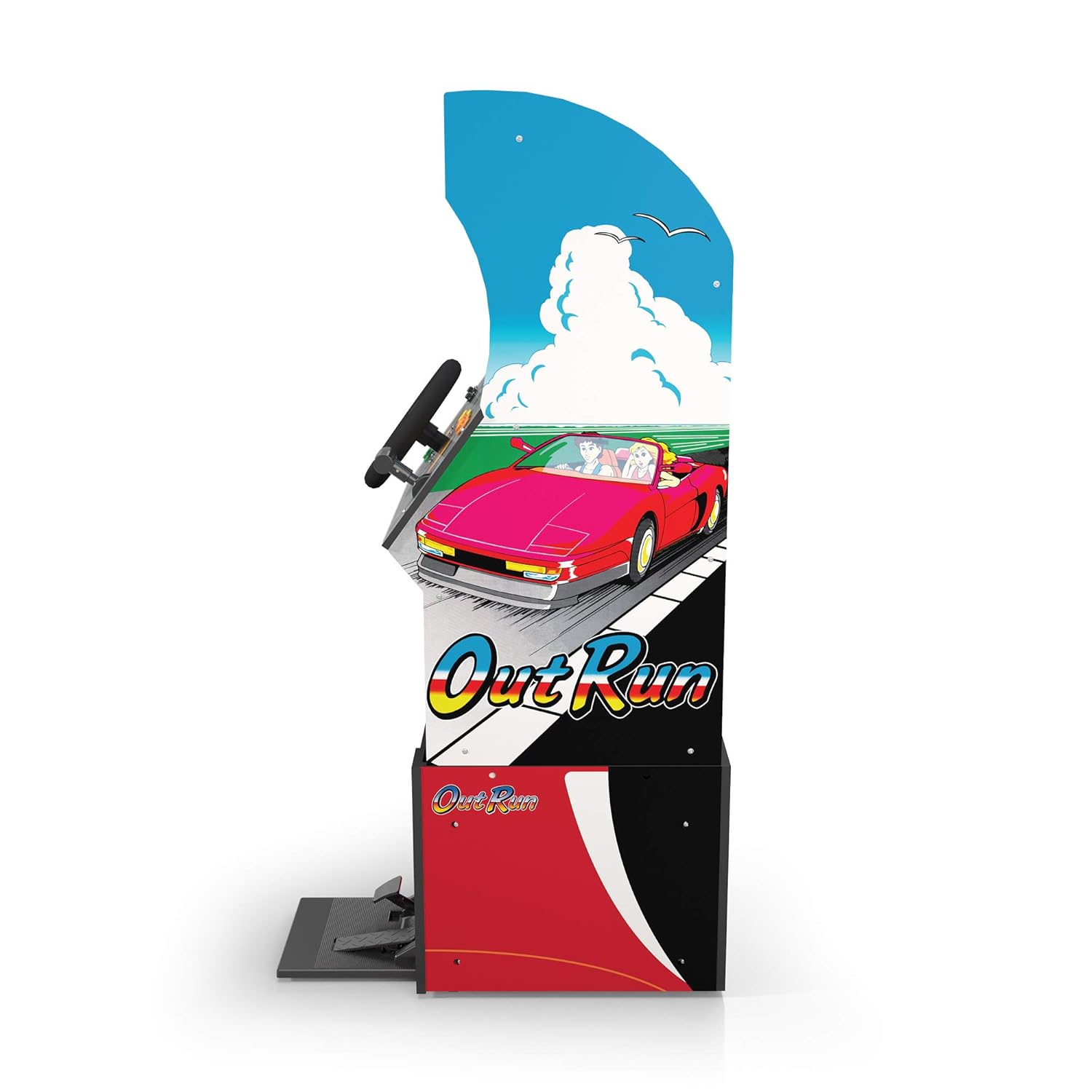
Ọgụgụ 3: Akụkụ profile of the arcade cabinet, illustrating the driving controls.
Nlekọta
Regular maintenance ensures the longevity and optimal performance of your arcade cabinet.
- Nhicha: Use a soft, dry cloth to wipe down the cabinet surfaces. For stubborn marks, a slightly damp cloth with mild soap can be used, followed by drying. Avoid abrasive cleaners or excessive moisture.
- Nlekọta ihuenyo: Clean the monitor screen with a microfiber cloth specifically designed for electronics. Do not spray liquid directly onto the screen.
- Nlekọta pedal: Periodically check the gas and brake pedals for any debris or obstructions that might hinder their movement. Keep the area around the pedals clean.
- Njikwa USB: Ensure all cables are neatly tucked away and not pinched or exposed, which could lead to damage.
Nchọpụta nsogbu
Lee ngalaba a maka nsogbu ndị a na-enwekarị na ngwọta ha. Ọ bụrụ na nsogbu ahụ anọgide, kpọtụrụ ndị ọrụ nkwado ndị ahịa.
| Nsogbu | Ihe nwere ike ime | Ngwọta |
|---|---|---|
| Unit anaghị agbanye ọkụ. | Power cable not connected; Power outlet issue; Power switch off. | Ensure power cable is securely plugged into the unit and a working outlet. Check power switch is 'ON'. |
| Enweghị onyonyo na ihuenyo. | Monitor cable loose; Monitor not powered. | Check monitor's power and video cables are securely connected. |
| Controls (steering wheel/pedals) unresponsive. | Control panel/pedal cables loose; Software glitch. | Verify all control panel and pedal cables are firmly connected to the main board. Try restarting the unit. |
| Egwuregwu ahụ na-akpọnwụ ma ọ bụ na-akụda. | Nsogbu ngwanrọ nwa oge. | Power off the unit, wait 10 seconds, then power back on. |
Nkọwapụta
- Nọmba nlereanya: 195570000861
- Akụkụ (agbakọtara): 47.75 x 23.75 x 10.5 inches (Height x Width x Depth)
- Arọ: 89.5 pound
- Included Games: Outrun, Turbo Outrun, Outrunners, Power Drift
- Njikwa: Steering Wheel, Gas Pedal, Brake Pedal, Game Selection Buttons
- Ike: AC Adapter (Input: 100-240V ~ 50/60Hz, Output: Specific to adapter, refer to label)
- Onye nrụpụta: Arcade 1Up
- Ụbọchị mwepụta: Eprel 7, 2021
Akwụkwọ ikike na nkwado
Arcade1Up products typically come with a limited manufacturer's warranty. For specific warranty terms and conditions, please refer to the warranty card included with your product or visit the official Arcade1Up websaịtị.
For technical support, missing parts, or warranty claims, please contact Arcade1Up Customer Support:
- Websaịtị: arcade1up.com/pages/contact-us
- Ekwentị: Rụtụ aka na onye ọrụ gọọmentị websaịtị maka nọmba kọntaktị mpaghara.
When contacting support, please have your model number (195570000861) and proof of purchase readily available.


