1. Okwu mmalite
The TechniSat DIGITRADIO 21 is a compact DAB+ and FM radio designed for under-cabinet installation, ideal for kitchens or other spaces where a space-saving audio solution is desired. It features digital radio reception (DAB+), traditional FM radio, Bluetooth audio streaming, and a clear color display. This manual provides essential information for the safe and efficient use of your device.
2. Ozi nchekwa
- Gụọ ntuziaka niile nke ọma tupu ị rụọ ọrụ ngwaọrụ.
- Debe ngwaọrụ ahụ ka ọ ghara iru mmiri, mmiri, na ebe ọkụ na-anaghị erute.
- Gbaa mbọ hụ na ikuku ikuku dị na gburugburu unit ahụ iji gbochie ikpo oke ọkụ.
- Jiri naanị nkwụnye ọkụ enyere.
- Anwala imeghe ma ọ bụ rụkwaa ngwaọrụ n'onwe gị. Kpọtụrụ ndị ọrụ ruru eru ọrụ niile.
- Jiri akwa dị nro hichaa ngwaọrụ ahụ. Ejila ihe nhicha mmiri mmiri.
3. Ihe ngwugwu
Chọpụta na ihe niile dị na ngwugwu:
- TechniSat DIGITRADIO 21 Unit
- Ihe nkwụnye ọkụ
- Mounting Material (screws, mounting plate)
- Akwụkwọ ntuziaka (akwụkwọ a)
4. Ngwaahịa gafereview
4.1 Njikwa ihu ihu na ngosipụta
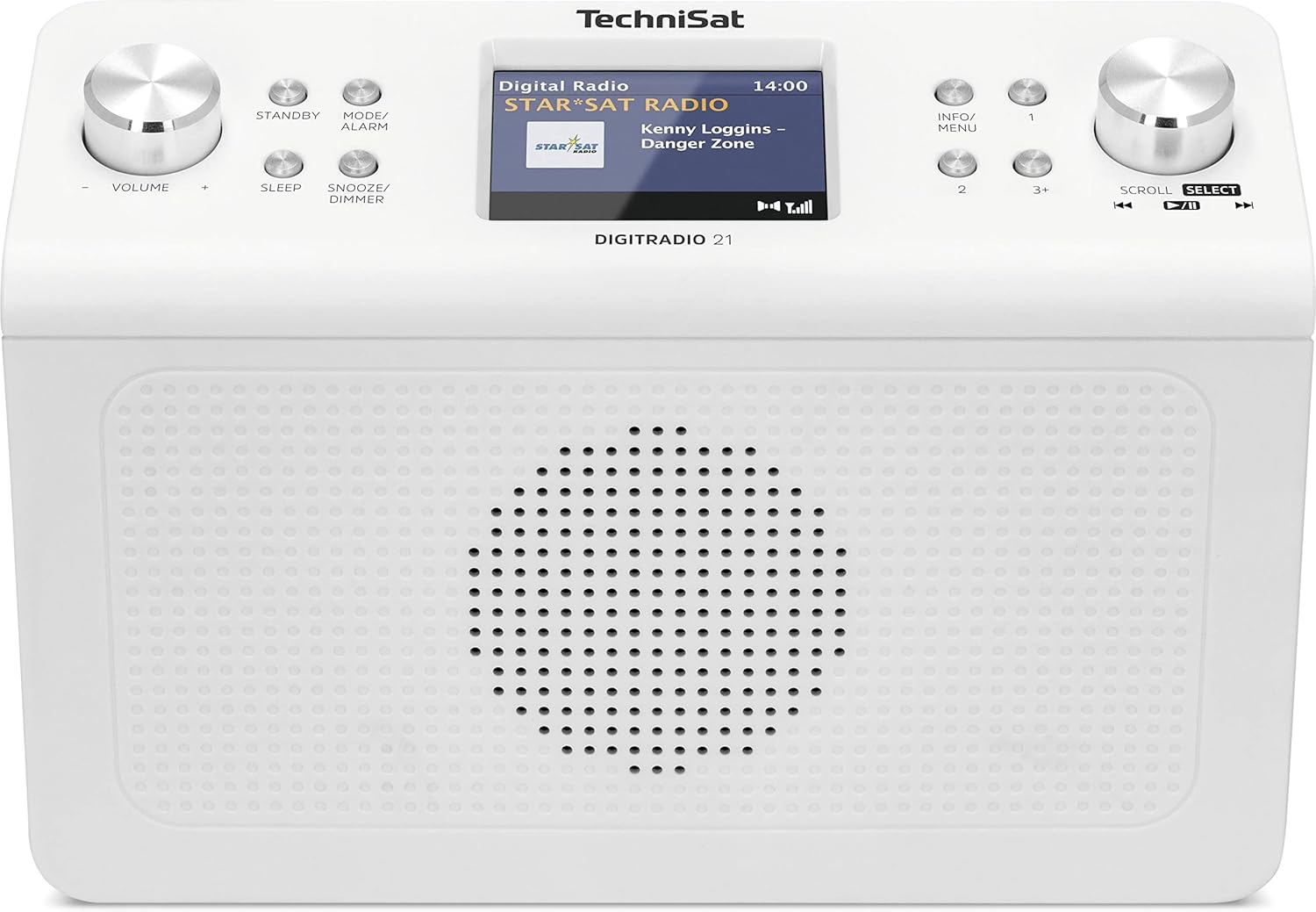
Foto nke 4.1: N'ihu view of the TechniSat DIGITRADIO 21. This image displays the central 2.8-inch color TFT display, the large volume knob on the left, and the scroll/select knob on the right. Surrounding buttons include Standby, Mode/Alarm, Sleep, Snooze/Dimmer, Info/Menu, and preset buttons 1, 2, 3+.
- Ngosipụta: 2.8-inch TFT color display for showing station information, time, and menu options.
- Mpịakọta Mpịakọta: Tụgharịa ka ịhazie olu.
- Njikere Button: Na-agbanye unit ahụ ma ọ bụ gbanyụọ.
- Mode/Alarm Button: Switches between radio modes (DAB+, FM, Bluetooth) and accesses alarm settings.
- Bọtịnụ ụra: Na-eme ka ọrụ ngụ oge ihi ụra rụọ ọrụ.
- Snooze/Dimmer Button: Snoozes the alarm or adjusts display brightness.
- Ozi/ bọtịnụ menu: Displays additional information or accesses the main menu.
- Preset Buttons (1, 2, 3+): Quickly access stored favorite stations.
- Scroll/Select Knob: Rotate to navigate menus or tune stations, press to confirm selection.
4.2 Njikọ azụ azụ

Foto nke 4.2: N'azụ view of the TechniSat DIGITRADIO 21. This image highlights the power input port (DC IN) and the 3.5mm headphone jack located on the back of the unit.
- DC N'ime: Power adapter connection port.
- Jack ekweisi (3.5mm): For connecting headphones for private listening.
5. Nhazi
5.1 Ịtinye redio
The DIGITRADIO 21 is designed for under-cabinet mounting. The included mounting plate and screws facilitate installation.
- Select a suitable location under a cabinet or shelf, ensuring sufficient space for the unit and access to controls.
- Position the mounting plate and mark the screw holes.
- Gwuo oghere ndị na-anya ụgbọelu ma ọ dị mkpa.
- Secure the mounting plate to the underside of the cabinet/shelf using the provided screws.
- Slide the DIGITRADIO 21 onto the mounted plate until it clicks securely into place.
Alternatively, the radio can be used as a standalone unit on a flat surface.
5.2 Njikọ ike
- Connect the power adapter cable to the "DC IN" port on the rear of the DIGITRADIO 21.
- Tinye nkwụnye ọkụ n'ime oghere mgbidi dabara adaba.
- Ngwaọrụ ahụ ga-agba ọkụ ma ọ bụ banye na ọnọdụ nchekwa.
6. Ntuziaka ọrụ
6.1 Gbanyụọ ma ọ bụ gbanyụọ
- Pịa Kwụrụ n'ụsọ bọtịnụ ka ịgbanwuo ma ọ bụ gbanyụọ redio.
6.2 Nhọrọ ọnọdụ
- Pịa Mode/Alarm button repeatedly to cycle through available modes: DAB+, FM, Bluetooth.
6.3 Ọrụ redio DAB+
- Select DAB+ mode using the Mode/Alarm bọtịnụ.
- The radio will automatically scan for available DAB+ stations upon first use or if no stations are found.
- Tugharia ihe Pịgharịa/Họrọ knob to browse the list of available stations.
- Pịa Pịgharịa/Họrọ knob to select and listen to a station.
- To store a favorite station: While listening, press and hold one of the Preset buttons (1, 2, 3+) until "Preset Saved" appears on the display.
- To recall a favorite station: Briefly press the corresponding bọtịnụ atọrọ.
6.4 FM Redio arụ ọrụ
- Select FM mode using the Mode/Alarm bọtịnụ.
- Tugharia ihe Pịgharịa/Họrọ knob to manually tune to a frequency.
- Iji nyochaa akpaaka maka ọdụ ọdụ na-esote, pịa ma jide Pịgharịa/Họrọ isi.
- To store a favorite station: While listening, press and hold one of the Preset buttons (1, 2, 3+) until "Preset Saved" appears on the display.
- To recall a favorite station: Briefly press the corresponding bọtịnụ atọrọ.
Ngụkọta ọdịyo Bluetooth 6.5
- Họrọ ọnọdụ Bluetooth site na iji Mode/Alarm button. The display will show "Bluetooth Pairing".
- Na ngwaọrụ Bluetooth gị (dịka ọmụmaatụ, ekwentị mkpanaaka, mbadamba), mee ka Bluetooth rụọ ọrụ ma chọọ ngwaọrụ dị.
- Select "DIGITRADIO 21" from the list of devices to pair.
- Ozugbo ejikọtara ya, ị nwere ike ịgbasa ọdịyo site na ngwaọrụ gị gaa na redio.
6.6 Alarm, Sleep Timer, and Snooze
- Mkpu: Pịa ma jide Mode/Alarm button to enter alarm settings. Use the Pịgharịa/Họrọ knob to set time, source, and volume.
- Oge ụra: Pịa Ụra button repeatedly to set a sleep timer (e.g., 15, 30, 60 minutes) after which the radio will automatically turn off.
- Soo: Mgbe oti mkpu dara, pịa Tie mkpu/nkpu button to temporarily silence it for a set period.
6.7 Ntọala ngosi
- Pịa Tie mkpu/nkpu button (when not snoozing an alarm) to adjust the display brightness.
- Pịa Ozi/NchNhr button to cycle through different display information (e.g., program type, frequency, date/time).
7. Nlekọta
- Nhicha: Wipe the radio with a soft, dry, lint-free cloth. Do not use abrasive cleaners, waxes, or solvents.
- Nchekwa: If storing the unit for an extended period, disconnect it from the power supply and store it in a cool, dry place.
8. Nchọpụta nsogbu
| Nsogbu | Ihe nwere ike ime | Ngwọta |
|---|---|---|
| Enweghị ike | Ejikọghị ihe nkwụnye ọkụ ma ọ bụ ụzọ adịghị mma. | Hụ na e jikọtara ihe nkwụnye ike ahụ nke ọma ma ebe a na-esi ya arụ ọrụ. |
| Nnabata DAB+ / FM adịghị mma | Weak signal, antenna position. | Adjust the position of the wire antenna for better reception. Perform a full scan for stations. |
| Nsogbu njikọta Bluetooth | Device not in pairing mode, radio not discoverable. | Ensure the radio is in Bluetooth pairing mode. Check your device's Bluetooth settings and try re-pairing. |
| Enweghị ụda | Volume too low, headphones connected. | Increase volume. Disconnect headphones if external sound is desired. |
9. Nkọwapụta
- Ụdị: DIGITRADIO 21
- Akara: TechniSat
- Nọmba nlereanya: 0001/3964
- Otu egwu redio: DAB+, FM (na RDS na PLL)
- Ụdị Bluetooth: 4.2
- Ọkà okwu: 2 W (RMS) Mono Speaker
- Ngosipụta: Ngosipụta Agba TFT nke 2.8-inch
- Favorite Station Memory: 10 for DAB+, 10 for FM
- Njikọ: 3.5mm Headphone Jack, DC IN
- Atụmatụ pụrụ iche: Clock, Alarm, Sleep Timer, Snooze Function, Display Dimmer, Bluetooth Audio Streaming
- Ịnye ọkụ: External Power Adapter (DC 5.9 V / 1000 mA)
- Akụkụ (W x H x D): 22.5 x 7.2 x 15.1 cm (ihe dị ka 8.86 x 2.83 x 5.94 sentimita)
- Agba: Ọcha (anọpụ iche)
10. Akwụkwọ ikike na nkwado
Specific warranty details are not provided in the product information. For warranty claims or technical support, please refer to the official TechniSat website or contact your retailer. Keep your proof of purchase for any warranty-related inquiries.
Maka enyemaka ọzọ, gaa na TechniSat official websaịtị.


