Okwu mmalite
This manual provides comprehensive instructions for the safe and efficient use of your Taurus Top Cuisine Food Processor, Model 925014000. Please read all instructions carefully before operating the appliance and retain this manual for future reference.
The Taurus Top Cuisine Food Processor is designed to simplify your cooking process with its versatile features, including 12 pre-set cooking programs, a 5-liter non-stick removable pot, a digital display, and a 24-hour programming function.
Ntuziaka nchekwa
Ịdọ aka ná ntị: Iji belata ihe egwu nke ọkụ, ujo eletriki, ma ọ bụ mmerụ ahụ, na-agbaso ihe ndị a dị mkpa maka nchekwa.
- Gụọ ntuziaka niile tupu i jiri ngwa.
- Emetụla ebe dị ọkụ aka. Jiri aka ma ọ bụ mkpọ.
- To protect against electrical shock, do not immerse the cord, plugs, or the main unit in water or other liquid.
- Nleba anya dị mkpa mgbe ụmụaka na-eji ngwa ọ bụla ma ọ bụ nso.
- Kpupu na ntinye mgbe ejighị ya na tupu ihicha. Kwe ka ọ dị jụụ tupu ịtinye ma ọ bụ wepụ akụkụ.
- Ejikwala ngwa ọ bụla nwere eriri ma ọ bụ plọg mebiri emebi arụ ọrụ, ma ọ bụ ka emechara ngwa ahụ ma ọ bụ mebie ya n'ụzọ ọ bụla. Kpọtụrụ ndị ahịa maka nyocha, ndozi ma ọ bụ mgbanwe.
- Iji mgbakwunye ngwa nke onye nrụpụta ngwa anaghị akwado nwere ike bute mmerụ ahụ.
- Ejila n'èzí.
- Ekwela ka eriri kwụgide n'akụkụ tebụl ma ọ bụ counter, ma ọ bụ metụ ebe dị ọkụ aka.
- Etinyela na ma ọ bụ nso gas na-ekpo ọkụ ma ọ bụ ọkụ eletrik, ma ọ bụ na oven ọkụ.
- Ekwesịrị iji nlezianya mee ihe mgbe ị na-ebugharị ngwa nwere mmanụ ọkụ ma ọ bụ ihe ọ bụla na-ekpo ọkụ.
- Buru ụzọ tinye plọg mgbe niile na ngwa, wee tinye eriri n'ime oghere mgbidi. Iji kwupu njikọ, gbanyụọ njikwa ọ bụla ka ọ bụrụ "gbanyụọ", wee wepụ plọg na mpụta mgbidi.
- Ejila ngwa maka ndị ọzọ na-abụghị ebumnuche ebumnuche.
- Ngwa a bụ maka naanị ụlọ.
Ngwaahịa gafereview
Familiarize yourself with the components of your Taurus Top Cuisine Food Processor.


Isi Components:
- Isi ngalaba: Ụlọ ihe kpo oku na njikwa panel.
- ite nwere ike ibughari: 5-liter capacity, non-stick coating.
- Ihe mkpuchi: With steam vent and sealing mechanism.
- Ogwe njikwa: Digital display, program selection buttons, timer, and start/stop.
- Aka na-ebu: For safe transport of the appliance.
Ngwa gụnyere:
- Nkata steamer: For steaming vegetables, fish, etc.
- iko: For precise ingredient measurements.
- Ngaji: For stirring and serving.
- Spatula: For mixing and scraping.
- Akwụkwọ nri: Contains over 50 recipes to get started.
Melite
- Iwepu: Jiri nlezianya wepụ ihe niile e ji ekpuchi ihe na ihe ndị ọzọ dị na igbe ahụ.
- Nhicha izizi: Before first use, wash the removable pot, lid, steamer basket, measuring cup, spoon, and spatula with warm, soapy water. Rinse thoroughly and dry all parts. Wipe the main unit with a damp akwa . Ejila akụkụ bụ isi n'ime mmiri.
- Nkwanye: Place the appliance on a stable, flat, heat-resistant surface, away from water sources and direct heat. Ensure adequate ventilation around the unit.
- Fanye ite: Place the clean, dry removable pot into the main unit. Ensure it is seated correctly.
- Njikọ ike: Plug the power cord into a grounded electrical outlet (240 VAC). The digital display will illuminate.

Ntuziaka ọrụ
Nrụ ọrụ bụ isi:
- Tinye ngwa nri: Place your desired ingredients into the removable pot.
- Mechie mkpuchi: Securely close the lid. Ensure it is properly locked to prevent steam from escaping.
- Họrọ Mmemme: Use the "MENU" button to cycle through the 12 available cooking programs. The selected program will be displayed on the digital screen.
- Adjust Time/Temperature (if applicable): For some programs, you may be able to adjust cooking time or temperature using the dedicated buttons. Refer to the recipe book for specific program settings.
- Malite isi nri: Press the "START" button to begin the cooking process. The appliance will automatically maintain the set temperature and time.
- Na-ekpo ọkụ: Once cooking is complete, the appliance may automatically switch to a "Keep Warm" function.
- Kwụsị: To stop cooking at any time, press the "STOP" button.
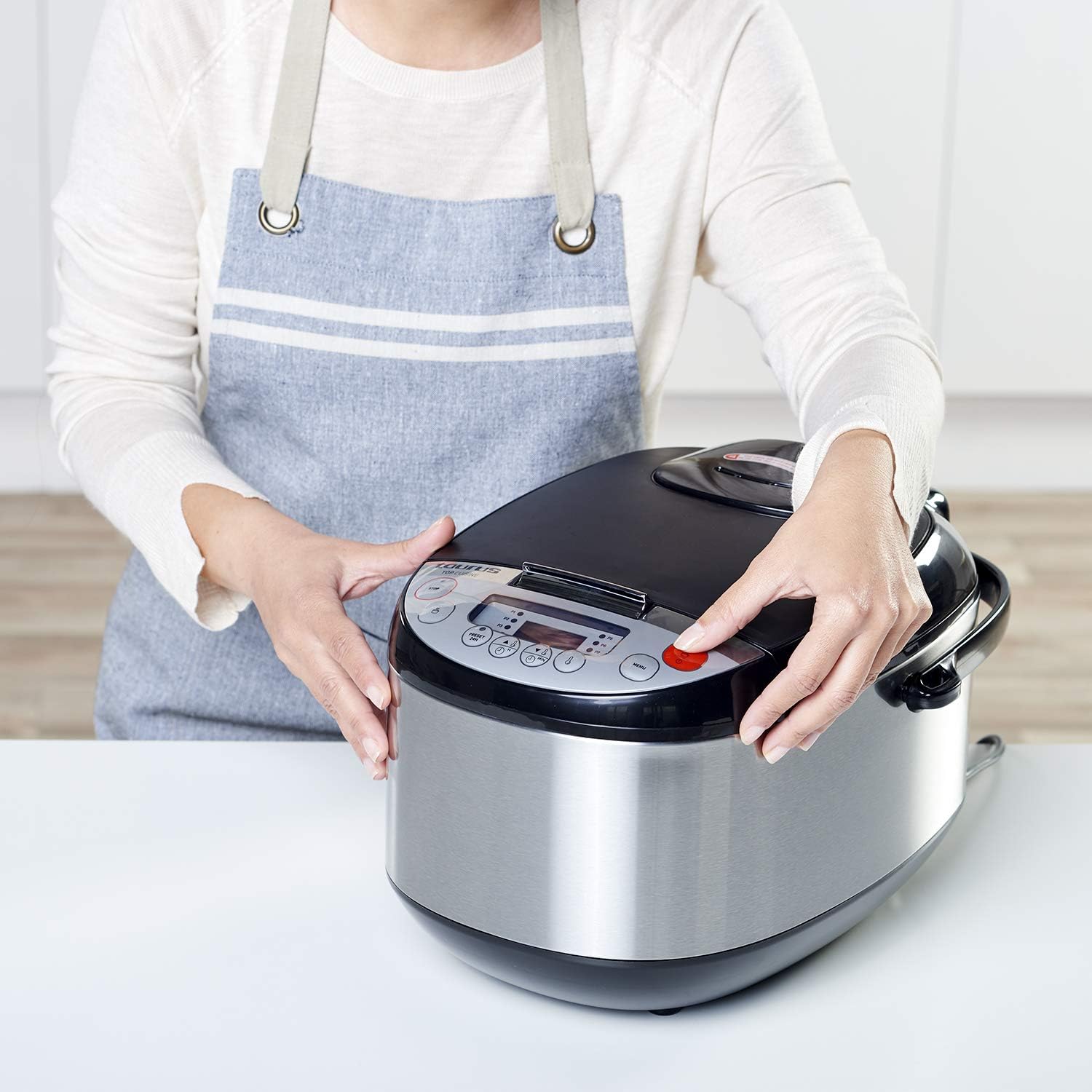
24-Hour Programming (Delay Start):
The 24-hour programming feature allows you to set a delayed start time for your cooking.
- Kwadebe Ngwakọta: Place all ingredients into the pot and close the lid.
- Họrọ Mmemme: Choose your desired cooking program using the "MENU" button.
- Tọọ oge igbu oge: Press the "PRESET/DELAY" button. Use the hour and minute adjustment buttons to set the desired delay time (up to 24 hours). This is the time until cooking na-amalite.
- Kwenye: Press the "START" button to confirm the delay setting. The timer will count down, and cooking will begin automatically once the delay time expires.
Using the Steamer Basket:
To steam food, place water in the bottom of the removable pot (ensure water level is below the steamer basket). Place ingredients in the steamer basket and insert it into the pot. Select the appropriate steaming program or a manual setting.
Nlekọta na nhicha
Regular cleaning ensures the longevity and optimal performance of your food processor.
- Kwụpụ: Kwụpụ ngwa ahụ mgbe niile na oghere ọkụ wee hapụ ya ka ọ dị jụụ kpamkpam tupu ihicha ya.
- Removable Pot and Accessories: The removable pot, lid, steamer basket, measuring cup, spoon, and spatula are dishwasher safe. Alternatively, wash them by hand with warm, soapy water and a non-abrasive sponge. Rinse thoroughly and dry.
- Isi ngalaba: Jiri nwayọ hichaa mpụta nke isi ihe, damp akwa . Ejila ihe mkpocha abrasive ma ọ bụ ihe nchacha. Ejila akụkụ isi na mmiri ma ọ bụ mmiri mmiri ọ bụla ọzọ.
- Nchekwa: Hụ na akụkụ niile dị ọcha ma kpọọ nkụ tupu ị debe ngwa ahụ. Debe ya n'ebe dị jụụ ma kpọọ nkụ.

Nchọpụta nsogbu
If you encounter issues with your Taurus Top Cuisine Food Processor, refer to the following table for common problems and solutions.
| Nsogbu | Ihe nwere ike ime | Ngwọta |
|---|---|---|
| Ngwa anaghị agbanwuo. | A naghị etinye ya; ike gitage; ezighi ezi ntinye. | Hụ na e tinyere eriri ọkụ eletrik n'ime oghere ọrụ nke ọma. Lelee ihe mgbochi sekit nke ụlọ gị. |
| Nri anaghị esi nri nke ọma. | Too much food; insufficient liquid; incorrect program selection. | Reduce food quantity. Add more liquid if necessary. Ensure the correct cooking program is selected for the type of food. |
| Lid is difficult to close or open. | Food debris or residue on the sealing ring; lid not aligned correctly. | Clean the lid and sealing ring thoroughly. Ensure the lid is aligned properly before attempting to close. |
| Koodu mperi na ngosi. | Okwu dị n'ime ahụ akọwapụtara. | Unplug the appliance for 5 minutes, then plug it back in. If the error persists, contact customer support. |
If the problem persists after attempting these solutions, please contact Taurus customer support.
Nkọwapụta
| Ụdị | Taurus |
| Nọmba nlereanya | 925014000 |
| Ike/Wattage | 900 watt |
| Voltage | 240 VAC |
| Ike olu | 5 lita |
| Akụkụ ngwaahịa (L x W x H) | 40.5 x 30 x 26 cm |
| Ibu | 5.2 n'arọ |
| Ihe onwunwe | Alloyed steel |
| Atụmatụ pụrụ iche | Programmable, 12 cooking programs, 24-hour delay start |
| Akụkụ echekwara efere efere | Removable pot, lid, and accessories |
Akwụkwọ ikike na nkwado
For warranty information and customer support, please refer to the warranty card included with your product or visit the official Taurus websaịtị. Debe ihe akaebe nke ịzụrụ ihe maka akwụkwọ ikike ọ bụla.
Onye nrụpụta: Taurus
Websaịtị: www.taurus.es (Ọpụample njikọ, ezigbo njikọ nwere ike ịdị iche site na mpaghara)


