1. Okwu mmalite
The TAKSTAR DA10 is a versatile 2-in-1 device designed to function as both a wireless microphone and a portable voice amplifier with an integrated speaker. It is suitable for various applications including karaoke, singing, home parties, meetings, outdoor events, and speeches. This manual provides detailed instructions for the proper setup, operation, and maintenance of your DA10 device.
Note: This device cannot connect to external speakers, amplifiers, or audio receivers like PA systems or karaoke systems.
2. Kedu ihe dị na Igbe ahụ
- TAKSTAR DA10 Wireless Microphone & Voice Ampna -emegharị ihe
- USB Type-C Nchaji USB
- Akwụkwọ ntuziaka onye ọrụ
3. Ngwaahịa gafereview & Atụmatụ
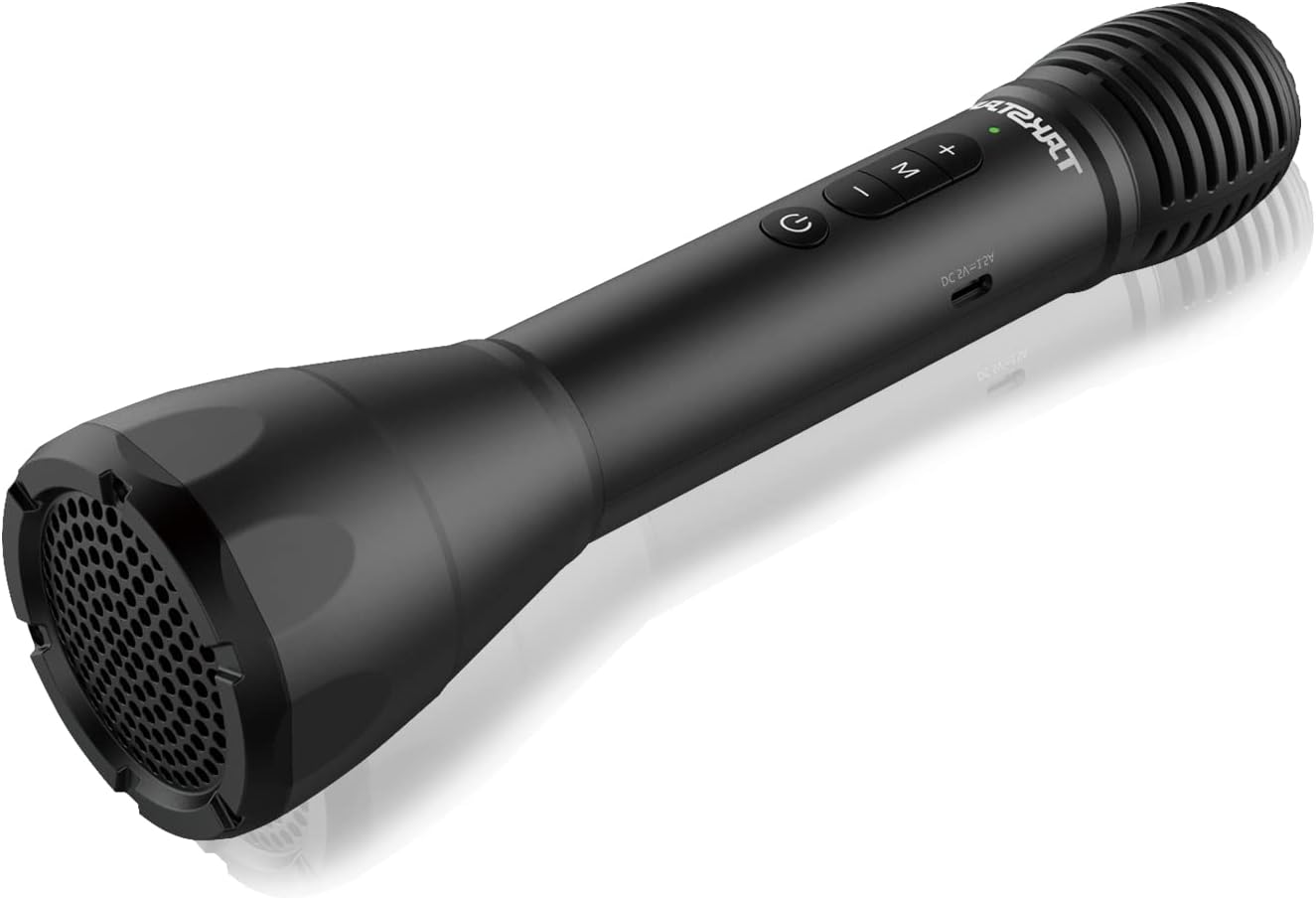
Figure 1: TAKSTAR DA10 Main Unit. A sleek black handheld microphone with integrated speaker at the base and control buttons on the handle.

Figure 2: Cardioid Pickup Pattern. The microphone features a cardioid pickup pattern for focused sound capture and clearer vocals, enhanced by a built-in DSP anti-howling chip.
Akụkụ ndị bụ isi:
- Ọrụ 2-na-1: Combines microphone, power amplifier, and speaker.
- Ikuku Bluetooth: Convenient wireless playing and connectivity to mobile phones, computers, and tablets.
- Ogo ụda ọkachamara: Built-in DSP chip for effective howling reduction and clear, natural sound. Rear earth material speaker for lightweight portability and strong audio.
- Ụdị Karaoke: Features reverb effects for an enhanced singing experience.
- Na-anọ ogologo oge: Up to 8 hours of working time on a single charge, with ultra-long standby and automatic power-off after 15 minutes of no input.
- Ndozi olu: Adjustable loudspeaker volume to suit different situations.
- Ụdị ọtụtụ: Switch between Speech Mode, Host Mode, Karaoke Mode, and Bluetooth Mode.
- Mkpuchi sara mbara: Covers an area of approximately 1,000 sq ft (100m²), suitable for about 25 people.
4. Nhazi
4.1 Ịchaji ngwaọrụ
Before first use, fully charge your TAKSTAR DA10. Connect the provided USB Type-C charging cable to the charging port on the microphone and to a suitable USB power source (e.g., computer, USB wall adapter). A full charge takes approximately 3 hours.
4.2 Njikọ Bluetooth
- Power on the TAKSTAR DA10 by pressing and holding the power button.
- Press the 'M' button to switch to Bluetooth Mode. The device will indicate it is ready for pairing.
- On your mobile phone, computer, or tablet, enable Bluetooth and search for available devices.
- Select 'TAKSTAR DA10' from the list of devices to pair. Once paired, the device will confirm the connection.

Figure 3: Bluetooth Connection. The diagram illustrates how to connect the TAKSTAR DA10 to a smartphone or laptop/PC via Bluetooth 5.0.
5. Ntuziaka ọrụ
5.1 Gbanyụọ ma ọ bụ gbanyụọ
Pịa ma jide bọtịnụ ike ka ịgbanwuo ma ọ bụ gbanyụọ ngwaọrụ ahụ.
5.2 Nhọrọ ọnọdụ
Press the 'M' button to cycle through the available modes:
- Ụdị okwu: Optimized for clear vocal delivery.
- Host Mode: Suitable for presentations and public speaking.
- Ụdị Karaoke: Adds reverb effects for singing.
- Ọnọdụ Bluetooth: For wireless audio playback from a paired device.
5.3 Mgbanwe olu
Use the volume control buttons (+/-) on the device to adjust the loudspeaker volume to your desired level.
5.4 Karaoke Reverb Effects
In Karaoke Mode, the built-in reverb effects are automatically applied to enhance your singing experience.

Figure 4: Voice Amplifier Coverage. The TAKSTAR DA10 provides 8W output power, covering up to 1000+ sq.ft (100+ m²) for effective voice ampntughari.

Figure 5: Versatile Usage. The image displays various applications for the TAKSTAR DA10, including karaoke, lectures/seminars, weddings, and teaching.
6. Nlekọta
- Debe ngwaọrụ akọrọ ma dị ọcha.
- Zere ikpughe ngwaọrụ ahụ na oke okpomọkụ ma ọ bụ ìhè anyanwụ kpọmkwem.
- Do not disassemble the device. Contact customer support for repairs.
- Charge the device regularly to maintain battery health, even if not in frequent use.
7. Nchọpụta nsogbu
| Nsogbu | Ngwọta enwere ike |
|---|---|
| Enweghị ụda sitere na ọkà okwu | Ensure device is powered on and volume is adjusted. Check Bluetooth connection. |
| Enweghị ike ijikọ site na Bluetooth | Ensure device is in Bluetooth Mode. Turn off and on Bluetooth on your external device. Restart the TAKSTAR DA10. |
| Howling/Feedback noise | Reduce microphone volume. Avoid pointing the microphone directly at the speaker. |
| Ndụ batrị dị mkpụmkpụ | Ensure device is fully charged before use. Reduce usage time at maximum volume. |
8. Nkọwapụta
| Njirimara | Nkọwa |
|---|---|
| Ụdị | TAKSTAR |
| Aha Nlereanya | DA10 |
| Teknụzụ Njikọta | Bluetooth |
| Ihe kpatara ụdị igwe okwu | Ejidere |
| Isi Iyi Ike | Akwadoro batrị (Lithium ion) |
| Oge ọrụ | Ruo awa iri abụọ |
| Oge Nchaji | Ihe dị ka awa 3 |
| Ike mmepụta | 8W |
| Mpaghara mkpuchi | Approx. 1,000 sq ft (100m²) |
| Mmetụta ọdịyo | 47.5 decibel |
| Signgbaàmà-na-Noise ruru | 66 dB |
| Nzaghachi ugboro ugboro | 8 kHz |
| Ụdị njikọ | USB Ụdị-C |
| Ibu Ibu | 0.035 ounce (gram 1) |
| Akụkụ ngwugwu | 11.26 x 4.09 x 3.31 sentimita asatọ |
9. Official Product Video
Video 1: TAKSTAR DA10S Bluetooth Wireless Microphone. This video provides an overview of the TAKSTAR DA10S, highlighting its features and functionality as a Bluetooth wireless microphone. Note: The DA10S is a variant of the DA10 model.
10. Akwụkwọ ikike & Nkwado
For warranty information or technical support, please refer to the contact card included in your product packaging or visit the official TAKSTAR website. You may also contact the seller, Takstar Official Store, directly through the Amazon platform for assistance.


