1. Okwu mmalite
This manual provides instructions for the Sharp Digital Alarm Clock, Model SPC547AJAMZ. This device features an easy-to-read LED display, a high-speed USB charging port, and essential alarm functions. Please read this manual thoroughly before use to ensure proper operation and to maximize the product's lifespan.

Figure 1: Sharp Digital Alarm Clock (Model SPC547AJAMZ) front view.
2. Akụrụngwa Ngwaahịa
The Sharp Digital Alarm Clock offers the following key features:
- Ngosipụta dị mfe ịgụ: Large, clear green LED digits for visibility from a distance.
- High-Speed USB Charging Port: A 2 AMP USB port for rapid charging of compatible devices such as smartphones and tablets.
- Olu mkpu nwere ike imeghari: Select between high and low alarm volume settings.
- Ọrụ dị mfe: Intuitive button controls for setting time and alarm.
- Ndabere batrị: Maintains time and alarm settings during power outages (requires 2 AAA batteries, not included). The display will be blank during battery backup mode, but the internal clock will continue to run, and the alarm will sound at the set time.

Figure 2: Alarm clock with a smartphone connected to the USB charging port.
3. Ihe ngwugwu
Chọpụta na ihe niile dị na ngwugwu:
- Sharp Digital Alarm Clock (Model SPC547AJAMZ)
- Ada Ada AC
- Akwụkwọ ntuziaka (akwụkwọ a)
Note: 2 AAA batteries for backup are not included and must be purchased separately.
4. Ozi nchekwa
Biko debe ihe nchekwa nchekwa ndị a:
- Ewepụla akụkụ ahụ na mmiri ma ọ bụ oke mmiri.
- Zere idobe nkeji n'akụkụ ebe okpomọkụ ma ọ bụ na ìhè anyanwụ.
- Use only the provided AC power adapter.
- Anwala ịkwasa ma ọ bụ gbanwee unit ahụ.
- Debe ebe ụmụaka na-apụghị iru.
- Gbaa mbọ hụ na ikuku ikuku dị na gburugburu unit ahụ.
5. Nhazi
5.1 Njikọ ike
- Plug the AC power adapter into the DC IN jack located on the back of the alarm clock.
- Tinye nsọtụ nke ọzọ nke ihe nkwụnye ike AC n'ime oghere mgbidi ọkọlọtọ (120V AC, 60Hz).
- The display will illuminate, and the clock will be ready for time setting.
5.2 Nwụnye Ndabere Batrị
To ensure time and alarm settings are retained during a power outage:
- Chọta ebe batrị dị na ala nke unit ahụ.
- Mepee mkpuchi nke batrị batrị.
- Insert two (2) new AAA batteries, observing the correct polarity (+ and -) as indicated inside the compartment.
- Mechie mkpuchi nke batrị batrị nke ọma.
Note: Batteries are for backup only. The clock display will not be lit during a power outage when operating on battery backup, but the internal clock will continue to run, and the alarm will sound at the set time.
6. Ntuziaka ọrụ
Familiarize yourself with the control buttons located on the top of the unit:
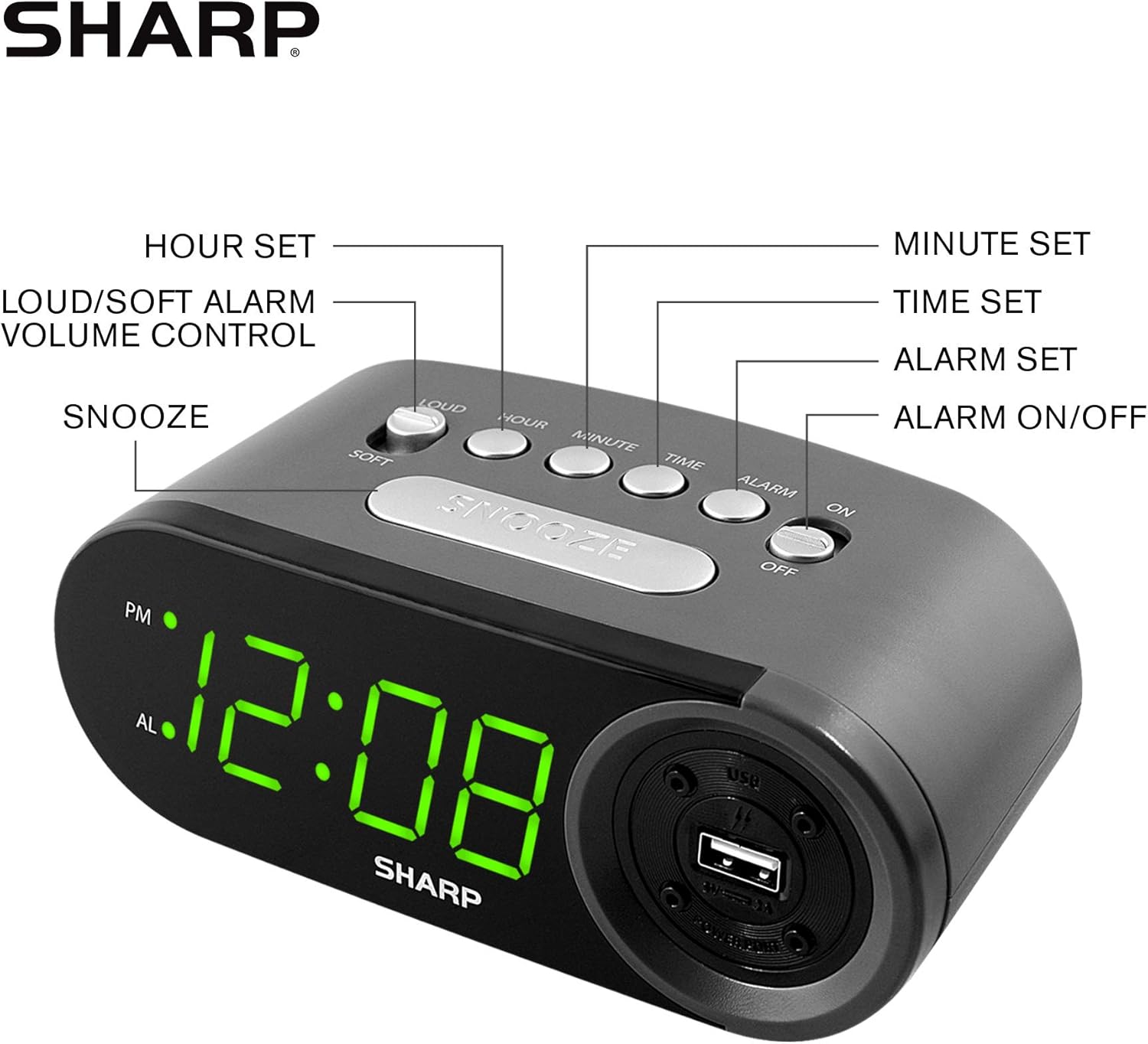
Figure 3: Top panel controls and their functions.
6.1 Ịtọ oge ugbu a
- Pịa ma jide OGE button until the display begins to flash.
- Pịa Awa button repeatedly to set the hour. Observe the PM indicator for afternoon hours.
- Pịa nkeji button repeatedly to set the minutes.
- Ozugbo etinyere oge achọrọ, pịa bọtịnụ oge achọrọ OGE bọtịnụ ọzọ iji kwado wee pụọ na ọnọdụ nhazi oge.
6.2 Ịtọ Oge Mkpu
- Pịa ma jide Mkpu button until the alarm time display begins to flash. The "AL" indicator will also flash.
- Pịa Awa button repeatedly to set the alarm hour. Observe the PM indicator.
- Pịa nkeji button repeatedly to set the alarm minutes.
- Ozugbo edobere oge mkpu achọrọ, pịa pịa bọtịnụ Mkpu button again to confirm and exit alarm setting mode.
6.3 Activating/Deactivating the Alarm
- Iji tụgharịa mkpu ahụ ON, slide na MGBANYERE/ Gbanyụọ switch to the "ON" position. The "AL" indicator will appear on the display.
- Iji tụgharịa mkpu ahụ Gbanyụọ, slide na MGBANYERE/ Gbanyụọ switch to the "OFF" position. The "AL" indicator will disappear.
6.4 Ọrụ snooze
Mgbe oti mkpu na-ada, pịa nnukwu URUA button. The alarm will temporarily stop and sound again after approximately 9 minutes.
6.5 Ịkwụsị Mkpu
To stop the alarm completely after it sounds (without using snooze), slide the MGBANYERE/ Gbanyụọ switch to the "OFF" position. The alarm will reset for the next day if the switch is moved back to "ON".
6.6 Ịgbanwe Olu Mkpu
Pịa LOUD/SOFT button to toggle between high and low alarm volume settings.
6.7 Iji Ọdụ Nchaji USB
Nke 2 AMP USB charging port is located on the right side of the unit.
- Connect your device's USB charging cable (not included) to the USB port on the alarm clock.
- Connect the other end of the cable to your smartphone, tablet, or other compatible USB-powered device.
- Ensure the alarm clock is connected to AC power for the USB port to function.
Note: Charging speed may vary depending on your device and cable.
7. Nlekọta
To keep your alarm clock in optimal condition:
- Nhicha: Jiri akwa dị nro hichaa otu ahụ. Ejila ihe nchacha abrasive ma ọ bụ ihe mgbaze.
- Ngbanwe batrị: Replace AAA backup batteries annually or when the battery low indicator (if present) appears, to ensure reliable backup functionality.
- Nchekwa: If storing the unit for an extended period, remove the backup batteries to prevent leakage.
8. Nchọpụta nsogbu
| Nsogbu | Ihe nwere ike ime | Ngwọta |
|---|---|---|
| Clock display is blank. | No AC power; power outage; a gbapụrụ ngwaọrụ ahụ. | Ensure AC adapter is securely plugged into the unit and a working wall outlet. Check for power outages. |
| Oti mkpu anaghị ada ụda. | Alarm is not activated; alarm time is incorrect; volume is too low. | Slide ALARM ON/OFF switch to "ON". Verify alarm time is set correctly. Adjust alarm volume using the LOUD/SOFT button. |
| USB charging port not working. | Clock not connected to AC power; device not compatible; faulty cable. | Ensure the clock is plugged into AC power. Try a different USB cable or device to confirm compatibility. |
| Time/Alarm settings lost after power outage. | Batrị ndabere anwụọla ma ọ bụ na etinyebeghị ya. | Install two fresh AAA batteries in the battery compartment, ensuring correct polarity. |
9. Nkọwapụta
- Akara: Nkọ
- Ụdị: SPC547AJAMZ
- Ụdị ngosi: LED dijitalụ (Akwụkwọ ndụ akwụkwọ ndụ)
- Isi mmalite ike: Corded Electric (AC 120V, 60Hz)
- Ndabere batrị: Batrị 2 x AAA (anaghị etinye ya)
- USB Nchaji Port: 2 AMP (5V)
- Akụkụ ngwaahịa: Ihe dị ka 6.2" W x 2.3" H x 3.25" D
- Ibu ihe: Ihe dị ka 9.6 ounces
- Ihe: Plastic
- UPC: 049353006000

Ọgụgụ 4: Akụkụ ngwaahịa.
10. Akwụkwọ ikike & Nkwado
10.1 Ozi akwụkwọ ikike
This Sharp product is covered by a limited manufacturer's warranty. For specific warranty terms and conditions, please refer to the warranty card included with your purchase or visit the official Sharp websaịtị. Debe nnata nzụta gị ka ihe akaebe nke ịzụrụ.
10.2 Nkwado ndị ahịa
If you have any questions, require assistance, or need to report an issue with your Sharp Digital Alarm Clock, please contact Sharp customer support. Contact details can typically be found on the official Sharp websaịtị ma ọ bụ na nkwakọ ngwaahịa.
Maka ozi ndị ọzọ, gaa na Sharp Store on Amazon.


