Ngwaahịa gafereview
The Hoco ES41 TWS (True Wireless Stereo) Bluetooth Headset provides a wireless audio experience with clear sound. This manual will guide you through the setup, operation, and maintenance of your ES41 headset.
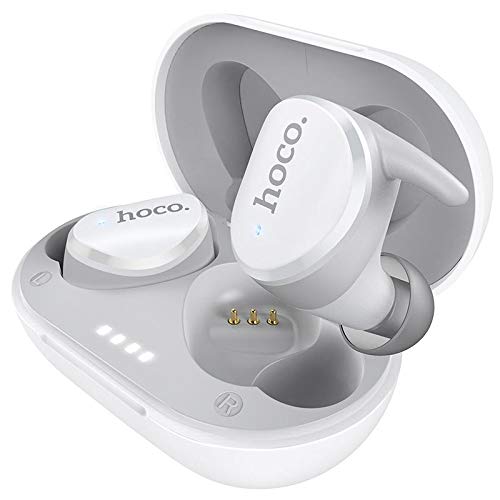
Image: The Hoco ES41 TWS Bluetooth Wireless Headset, showing both earbuds and the charging case in white.
Ihe ngwugwu
Biko lelee ngwungwu maka ihe ndị a:
- Hoco ES41 TWS Wireless Earbuds (Left and Right)
- Akpa nchaji ikuku
- USB Charging Cable (Micro USB)
- Akwụkwọ ntuziaka onye ọrụ

Foto: ihu na azụ view of the Hoco ES41 retail packaging, displaying the product and key features.
Melite
1. Charging the Headset and Case
Tupu ojiji nke mbụ, chajie chaja chaja na ihe ntị ntị.
- Jikọọ eriri chaja USB enyere na ọdụ chaja dị na akpa ahụ na isi iyi ike USB.
- The indicator lights on the charging case will illuminate to show charging status.
- Tinye ekweisi n'ime akpa chaja. Hụ na ha nọdụrụ nke ọma; ekweisi ga-amalite ịchaji na akpaghị aka.
- Charging time for the headset is approximately 1 hour. The charging case takes approximately 2.5 hours to fully charge.

Image: The Hoco ES41 earbuds placed inside the open charging case, showing the LED indicator lights for battery status.
2. Ijikọ na ngwaọrụ Bluetooth
The ES41 headset uses Bluetooth 5.0 for a stable connection.
- Mmakọ izizi:
- Mepee igbe nchaji. Igwe ntị ga-agbanye na-akpaghị aka wee banye ọnọdụ njikọta.
- Na ngwaọrụ gị (smartphone, mbadamba, wdg), gbanye Bluetooth.
- Chọọ maka Bluetooth devices and select "Hoco ES41" from the list.
- Ozugbo ejikọrọ, ị ga-anụ ụda nkwenye, ọkụ egosi earbuds ga-agbanwe.
- Njikọta:
- After initial pairing, the earbuds will automatically connect to the last paired device when removed from the charging case and Bluetooth is enabled on the device.
Ntuziaka ọrụ
Gbanyụọ/ Gbanyụọ
- Ike Na: Open the charging case, or long-press the touch area on both earbuds for approximately 3 seconds.
- Gbanyụọ: Place the earbuds back into the charging case and close the lid, or long-press the touch area on both earbuds for approximately 5 seconds.
Egwu Egwu
- Gwuo/kwụsịtụ: Pịa ebe aka dị na ntị abụọ ahụ otu ugboro.
- Track na-esote: Pịa mpaghara emetụ aka na ntị ntị aka nri ugboro abụọ.
- Gara aga Track: Kpatụ mpaghara aka aka ekpe ugboro abụọ.
Njikwa Oku
- Azịza/Kwụsị Oku: Pịa ebe aka dị na ntị abụọ ahụ otu ugboro.
- Jụ oku: Long-press the touch area on either earbud for 2 seconds.
Onye enyemaka olu
- Mee ka onye enyemaka olu rụọ ọrụ: Triple-tap the touch area on either earbud.
Nlekọta
- Nhicha: Jiri ákwà dị nro ma kpọọ nkụ hichaa ntị ntị na ihe mkpuchi chaja. Ejila kemịkal siri ike ma ọ bụ ihe ndị na-emebi emebi.
- Nchekwa: Mgbe ejighị ya, chekwaa earbuds n'ime akpa nchaji ha iji chebe ha ma debe ha ebubo. Chekwaa n'ebe dị jụụ, kpọrọ nkụ na-adịghị na ìhè anyanwụ kpọmkwem na oke okpomọkụ.
- Nguzogide mmiri: The earbuds are not waterproof. Avoid exposure to water, sweat, or high humidity.
Nchọpụta nsogbu
- Earbuds anaghị ejikọ onwe ha:
Place both earbuds back into the charging case, close the lid, then open it again. This should reset their connection.
- Isi ntị anaghị ejikọ na ngwaọrụ:
Ensure Bluetooth is enabled on your device. Forget "Hoco ES41" from your device's Bluetooth settings and attempt to pair again.
- Enweghị ụda sitere na otu ntị ntị:
Check if both earbuds are charged. Try placing them back in the case and taking them out again. If the issue persists, try resetting the earbuds (refer to the full manual if available for specific reset instructions).
- Nsogbu ịchaji:
Ensure the charging cable is securely connected and the power source is active. Clean the charging contacts on both the earbuds and the case with a dry cotton swab.
Nkọwapụta
| Njirimara | Nkọwapụta |
|---|---|
| Aha Nlereanya | ES41 |
| Ụdị Bluetooth | 5.0 |
| Chip Bluetooth | JL6936D |
| Ịchaji Ike batrị Case | 400mAh |
| Single Headset Battery Capacity | 40mAh |
| Oge Okwu/Egwu | awa 5 |
| Oge Njikere | awa 200 |
| Oge Nchaji ekweisi | 1 elekere |
| Oge Nchaji Okwu | awa 2.5 |
| Mkpokọta ibu | 37g |
| Single Headset Weight | 4g |
| Usoro njikwa | Metụ aka |
| Teknụzụ Njikọta | Ikuku |
| Ụdị ekweisi | Na Ntị |
| Ihe onwunwe | Plastic |
| Ngwa dakọtara | Ekwentị |
Akwụkwọ ikike na nkwado
For warranty information and technical support, please refer to the documentation provided with your purchase or contact HOCO customer service. Keep your proof of purchase for warranty claims.