1. Okwu mmalite
Daalụ maka ịzụrụasing the Globo Lighting SULLY LED Flush Mount Lamp. This manual provides essential information for the safe and efficient use of your new lighting fixture. Please read these instructions carefully before installation and retain them for future reference.

Foto 1.1: N'ihu view of the Globo Lighting SULLY LED Flush Mount Lamp, ihe ngosiasing its sleek black metal and white diffuser design.
2. Ozi nchekwa
Na-agbaso ihe ndị dị mkpa gbasara nchekwa mgbe niile mgbe ị na-etinye ma na-arụ ọrụ na ngwaahịa eletriki iji belata ihe egwu nke ọkụ, ujo eletriki, na mmerụ ahụ onwe onye.
- Kwụpụ ike: Always ensure the main power supply is switched off at the circuit breaker before beginning any installation, maintenance, or cleaning.
- Eletrik tozuru oke: Installation should be performed by a qualified electrician or a competent person in accordance with local electrical codes.
- Voltage ndakọrịta: Gbaa mbọ hụ na ọkọnọ voltage dabara na lamp's specified voltage (24 VDC).
- Nkwanye echekwabara: Ndị lamp must be securely mounted to a structurally sound surface.
- Zere mmiri mmiri: Do not install in excessively damp or wet locations unless the product is specifically rated for such environments.
- Enweghị akụkụ ndị ọrụ nwere ike ịrụ ọrụ: This LED fixture contains no user-serviceable parts. Do not attempt to disassemble or modify the lamp.
3. Ihe ngwugwu
Verify that all components are present and undamaged before proceeding with installation. If any parts are missing or damaged, contact your retailer.
- Globo Lighting SULLY LED Flush Mount Lamp (1 nkeji)
- Ngwa mgbanaka (skru, arịlịka mgbidi)
- Akwụkwọ ntuziaka (akwụkwọ a)
4. Nkọwapụta
| Njirimara | Nkọwapụta |
|---|---|
| Nọmba nlereanya | SULLY |
| Ụdị | Globo ọkụ |
| Ihe onwunwe | Ọla |
| Ụdị isi iyi ọkụ | Ikanam |
| Ọnụọgụ nke isi mmalite ọkụ | 1 (integrated LED array) |
| Voltage | 24 Volt DC (VDC) |
| Wattage | 24 Watt |
| Isi Iyi Ike | Igwe ọkụ eletrik |
| Ụdị ụlọ | Garden (Note: Typically for indoor use, verify IP rating for outdoor use) |
| ASIN | B08WHVNWBV |
5. Nwụnye
Ngwa achọrọ: Skrewdriver, drill, waya na-ewepụ ihe, voltage tester, safety glasses.
- Kwadebe maka nwụnye: Turn off power at the main circuit breaker. Ensure the power is completely off using a voltagọ bụ onye nyocha.
- Remove Existing Fixture (if applicable): Carefully remove any existing light fixture, noting the wiring connections.
- Nwụnye bracket: Jiri skru ndị enyere tinye ihe nkwado ahụ n'ime igbe njikọ dị n'uko ụlọ. Hụ na e ji skru ndị a sie ike.
- Njikọ waya: Connect the electrical wires from the ceiling to the lamp's wires. Typically, connect live (black/brown) to live, neutral (white/blue) to neutral, and ground (green/yellow) to ground. Ensure all connections are secure with wire nuts.

Foto 5.1: Ime view nke lamp showing the LED driver and wiring terminals. Ensure connections are made according to local electrical codes.
- Tinye Lamp to Bracket: Jiri nlezianya dozie lamp with the mounting bracket and secure it using the provided screws. Ensure no wires are pinched during this step.
- Weghachi ike: Ozugbo lamp is securely installed, restore power at the circuit breaker.
- Ọrụ nnwale: Gbanye ihe mgba ọkụ iji nwalee lamp'ọrụ.
6. Ntuziaka ọrụ
The Globo Lighting SULLY LED Flush Mount Lamp e mere maka ọrụ dị mfe.
- Gbanyụọ/ Gbanyụọ: Use a standard wall switch to turn the lamp gbanye ma ọ bụ gbanyụọ.
- Color Temperature/Color Changing: Nke a lamp may feature adjustable color temperature or color-changing capabilities. If so, these functions are typically controlled via a remote control (not included unless specified) or by cycling the wall switch rapidly. Refer to any additional documentation provided with a remote control if applicable.

Image 6.1: The SULLY lamp illuminated with a warm white light setting.
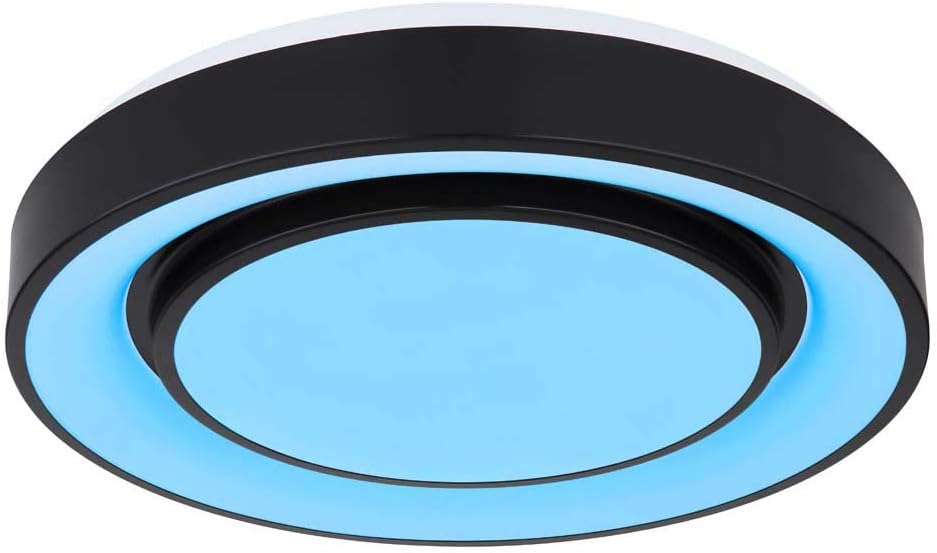
Image 6.2: The SULLY lamp illuminated with a blue light setting, indicating potential color-changing features.
7. Nlekọta
The Globo Lighting SULLY LED Flush Mount Lamp chọrọ obere mmezi.
- Nhicha: Ensure the power is off before cleaning. Wipe the lamp nwere nro, kpọrọ nkụ, ma ọ bụ obere damp Ákwà. Ejila ihe nhicha, ihe mgbaze, ma ọ bụ kemịkalụ siri ike, n'ihi na ihe ndị a nwere ike imebi ihe ndị dị na ya ma ọ bụ ihe ndị dị na eletriki.
- Ọkụ: The integrated LED light source is designed for long life and is not user-replaceable. Do not attempt to replace the LEDs.
- Nyocha: Nyochaa lamp maka ihe ịrịba ama ọ bụla nke mmebi ma ọ bụ njikọ na-adịghị mma. Ọ bụrụ na achọpụta nsogbu ọ bụla, gbanyụọ ọkụ eletrik ma gakwuru ọkachamara ọkụ eletrik ruru eru.
8. Nchọpụta nsogbu
Ọ bụrụ na ị na-enwe nsogbu na iL gịamp, rụtụ aka na usoro nchọpụta nsogbu ndị a na-ahụkarị:
| Nsogbu | Ihe nwere ike ime | Ngwọta |
|---|---|---|
| Lamp anaghị agbanye | Enweghị ọkụ Njikọ waya na-adịghị mma Mgbanwe mgbidi ezighi ezi | Check circuit breaker and wall switch. Ensure power is on. Turn off power and check wiring connections. Tighten if loose. Nwalee ihe mgba ọkụ mgbidi ahụ site na iji ngwaọrụ ọzọ ma ọ bụ gakwuru onye ọrụ ọkụ eletrik. |
| Ìhè flickers | Njikọ waya na-adịghị mma Mgbanwe dimmer na-ekwekọghị (ọ bụrụ na ọ dị mkpa) | Turn off power and check wiring connections. Tighten if loose. Ensure any dimmer switch used is compatible with LED fixtures. Replace if necessary. |
| Incorrect color or function | Okwu njikwa anya Switch cycling error | Check remote control batteries or refer to remote instructions. Try cycling the wall switch off and on slowly, then rapidly, to reset or change modes. |
If these steps do not resolve the issue, contact a qualified electrician or the retailer for assistance.
9. Akwụkwọ ikike na nkwado
Globo Lighting products are manufactured to high-quality standards. For information regarding warranty coverage, please refer to the warranty card included with your purchase or contact your retailer. Keep your proof of purchase for any warranty claims.
For technical support or further inquiries, please contact the retailer where the product was purchased or visit the official Globo Lighting websaịtị maka ozi kọntaktị.


