Okwu mmalite
Thank you for choosing the ttec AirBeat Free True Wireless Earphones. This manual provides essential information for setting up, operating, and maintaining your earphones to ensure optimal performance and longevity. Please read this manual thoroughly before using the product.
Ihe ngwugwu
Gbaa mbọ hụ na ihe niile dị na ngwugwu gị:
- ttec AirBeat Free True Wireless Earphones (Left and Right)
- Nchaji case
- Igwe nchaji USB
- Nkịta ntị
- Akwụkwọ ntuziaka (akwụkwọ a)
Ngwaahịa gafereview
Familiarize yourself with the components of your ttec AirBeat Free earphones and charging case.

Figure 1: The compact ttec AirBeat Free charging case, shown held in a hand, highlighting its portable design.
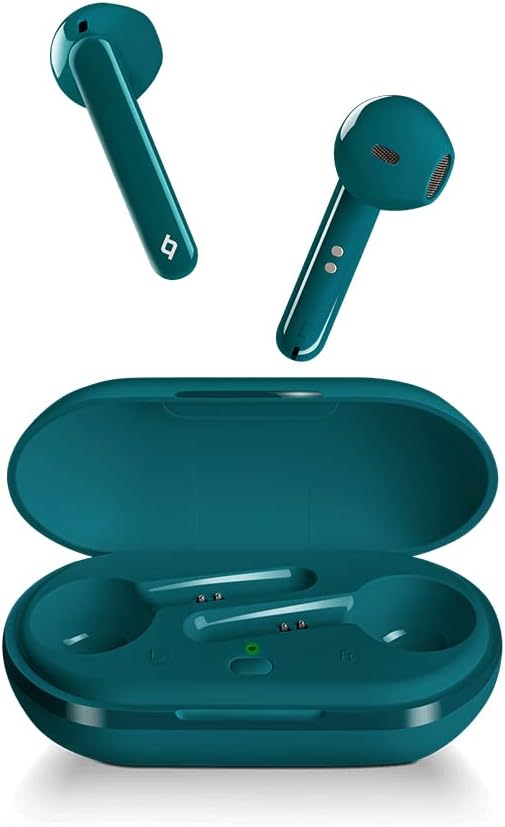
Figure 2: The ttec AirBeat Free earbuds displayed alongside their open charging case, showing the earbuds' design and the charging slots.

Figure 3: A single ttec AirBeat Free earbud positioned next to its open charging case, illustrating the earbud's form factor and the case's interior.
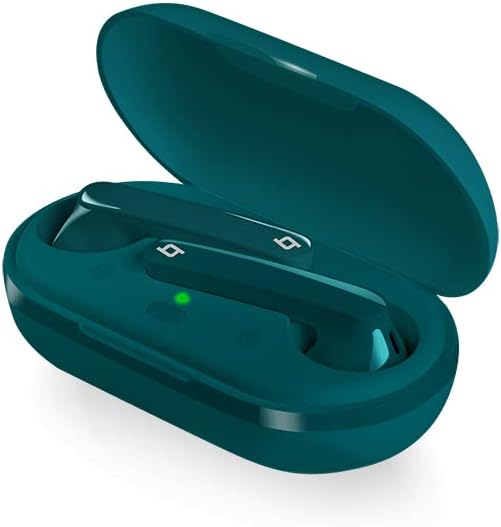
Ọgụgụ 4: Otu akụkụ view of the ttec AirBeat Free earbuds securely placed within their open charging case, showing the charging indicators.
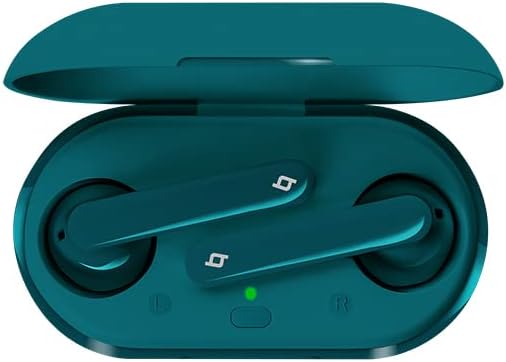
Ọgụgụ 5: A n'elu-ala view of the ttec AirBeat Free earbuds nestled in their open charging case, clearly showing the left and right earbud positions and the charging status light.
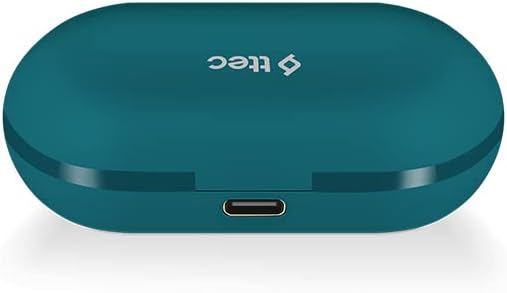
Figure 6: The closed ttec AirBeat Free charging case, viewed from the back, highlighting the USB-C charging port.
Melite
1. Ịchaji ekwe ntị na akpa
Tupu ejie ya nke mbụ, chajie nke ọma ekweisi na akpa nchaji.
- Tinye ekwe ntị abụọ n'ime igbe nchaji.
- Connect the USB charging cable to the charging port on the back of the case (refer to Figure 6) and plug the other end into a USB power source.
- The indicator light on the charging case will show charging status. A full charge provides up to 30 hours of extra battery life with the case, and up to 4 hours for the earphones on a single charge.
- Nke Charge & Go feature allows 1 hour of use with only 15 minutes of charging.
2. Njikọ Bluetooth
Pair your ttec AirBeat Free earphones with your Bluetooth-enabled device.
- Hụ na ekwe ntị ndị ahụ dị na chajị ma dịkwa n'ime akpa chajị ahụ.
- Open the charging case lid. The earphones will automatically enter pairing mode.
- Na ngwaọrụ gị (smartphone, tabletị, wdg), gaa na ntọala Bluetooth wee mee ka Bluetooth nwee ike.
- Chọọ maka ngwaọrụ dị. Họrọ "ttec AirBeat Free"site na listi.
- Ozugbo ejikọtara ya, ị ga-anụ ụda nkwenye, ọkụ ihe ngosi dị na ekwe ntị nwere ike ịgbanwe.
- Nke MonoSmart technology allows either earbud to be used independently. To use a single earbud, simply remove one from the case while the other remains inside or is turned off.
Ntuziaka ọrụ
The ttec AirBeat Free earphones feature touch sensors for easy control of music and calls.
Njikwa egwu
- Gwuo/kwụsịtụ: Single tap on either earbud's touch sensor.
- Track na-esote: Double tap on the right earbud's touch sensor.
- Gara aga Track: Double tap on the left earbud's touch sensor.
- Olu elu: Triple tap on the right earbud's touch sensor.
- Olu ala: Triple tap on the left earbud's touch sensor.
Njikwa oku
- Azịza/Kwụsị Oku: Single tap on either earbud's touch sensor.
- Jụ oku: Press and hold either earbud's touch sensor for 2 seconds.
- Mee ka onye enyemaka olu rụọ ọrụ: Press and hold either earbud's touch sensor for 3 seconds (e.g., Siri, Google Assistant).
Gbanyụọ/ Gbanyụọ
- Ike Na: Open the charging case lid, or press and hold the touch sensor for 3 seconds if out of case.
- Gbanyụọ: Place earphones back into the charging case and close the lid, or press and hold the touch sensor for 5 seconds.
Nlekọta na nlekọta
Proper care will extend the life of your earphones.
- Nhicha: Use a soft, dry, lint-free cloth to clean the earphones and charging case. Do not use harsh chemicals or abrasive materials.
- Nguzogide mmiri: The earphones have an IPX4 water and dust proof rating, meaning they are resistant to splashing water from any direction. Do not submerge them in water or expose them to heavy rain. Dry them thoroughly if they get wet.
- Nchekwa: Mgbe ị naghị eji ya, debe ekweisi ndị ahụ n'ime akpa chaja ha iji chebe ha ma mee ka ha dị ọkụ. Debe ha n'ebe dị jụụ ma kpọọ nkụ, ebe okpomọkụ na-adịghị oke njọ.
- Ndụ batrị: To preserve battery life, charge the earphones and case regularly, even if not used for extended periods.
Nchọpụta nsogbu
If you encounter issues with your ttec AirBeat Free earphones, try the following solutions:
| Nsogbu | Ngwọta enwere ike |
|---|---|
| Earphones not pairing/connecting. |
|
| Naanị otu earbud na-arụ ọrụ. |
|
| Obere olu ma ọ bụ ogo ụda adịghị mma. |
|
| Nchaji anaghị akwụ ụgwọ. |
|
Nkọwapụta
Key technical specifications for the ttec AirBeat Free True Wireless Earphones:
- Aha nlereanya: AirBeat efu
- Nọmba nlereanya: 2KM133T
- Ụdị Bluetooth: 5.0
- Water and Dust Proof Rate: IPX4
- Ibu ihe ntị ntị: 3.6 grams (nke ọ bụla)
- Ịchajị arọ nke ikpe: 37 grams
- Earphone Battery Life (single charge): Ruo awa iri abụọ
- Ngụkọta ndụ batrị (ya na igbe nchaji): Ruo awa iri abụọ
- Nchaji ngwa ngwa: 15 minutes charge for 1 hour playback (Charge & Go)
- Njikwa mkpọtụ: Nkagbu mkpọtụ nọ n'ọrụ
- Teknụzụ Njikọta: Ikuku (Bluetooth)
- Headphones Ear Placement: Na Ntị
- Ngwa gụnyere: Nkịta ntị
- Agba: Turquoise
Akwụkwọ ikike na nkwado
For warranty information and customer support, please refer to the official ttec websaịtị ma ọ bụ kpọtụrụ onye na-ere ahịa mpaghara gị.
Onye nrụpụta: tc
Ụbọchị mbụ dị: Ọnwa Abụọ 9, 2021
If you experience issues not covered in the troubleshooting section, please contact ttec customer service for further assistance.


