Okwu mmalite
Thank you for choosing the FLYLINKTECH CF700 Multi-functional Jump Starter and Tire Inflator. This device is designed to provide reliable assistance for vehicle emergencies, including jump-starting dead batteries, inflating tires, and serving as a portable power bank. Please read this manual thoroughly before use to ensure safe and optimal operation.
Ntuziaka nchekwa dị mkpa
Failure to follow these instructions may result in electric shock, fire, and/or serious injury. Save these instructions for future reference.
- Always wear safety glasses and protective gloves when operating the jump starter.
- Malitela batrị oyi kpọnwụrụ akpọnwụ.
- Ensure the vehicle is in park (P) or neutral (N) and the parking brake is engaged.
- Debe ụmụaka na ndị na-enweghị ikike ka ha ghara ịnọ n'ebe ọrụ.
- Do not connect the positive (+) and negative (-) clamps ọnụ.
- Ewepụla ngwaọrụ ahụ na mmiri ozuzo ma ọ bụ ọnọdụ mmiri.
- Akpọsakwala otu ahụ. Kpọtụrụ ndị ọrụ ruru eru ọrụ niile.
- Store the device in a cool, dry place away from direct sunlight and heat.
- The device contains a lithium-ion battery. Dispose of it according to local regulations.
Ihe ngwugwu
Chọpụta na ihe niile dị na ngwugwu gị:
- FLYLINKTECH CF700 Jump Starter and Tire Inflator
- Amamihe Clamps with 8 Protections
- USB gaa na USB Type-C
- DC nkwụnye
- 3 x Valve Adapters (for various inflatables)
- Akwụkwọ ntuziaka (akwụkwọ a)
- Akpa nchekwa

Ngwaahịa gafereview
Familiarize yourself with the different parts and functions of your FLYLINKTECH CF700 device.

- DC 12V-16V/10A Output Port: Maka ike ngwa ngwa ụgbọ ala 12V.
- USB Output Ports (QC3.0 & 2.4A): For charging mobile phones, tablets, and other USB-powered devices.
- Ụdị ntinye-C: For recharging the CF700 unit.
- EC5 Output Port: For connecting the smart jump starter clamps.
- Bọtịnụ ike: To turn the unit on/off and cycle through LED light modes.
- LCD Power Indicator: Na-egosiputa ego batrị fọdụrụnụ.
- LCD Air Pressure Display: Shows current and target tire pressure.
- ON/OFF Button (for Air Compressor): Activates and deactivates the tire inflator.
- Ọkụ ọkụ mberede LED: Provides illumination with Stable, SOS, and Strobe modes.
Nkọwapụta
| Njirimara | Nkọwapụta |
|---|---|
| Nlereanya | CF700 |
| Ọnụ ugbu a | 2500A |
| Ike batrị | 24000mAh |
| Servicedị Ọrụ hicgbọ | Car, Motorcycle, SUV, Scooter, Truck, Tractor |
| Ndakọrịta nke igwe | Up to All Gasoline Engines, Up to 8.0L Diesel Engines |
| Nrụgide Taya Inflator | Max 150 PSI (0.3~10.3 BAR) |
| USB mmepụta 1 (QC3.0) | 5V/3A, 9V/2A, 12V/1.5A |
| Mmepụta USB 2 | 5V/2.4A |
| Mmepụta DC | 12V-16V/10A |
| Ike ọkụ ọkụ LED | 5W |
| Okpomọkụ na-arụ ọrụ | -20°C ruo 60°C (-4°F ruo 140°F) |
| Akụkụ (L x W x H) | Ihe ruru. 22 x 17 x 9 cm (8.7 x 6.7 x 3.5 sentimita) |
| Ibu | Ihe ruru. 1.5 n'arọ (3.3 lbs) |
Ịchaji ngwaọrụ
Before first use, fully charge the FLYLINKTECH CF700. It takes approximately 5 hours to fully charge using a fast charger.
- Connect the USB to Type-C cable to the Type-C input port on the CF700.
- Connect the other end of the USB cable to a USB wall adapter (not included) or a car charger.
- The LCD power indicator will show the charging progress. The device is fully charged when the indicator shows 100%.
It is recommended to recharge the unit every 3-6 months to maintain battery health, even if not in use.
Malie Malite Ụgbọala
The CF700 can jump start 12V vehicles with up to all gasoline engines and 8.0L diesel engines.

- Ensure the CF700 is sufficiently charged (at least 50% recommended).
- Turn off the vehicle's ignition and all accessories (lights, radio, etc.).
- Tinye smart clamp cable into the EC5 output port of the CF700. The indicator light on the smart clamp will flash green and red.
- Jikọọ Uhie nti (+) clamp gaa na ọdụ batrị dị mma (+) nke ụgbọ ala.
- Jikọọ OJI adịghị mma (-) clamp to the vehicle's negative (-) battery terminal or a solid metal part of the engine block (unpainted).
- Ozugbo clamps are correctly connected, the indicator light on the smart clamp will turn solid green. If it flashes red, check the connections.
- Bido injin ụgbọ ala.
- Once the engine starts, immediately remove the smart clamps from the vehicle battery, first the negative (-) clamp, then the positive (+) clamp.
- Disconnect the smart clamp cable from the CF700.
Mara: If the vehicle does not start after 3 attempts, stop and check for other potential issues with the vehicle.

Using the Tire Inflator
The integrated air compressor can inflate tires up to 150 PSI and features an automatic shut-off function.
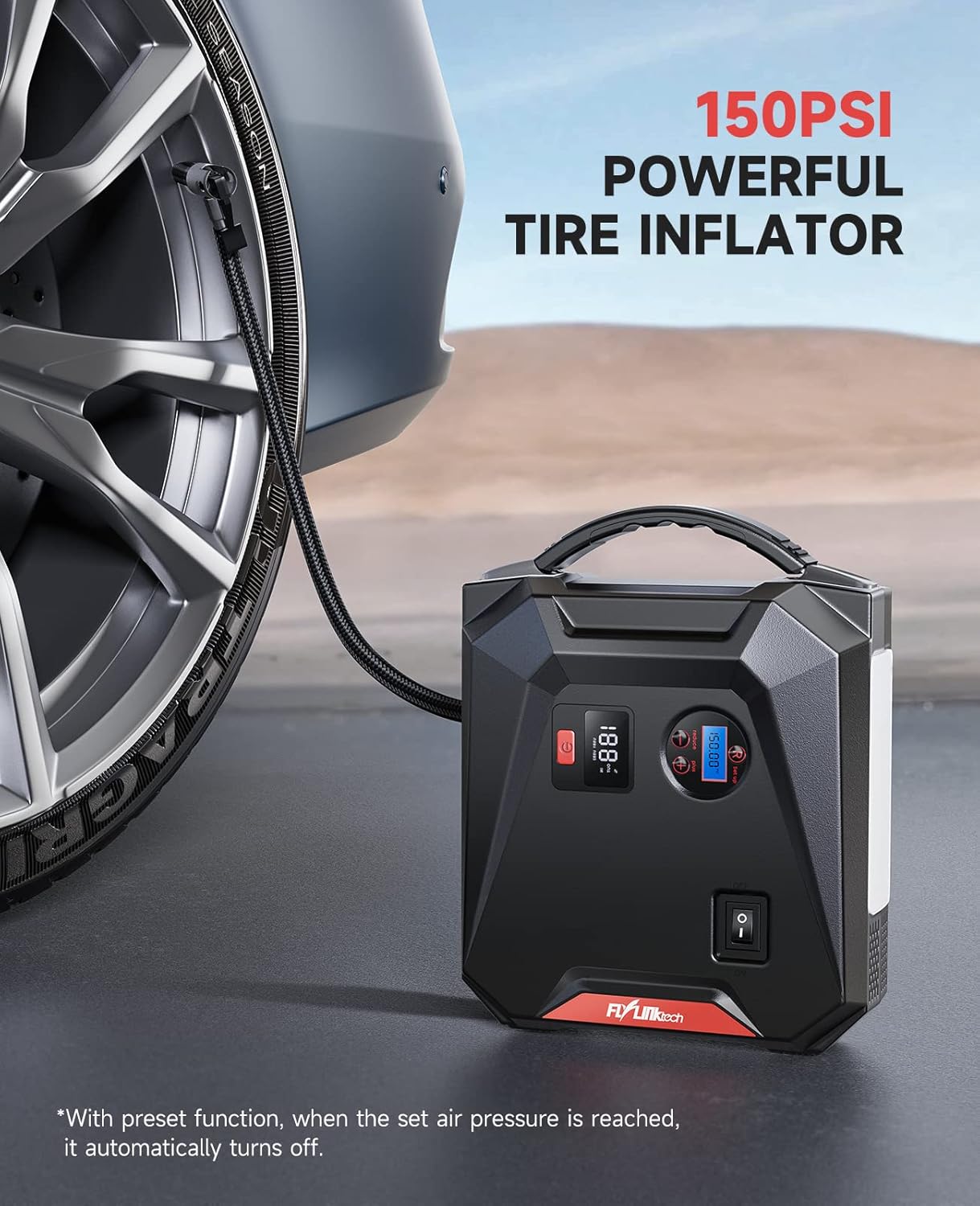
- Connect the air hose to the tire valve stem. Ensure it is securely tightened to prevent air leakage.
- Press the power button on the CF700 to turn on the unit. The LCD air pressure display will show the current tire pressure.
- Use the '+' and '-' buttons to set the desired target pressure. The unit supports PSI, BAR, KPA, and KG/CM².
- Press the ON/OFF button for the air compressor to start inflation.
- Ngwakọta ahụ ga-akwụsị ozugbo e ruru nrụgide e setịpụrụ.
- Disconnect the air hose from the tire valve.
Use the included valve adapters for inflating bicycles, balls, and other inflatables.
Iji dị ka Power Bank
The 24000mAh capacity allows you to charge various electronic devices.

- Nchaji USB: Connect your device's USB charging cable to either of the USB output ports (USB 1 QC3.0 or USB 2 2.4A) on the CF700. The device will begin charging automatically.
- Mmepụta DC: For 12V car accessories, connect the accessory to the DC 12V-16V/10A output port. Ensure the accessory's power requirements do not exceed 10A.
Iji ọkụ Mberede LED
The 5W LED light provides illumination for various situations.

- Press and hold the power button for approximately 3 seconds to turn on the LED light in Stable mode.
- Press the power button again to cycle through the light modes: Stable → SOS → Strobe → Off.
- To turn off the light directly from any mode, press and hold the power button for 3 seconds.
Nchọpụta nsogbu
| Nsogbu | Ihe nwere ike ime | Ngwọta |
|---|---|---|
| Ngwaọrụ anaghị agbanwu. | Ahapụla batrị kpamkpam. | Chajie ngwaọrụ ahụ nke ọma. |
| Ụgbọ ala anaghị ebido. | ezighi ezi clamp njikọ; Batrị ngwaọrụ dị oke ala; Batrị ụgbọala mebiri emebi nke ukwuu. | Lelee clamp connections (solid green light on smart clamp); Recharge CF700; Consult a mechanic. |
| Smart clamp egosi na-egbuke egbuke uhie. | Reverse polarity connection; Short circuit; Over-temperature. | Kwupu njikọ clamps and reconnect correctly; Check for short circuits; Allow device to cool down. |
| Tire inflator does not start or stops prematurely. | Air hose not securely connected; Target pressure already reached; Device battery too low. | Ensure hose is tight; Check current pressure; Recharge CF700. |
| USB devices not charging. | Device battery too low; Cable issue; Device not compatible. | Recharge CF700; Try a different USB cable; Check device compatibility. |
Nlekọta na Nchekwa
- Jiri akwa kpọrọ nkụ dị nro hichaa ngwaọrụ ahụ. Ejila kemịkalụ siri ike ma ọ bụ ihe abrasive.
- Store the CF700 in its storage bag in a cool, dry place between -20°C and 60°C (-4°F and 140°F).
- Avoid storing the device in direct sunlight or near heat sources.
- For optimal battery life, recharge the unit every 3-6 months, even if not used.
Akwụkwọ ikike na nkwado
FLYLINKTECH products are designed and manufactured to the highest quality standards. For warranty information or technical support, please refer to the contact details provided on the product packaging or the official FLYLINKTECH website. Please have your model number (CF700) and purchase date available when contacting support.