1. Ngwaahịa gafereview
This manual provides essential information for the safe and effective installation, operation, and maintenance of the IDEC ASLW212620S Illuminated 22mm Selector Switch. This device is designed for industrial control applications, offering a clear visual indication of its operational state through illumination.
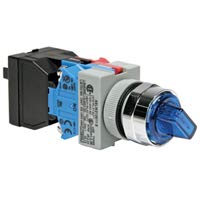
Foto 1: IDEC ASLW212620S Illuminated 22mm Selector Switch. This image displays the complete assembly of the selector switch, including the illuminated actuator, mounting base, and contact blocks. The blue translucent handle indicates its illuminated feature.
Akụkụ ndị bụ isi:
- 22mm mounting diameter for standard panel cutouts.
- Illuminated actuator for clear status indication.
- Two-position selector switch functionality.
- Panel mount design.
- IP54 International Protection Rating, offering protection against dust and splashing water.
2. Ozi nchekwa
Read and understand all instructions before installing, operating, or maintaining this product. Failure to follow these instructions may result in serious injury or property damage.
- Ihe ize ndụ eletrik: Ensure all power is disconnected before performing any installation or maintenance. Only qualified personnel should perform electrical work.
- Ojiji nke ọma: Use this switch only for its intended purpose in industrial control circuits. Do not exceed specified voltage na ọkwa dị ugbu a.
- Ọnọdụ gburugburu: Do not expose the switch to conditions outside its specified operating temperature, humidity, or IP rating.
- Nyocha: Regularly inspect the switch for any signs of damage, wear, or loose connections. Replace damaged components immediately.
3. Ntọala na nwụnye
Proper installation is crucial for the reliable operation of the IDEC ASLW212620S selector switch.
3.1 Panel arịọnụ
- Ensure the control panel has a 22mm diameter cutout for the switch.
- Insert the switch actuator assembly through the front of the panel cutout.
- Secure the switch to the panel using the provided mounting nut and washer on the rear side of the panel. Tighten securely but do not overtighten.
- Attach the contact block(s) and lamp holder (if separate) to the rear of the switch assembly, ensuring they are correctly oriented and locked into place.
3.2 Waya
Refer to the wiring diagram provided with your specific contact block and lamp holder for detailed connection instructions. General guidelines are as follows:
- Ensure all power is off before wiring.
- Connect control circuit wires to the appropriate terminals on the contact blocks.
- Connect power for the illumination lamp nke lamp holder terminals, observing correct polarity if applicable.
- Verify all connections are secure and free from shorts.
4. Ntuziaka ọrụ
The IDEC ASLW212620S is a two-position selector switch. Its operation is straightforward:
- Position Selection: Rotate the switch actuator to select between the two available positions. Each position corresponds to a specific state of the connected control circuit.
- Ọkụ: The integrated lamp will illuminate when power is supplied to its terminals, providing a visual indication of the switch's status or the circuit's condition, depending on how it is wired.
5. Nlekọta
Regular maintenance helps ensure the longevity and reliable performance of your selector switch.
- Nhicha: Clean the exterior of the switch with a soft, damp cloth. Do not use abrasive cleaners or solvents, as these can damage the plastic components or markings.
- Nyocha: Periodically check for loose mounting nuts, damaged wiring, or signs of corrosion on terminals. Ensure the actuator rotates smoothly between positions.
- Lamp Ndochi: Ọ bụrụ na ọkụ lamp fails, replace it with a lamp nke otu voltage and type specified by IDEC for this model. Ensure power is disconnected before replacing the lamp.
6. Nchọpụta nsogbu
If you encounter issues with your IDEC ASLW212620S switch, consider the following common problems and solutions:
- Switch Not Actuating Circuit:
- Check wiring connections to the contact blocks.
- Verify the contact block is correctly attached and functioning.
- Ensure the switch actuator is fully rotated to the desired position.
- Ọkụ anaghị arụ ọrụ:
- Check power supply to the lamp njide.
- Verify wiring connections to the lamp njide.
- Nyochaa lamp for damage or burnout; replace if necessary.
- Gbaa mbọ hụ na lamp holder is correctly installed.
- Stiff or Loose Actuator:
- Check for foreign objects obstructing movement.
- Ensure the mounting nut is not overtightened or too loose.
- If the issue persists, the switch mechanism may be damaged and require replacement.
7. Nkọwapụta
| Nkọwapụta | Nkọwa |
|---|---|
| Ụdị | Idec |
| Nlereanya | ASLW212620S |
| Onye nrụpụta | IDEC |
| Ụdị nkwụnye | Ugwu Panel |
| Ụdị Actuator | Nhọrọ Nhọrọ |
| Ọnụọgụ nke ọkwa | 2 |
| Ogo nchekwa mba ụwa | IP54 |
| Ụbọchị mbụ dị | Disemba 4, 2020 |
8. Akwụkwọ ikike na nkwado
IDEC products are manufactured to high-quality standards. For specific warranty information, please refer to the documentation provided with your purchase or visit the official IDEC website. For technical support or further assistance, please contact IDEC customer service.
IDEC Corporation Contact Information:
(Please refer to the official IDEC website for the most current contact details and regional support information.)


