Okwu mmalite
This manual provides detailed instructions for the safe and effective operation of the AOPUTTRIVER AP-7200APP Professional True-RMS Clamp Meter. This device is designed for measuring AC/DC current, AC/DC voltage, resistance, capacitance, continuity, and temperature, and features non-contact voltage (NCV) detection and Bluetooth connectivity for mobile app integration.
Ozi nchekwa
Always adhere to safety precautions when using electrical testing equipment. This device complies with IEC 61010-1, CAT III 600V safety standards and features double insulation for enhanced protection.
- Ekwela ka oke ntinye nke akọwapụtara maka oke nha ọ bụla.
- Kpachara anya nke ukwuu mgbe ị na-arụ ọrụ na sekit ndị dị ndụ.
- Ensure the test leads are in good condition and properly connected before use.
- Do not operate the meter if it appears damaged or if the casing is open.
- Refer to local and national safety codes for proper electrical work procedures.
Ihe ngwugwu
Nyochaa na etinyere ihe niile edepụtara n'okpuru na ngwugwu gị:
- AOPUTTRIVER AP-7200APP Clamp Mita
- Nyocha okpomọkụ
- Test Leads (Red/Black)
- Batteries (AAA type, typically 2)
- Akwụkwọ ntuziaka

Image: Contents of the AP-7200APP package, including the clamp meter, temperature probe, test leads, batteries, and instruction manual.
Ngwaahịa gafereview
Familiarize yourself with the components of the AP-7200APP Clamp Mita:

Image: Labeled diagram of the AP-7200APP Clamp Meter, highlighting its main components and controls.
- Clamp Nkịta: Opens 26mm to enclose conductors for current measurement.
- Jaw-opening Handle: Eji ya emeghe ma mechie clamp agba.
- NCV Detection Area: Located at the top, used for non-contact voltage nchọpụta.
- Lamp Ìhè: Illuminates the measurement area. Press the "HOLD" key for over 2 seconds to activate.
- Ngbanwe Rotary: Selects measurement functions and ranges.
- Ngosipụta LCD: 6000 counts display, showing measurement values and function symbols.
- Jide igodo: Freezes the current display reading. Press for >2 seconds to activate backlight.
- SEL Key: Used to change measurement modes within a function (e.g., AC/DC, Diode/Continuity/Capacitance).
- Igodo MAX/MIN: Records maximum and minimum measured values. Press for >2 seconds to exit.
- Hz/Duty Key: Selects frequency or duty cycle measurement.
- REL Key: Activates relative measurement mode.
- Jack ntinye COM: Common terminal for test leads and temperature probe.
- VΩHz°C°F Input Jack: Ọnụ ntinye ntinye maka voltage, resistance, frequency, capacitance, and temperature measurements.
Melite
1. Ntinye batrị
The meter requires two AAA batteries. Open the battery compartment cover on the back of the device, insert the batteries according to the polarity indicators, and securely close the cover. A low battery indicator will appear on the LCD when replacement is needed.
2. Bluetooth Connection (AiLink App)
The AP-7200APP can connect to a mobile device via Bluetooth for remote monitoring and data analysis. The effective control distance is approximately 10-15 meters.
- Budata ngwa: Scan the QR code provided in the manual or search for "AiLink" in the Google Play Store (for Android) or Apple App Store (for iOS). Download and install the application. You can also download it from aicare.net.cn/app/ailink/download/.
- Mepee ngwa: Launch the AiLink application on your mobile phone.
- Jikọọ na ngwaọrụ: Within the app, press the "ADD" or "Connect" button to search for nearby devices. Select the "Clamp Meter" from the list to establish a connection.
- Nyochaa Data: Once connected, the app will display real-time measurement data from the clamp meter. You can analyze and save this data.

Image: Visual guide for Bluetooth connection and app usage, showing the AiLink app interface.
Ntuziaka ọrụ
Before any measurement, ensure the rotary switch is set to the OFF position when not in use.
1. AC/DC Current Measurement (Clamp)
- Nịm Rotary mgba ọkụ na 60A~ or 400A~ position for AC current, or 60A= or 400A= for DC current.
- Press the jaw-opening handle to open the clamp agba.
- Enclose a single conductor with the clamp jaws. Ensure the conductor is centered within the jaws for accurate readings.
- Gụọ uru dị ugbu a na ngosipụta LCD.
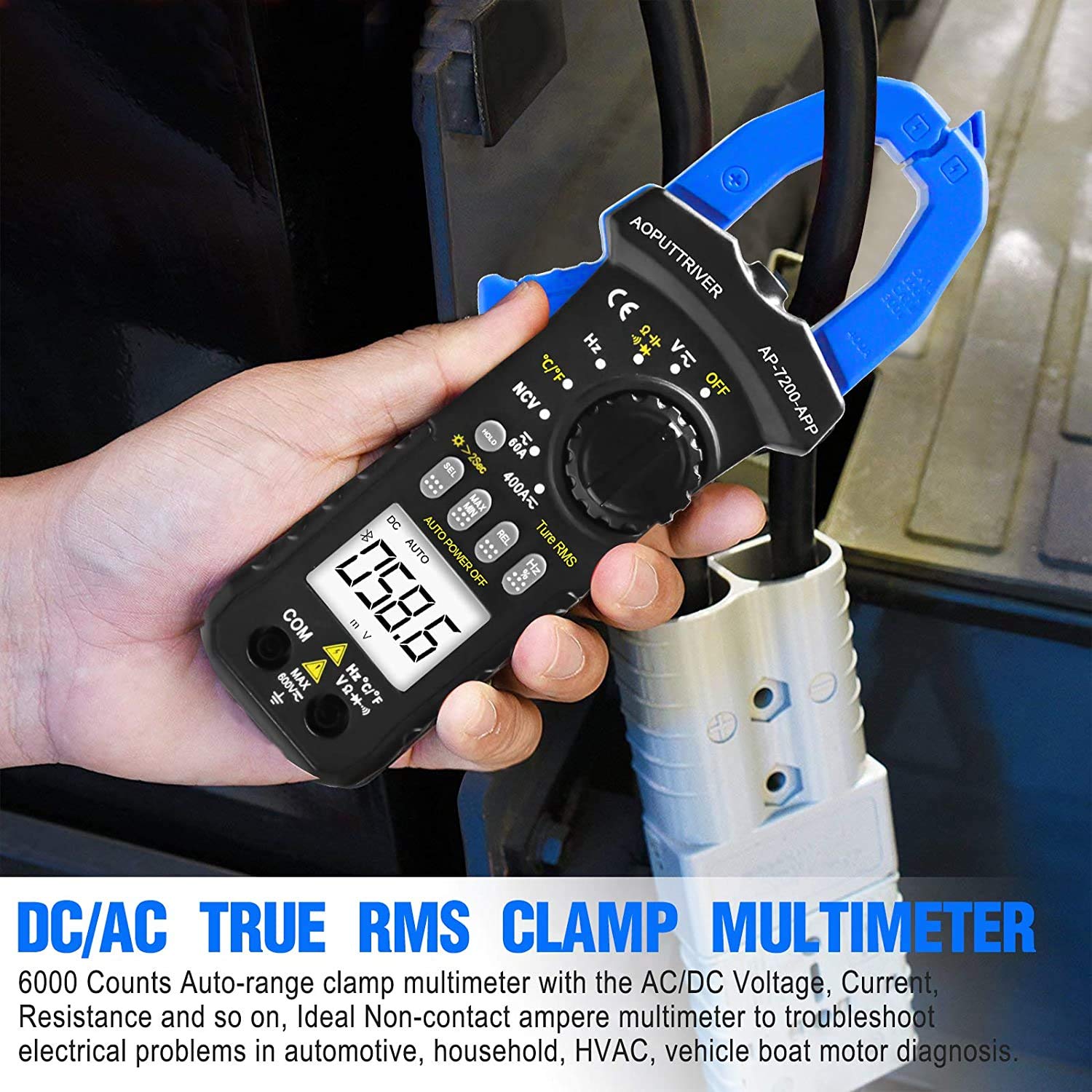
Image: Demonstrating current measurement using the clamp jaws on an electrical cable.
2. AC/DC Voltage Ntụ
- Insert the red test lead into the VΩHz°C°F jack and the black test lead into the COM jack.
- Nịm Rotary mgba ọkụ na V~ (Mpịakọta ACtage) ma ọ bụ V= (DC Voltage) ọnọdụ.
- Connect the test leads in parallel to the circuit or component under test.
- Gụọ voltage uru na LCD ngosi.
3. Resistance, Capacitance, Continuity, Diode Measurement
- Insert the red test lead into the VΩHz°C°F jack and the black test lead into the COM jack.
- Nịm Rotary mgba ọkụ na Ω ọnọdụ.
- Pịa SEL key to cycle through Resistance (Ω), Continuity (buzzer icon), Diode (diode icon), and Capacitance (F) modes.
- Connect the test leads to the component. For resistance and capacitance, ensure the component is de-energized.
- Read the measurement on the LCD. For continuity, a beep indicates a continuous circuit.
4. Ndị na-abụghị kọntaktị Voltage (NCV) Nchọpụta
- Nịm Rotary mgba ọkụ na NCV ọnọdụ.
- Place the NCV detection area (top of the clamp jaws) near the conductor or outlet to be tested.
- Ọ bụrụ na AC voltage ≥ 90V RMS is detected, the lamp light will illuminate, and an audible alarm will sound.

Image: Demonstrations of temperature measurement, NCV detection, continuity testing, and current measurement.
5. Nleba okpomọkụ
- Insert the temperature probe into the VΩHz°C°F and COM jacks, observing polarity.
- Nịm Rotary mgba ọkụ na ° C/° F ọnọdụ.
- Debe nsọtụ ihe nyocha okpomọkụ ahụ n'elu ma ọ bụ nso ihe a ga-atụ okpomọkụ ya.
- Read the temperature value on the LCD display. Press the SEL key to switch between Celsius (°C) and Fahrenheit (°F).

Image: Temperature measurement using the included probe, with display examples in Celsius and Fahrenheit.
6. Ọrụ ọkụ azụ
To activate the backlight for improved visibility in dim environments, press and hold the Jide key for more than 2 seconds. Press and hold again for 2 seconds to turn it off.

Foto: The clamp meter's backlight feature in action, enhancing readability in low-light conditions.
Nlekọta
1. Nhicha
Hichapụ mita ahụ casing na adamp cloth and mild detergent. Do not use abrasives or solvents. Ensure the meter is completely dry before storage or use.
2. Ngbanwe batrị
When the low battery indicator appears on the display, replace the batteries promptly to ensure accurate measurements. Refer to the "Battery Installation" section for instructions.
3. Nchekwa
If the meter is not used for an extended period, remove the batteries to prevent leakage. Store the device in a cool, dry place, away from direct sunlight and extreme temperatures.
Nchọpụta nsogbu
| Nsogbu | Ihe nwere ike ime | Ngwọta |
|---|---|---|
| Mita ahụ anaghị agba ọkụ. | Batrị nwụrụ anwụ ma ọ bụ arụnyere na ezighi ezi. | Lelee polarity batrị; dochie batrị. |
| Ọgụgụ na-ezighi ezi. | Incorrect function selected; poor test lead connection; external interference. | Verify rotary switch setting; ensure secure test lead connection; move away from strong electromagnetic fields. |
| Njikọ Bluetooth ada ada. | Meter too far from phone; Bluetooth off on phone; app not installed correctly. | Ensure meter is within 10-15m range; enable Bluetooth on phone; reinstall AiLink app. |
| NCV detection not working. | Not in NCV mode; voltage n'okpuru ala. | Set rotary switch to NCV; ensure voltage is ≥ 90V AC RMS. |
Nkọwapụta
| Njirimara | Nkọwapụta |
|---|---|
| Nọmba nlereanya | AP-7200APP |
| Ngosipụta | 6000 Counts LCD |
| AC Voltage Oke | 6 ~ 600V |
| DC Voltage Oke | 600mV ~ 600V |
| AC dị ugbu a | 60A ~ 400A |
| DC dị ugbu a | 60A ~ 400A |
| Oke mgbochi | 600Ω ~ 60MΩ |
| Oke ikike | 6nF ~ 60mF (Inferred from 6000 counts and common multimeter ranges) |
| Oke okpomọkụ | -20°C ~ 1000°C |
| NCV Detection Threshold | ≥ 90V AC RMS |
| Ụkpụrụ nchekwa | IEC 61010-1, CAT III 600V |
| Isi Iyi Ike | Akwanyere batrị |
| Akụkụ | 207 x 75 x 37mm |
| Ibu Ibu | 390 grams |
| Oke Bluetooth | 10-15m (ihe dị ka.) |
Akwụkwọ ikike na nkwado
AOPUTTRIVER provides a Akwụkwọ ikike ngwaahịa nke ọnwa 48 for the AP-7200APP Clamp Meter. For any product issues or technical assistance, please contact our customer service. We offer 7/24 nkwado ndị ahịa to resolve your concerns promptly.
Contact information can typically be found on the product packaging or the official AOPUTTRIVER websaịtị.


