1. Okwu mmalite
This manual provides essential information for the safe and effective use of your Sportstech DFT100 Treadmill. Please read it thoroughly before initial use and retain it for future reference.
The Sportstech DFT100 is designed for both home and office environments, offering a versatile solution for walking and light jogging. Its compact and foldable design allows for easy storage, making it suitable for various living and working spaces.
2. Ntuziaka nchekwa
Ịdọ aka ná ntị: To reduce the risk of serious injury, read all important precautions and instructions in this manual before using the treadmill.
- Kpọtụrụ dọkịta gị tupu ịmalite mmemme mmega ahụ ọ bụla.
- Na-eyi akpụkpọ ụkwụ egwuregwu kwesịrị ekwesị mgbe niile mgbe ị na-eji igwe treadmill.
- Ensure the area around the treadmill is clear of obstructions (at least 0.6 meters on all sides).
- The maximum user weight for this treadmill is 100 n'arọ (220 lbs). Agafela oke a.
- Debe ụmụaka na anụ ụlọ n'ebe a na-azọ ụkwụ n'ebe a na-arụ ọrụ.
- Use the treadmill only on a level, stable surface.
- Connect the treadmill to a properly grounded electrical outlet.
- In case of emergency, press the 'Stop' button on the remote control.
3. Akụrụngwa Ngwaahịa
- Nhazi kọmpat na nke enwere ike mpịaji: Ultra-slim profile (approximately 14 cm high when folded) and a foldable handle for easy storage and transport.
- Oke ọsọ: Adjustable speed from 0.8 km/h to 8 km/h, suitable for walking and light jogging.
- Igwe okwu Bluetooth agbakwunyere: Enjoy audio during your workout by connecting your device via Bluetooth.
- Ikanam Display: Clear display of essential workout metrics such as speed, distance, time, and calories burned.
- Ndakọrịta ngwa: Connects with Kinomap & FitShow applications for enhanced control, personalized workout programs, and tracking.
- Ọrụ dị jụụ: Designed for low noise levels (below 75dB), making it ideal for use in quiet environments like offices or homes.
- Njikwa anya: Convenient wireless remote control for easy adjustment of functions.
- Ihe njide karama: Integrated holder to keep your hydration accessible during workouts.

A user exercising on the Sportstech DFT100 treadmill, with a display showing workout metrics and app integration.
4. Nhazi
- Unboxing: Carefully remove the treadmill from its packaging. Retain all packaging materials for potential future transport or returns.
- Nkwanye: Place the treadmill on a flat, stable surface. Ensure there is at least 0.6 meters of clear space around the treadmill for safe operation.
- Ịkpọghee ogwe aka: If the handlebar is folded, lift it into the upright position until it locks securely. Ensure all locking mechanisms are fully engaged before use.
- Njikọ ike: Connect the power cable to the treadmill's power input, then plug the other end into a standard, grounded electrical outlet.

Illustrates the Sportstech DFT100 treadmill being folded for storage and transported using its built-in wheels. It highlights its compact design, only 14 cm high when stored flat.
5. Ntuziaka ọrụ
- Gbanyụọ/ Gbanyụọ: Locate the main power switch on the treadmill (usually at the front near the power cord). Flip the switch to the 'ON' position. The LED display will illuminate. To turn off, flip the switch to 'OFF'.
- Iji Remote Control: The treadmill is primarily controlled via the included wireless remote. Ensure the remote has working batteries.
- Ịmalite mgbatị ahụ: Step onto the treadmill belt. Press the 'Start' button on the remote control. The belt will begin moving at a low default speed.
- Ndozi ọsọ ọsọ: Use the '+' and '-' buttons on the remote control to increase or decrease the running belt speed in increments.
- Ịkwụsị mgbatị ahụ: To stop the treadmill, press the 'Stop' button on the remote control. The belt will gradually slow down and come to a complete stop.
- Bluetooth Connection (Audio): Mee ka Bluetooth rụọ ọrụ na ama ma ọ bụ mbadamba gị. Chọọ maka 'DFT100' in the list of available devices and pair. You can now play music through the treadmill's integrated speakers.
- App Connection (Kinomap & FitShow): Download the Kinomap or FitShow application from your device's app store. Follow the in-app instructions to connect to your DFT100 treadmill. This allows for advanced workout tracking, control, and access to various training programs.
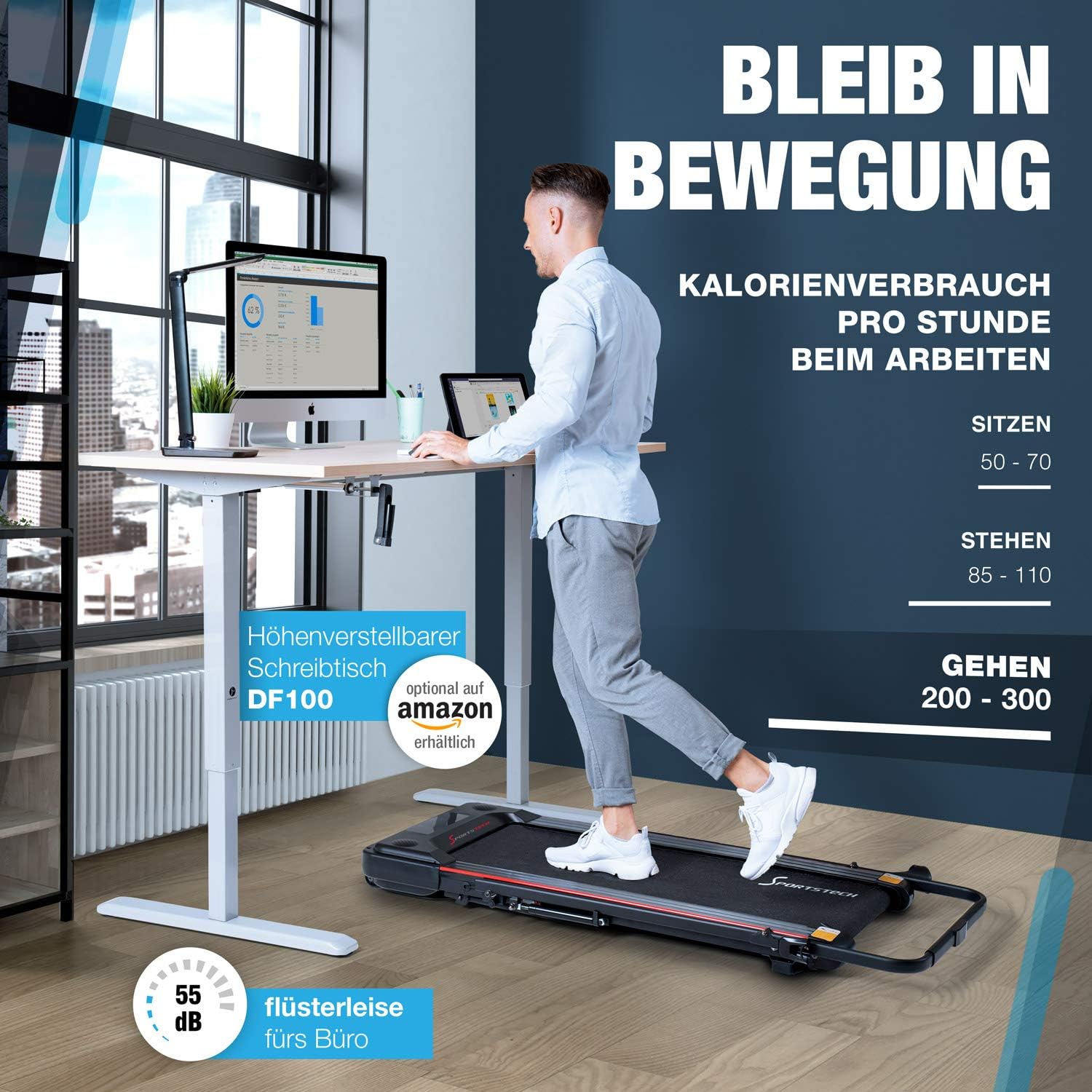
A person walking on the Sportstech DFT100 treadmill while working at a standing desk, demonstrating its use in an office environment.
6. Nlekọta
Regular maintenance ensures the longevity and optimal performance of your Sportstech DFT100 Treadmill.
- Nhicha: Regularly wipe down the treadmill's surfaces with a damp akwa . Zere iji ihe nhicha ma ọ bụ ihe mgbaze nwere ike imebi njedebe.
- mmanu eriri: The running belt requires periodic lubrication to reduce friction and ensure smooth operation. Refer to the detailed instructions in the full product manual for the correct type of lubricant and the recommended application frequency (typically every 30-50 hours of use).
- Ndozi eriri: If the running belt appears to be shifting to one side or slipping during use, it may require adjustment. Consult the full product manual for detailed instructions on how to center and tension the running belt.
- Nchekwa: When not in use, the treadmill can be folded and stored vertically or horizontally in a dry, clean area.
7. Nchọpụta nsogbu
If you encounter issues with your Sportstech DFT100 Treadmill, refer to the following common troubleshooting steps:
- Treadmill anaghị arụ ọrụ: Ensure the power cable is securely connected to both the treadmill and a functional, grounded wall outlet. Check that the main power switch is in the 'ON' position.
- Running belt does not move: Verify that the main power is on and the remote control has working batteries. Ensure there are no obstructions preventing the belt from moving.
- Mkpọtụ na-adịghị ahụkebe mgbe a na-arụ ọrụ: Immediately stop the treadmill. Check for any loose parts or foreign objects on or under the running belt. If the noise persists, refer to the maintenance section for belt lubrication or adjustment.
- Nsogbu njikọ ngwa: Ensure Bluetooth is enabled on your smartphone/tablet and the treadmill. Try restarting both devices. Check the app's permissions on your device.
- Njikwa anya anaghị aza: Replace the batteries in the remote control. Ensure there are no obstructions between the remote and the treadmill's receiver.
For more complex issues, please contact Sportstech customer support.
8. Nkọwapụta
| Njirimara | Nkọwapụta |
|---|---|
| Ụdị | Egwuregwu teknụzụ |
| Nọmba nlereanya | sp_dft_pl |
| Agba | Nwa |
| Ihe onwunwe | Ọla |
| Ụdị ngosi | LCD |
| Product Dimensions (L x W x H, Unfolded) | 124 x 62.5 x 105 cm |
| Ibu Ibu | 27 kilogram |
| Oke oke ibu | 100 kilogram |
| Oke ọsọ | 0.8 ruo 8 km / h |
| Ike inyinya | 588 Watt |
| Ọnụọgụ nke Mmemme | 17 |
| Atụmatụ pụrụ iche | App, display, remote control |
| Max Incline Percentage | 15 (Note: Primary use is flat walking/jogging) |
9. Akwụkwọ ikike na nkwado
For detailed warranty information, product registration, and customer support, please refer to the documentation included with your purchase or visit the official Sportstech websaịtị. Debe nnata nzụta gị dị ka ihe akaebe nke ịzụrụ ihe maka akwụkwọ ikike ọ bụla.


