Okwu mmalite
Thank you for choosing the Cshidworld 4-in-1 Women Electric Shaver Kit. This versatile grooming device is designed for efficient and painless hair removal across various body areas, including the face, armpits, legs, bikini line, and nose. This manual provides essential information on safety, operation, maintenance, and troubleshooting to ensure optimal performance and longevity of your device.
Ozi nchekwa
For safe use of your electric shaver, please observe the following precautions:
- Do not use the device near water or while it is charging to prevent electrical hazards.
- Avoid using the shaver on irritated, broken, or infected skin. If skin irritation occurs, discontinue use immediately.
- Debe ngwaọrụ ahụ ka ụmụaka ghara iru ya.
- Hụ na ọdụ chaja ahụ kpọrọ nkụ tupu ijikọ chaja ahụ.
- Akwụsịla ma ọ bụ nwaa ịrụkwa ngwaọrụ n'onwe gị. Kpọtụrụ nkwado ndị ahịa maka enyemaka.
Ngwaahịa gafereview na akụrụngwa
The Cshidworld 4-in-1 Electric Shaver Kit includes a main rechargeable body and four interchangeable heads designed for different grooming needs.
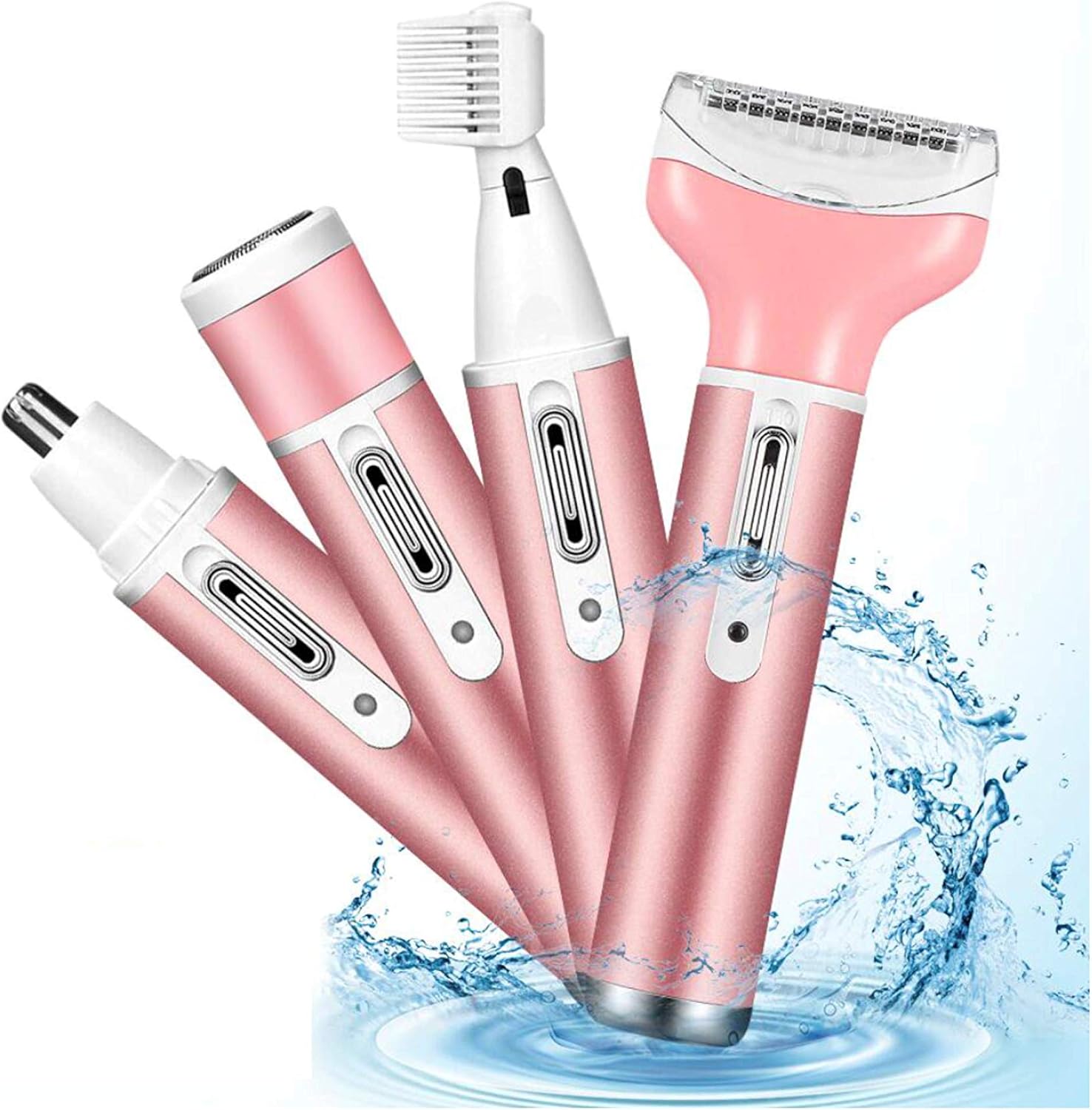
Image: The Cshidworld 4-in-1 Electric Shaver Kit, showcasing the main unit and its four distinct attachments: a wide shaving head, a precision epilator head, a cylindrical nose hair trimmer, and a slender eyebrow trimmer with a comb. The devices are depicted in a rose gold and white color scheme, surrounded by water splashes, indicating its waterproof design.
Ngwa ahụ na-agụnyekarị:
- Main Device Body: Rechargeable unit with power button.
- Isi Shaver: For general body hair removal (legs, arms, bikini area).
- Isi Epilator: For longer-lasting hair removal by plucking hair from the root.
- Isi Imi Ntutu: For safe and comfortable trimming of nose and ear hair.
- Eyebrow Trimmer Head: For precise shaping and trimming of eyebrows.
- eriri USB: Maka ịchaji ngwaọrụ.
- Nhicha ahịhịa: For maintaining hygiene of the heads.
Melite
Ịchaji ngwaọrụ
- Gbaa mbọ hụ na agbanyụrụ ngwaọrụ ahụ.
- Connect the USB charging cable to the charging port on the main device body.
- Tinye nsọtụ nke ọzọ nke eriri USB n'ime ihe nkwụnye ọkụ USB dakọtara (anaghị etinye ya) ma ọ bụ ọdụ ụgbọ USB kọmputa.
- The charging indicator light will illuminate (color may vary) to show that the device is charging.
- Allow the device to fully charge before first use. Charging time typically ranges from 2-3 hours. The indicator light may change or turn off when fully charged.
Attaching and Detaching Heads
- To attach a head, align the head with the main device body and gently push until it clicks into place.
- To detach a head, hold the main device body firmly and pull the head straight off. Some models may have a release button; refer to specific product diagrams if available.
Ntuziaka ọrụ
Before use, ensure your skin is clean. For best results, it is recommended to use the device on wet skin, especially for shaving, as it is waterproof.
Ọrụ izugbe
- Select and attach the desired grooming head.
- Pịa bọtịnụ ike ka ịgbanwuo ngwaọrụ.
- Gently move the device over the skin against the direction of hair growth.
- After use, turn off the device and clean the head.
Specific Head Usage
- Shaver Head (Body Hair):
Ideal for legs, arms, and bikini areas. Hold the shaver at a 45-degree angle to the skin and glide gently. For optimal results, use on wet skin with shaving cream or gel.
- Isi Epilator:
Suitable for longer hair on legs, arms, and underarms. Ensure hair is not too short (ideally 2-5mm). Hold the skin taut and move the epilator slowly against hair growth. Some discomfort may be experienced initially.
- Isi Imi Ntutu:
Gently insert the trimmer tip into the nostril or ear canal. Move in a circular motion to trim unwanted hair. Do not insert too deeply.
- Eyebrow Trimmer Head:
Use for shaping and trimming eyebrows. For precise trimming, use the comb attachment if provided, or carefully trim individual hairs without it. Move slowly and with control.
Nlekọta na nhicha
Regular cleaning ensures hygiene and extends the lifespan of your device.
- Mgbe ojiji ọ bụla: Turn off the device and detach the head. Use the provided cleaning brush to remove any trapped hairs from the blades and inside the head.
- Ịsa mmiri: Since the device is waterproof, the heads can be rinsed under running water. Ensure the main body's charging port is sealed or kept dry if rinsing the entire unit. Allow heads to air dry completely before reattaching or storing.
- Nhicha miri emi: Periodically, you may use a mild soap solution to clean the heads more thoroughly. Rinse thoroughly with clean water afterward.
- Nchekwa: Store the device and its attachments in a dry, cool place, away from direct sunlight and extreme temperatures. Keep the protective caps on the heads when not in use.
Nchọpụta nsogbu
If you encounter issues with your Cshidworld Electric Shaver, refer to the following common problems and solutions:
| Nsogbu | Ihe nwere ike ime | Ngwọta |
|---|---|---|
| Ngwaọrụ anaghị agbanwu. | Batrị dị ala ma ọ bụ mebie ya. | Charge the device fully. Ensure the charging cable is properly connected. |
| Poor shaving/trimming performance. | Blades are clogged with hair or dull. Hair is too long/short for the attachment. | Clean the head thoroughly. Ensure hair length is appropriate for the chosen head (e.g., epilator works best on 2-5mm hair). Replace head if blades are dull. |
| Device stops working during use. | Batrị dị ala. | Fanye ngwaọrụ ahụ. |
| Mmekpa ahụ akpụkpọ ahụ mgbe ejiri ya. | Improper technique, sensitive skin, or device not clean. | Ensure skin is clean and taut during use. Use on wet skin if preferred. Clean the device thoroughly. If irritation persists, discontinue use. |
Ọ bụrụ na nsogbu ahụ dịgidere mgbe ịnwale azịza ndị a, biko kpọtụrụ nkwado ndị ahịa.
Nkọwapụta
- Aha nlereanya: 85
- Isi mmalite ike: Batrị kwadoro (enwere ike ịchaji)
- Atụmatụ pụrụ iche: Rechargeable, Waterproof, Compact
- Eji akwadoro: Lip, Nose Hair, Pubic, Armpit, Eyebrow, Face, Leg
- Akara: Chishidworld
- ASIN: B08NWJ6FQP
- Onye nrụpụta: Chishidworld
- Akụkụ ngwugwu: 9.13 x 5.51 x 2.87 sentimita asatọ
- Ibu ihe: 6.74 ounces
Akwụkwọ ikike na nkwado
This product comes with a standard manufacturer's warranty. For specific warranty terms and conditions, please refer to the product packaging or contact the retailer where the product was purchased.
For technical support, troubleshooting assistance, or inquiries regarding replacement parts, please contact Cshidworld customer service through their official website or the contact information provided with your purchase. Please have your model number (85) and purchase details ready when contacting support.