1. Okwu mmalite
Thank you for choosing the Cecotec TotalPure 1000 Handy Air Purifier. This device is designed to improve the air quality in your home by filtering out harmful particles and allergens. Please read this manual carefully before operating the appliance to ensure safe and efficient use. Keep this manual for future reference.
The TotalPure 1000 Handy features a 60 CADR (Clean Air Delivery Rate), capable of filtering and cleaning 60 m³/h of air. It utilizes a 3-stage filtration system, covers an area of up to 25 m³, and offers 3 fan speeds. An integrated ionizer helps to further purify the air by generating negative ions. Convenient features include a timer for automatic shut-off and a quiet night mode.
2. Ntuziaka nchekwa
Na-agbaso usoro nchekwa nchekwa mgbe niile mgbe ị na-eji ngwa eletriki iji belata ihe egwu nke ọkụ, ujo eletrik na mmerụ ahụ.
- Gbaa mbọ hụ na voltagegosiri na ngwa ahụ dabara na ọkọnọ ike mpaghara gị tupu ijikọ.
- Ejila eriri ma ọ bụ plọg mebiri emebi rụọ ọrụ ngwaọrụ ahụ. Kpọtụrụ ndị ọrụ nlekọta ndị ahịa maka ndozi.
- Debe oghere ikuku na ọpụpụ ka ọ bụrụ ihe mgbochi.
- Do not insert fingers or objects into the air inlets or outlets.
- This appliance is for indoor use only. Do not use it outdoors or in wet environments.
- Unplug the air purifier before cleaning, performing maintenance, or when not in use for extended periods.
- Do not use abrasive cleaners or flammable liquids to clean the appliance.
- Debe ebe ụmụaka na anụ ụlọ na-apụghị iru.
- Place the air purifier on a stable, flat surface.
3. Ngwa ngwaahịa
Familiarize yourself with the main parts of your Cecotec TotalPure 1000 Handy Air Purifier.

Foto 3.1: N'ihu-n'akuku view of the Cecotec TotalPure 1000 Handy Air Purifier. It shows the main body, air intake vents, and the control panel on top.

Foto 3.2: N'elu view of the air purifier, highlighting the circular air outlet grille and the touch control panel with power, fan speed, and timer indicators.
- Ọpụpụ ikuku: Located on the top, where purified air is released.
- Ogwe njikwa: Touch-sensitive buttons for power, fan speed, and timer settings.
- Ikuku ụgbọ mmiri: Vents on the lower front and sides for drawing in ambient air.
- Ngalaba nzacha: Located at the bottom/rear, housing the 3-stage nyo.
- eriri ike: Maka ijikọ na oghere eletrik.
4. Nhazi
Follow these steps to set up your air purifier for the first time.
- Ịkwapu: Carefully remove the air purifier from its packaging. Retain packaging for future storage or transport.
- Ntinye nyocha: The filter may come pre-installed or require installation. Open the filter compartment (usually by twisting the base or opening a panel), remove any plastic packaging from the filter, and insert it correctly. Close the compartment securely.
- Nkwanye: Place the air purifier on a firm, level surface. Ensure there is at least 20 cm (8 inches) of clear space around the air inlets and outlets for optimal air circulation. Avoid placing it near heat sources, direct sunlight, or in areas with high humidity.
- Njikọ ike: Tinye eriri ọkụ n'ime oghere eletrik ọkọlọtọ.

Foto 4.1: The air purifier positioned on a wooden cabinet, demonstrating suitable placement in a living space.
5. Ntuziaka ọrụ
Your air purifier features intuitive touch controls on its top panel.
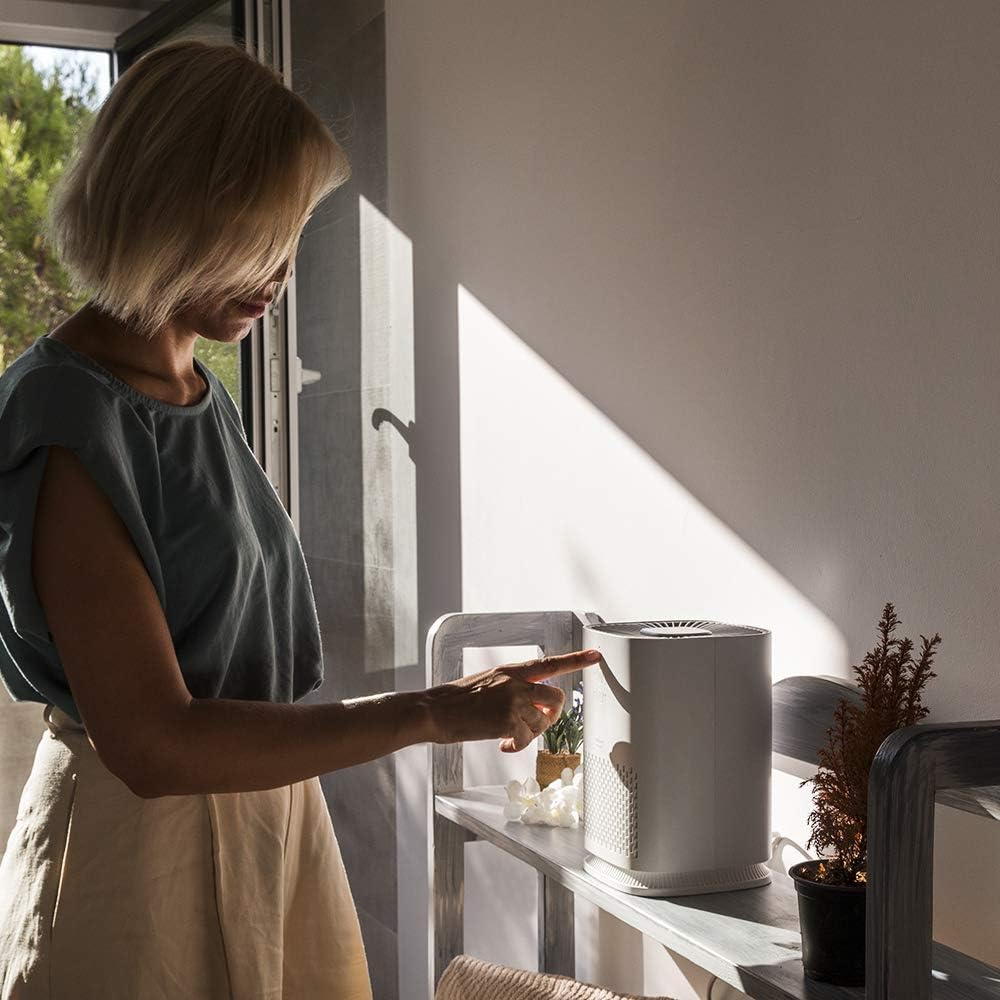
Foto 5.1: A user interacting with the touch control panel on the top of the air purifier.
5.1 Gbanyụọ ma ọ bụ gbanyụọ
- Pịa bọtịnụ ike ( ⏻ ) once to turn the unit on. The default fan speed will activate.
- Pịa bọtịnụ ike ọzọ iji gbanyụọ unit ahụ.
5.2 Ịgbanwe Ọsọ Fan
The air purifier has 3 fan speeds: Low, Medium, and High.
- Pịa bọtịnụ ọsọ ọsọ (💨) repeatedly to cycle through the speeds: Low (1 dot), Medium (2 dots), High (3 dots).
- The corresponding LED indicator will light up to show the selected speed.
5.3 Ọrụ ngụ oge
Set the air purifier to automatically turn off after a specified period.
- Pịa bọtịnụ ngụ oge (⏱) repeatedly to select a shut-off time: 1 hour, 3 hours, 7 hours, or 15 hours.
- The LED indicator next to the selected time will illuminate.
- To cancel the timer, cycle through the options until no timer LED is lit, or turn the unit off.
5.4 Ụdị abalị
Night mode operates the air purifier at its lowest speed and with minimal noise for undisturbed rest.
- To activate Night Mode, press and hold the bọtịnụ ọsọ ọsọ for a few seconds. The unit will switch to the lowest speed, and display lights may dim or turn off.
- To exit Night Mode, press the bọtịnụ ọsọ ọsọ ọzọ ma ọ bụ bọtịnụ ike.
Ọrụ ionizer 5.5
The integrated ionizer helps to purify the air by releasing ion adịghị mma.
- The ionizer typically operates automatically when the unit is on. Refer to the product's full manual or manufacturer's website for specific controls if you wish to disable or enable it manually.
6. Nlekọta
Mmezi mgbe niile na-eme ka arụmọrụ kacha mma ma na-agbatị ndụ nke ihe nhicha ikuku gị.
6.1 Na-ehicha Mpụga
- Kwupu ihe ikuku ikuku tupu ihicha ya.
- Jiri nwayọ hichaa elu mpụta, damp akwa .
- Do not use harsh chemicals, abrasive cleaners, or flammable liquids.
- Clean the air inlet and outlet grilles with a soft brush or vacuum cleaner attachment to remove dust.
6.2 Ndochi nzacha
Nke 3-stage filter needs to be replaced periodically to maintain purification efficiency. The frequency depends on air quality and usage, typically every 6-12 months.
- Kwupu ihe ikuku ikuku.
- Open the filter compartment (refer to specific instructions for your model, usually by twisting the base or opening a rear panel).
- Wepu nzacha ochie wee tụfuo ya nke ọma.
- Insert a new, genuine Cecotec replacement filter, ensuring it is correctly oriented.
- Mechie oghere nzacha nke ọma.
- Plug in the air purifier and reset the filter indicator (if applicable, refer to specific model instructions).
Mara: Replacement filters are sold separately. Ensure you purchase the correct filter for Model 05624.
7. Nchọpụta nsogbu
If you encounter issues with your air purifier, refer to the following common problems and solutions.
| Nsogbu | Ihe nwere ike ime | Ngwọta |
|---|---|---|
| Unit anaghị agbanwuo. | Enweghị ọkụ. | Check if the power cord is securely plugged into the outlet and the unit. Test the outlet with another device. |
| Reduced airflow or poor purification. | Blocked air inlets/outlets. Dirty or old filter. | Ensure nothing is obstructing the air vents. Clean or replace the filter as per maintenance instructions. |
| Mkpọtụ na -adịghị ahụkebe. | Unit not on a stable surface. Foreign object inside. | Place the unit on a flat, stable surface. Unplug and check for any foreign objects in the air inlets or filter compartment. |
| Njikwa anaghị anabata. | Nsogbu eletrọniki nwa oge. | Unplug the unit for 5 minutes, then plug it back in and try again. |
Ọ bụrụ na nsogbu ahụ anọgide mgbe ị nwalechara ngwọta ndị a, biko kpọtụrụ ndị ọrụ Cecotec.
8. Nkọwapụta
| Njirimara | Nkọwapụta |
|---|---|
| Ụdị | Cecotec |
| Nọmba nlereanya | 05624 |
| Agba | Ọcha |
| Akụkụ ngwaahịa (L x W x H) | 32.5 x 19.8 x 20 cm (12.8 x 7.8 x 7.9 inch) |
| Ibu | 1.5 Kilogram (3.3 lbs) |
| Ike | 25 Watt |
| Ọkwa mkpọtụ | 55 dB (kacha) |
| Usoro njikwa | Metụ aka |
| Ụdị nzacha | HEPA (afọ 3)tage nzacha) |
| Mpaghara mkpuchi | Ruo 25 m³ |
| CADR | 60m³/h |
| Asambodo | Asambodo CE |
9. Akwụkwọ ikike na nkwado
Cecotec products are manufactured to high-quality standards. This product is covered by a manufacturer's warranty in accordance with local consumer protection laws.
- Oge ikike: Refer to your purchase documentation or local Cecotec websaịtị maka usoro na oge nkwa akọwapụtara.
- Nkwado ndị ahịa: For technical assistance, warranty claims, or to purchase replacement parts (such as filters), please contact Cecotec customer service. Contact information can typically be found on the official Cecotec websaịtị ma ọ bụ na nkwakọ ngwaahịa gị.
- Ihe akaebe nke ịzụrụ: Always retain your proof of purchase (receipt or invoice) as it will be required for any warranty service.


