1. Okwu mmalite
The OttLite Entertain LED Speaker Lamp (Model S83WGW) is a versatile lighting and audio solution designed for various indoor environments. This device integrates an LED lamp with adjustable brightness and color modes, a Bluetooth speaker for wireless audio streaming, and a detachable emergency light feature. This manual provides detailed instructions for the proper setup, operation, and maintenance of your lamp.

Image 1.1: The OttLite Entertain LED Speaker Lamp, ihe ngosiasing its integrated design.
2. Ihe ngwugwu
Chọpụta na ihe niile dị na ngwugwu:
- OttLite Entertain LED Speaker Lamp (S83WGW)
- Igwe ọkụ ọkụ
3. Nhazi
- Iwepu: Jiri nlezianya wepụ ihe niile dị na nkwakọ ngwaahịa.
- Nkwanye: Debe lamp n'elu elu kwụsiri ike, dịkwa larịị.
- Njikọ ike: Connect the provided power cable to the lamp's power input port and then plug it into a standard 120V AC wall outlet. The lamp's internal battery will begin charging automatically.
4. Ntuziaka ọrụ
4.1. Light Functions
Ndị lamp features touch-activated controls located on the top of the shade for easy adjustment of light settings.
- Gbanyụọ/ Gbanyụọ: Lightly touch the metallic button on the top center of the lamp shade to turn the light on or off.
- Gbanwee ihie: With the light on, repeatedly touch the metallic button to cycle through three brightness levels.
- Gbanwee Ụdị agba: Press and hold the metallic button for approximately 2 seconds to switch between the three color temperature modes: warm white, bright white, and natural daylight. Release the button when the desired mode is active.
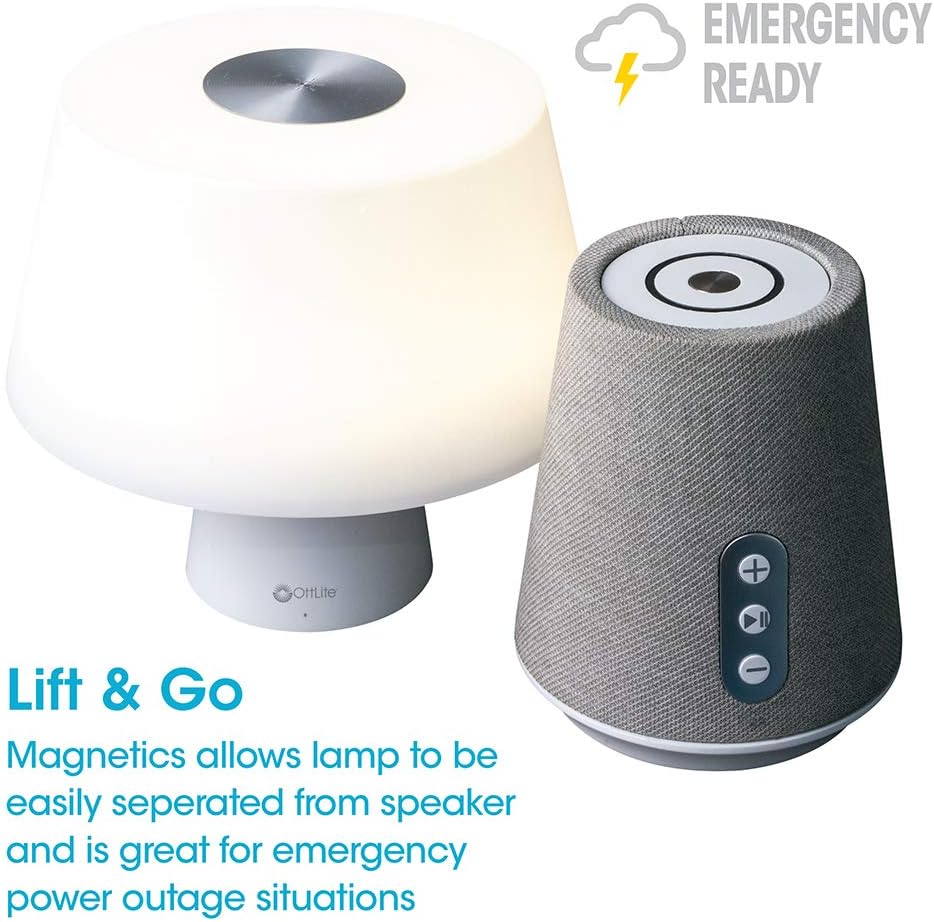
Image 4.1: Activating the lamp's light functions via the touch control on top of the shade.

Foto 4.2: The lamp offers three distinct color temperature modes for varied lighting needs.
4.2. Ọkà okwu Bluetooth
The integrated Bluetooth speaker allows for wireless audio playback from compatible devices.
- Power On Speaker: Press the Play/Pause button on the front of the speaker base to turn the speaker on. A tone will indicate it is ready for pairing.
- Na-ejikọta: On your audio device (e.g., smartphone, tablet), enable Bluetooth and search for available devices. Select "OttLite Entertain" from the list. A confirmation tone will sound upon successful pairing.
- Njikwa ọdịyo:
- Pịa + bọtịnụ ka iwelie olu.
- Pịa - bọtịnụ iji belata olu.
- Pịa Gwuo/kwụsịtụ bọtịnụ iji kpọọ ma ọ bụ kwụsịtụ ọdịyo.
- Power Off Speaker: Press and hold the Play/Pause button for approximately 3 seconds to turn the speaker off.

Image 4.3: The speaker base with clearly labeled controls for volume and playback.

Image 4.4: The speaker base highlights its Bluetooth connectivity feature.
4.3. Emergency Light Feature (Lift & Go)
Ndị lamp portion can be detached from the speaker base to function as a portable emergency light.
- Detaching the Light: Jiri nwayọọ bulie lamp shade portion straight up from the speaker base. It is held in place by magnets.
- Using the Emergency Light: The detached light will operate on its internal rechargeable battery. Use the touch control on top of the shade to turn it on/off and adjust brightness as described in Section 4.1. The light can provide illumination for 5 to 30+ hours depending on the brightness setting.
- Na-ebugharị: To recharge the emergency light, simply place it back onto the speaker base. Ensure it is properly seated for charging to commence.

Image 4.5: The 'Lift & Go' feature allows the lamp to be used as a portable emergency light.
5. Nlekọta
To ensure the longevity and optimal performance of your OttLite Entertain LED Speaker Lamp, soro ntuziaka mmezi ndị a:
- Nhicha: Kwupu njikọ lamp from the power source before cleaning. Use a soft, dry cloth to wipe down the exterior surfaces. Do not use abrasive cleaners, solvents, or harsh chemicals, as these may damage the finish.
- Nchekwa: Mgbe ejighị ya ogologo oge, chekwaa lamp n'ebe dị jụụ, kpọrọ nkụ na-adịghị na ìhè anyanwụ kpọmkwem na oke okpomọkụ.
- Nlekọta batrị: For the internal rechargeable battery, avoid fully discharging it frequently. Recharge the lamp regularly, even if not in constant use, to maintain battery health.
6. Nchọpụta nsogbu
Ọ bụrụ na ị na-enwe nsogbu na iL gịamp, rụtụ aka na usoro nchọpụta nsogbu ndị a:
| Nsogbu | Ihe nwere ike ime | Ngwọta |
|---|---|---|
| Lamp ìhè anaghị agbanwuo. | A naghị etinye ya; ike gitage; internal battery depleted; faulty connection. | Ensure power cable is securely plugged in. Check power outlet. Recharge the lamp by placing it on the base. |
| Bluetooth speaker does not connect. | Speaker not in pairing mode; device Bluetooth off; already connected to another device. | Ensure speaker is on and in pairing mode. Turn Bluetooth on your device. Disconnect from other devices. |
| Emergency light does not work when detached. | Internal battery depleted. | Place the light back on the speaker base to recharge its internal battery. |
| Poor audio quality from speaker. | Device too far from speaker; interference; low battery. | Move device closer to speaker. Avoid obstacles. Ensure speaker is charged. |
7. Nkọwapụta
| Njirimara | Nkọwa |
|---|---|
| Nọmba nlereanya | S83WGW |
| Ụdị | OttLite |
| Akụkụ ngwaahịa | 3.12"D x 3.12"W x 10.87"H |
| Ibu Ibu | 2.6 pound |
| Ụdị isi iyi ọkụ | Ikanam |
| Wattage | 3 watt |
| Icha ọkụ | 337 Lumen |
| Okpomọkụ agba | 5000 Kelvin (ìhè ụbọchị) |
| Usoro njikwa | Metụ aka |
| Isi Iyi Ike | Corded Electric (with rechargeable battery for emergency light) |
| Batrị | 1 batrị lithium ion (gụnyere) |
| Ihe onwunwe | Plastic |
| UPC | 761712019116 |
8. Akwụkwọ ikike na nkwado
For warranty information or technical support, please refer to the official OttLite websaịtị ma ọ bụ kpọtụrụ ngalaba ọrụ ndị ahịa ha. Debe nnata nzụta gị dị ka ihe akaebe nke ịzụrụ ihe maka akwụkwọ ikike ọ bụla.
Ozi mkpọtụrụ: Biko gaa leta OttLite's official store page for current support options and contact details.


