1. Okwu mmalite
This manual provides essential information for the safe and efficient operation of your Cecotec Ready Warm 800 Thermal Connected 600W Digital Heater. Please read these instructions carefully before using the appliance and retain them for future reference. This heater is designed to provide supplementary heating for indoor spaces and features Wi-Fi connectivity for remote control.
2. Ntuziaka nchekwa
WARNING: Failure to follow these safety instructions may result in fire, electric shock, or injury.
- Gbaa mbọ hụ na voltage egosiri na akara ọkwa dabara na isi vol gịtage tupu ejikọta ngwa ahụ.
- Do not cover the heater. Overheating can occur if the heater is covered or obstructed.
- Keep flammable materials such as furniture, curtains, and bedding at least 1 meter (3 feet) away from the heater.
- Do not operate the heater with a damaged cord or plug, or after the appliance malfunctions or has been dropped or damaged in any manner.
- Ezubere ngwa a maka iji ndị mmadụ (gụnyere ụmụaka) nwere ike anụ ahụ, mmetụta uche ma ọ bụ nke uche, ma ọ bụ enweghị ahụmịhe na ihe ọmụma, ma ọ bụrụ na enyereghị ha nlekọta ma ọ bụ ntụziaka gbasara iji ngwa ahụ site n'aka onye na-ahụ maka nchekwa ha.
- Ekwesịrị ilekọta ụmụaka ka ha hụ na ha ejighi ngwa eji egwu egwu egwu.
- Ejila ikpo ọkụ na gburugburu ebe ịsa ahụ, ebe ịsa ahụ ma ọ bụ ọdọ mmiri.
- Always unplug the heater when not in use or before cleaning.
- Do not insert any objects into the ventilation or exhaust openings as this may cause electric shock, fire, or damage to the heater.
3. Ngwaahịa gafereview
Familiarize yourself with the components of your Cecotec Ready Warm 800 Digital Heater.

This image shows the Cecotec Ready Warm 800 Digital Heater from a side angle, highlighting its slim profile and the integrated control panel on the right side. The heater is white with black vents at the top and stands on two white feet.

The heater is shown in a home environment, positioned on a wooden floor next to a person seated on a black armchair, illustrating its compact size and how it fits into a living space.
Ogwe njikwa na ngosi
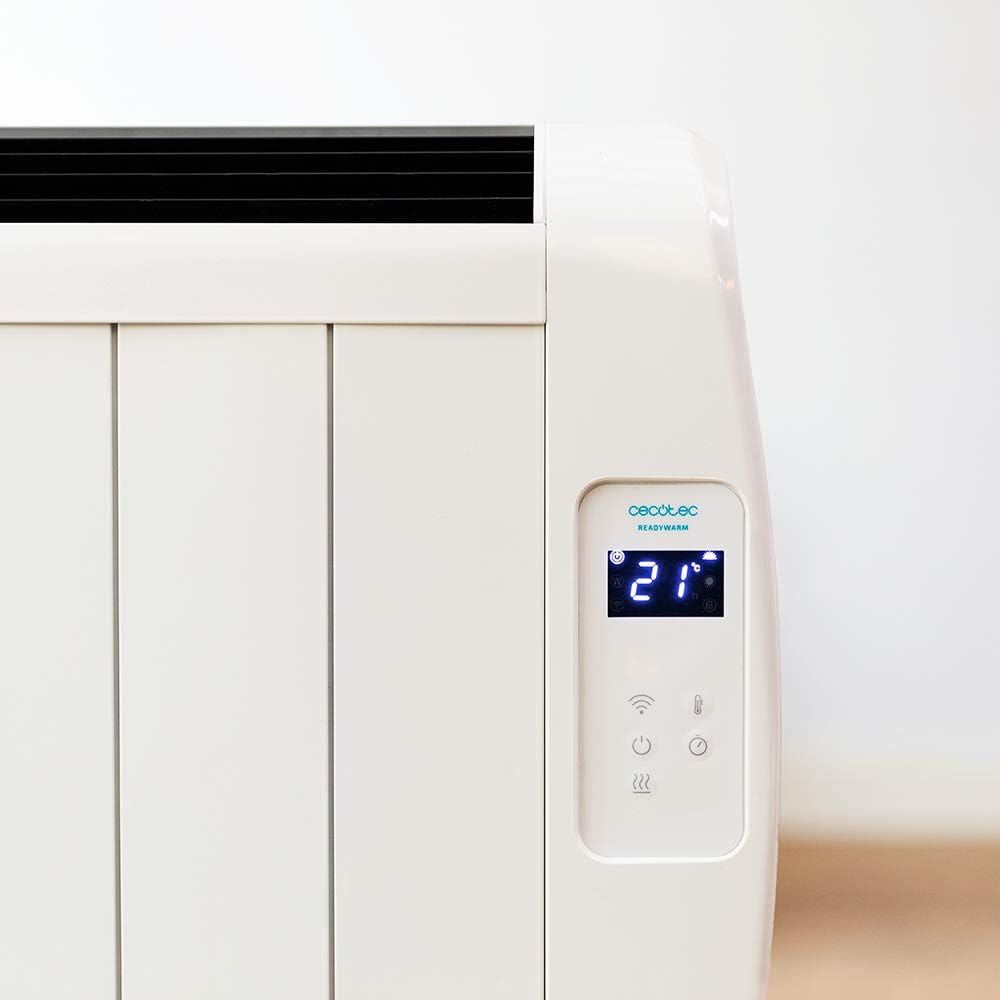
A zuru ezu view of the heater's digital control panel, featuring a clear LCD screen showing '21' degrees Celsius, indicating the current temperature setting. Below the screen are touch-sensitive buttons for power, Wi-Fi, mode selection, and temperature adjustment.

This image focuses on the digital control panel, showing the LCD screen set to a timer function, displaying '04' hours. This indicates the heater is programmed to operate for a specific duration.
The digital display shows the current temperature, timer settings, and Wi-Fi status. The touch-sensitive buttons allow for easy control of the heater's functions.
Mgbanwe ọkụ

A close-up shot of the heater's base, revealing the physical on/off power switch. This switch provides a direct way to cut power to the unit.
A physical power switch is located at the base of the unit for complete power disconnection.
4. Nhazi
- Iwepu: Jiri nlezianya wepụ ihe na-ekpo ọkụ ahụ n'ime ihe mkpuchi ya. Debe ihe mkpuchi ahụ maka nchekwa ma ọ bụ ibuga ya.
- Nkwanye: Place the heater on a firm, level surface. Ensure there is at least 1 meter (3 feet) of clear space around the heater from walls, furniture, and other objects. Do not place it directly under a power outlet.
- Njikọ ike: Plug the power cord into a suitable 230V AC power outlet. Ensure the main power switch at the base of the unit is in the 'OFF' position before plugging in.
- Ike izizi: Flip the main power switch at the base of the unit to the 'ON' position. The digital display on the control panel should illuminate.
Dimensions for Placement

This image provides a clear diagram of the heater's physical dimensions: 63 cm in width, 10.5 cm in depth, and 53.5 cm in height, useful for planning placement.
5. Ntuziaka ọrụ
Isi ọrụ
- Gbanyụọ/ Gbanyụọ: Pịa bọtịnụ ike (U) on the control panel to turn the heater on or off.
- Ndozi okpomọkụ: Use the temperature up (+) na ala (-) buttons to set your desired room temperature. The display will show the set temperature.
- Nhọrọ ụdị: Press the mode button to cycle through available heating modes (e.g., Low, Medium, High, or Eco, depending on the model's specific programming).
- Ọrụ ngụ oge: Press the timer button to set an operating duration. Use the temperature adjustment buttons to set the desired hours (e.g., 0-24 hours). The heater will automatically turn off after the set time.
Njikọ Wi-Fi na njikwa ngwa
The Cecotec Ready Warm 800 features Wi-Fi connectivity, allowing you to control the heater remotely via a smartphone application.

A hand holding a smartphone with the Cecotec Ready Warm mobile application open. The app interface shows a large dial indicating '33°C' and various control options, demonstrating remote control capabilities.
- Budata ngwa: Chọọ maka the 'Cecotec Ready Warm' app in your smartphone's app store (iOS or Android).
- Debanye aha/Banye: Mepụta akaụntụ ma ọ bụ banye ma ọ bụrụ na ịnweelarị otu.
- Tinye ngwaọrụ: Follow the in-app instructions to add your Ready Warm 800 heater. This typically involves putting the heater into pairing mode (often by pressing and holding the Wi-Fi button on the control panel) and connecting it to your home Wi-Fi network.
- Njikwa anya: Once connected, you can control the heater's power, temperature, modes, and timer functions from your smartphone.
6. Nlekọta
Nlekọta oge niile na-eme ka arụmọrụ dị mma na ogologo ndụ nke ikpo ọkụ gị.
- Nhicha: Na-ewepụ ihe ọkụ ọkụ mgbe niile ma kwe ka ọ dị jụụ kpamkpam tupu ihicha ya. Jiri nwayọọ, damp akwa iji hichaa elu elu. Ejila ihe nchacha abrasive ma ọ bụ ihe mgbaze.
- Mwepụ uzuzu: Periodically use a vacuum cleaner with a brush attachment to remove dust from the air intake and exhaust vents.
- Nchekwa: If storing the heater for an extended period, unplug it, clean it thoroughly, and store it in a cool, dry place, preferably in its original packaging.
- Enweghị akụkụ ndị ọrụ-ọrụ: Do not attempt to open or repair the heater yourself. Refer all servicing to qualified personnel.
7. Nchọpụta nsogbu
If you encounter issues with your heater, refer to the following table for common problems and solutions.
| Nsogbu | Ihe nwere ike ime | Ngwọta |
|---|---|---|
| Igwe ọkụ anaghị agbanye. | No power supply. Main power switch off. | Check if the power cord is securely plugged in. Ensure the main power switch at the base is ON. Check the wall outlet. |
| Enweghị mmepụta okpomọkụ. | Temperature setting too low. Overheat protection activated. | Increase the desired temperature setting. Unplug the heater, let it cool for 30 minutes, then plug it back in. Ensure vents are not blocked. |
| Njikọ Wi-Fi daa. | Incorrect Wi-Fi password. Heater too far from router. App issues. | Verify Wi-Fi password. Move heater closer to the router. Restart the app and heater. Ensure your router is 2.4GHz compatible. |
| Igwe ọkụ na-agbanyụ na mberede. | Timer function activated. Overheat protection. | Check if the timer is set. If not, unplug the heater, let it cool, and check for obstructions. |
8. Nkọwapụta
| Njirimara | Nkọwa |
|---|---|
| Ụdị | Cecotec |
| Nọmba nlereanya | 05372 |
| Ike / Wattage | 600W |
| Voltage | 230 volts |
| Akụkụ ngwaahịa | 63 x 10.5 x 53.5 cm |
| Ibu | 3.4 n'arọ |
| Atụmatụ pụrụ iche | Portable, Wireless (Wi-Fi Control), LCD Screen |
| Usoro kpo oku | Na-egbuke egbuke |
| Ojiji ime ime/n'èzí | Ime ụlọ |
| Ụdị nkwụnye | Wall Mount (optional, accessories not included) / Freestanding |
9. Akwụkwọ ikike na nkwado
Your Cecotec Ready Warm 800 Digital Heater is covered by a manufacturer's warranty. Please refer to the warranty card included with your purchase for specific terms and conditions, including the warranty period and coverage details.
For technical support, troubleshooting assistance beyond this manual, or warranty claims, please contact Cecotec customer service. Contact information can typically be found on the Cecotec official websaịtị ma ọ bụ na nkwakọ ngwaahịa gị.
Mgbe ị na-akpọtụrụ nkwado, biko nwee nọmba nlereanya ngwaahịa gị (05372) yana akaebe nke ịzụrụ dị ngwa ngwa.


