1. Okwu mmalite
Thank you for choosing the Cecotec Ready Warm 1200 Thermal Connected Electric Heater. This advanced heating solution is designed to provide efficient and comfortable warmth for rooms up to 10 m². Featuring 6 heating elements and 900 W of power, it ensures rapid heating. With its intuitive LED display, programmable timer, and convenient Wi-Fi control via your smartphone, managing your home's temperature has never been easier. This manual provides essential information for safe operation, installation, maintenance, and troubleshooting.
2. Ntuziaka nchekwa dị mkpa
Please read all safety warnings and instructions carefully before using this appliance to prevent electric shock, fire, injury, or property damage. Keep this manual for future reference.
- Always ensure the heater is placed on a stable, level surface or securely mounted to a wall.
- Do not cover the heater or block any air vents. Overheating can occur if the heater is covered.
- Keep combustible materials such as furniture, curtains, and paper at least 1 meter (3 feet) away from the front and sides of the heater.
- Do not use the heater in bathrooms, laundry areas, or similar indoor locations where water may be present.
- Wepụ ihe na-ekpo ọkụ ahụ mgbe a naghị eji ya ma ọ bụ tupu e hichaa ya.
- This appliance is equipped with an overheating protection system to ensure safety.
- Activate the child lock function to prevent accidental changes to settings by children.
- Ejila ihe na-ekpo ọkụ ọ bụla rụọ ọrụ na eriri ma ọ bụ plọg mebiri emebi, ma ọ bụ mgbe ihe na-ekpo ọkụ ahụ mebiri emebi ma ọ bụ mgbe ọ dasịrị ma ọ bụ mebie n'ụzọ ọ bụla.
- Ejila ma ọ bụ kwe ka ihe ndị mba ọzọ banye n'ime ikuku ventilashị ma ọ bụ iyuzucha oghere n'ihi na nke a nwere ike ịkpata ujo eletrik ma ọ bụ ọkụ, ma ọ bụ mebie ikpo ọkụ.
3. Ngwa ngwaahịa
The Cecotec Ready Warm 1200 heater consists of the main unit and detachable feet for floor standing.

Foto 3.1: N'ihu view of the Cecotec Ready Warm 1200 Thermal Connected Electric Heater, showcasing its slim design and control panel on the right side.
- Ihe ndị na-ekpo ọkụ: 6 internal elements for efficient heat distribution.
- Ogwe njikwa: Integrated LED display and touch buttons for operation.
- Ike mgba ọkụ: Located on the side or bottom for main power control.
- eriri ike: Maka ijikọ na oghere eletrik.
- Feet (optional): Two detachable feet for stable floor placement.
- Wall Mounting Brackets (optional): For secure wall installation.
4. Ntọala na nwụnye
The Ready Warm 1200 heater offers flexible installation options: it can be used as a freestanding unit with its feet or securely mounted to a wall.

Foto 4.1: Agara nso view of the sturdy feet attached to the base of the heater, providing stability for floor standing.

Foto 4.2: The Cecotec Ready Warm 1200 heater positioned in a living room setting, demonstrating its compact size and aesthetic integration into a home environment.
4.1. Floor Standing Installation
- Carefully unpack the heater and all accessories.
- Attach the two provided feet to the base of the heater using the screws. Ensure they are securely fastened.
- Place the heater on a firm, level surface, ensuring adequate clearance from walls and furniture as per safety instructions.
- Tinye eriri ọkụ n'ime ebe eletrik kwesịrị ekwesị.
4.2. Wall Mounting Installation
(Note: Wall mounting hardware and specific instructions may vary. Refer to the separate wall mounting kit instructions if included.)
- Identify a suitable wall location, ensuring it is clear of electrical wiring, plumbing, and combustible materials.
- Mark the drilling points on the wall according to the provided wall mounting bracket template.
- Gwuo oghere ma tinye plọg mgbidi kwesịrị ekwesị.
- Secure the wall mounting brackets to the wall.
- Carefully hang the heater onto the wall mounting brackets, ensuring it is securely locked in place.
- Tinye eriri ọkụ n'ime ebe eletrik kwesịrị ekwesị.
5. Ntuziaka ọrụ
5.1. Ogwe njikwa gafereview
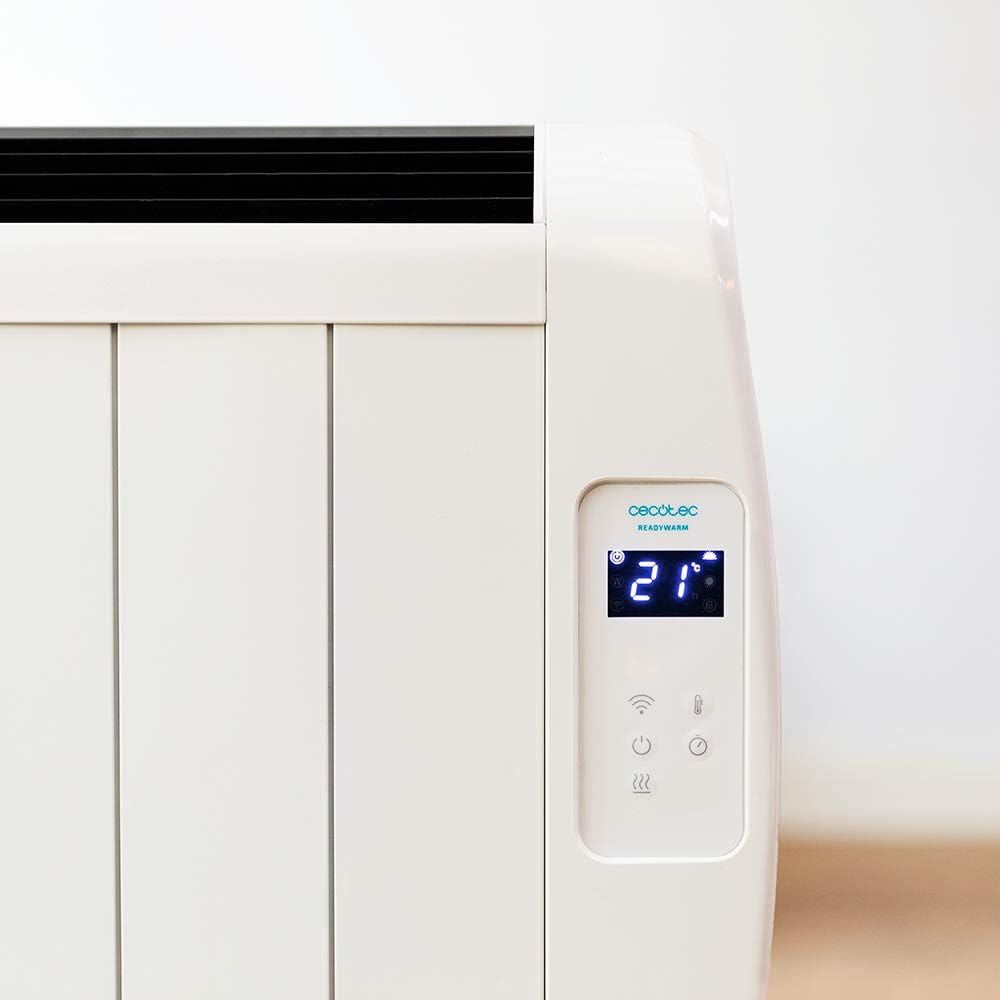
Foto 5.1: Zuru ezu view of the heater's LED display, showing the current room temperature (21°C) and various control icons.

Foto 5.2: Zuru ezu view of the heater's LED display, showing the timer function set to 4 hours, along with power and Wi-Fi indicators.
The control panel features an LED display and touch-sensitive buttons for easy operation.
- bọtịnụ ike (⏻): Na-agbanyụ/Gbanyụọ ihe na-ekpo ọkụ.
- Bọtịnụ ọnọdụ (M): Cycles through available heating modes.
- Temperature/Timer Adjustment Buttons (+ / -): Na-agbanwe ntọala okpomọkụ ma ọ bụ ihe nhazi oge achọrọ.
- Ihe ngosi Wi-Fi: Shows Wi-Fi connection status.
- Bọtịnụ mkpọchi ụmụaka: Activates/deactivates child lock.
5.2. Basic Ọrụ
- Ensure the heater is plugged in and the main power switch (if present, usually on the side/bottom) is ON.
- Pịa bọtịnụ ike (⏻) on the control panel to turn on the heater. The LED display will illuminate.
- Ngosipụta ga-egosi okpomọkụ ụlọ dị ugbu a.
5.3. Ntọala okpomọkụ
- While the heater is ON, use the + or - bọtịnụ iji dozie okpomọkụ achọrọ.
- Enwere ike ịtọ okpomọkụ n'etiti 5 ° C na 40 Celsius.
- The heater will automatically maintain the set temperature, turning on and off as needed.
5.4. Nhọrọ mode
The heater features 3 operating modes. Press the Bọtịnụ ọnọdụ (M) to cycle through them. Specific mode details are typically found in the full product manual, but common modes include:
- Ụdị nkasi obi: Maintains a comfortable, user-defined temperature.
- Ụkpụrụ Eco: Operates at a lower power setting to save energy while still providing warmth.
- Anti-freeze Mode: Maintains a minimum temperature (e.g., 5°C) to prevent pipes from freezing.
5.5. Ọrụ ngụ oge
The programmable timer allows you to set specific times for the heater to turn ON or OFF.
- Pịa Bọtịnụ ngụ oge (often integrated with mode or a dedicated icon).
- Jiri ihe + or - buttons to set the desired operating duration or delay.
- Confirm the setting. The heater will operate according to the programmed schedule.
5.6. Wi-Fi Control (Smartphone App)
Control your heater remotely using the dedicated smartphone application.

Foto 5.3: A hand holding a smartphone displaying the Cecotec ReadyWarm app interface, showing temperature control and other settings for the heater.
- Download the official Cecotec ReadyWarm app from your smartphone's app store (iOS or Android).
- Debanye aha akaụntụ wee banye.
- Follow the in-app instructions to add your Ready Warm 1200 heater. This typically involves putting the heater into pairing mode (refer to the heater's display or specific app instructions).
- Once connected, you can control all functions, including power, temperature, modes, and timer, from your smartphone.
6. Nlekọta na nlekọta
Ịsacha ihe na nlekọta kwesịrị ekwesị mgbe niile ga-eme ka ihe na-ekpo ọkụ gị dịgide ogologo oge ma rụọ ọrụ nke ọma.
- Tupu ihicha: Na-ewepụ ihe na-ekpo ọkụ mgbe niile na ebe ọkụ ọkụ ma kwe ka ọ dị jụụ kpamkpam tupu ihicha ya.
- Nchacha mpụta: Jiri nwayọ hichaa elu mpụta, damp cloth. Do not use abrasive cleaners, waxes, or polishes as they may damage the finish.
- Mwepụ uzuzu: Use a vacuum cleaner with a brush attachment to remove dust from the air intake and exhaust vents.
- Nchekwa: If storing the heater for an extended period, unplug it, clean it thoroughly, and store it in a cool, dry place, preferably in its original packaging.
- Ejila ikpo ọkụ na mmiri ma ọ bụ mmiri mmiri ọ bụla ọzọ.
7. Nchọpụta nsogbu
If you encounter any issues with your Cecotec Ready Warm 1200 heater, please refer to the table below for common problems and solutions.
| Nsogbu | Ihe nwere ike ime | Ngwọta |
|---|---|---|
| Igwe ọkụ anaghị agbanye. | Not plugged in; main power switch OFF; power outage. | Ensure power cord is securely plugged in. Check main power switch. Verify power supply. |
| Ihe na-ekpo ọkụ na-akwụsị ịrụ ọrụ na mberede. | Overheating protection activated; timer expired. | Unplug, allow to cool for 30 minutes, remove any obstructions. Check timer settings. |
| Igwe ọkụ anaghị ekpo ọkụ nke ọma. | Temperature setting too low; room too large; vents blocked. | Increase desired temperature. Ensure heater is appropriate for room size. Clear any obstructions from vents. |
| Nsogbu njikọ Wi-Fi. | Incorrect Wi-Fi password; router too far; app not updated. | Re-enter Wi-Fi password. Move heater closer to router. Update app to latest version. Restart router and heater. |
| Ngosipụta na-egosi koodu mperi. | Nrụ ọrụ dị n'ime. | Note the error code and contact customer support. Do not attempt to repair. |
8. Nkọwapụta
Technical specifications for the Cecotec Ready Warm 1200 Thermal Connected Electric Heater (Model: 05373).
| Njirimara | Nkọwa |
|---|---|
| Nọmba nlereanya | 05373 |
| Ụdị | Cecotec |
| Ike | 900 W |
| Ihe ndị na-ekpo ọkụ | 6 |
| Nha ime ụlọ akwadoro | Ihe ruru 10 m² |
| Akụkụ (L x W x H) | 62.5 x 11 x 67.5 cm |
| Ibu | 4.3 n'arọ |
| Njikwa | LED Display, Touch Buttons, Wi-Fi App Control, Wireless Remote Control |
| Oke okpomọkụ | 5°C - 40°C |
| Atụmatụ nchekwa | Nchekwa ekpo oke ọkụ, Mkpọchi ụmụaka |
| Nhọrọ nwụnye | Wall-mounted or Floor-standing (with included feet) |
9. Akwụkwọ ikike na nkwado
For information regarding warranty coverage, technical support, or service, please refer to the warranty card included with your product or visit the official Cecotec websaịtị ahụ. Anwala ịrụzi ngwaọrụ ahụ n'onwe gị.
For further assistance, please contact Cecotec customer service.


