1. Okwu mmalite
This manual provides instructions for the safe and efficient operation, maintenance, and troubleshooting of your Solis Barista Perfetta Plus Espresso Machine. Please read all instructions carefully before using the appliance and retain this manual for future reference.
2. Ntuziaka nchekwa
- Jikọọ ngwa ahụ na ebe a na-etinye ọkụ eletrik n'ala mgbe niile.
- Etinyela igwe ahụ, eriri ọkụ eletrik, ma ọ bụ tinye mmiri ma ọ bụ mmiri mmiri ndị ọzọ n'ime ya.
- Keep hands and fingers away from hot surfaces and steam.
- Unplug the machine from the power outlet before cleaning or when not in use.
- Ejila eriri ma ọ bụ plọg mebiri emebi rụọ ngwa ahụ.
- Ebughị ngwa a maka ndị mmadụ (gụnyere ụmụaka) nwere ike anụ ahụ, mmetụta uche, ma ọ bụ nke uche, ma ọ bụ enweghị ahụmịhe na ihe ọmụma, ma ọ bụrụ na enyereghị ha nlekọta ma ọ bụ ntụziaka gbasara iji ngwa ahụ site n'aka onye na-ahụ maka nchekwa ha. .
- Ensure the water tank is filled with fresh, cold water before operation.
3. Ihe ngwugwu
Chọpụta na ihe niile dị na nkwakọ ngwaahịa:
- Solis Barista Perfetta Plus Espresso Machine
- Portafilter
- Otu nkata nzacha ọkụ
- Nkata Myọcha Ọkpụkpọ Abụọ
- Tamper
- Atụ Scoop
- Nhicha ahịhịa
- Water Filter (if included)
- Akwụkwọ ntuziaka onye ọrụ

Image: Solis Barista Perfetta Plus Espresso Machine with its various accessories, including portafilter, tamper, and filter baskets.
4. Ngwaahịa gafereview
Familiarize yourself with the components of your espresso machine:

Foto: N'ihu view of the Solis Barista Perfetta Plus Espresso Machine, showing the control panel, pressure gauge, portafilter, and drip tray.
- Ogwe njikwa: Buttons for Program (Prog.), Single Espresso, Double Espresso, and Steam.
- Nleba mgbali: Displays brewing pressure.
- Portafilter: Holds the ground coffee for brewing.
- Ụdị Steam: Used for steaming milk.
- Ntapu atịpị: Na-anakọta mmiri karịrị akarị na ntụpụ kọfị.
- tank mmiri: Removable reservoir for water supply.
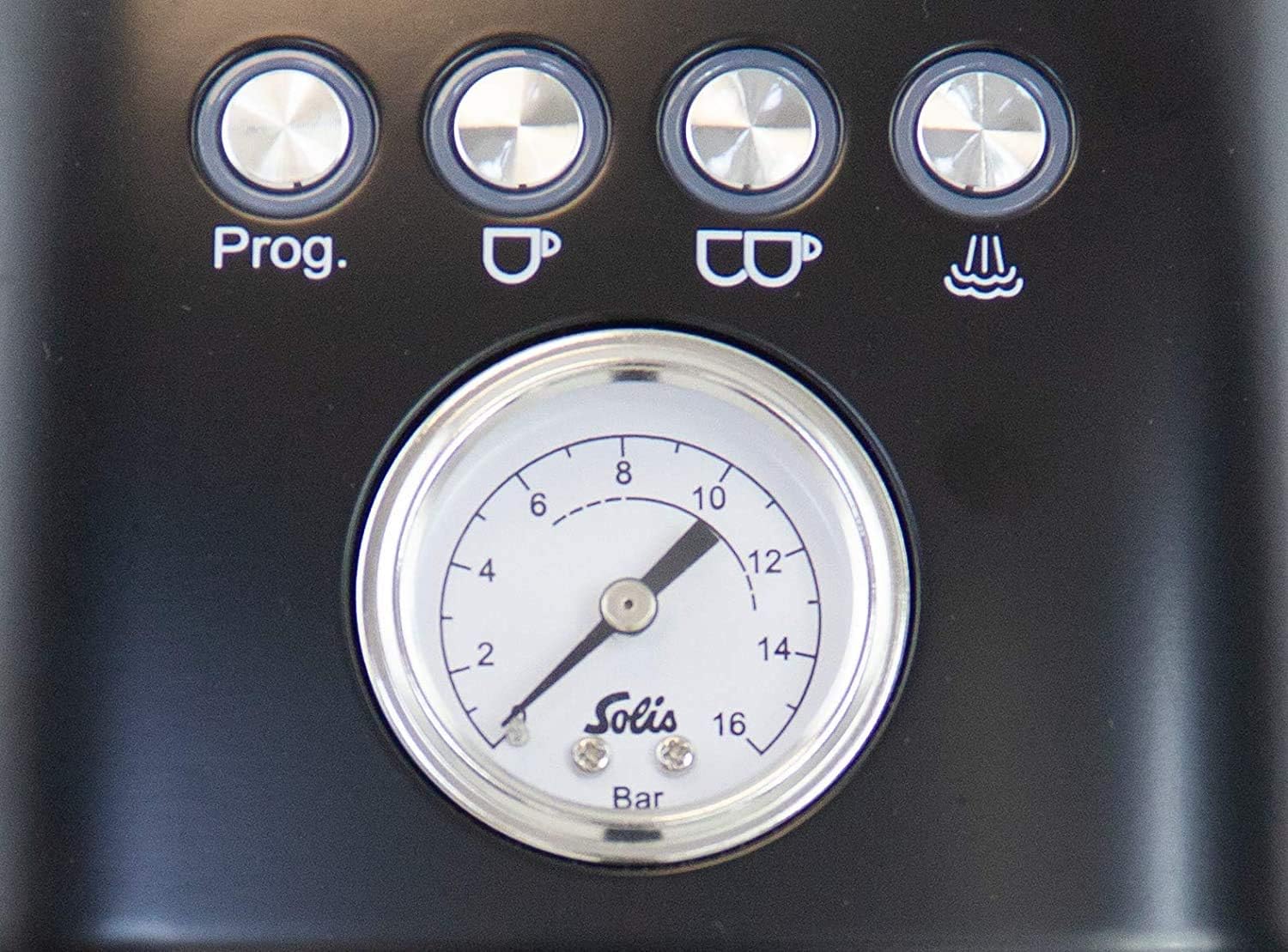
Image: Close-up of the control panel, highlighting the 'Prog', single and double espresso buttons, steam button, and the central pressure gauge.

Foto: Akụkụ view of the Solis Barista Perfetta Plus Espresso Machine, clearly showing the removable water tank with 'Max' and 'Min' level indicators.
5. Nhazi
5.1 Mwepu na ntinye
- Remove all packaging materials and protective films from the machine.
- Debe igwe ahụ n'elu ebe kwụsiri ike, nke dị larịị, na nke na-anaghị ekpo ọkụ, ebe dị anya na ebe mmiri na okpomọkụ dị.
- Gbaa mbọ hụ na ikuku ikuku zuru oke gburugburu ngwa.
5.2 Na-ejuputa tank mmiri
- Wepu tank mmiri ahụ n'azụ igwe.
- Fill the tank with fresh, cold drinking water up to the 'Max' level indicator.
- Dochie tank mmiri ahụ nke ọma n'ọnọdụ ya.
5.3 Ojiji Mbụ / Ịkwalite Igwe ahụ
- Tinye eriri ọkụ n'ime oghere eletrik gbadoro ụkwụ.
- Press the 'ON/OFF' button to turn on the machine. The buttons will flash as the machine heats up.
- Once the buttons are steadily lit, the machine is ready.
- Tinye otu iko n'okpuru portafilter spout (na-enweghị kọfị).
- Press the 'Double Espresso' button to run water through the group head. This primes the pump and flushes any manufacturing residue. Repeat this step for the steam wand by activating the steam function and letting water/steam flow for a few seconds.
6. Ntuziaka ọrụ
6.1 Ime Espresso
- Kwadebe Portafilter: Select the appropriate filter basket (single or double) and insert it into the portafilter.
- Kọfị Kọfị: Grind fresh coffee beans to a fine consistency suitable for espresso. The grind size significantly impacts extraction.
- Jupụta na Tamp: Fill the filter basket with ground coffee. Use the tamper to press the coffee evenly and firmly.
- Tinye nzacha Portafilter: Attach the portafilter to the group head by aligning it and rotating it to the right until it is secure.
- Iko ebe: Position your espresso cup(s) under the portafilter spouts.
- Brew Espresso: Press the 'Single Espresso' or 'Double Espresso' button. The machine will automatically brew the pre-programmed volume of espresso.
- Nyochaa Nrụgide: Observe the pressure gauge during brewing. Optimal pressure is typically within the indicated range.
6.2 Programming Shot Volume
- With the machine ready, press and hold the 'Prog.' button until it flashes.
- Press either the 'Single Espresso' or 'Double Espresso' button to start brewing.
- Once the desired volume of espresso is dispensed, press the same espresso button again to stop. The machine will save this volume for future use.
6.3 Mmiri ara ehi na-esi ísì
- Fill a milk pitcher with cold milk, typically to just below the spout.
- Press the 'Steam' button. The button will flash as the machine heats up to steaming temperature.
- Once the 'Steam' button is steadily lit, purge the steam wand by opening the steam knob briefly to release any condensed water. Close the knob.
- Insert the steam wand tip just below the surface of the milk. Open the steam knob fully.
- Steam the milk until it reaches the desired temperature and texture.
- Mechie ntụ ọka uzuoku wee wepụ ite ahụ.
- Jiri mgbasa ozi hichaa akpa uzuoku ozugboamp cloth to prevent milk residue from drying. Purge the wand again briefly to clear any internal milk.
7. Nlekọta na nhicha
7.1 Nhicha kwa ụbọchị
- Ntapu atịpị: Empty and rinse the drip tray after each use or when the 'Full' indicator appears.
- Portafilter na nzacha nzacha: Remove spent coffee grounds, rinse the portafilter and filter baskets under hot water.
- Ụdị Steam: Wipe the steam wand immediately after each use with a damp cloth. Purge the wand to clear any milk residue.
7.2 Otu isi nhicha
Periodically clean the group head to remove coffee oils and residue:
- Insert a blind filter (if provided) into the portafilter.
- Add a small amount of espresso machine cleaning detergent to the blind filter.
- Tinye portafilter na isi otu.
- Run a short brewing cycle (e.g., single espresso button) for 10 seconds, then stop. Wait 10 seconds. Repeat 5 times.
- Remove the portafilter, rinse it, and repeat the process with clean water to flush out detergent.
7.3 calhapụ ịda
Descaling is necessary to remove mineral buildup and maintain machine performance. The frequency depends on water hardness and usage. Refer to the descaling indicator (if present) or descale every 2-3 months.
- Empty the water tank and fill it with a descaling solution mixed according to the manufacturer's instructions.
- Place a large container under the group head and steam wand.
- Follow the specific descaling procedure outlined in your machine's full manual or activate the descaling program if available. This typically involves running the solution through the group head and steam wand.
- After the descaling cycle, rinse the water tank thoroughly and fill it with fresh water. Run several cycles of fresh water through the machine to flush out any remaining descaling solution.
8. Nchọpụta nsogbu
If you encounter issues, consult the following table before contacting customer support:
| Nsogbu | Ihe nwere ike ime | Ngwọta |
|---|---|---|
| Enweghị mmiri si n'isi otu pụta | Water tank empty; machine not primed; pump airlock; clogged filter basket. | Jupụta tank mmiri; mbụ igwe; nkata nzacha dị ọcha. |
| Espresso brews too slowly or not at all | Ala kọfị mara mma nke ukwuu; kọfị tampsiri ike nke ukwuu; nzacha akpọchiri akpọchi. | Jiri ụrọ kpụ ọkụ n'ọnụ; tamp with less pressure; clean filter. |
| Espresso brews too quickly / weak coffee | Coffee ground too coarse; not enough coffee; coffee tampadịchaghị mfe. | Use finer grind; increase coffee dose; tamp na nrụgide ọzọ. |
| Enweghị uzuoku si na uzuoku wand | Steam button not activated; steam wand clogged. | Ensure steam function is on and heated; clean steam wand tip. |
| Igwe anaghị agbanwu | A naghị etinye ya; okwu mgbapụta ike. | Lelee njikọ ike; gbalịa ụzọ ọpụpụ dị iche. |
9. Nkọwapụta
- Akara: Solis
- Ụdị: Perfetta Plus
- Akụkụ ngwaahịa: 17 x 7 x 12.5 sentimita asatọ
- Ibu ihe: 17.44 pound
- Ụdị ntinye kọfị: Ala kọfị
- Ụdị ọrụ: Akpaaka zuru oke
- Njirimara Pụrụ Iche: Enwere ike ime mmemme
- Ngwa gụnyere: Iyo
10. Akwụkwọ ikike na nkwado
The Solis Barista Perfetta Plus Espresso Machine comes with a manufacturer's warranty. For specific warranty terms, duration, and conditions, please refer to the warranty card included with your product or visit the official Solis website. For technical support, spare parts, or service inquiries, please contact Solis customer service through their official channels.


