1. Okwu mmalite
The GRAVITY STANDS FM SEAT1 BR is a versatile height-adjustable stool designed for musicians and performers, offering enhanced comfort and support during long sessions. It features an ergonomically shaped seat, an adjustable backrest, and a footrest, all built on a solid steel frame for stability. This manual provides detailed instructions for assembly, operation, maintenance, and troubleshooting to ensure optimal use of your FM SEAT1 BR stool.
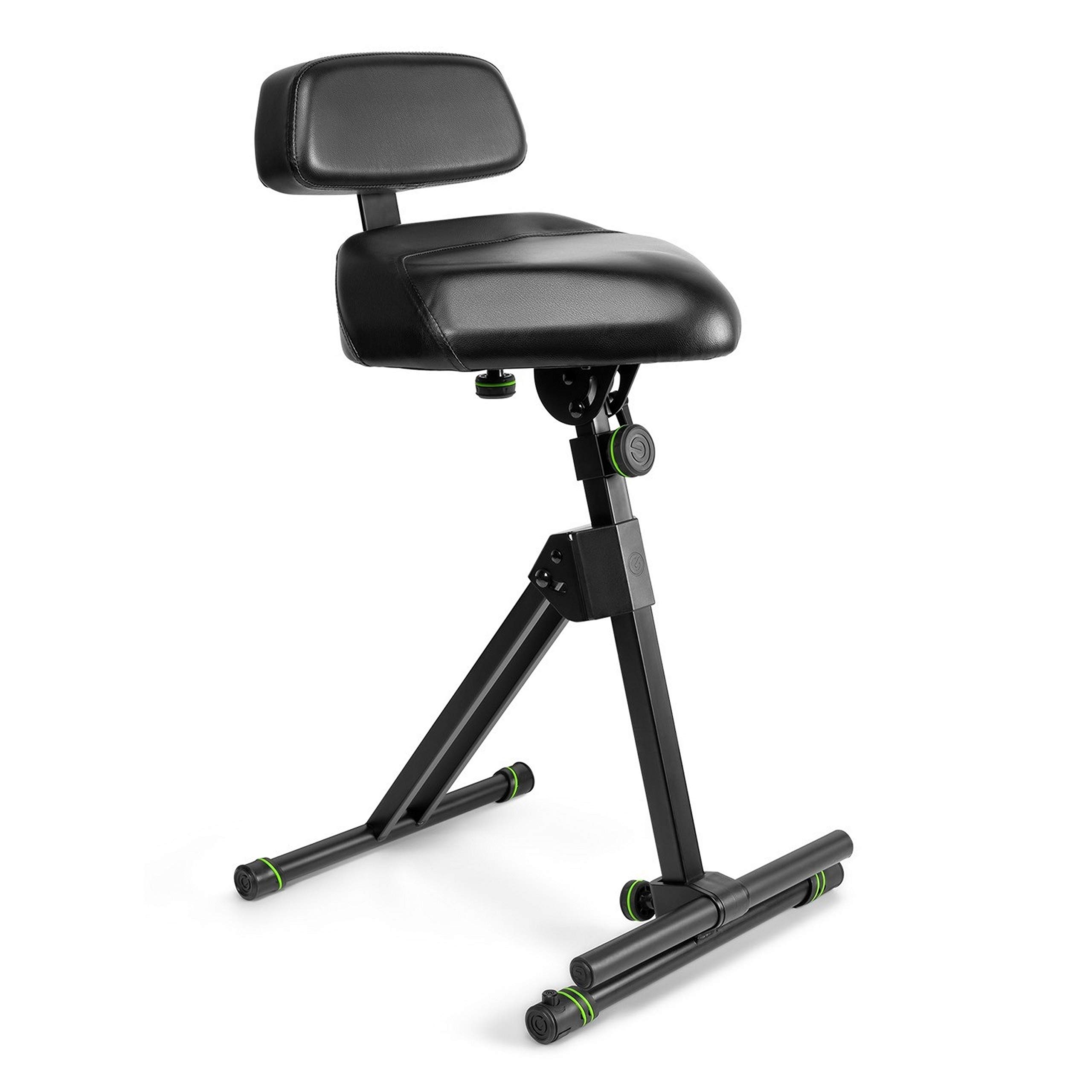
Figure 1: GRAVITY STANDS FM SEAT1 BR Height Adjustable Stool. This image shows the complete stool with its seat, backrest, and footrest components.
Akụkụ ndị bụ isi:
- Ergonomically shaped seat with adjustable height and tilt angle.
- Backrest adjustable in height and depth.
- Footrest with continuously variable height adjustment.
- Solid steel construction for durability and stability.
- Convenient folding mechanism for transport and storage.
2. Ozi nchekwa dị mkpa
Ịdọ aka ná ntị: Do not exceed the maximum weight capacity of 150 kg (approximately 330 lbs). Exceeding this limit may result in product damage or personal injury.
- Ensure all locking mechanisms and adjustments are securely fastened before use.
- Use the stool on a stable, level surface. The integrated leveling feet (KS Vari-Foot® 1) can be adjusted for uneven surfaces.
- Debe aka na mkpịsị aka gị ka ha ghara ịgagharị n'ebe akụkụ ndị ọzọ na-agagharị mgbe ị na-ahazi ha iji gbochie ịpịkọta ha.
- Regularly inspect the stool for any signs of wear, damage, or loose components. Do not use if damaged.
3. Ntọala na Mgbakọ
The FM SEAT1 BR stool features a folding mechanism for quick assembly and disassembly.
3.1 Ịmeghe oche ahụ
- Jiri nlezianya wepụ ihe n'ime akpa ya.
- Place the folded stool on a flat surface.
- Unfold the main frame components until they lock into their open position. Ensure the locking pins or levers are fully engaged.
- Extend the base legs to their full width for maximum stability.

Figure 2: Stool in an unfolded position, ready for adjustments. This image illustrates the stool's frame fully extended.
3.2 Attaching the Backrest (if detached)
If the backrest is not pre-attached, follow these steps:
- Locate the backrest support bar and the corresponding slot on the main frame.
- Slide the backrest support bar into the slot.
- Secure the backrest using the provided screws or locking knob. Ensure it is firmly attached.

Figure 3: Stool with backrest attached. This image shows the backrest securely mounted to the main frame.
3.3 Adjusting for Uneven Surfaces
The tubular base construction is fitted with KS Vari-Foot® 1 leveling feet.
- To stabilize the stool on uneven surfaces, rotate the screw mechanism on each foot until the stool is level and stable.

Figure 4: Close-up of the KS Vari-Foot® 1 leveling feet. This image highlights the adjustable feet mechanism for stability on uneven ground.
4. Ntuziaka ọrụ
The FM SEAT1 BR offers multiple adjustment options to achieve a comfortable and ergonomic seating position.
4.1 Ndozi elu oche
- Locate the height adjustment mechanism on the main vertical support.
- Loosen the locking knob or lever.
- Adjust the seat to the desired height (range: 67 cm to 97 cm).
- Securely tighten the locking knob or lever to fix the seat in position.
4.2 Seat Tilt Adjustment
- The seat can be tilted forwards or backwards at continuously variable angles.
- Locate the tilt adjustment mechanism beneath the seat.
- Loosen the adjustment knob, set the desired tilt, and then firmly tighten the knob to secure the position.

Figure 5: Stool with the seat tilted forward. This image demonstrates the adjustable seat tilt feature.
4.3 Ndozi azụ azụ
The backrest can be adjusted in both height and distance from the seat.
- Ndozi elu: Loosen the knob on the backrest support bar, slide the backrest up or down to the desired height, and re-tighten.
- Ndozi omimi: Loosen the knob that controls the backrest's distance from the seat, adjust the depth, and re-tighten.
4.4 Ndozigharị ụkwụ
- The footrest is continuously height-adjustable.
- Locate the adjustment mechanism for the footrest.
- Loosen the locking mechanism, move the footrest to a comfortable height, and then firmly secure it. This allows for resting one or both legs and helps relieve back strain.

Figure 6: Close-up of the adjustable footrest. This image shows the footrest bar and its attachment point on the stool's frame.
5. Nlekọta na nlekọta
Proper maintenance ensures the longevity and safe operation of your Gravity Stands FM SEAT1 BR stool.
- Nhicha: Wipe down the frame with a soft, damp cloth. For the leatherette seat and backrest, use a mild, non-abrasive cleaner specifically designed for synthetic leather, if necessary. Avoid harsh chemicals.
- Nyocha: Periodically check all screws, bolts, and locking mechanisms to ensure they are tight and secure.
- mmanu mmanu: If any moving parts become stiff, apply a small amount of silicone-based lubricant to the pivot points.
- Nchekwa: When not in use, fold the stool flat and store it in a dry, clean environment to protect it from dust and moisture.
6. Nchọpụta nsogbu
If you encounter issues with your FM SEAT1 BR stool, refer to the following common problems and solutions.
| Nsogbu | Ihe nwere ike ime | Ngwọta |
|---|---|---|
| Stool feels unstable or wobbly. | Uneven surface; loose connections; legs not fully extended. |
|
| Seat or backrest slips after adjustment. | Locking mechanism not tightened sufficiently. |
|
| Footrest feels loose or detaches. | Improper assembly; loose fastening. |
|
| Difficulty folding/unfolding the stool. | Mechanism isi ike; ihe mgbochi. |
|
7. Nkọwapụta
| Njirimara | Nkọwa |
|---|---|
| Nọmba nlereanya | FM SEAT1 BR |
| Ụdị | Ike ndọda |
| Ihe onwunwe | Steel frame, Leatherette seat/backrest |
| Agba | Nwa |
| Ibu Ibu | 22 pound (ihe dị ka 10 n'arọ) |
| Akụkụ ngwaahịa (Apịaji) | 12 x 12 x 38 sentimita (ihe dịka 30.5 x 30.5 x 96.5 cm) |
| Oke ndozi ịdị elu | 67 cm to 97 cm (approx. 26.4 to 38.2 inches) |
| Ike ibu kacha | 150 n'arọ (330 lbs) |

Figure 7: Dimensions of the GRAVITY STANDS FM SEAT1 BR stool. This image provides key measurements for the product.
8. Akwụkwọ ikike na nkwado
Gravity products are known for their quality and often come with a manufacturer's warranty. For specific warranty details, including coverage period and terms, please refer to the documentation included with your purchase or visit the official Gravity Stands websaịtị.
For technical support, spare parts, or warranty claims, please contact Gravity customer service directly. Contact information can typically be found on the manufacturer's websaịtị ma ọ bụ na nkwakọ ngwaahịa gị.
Onye nrụpụta Websaịtị: www.gravitystands.com


