1. Okwu mmalite
Thank you for choosing Senso Wireless Earbuds. These True Wireless Stereo (TWS) earphones are designed for an active lifestyle, featuring a secure fit, high-quality audio, and sweatproof construction. This manual will guide you through the setup, operation, and maintenance of your new earbuds.
2. Kedu ihe dị na Igbe ahụ
- Senso Wireless Earbuds (Left and Right)
- Akpa Nchaji enwere ike ibugharị
- Igwe nchaji USB
- Ntuziaka onye ọrụ
- Ọnụ ọgụgụ dị ukwuu nke ndụmọdụ ntị
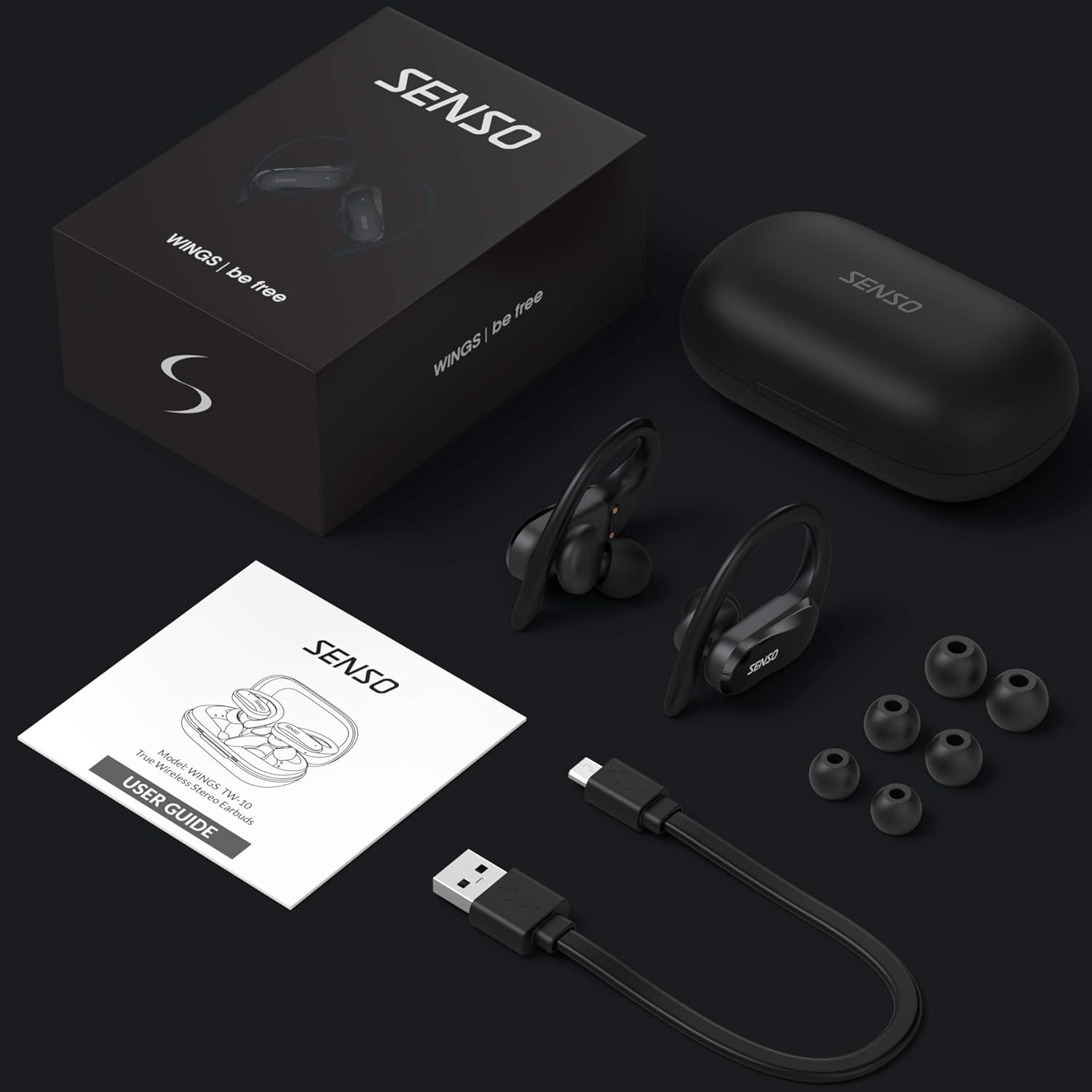
Image: The Senso Wireless Earbuds packaging, displaying the earbuds, charging case, user guide, USB charging cable, and various ear tip sizes.
3. Ngwaahịa gafereview
The Senso Wings TW10 earbuds are designed for comfort and performance, featuring advanced audio technology and a durable build.

Foto: Ihe gbawara view of the earbud, illustrating the 13mm dynamic driver responsible for delivering premium sound quality with intense bass and dynamic range.

Foto: nkọwa zuru ezu view of the earbud's internal circuitry, emphasizing the Bluetooth 5.0 chipset and CVC 8.0 Noise Cancellation Technology for stable connection and clear audio.

Image: Two scenarios demonstrating the earbuds' versatility: one earbud in use for mono mode (e.g., driving) and both earbuds for dual mode (e.g., binaural calls).

Image: The earbuds are shown resisting water splashes, indicating their IPX6 waterproof rating, suitable for sweat, water, and rain.
4. Nhazi
4.1 Ịchaji ntị na akpa
Before first use, fully charge the earbuds and the charging case. Place the earbuds into the charging case. Connect the USB charging cable to the case and a power source. The indicator lights on the case will show the charging status.
4.2 Mmakọ mbụ
- Hụ na e nwere chajị ọkụ na ntị gị.
- Mepee igbe nchaji. Igwe ntị ga-agbanye na-akpaghị aka wee banye ọnọdụ njikọta.
- Na ngwaọrụ gị (smartphone, mbadamba, wdg), gbanye Bluetooth.
- Chọọ maka available Bluetooth devices and select "SENSO Wings TW10" from the list.
- Once connected, you will hear an audio prompt, and the earbud indicator lights will change.

Image: The earbuds are shown connecting to a smartphone, demonstrating the simple and fast pairing process upon removal from the charging case.
Video: An official product video demonstrating the features and setup of the Senso WINGS Ultra Durable Premium Audio Wireless Earbuds.
5. Ntuziaka ọrụ
5.1 Yiri ekwe ntị
Place the earbuds in your ears and adjust the ear hooks for a secure and comfortable fit. The 60-degree twist lock system ensures they stay in place during physical activity.

Image: A user demonstrating the secure fit of the earbuds with the 60-degree twist lock system, ideal for sports and exercise.
5.2 Njikwa ntọala
The earbuds feature touch-sensitive controls for media playback and call management. Refer to the detailed user guide included in the box for specific touch commands for functions such as play/pause, skip track, answer/end call, and voice assistant activation.
5.3 Mono or Dual Mode
You can use either earbud independently (mono mode) or both together (dual mode) for a stereo audio experience. This flexibility allows for awareness of your surroundings when needed.
5.4 Ọrụ oku
Each earbud is equipped with a microphone, enabling binaural calls for clear communication. Use the touch controls to answer, end, or reject calls.
6. Nlekọta
6.1 Nhicha
- Jiri akwa dị nro, kpọrọ nkụ na-adịghị na-ehicha ntị ntị na chaja mgbe niile.
- Wepu ndụmọdụ ntị wee jiri ncha na mmiri dị nro hichaa ha, wee kpochaa nke ọma tupu itinyeghachi ya.
- Zere iji ihe nhicha ma ọ bụ ihe mgbaze.
6.2 Nchekwa
- Chekwaa ntị ntị n'akpa chaja ha mgbe anaghị eji ya iji chebe ha ma debe ya ebubo.
- Debe ngwaọrụ ahụ n'ebe dị jụụ, ebe kpọrọ nkụ, pụọ na oke okpomọkụ yana ìhè anyanwụ kpọmkwem.
7. Nchọpụta nsogbu
7.1 Okwu njikọta
- Gbaa mbọ hụ na ejirila ekwe ntị abụọ a chaja nke ọma.
- Gbanyụọ Bluetooth na ngwaọrụ gị, wee gbanye ya ọzọ.
- Chezọ ngwaọrụ ahụ na ndetu Bluetooth gị wee nwaa ijikọ ọzọ.
- If only one earbud connects, try resetting the earbuds (refer to the full user guide for specific reset instructions).
7.2 Enweghị ụda ma ọ bụ olu dị ala
- Lelee ọkwa olu dị na ngwaọrụ gị na ekweisi gị.
- Gbaa mbọ hụ na ekwe ntị na-anọdụ ala nke ọma na ntị gị.
- Clean any debris from the earbud speakers and ear tips.
7.3 Nsogbu Nchaji
- Hụ na eriri chaja ahụ ejikọtara ya na akpa ahụ na isi iyi ike ahụ nke ọma.
- Hụ na kọntaktị chaja dị na ntị ntị na n'ime akpa ahụ dị ọcha ma ghara inwe ihe mgbochi ọ bụla.
- Gbalịa eriri chaja dị iche ma ọ bụ nkwụnye ọkụ.
8. Nkọwapụta
| Njirimara | Nkọwa |
|---|---|
| Aha Nlereanya | Wings TW10 |
| Teknụzụ Njikọta | Bluetooth 5.0, ikuku |
| Teknụzụ nzikọrịta ozi ikuku | Bluetooth |
| Njikwa mkpọtụ | Nkagbu mkpọtụ nọ n'ọrụ |
| Ọkwa Nguzogide mmiri | Ihe mgbochi mmiri (IPX6) |
| Ndụ batrị (Earbuds) | Awa 8 |
| ngụkọta oge egwuregwu (ya na ikpe) | Ruo awa 30 |
| Nha ọkwọ ụgbọ ala ọdịyo | 10 millimeters |
| Mgbochi | 32 ohms |
| Ụdị njikwa | Njikwa Mgbasa ozi |
| Usoro njikwa | Ime ime |
| Ntinye ntị | Na Ntị |
| Ụdị Ihe | Na Ntị |
| Ihe onwunwe | Silikoni |
| Ibu Ibu | 7 ounces |

Image: The earbuds and charging case illustrating the extended playtime: 6 hours for the earbuds and up to 30 hours total with the portable charging case.
9. Akwụkwọ ikike na nkwado
Senso offers a standard warranty for its products. Additionally, you may be eligible for an extended warranty.
9.1 Akwụkwọ ikike agbatịkwuru
To convert to a two-year extended warranty, visit www.sensoshop.com/warranty. This must be claimed within 7 days of receiving your product.
9.2 Nkwado ndị ahịa
For any product-related issues or inquiries, please contact Senso customer support. Details can be found on the warranty card included in your product packaging or on the official Senso websaịtị.


