Okwu mmalite
Thank you for choosing the WEKOME D6 Desktop Mini Bluetooth Speaker. This compact and portable speaker delivers clear sound quality and offers versatile connectivity options. This manual provides detailed instructions on how to set up, operate, and maintain your speaker to ensure optimal performance.
Ngwaahịa gafereview

Foto 1: N'ihu view of the WEKOME D6 Mini Bluetooth Speaker, highlighting its compact cylindrical design and control panel.
The WEKOME D6 is a palm-sized desktop speaker designed for portability and ease of use. It features Bluetooth connectivity for wireless audio streaming and a TF card slot for direct music playback. Its robust design ensures clear audio output for various compatible devices.
Akụkụ ndị bụ isi:
- Njikọ Bluetooth: Seamless wireless pairing with smartphones, tablets, and laptops.
- Nhazi kọmpat: Palm-sized for easy portability.
- Kpochapụ ogo ụda: Delivers crisp and clear audio.
- Ogologo ndụ batrị: 500 mAh battery provides approximately 4-5 hours of playback.
- Ogologo ogologo: Bluetooth transmission distance of up to 10 meters (33 feet).
- Nkwado Kaadị TF: Maximum support for 32GB TF (MicroSD) cards for direct music playback.
- Ike mmepụta: Speaker maximum output power of 10 Watts.
Ihe ngwugwu
Biko lelee ngwungwu maka ihe ndị a:
- WEKOME D6 Desktop Mini Bluetooth Speaker
- Igwe nchaji USB
- Akwụkwọ ntuziaka (akwụkwọ a)
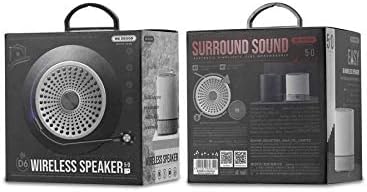
Foto 2: Retail packaging of the WEKOME D6 Mini Bluetooth Speaker, illustrating the product's branding and key information on the box.
Melite
1. Ịnanye onye na-ekwu okwu:
- Jikọọ obere nsọtụ nke eriri chaja USB na ọdụ chaja dị na ọkà okwu.
- Jikọọ nsọtụ nke ọzọ nke eriri USB na ihe nkwụnye ọkụ USB (anaghị etinye ya) ma ọ bụ ọdụ ụgbọ USB nke kọmputa.
- The charging indicator light will illuminate during charging and turn off once fully charged. A full charge typically takes 2-3 hours.
2. Ịgbanwu/ Gbanyụọ:
- Iji gbanye: Pịa ma jide bọtịnụ ike ruo sekọnd ole na ole ruo mgbe ị nụrụ ụda olu ma ọ bụ hụ ìhè ihe ngosi.
- Iji gbanyụọ: Pịa ma jide bọtịnụ ike ọzọ ruo sekọnd ole na ole.
3. Njikọ Bluetooth:
- Ensure the speaker is powered on and in Bluetooth pairing mode (it will usually enter this mode automatically upon first power-on or if no device is connected). The indicator light will typically flash rapidly.
- Na ngwaọrụ gị (smartphone, tabletị, laptọọpụ), gbanye Bluetooth wee chọọ ngwaọrụ dị.
- Select "WEKOME D6" from the list of found devices.
- Once paired, the speaker will provide an audible confirmation, and the indicator light will stop flashing and remain solid.
- The speaker will automatically reconnect to the last paired device when powered on, if the device's Bluetooth is enabled and within range.
4. TF Card Insertion:
- Locate the TF card slot on the speaker.
- Gently insert a TF (MicroSD) card (up to 32GB) with pre-loaded music files into the slot until it clicks into place.
- The speaker will automatically switch to TF card playback mode if a card is detected.
Onye na-arụ ọrụ
bọtịnụ njikwa:
Refer to Figure 1 for the location of the control buttons.
- Bọtịnụ ike: Pịa ma jide ka ịgbanwuo/ gbanyụọ.
- Volume Up / Next Track Button (+):
- Short press: Increase volume.
- Long press: Skip to the next track.
- Bọtịnụ Kwụsị/ Kwụsị (||): Obere pịa ka ịkpọọ ma ọ bụ kwụsịtụ egwu.
- Volume Down / Previous Track Button (-):
- Short press: Decrease volume.
- Long press: Go to the previous track.
- Mode Button (Dot between + and Play/Pause): Short press to switch between Bluetooth mode and TF card mode (if a TF card is inserted).
Nlekọta
- Nhicha: Use a soft, dry cloth to clean the speaker's surface. Do not use abrasive cleaners, alcohol, or other chemical solvents, as these may damage the finish.
- Nchekwa: Chekwaa ọkà okwu n'ebe dị jụụ, kpọrọ nkụ na-adịghị na ìhè anyanwụ kpọmkwem na oke okpomọkụ.
- Nlekọta batrị: To prolong battery life, avoid fully discharging the speaker frequently. Charge the speaker regularly, even if not in use for extended periods.
- Nguzogide mmiri: This speaker is not water-resistant. Avoid exposure to liquids.
Nchọpụta nsogbu
| Nsogbu | Ihe nwere ike ime | Ngwọta |
|---|---|---|
| Ọkà okwu anaghị agba ọkụ. | Batrị dị ala. | Chajie ọkà okwu zuru ezu. |
| Enweghị ụda. | Volume too low; Speaker not paired; Incorrect mode. | Increase volume; Ensure speaker is paired; Switch to correct mode (Bluetooth/TF card). |
| Enweghị ike ijikọ na ngwaọrụ Bluetooth. | Ọkà okwu adịghị n'ụdị njikọta; Gbanyụọ ngwaọrụ Bluetooth; Ọ dị anya na ọkà okwu. | Ensure speaker is in pairing mode; Turn on device Bluetooth; Move device closer to speaker (within 10M). |
| Music stops playing from TF card. | TF card not inserted correctly; Corrupted files; Unsupported format. | Reinsert TF card; Check TF card for errors; Ensure music files dị na usoro akwadoro (dịka ọmụmaatụ, MP3). |
Nkọwapụta
| Ụdị | WEKOME |
| Aha Nlereanya | D6 |
| Teknụzụ Njikọta | Bluetooth |
| Ụdị Ọkà Okwu | Desktop Mini Speaker |
| Ike Nwepu kacha elu | 10 Watt |
| Ike batrị | 500 mAh (approx. 4-5 hours playback) |
| Ogologo nnyefe | 10 mita (33 ụkwụ) |
| Nkwado kaadị TF | Ruo 32GB |
| Ngwa dakọtara | Laptọọpụ, Smartphone, Mbadamba ụrọ |
| Ụdị nkwụnye | N'elu tebụl |
| Akụkụ ngwugwu | 12.4 x 11.4 x 7.6 cm |
| Ibu | 210 g |
Akwụkwọ ikike na nkwado
For warranty information and technical support, please refer to the warranty card included with your product or contact WEKOME customer service through their official website or authorized retailers. Keep your purchase receipt as proof of purchase for warranty claims.


