Okwu mmalite
This manual provides comprehensive instructions for the setup, operation, and maintenance of your Rimous Replacement Remote Control for LG Smart TVs. Designed for broad compatibility, this remote offers a convenient and reliable solution for controlling your LG television.
Njirimara ngwaahịa
- Ndakọrịta zuru oke: Works with LG Smart TVs from 2010-2024 models, including OLED, 4K UHD, and WebOS systems.
- Batrị etinyegoro mbụ: Includes premium batteries for immediate use.
- Anti-Loss Holder: Comes with a wall-mounted holder to reduce the risk of misplacing the remote.
- One-Touch Shortcut Buttons: Dedicated buttons for Netflix and Prime Video for quick access.
- Arụmọrụ emelitere: Equipped with a smart chip for improved functionality, longer transmission range, responsive buttons, and stable performance.
Melite
1. Ntinye batrị
- Chọta ebe batrị dị n'azụ nke njikwa anya.
- Mikpuo mkpuchi batrị ahụ ala iji mepee ya.
- Insert the two included AAA batteries, ensuring correct polarity (+ and - terminals match the markings inside the compartment).
- Weghachite mkpuchi batrị n'ime ebe ruo mgbe ọ pịrị na nchekwa.

The image displays the Rimous replacement remote control, two AAA batteries, and a black wall-mount holder designed to keep the remote accessible.
2. Holder Installation
- Clean the desired surface (e.g., side of TV, wall, or table) where you wish to mount the holder. Ensure the surface is dry and free of dust.
- Remove the protective backing from the adhesive strip on the back of the holder.
- Press the holder firmly onto the cleaned surface for at least 30 seconds.
- Allow the adhesive to set for a few hours before placing the remote control in the holder.

A visual representation of the remote's performance, indicating a rapid 0.2-second response time and an effective transmission range exceeding 35 feet. The remote is shown being used in a living room setting.
Ntuziaka ọrụ
Ọrụ ndị bụ isi
The Rimous remote control is designed for immediate use with compatible LG TVs without requiring any programming. Simply point the remote at your TV and begin using its functions.
- bọtịnụ ike (⏻): Gbanyụọ ma ọ bụ gbanyụọ TV.
- Igodo ọnụọgụ (0-9): Họrọ ọwa ozugbo.
- Elu elu/ala (VOL +/-): Na-edozi olu TV.
- Channel Up/Down (CH PAGE): Na-agbanwe ọwa TV.
- Bọtịnụ Nsoroụzọ (▲ ▼ ◀ ▶): Gaa na menus na nhọrọ.
- OK bọtịnụ: Na-akwado nhọrọ.
- Bọtịnụ azụ: Na-alaghachi na ihuenyo gara aga ma ọ bụ menu.
- Wepụ bọtịnụ: Na-apụ na menu ma ọ bụ ngwa dị ugbu a.
Bọtịnụ ụzọ mkpirisi
Access popular streaming services directly with dedicated buttons:
- bọtịnụ Netflix: Na-amalite Netflix ngwa.
- Bọtịnụ vidiyo izizi: Launches the Prime Video application.

A zuru ezu view of the remote control, emphasizing the dedicated Netflix and Prime Video shortcut buttons for quick access to streaming services.
Ndakọrịta
This remote is compatible with a wide range of LG Smart TV models, including those with:
- LED, LCD, 3D, OLED, 4K UHD displays
- WebSistemụ OS
- Specific original remote models such as AKB74915305, AKB75375604, AKB75095307, AKB75675304, AKB74475401, AKB74475433, AKB73975702, AKB75055701, AKB73975711, AKB73715608, AKB74915324, AKB73715601, AKB75095308, AKB74915304, AKB75095330, AGF76631064.

This image illustrates the broad compatibility of the Rimous remote control across different LG television technologies, including LED, LCD, UHD, HD, OLED, WebOS, and 4K models.
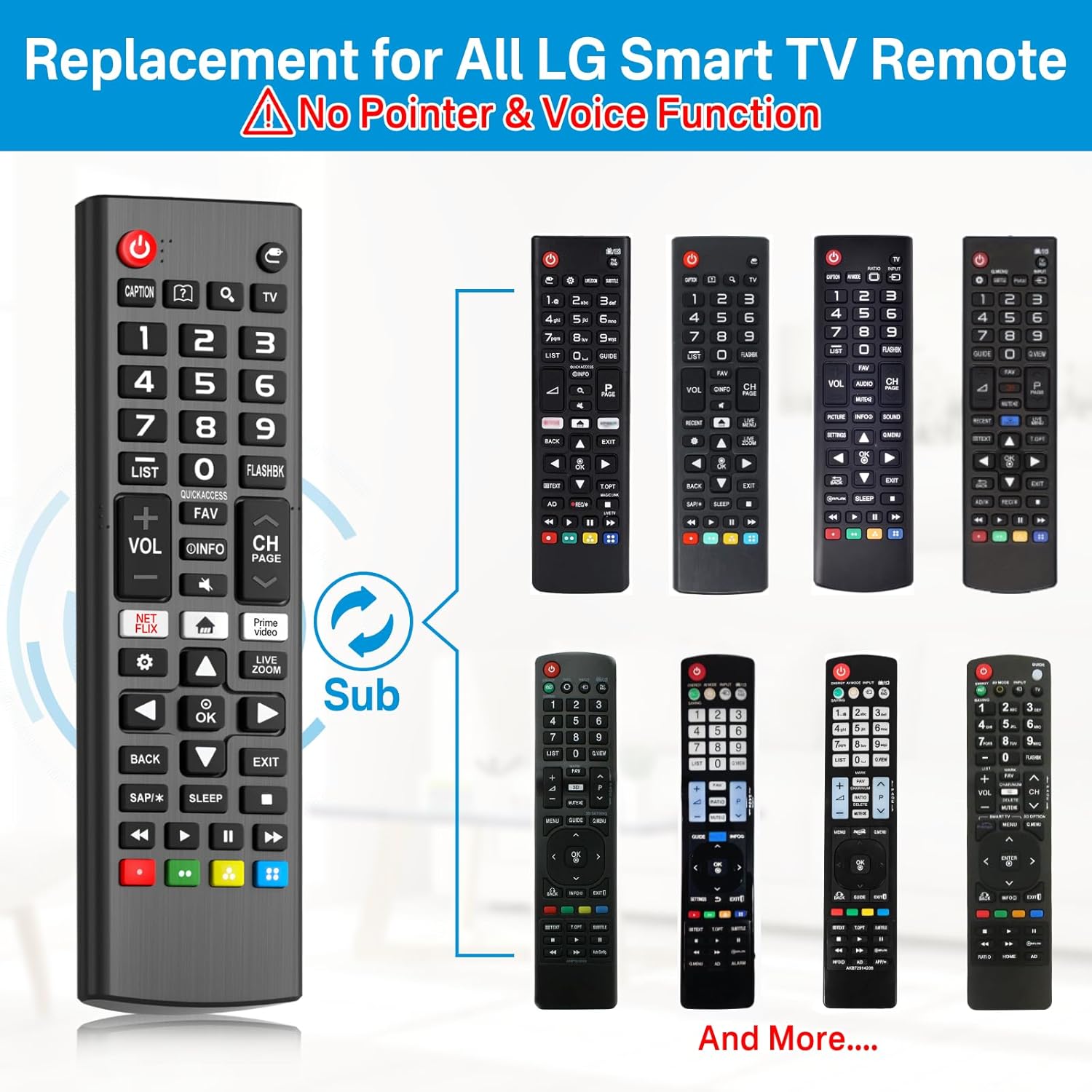
This image displays the Rimous remote alongside several original LG remote control designs, illustrating its function as a universal replacement for various models.
Nlekọta
- Debe ihe njikwa remote ahụ ọcha site n'iji ákwà dị nro ma kpọọ nkụ hichaa ya.
- Avoid exposing the remote to extreme temperatures, moisture, or direct sunlight.
- Ọ bụrụ na a gaghị eji remote ahụ ruo ogologo oge, wepụ batrị ndị ahụ iji gbochie mmiri ịpụ apụ.
Nchọpụta nsogbu
- Remote anaghị aza:
- Ensure the batteries are inserted correctly with the proper polarity.
- Replace the batteries with new ones if they are depleted.
- Ensure there are no obstructions between the remote and the TV's infrared sensor.
- Nyochaa na a tụrụ anya n'ime ime ihe ozugbo na TV.
- Bọtịnụ ndị akọwapụtara anaghị arụ ọrụ:
- Check for any debris or stickiness around the button. Gently clean if necessary.
- If only certain smart TV functions (like pointer or voice control) are not working, please note that this remote is a standard replacement and does not support advanced features like pointer or voice control found on some original LG Magic Remotes.
Nkọwapụta
| Njirimara | Nkọwa |
|---|---|
| Akụkụ ngwaahịa | 6.3 x 3.54 x 0.39 sentimita asatọ |
| Ibu Ibu | 3.84 ounces |
| Ụdị | Rimous |
| Onye nrụpụta | Rimous |
| Njirimara Pụrụ Iche | Ergonomic, Lightweight, No Programming Required |
| Agba | Nwa |
| Ọnụọgụ ngwaọrụ akwadoro kacha | 1 |
| Ngwa dakọtara | Television (LG Smart TVs) |
Akwụkwọ ikike na nkwado
Specific warranty information is not provided in the product details. For any support inquiries or further assistance, please refer to the seller's contact information or the platform where the product was purchased.

