Okwu mmalite
This user manual provides comprehensive instructions for the setup, operation, maintenance, and troubleshooting of your Suntek HC-800LTE 4G Trail Camera. Please read this manual carefully before using the device to ensure proper functionality and longevity.
Ihe ngwugwu
Mgbe ịmepechara ngwugwu ahụ, biko chọpụta na agụnyere ihe niile ndị a:
- 1 x HC-801LTE Hunting Camera
- 1 x Antten
- 1 x eriri USB
- 1 x Fixing Strap
- 1 x Printed User Manual (English)
- 1 x Mini CD with User Manual (German, English, French, Italian, Spanish)
Note: SIM card and AA batteries are not included and must be purchased separately.

Image: The complete package contents, showing the HC-800LTE camera, its antenna, a USB cable, and a mounting strap.
Melite
1. Ntinye batrị
The HC-800LTE camera requires 8 x 1.5V AA batteries for operation (not included). Alternatively, it can be powered by a 6V external power source.
- Mepee igwefoto casing site na ịtọghe ihe mkpuchi akụkụ.
- Chọta ebe batrị.
- Fanye batrị AA 8, na-eme ka polarity ziri ezi (+/-) dị ka egosiri n'ime ụlọ.
- Mechie mkpuchi nke batrị batrị nke ọma.
2. SIM Card and Micro SD Card Installation
A Micro SD card (up to 64GB, not included) is required to store photos and videos. A SIM card (not included) is necessary for 4G/3G/2G network functions like sending photos/videos via MMS/SMTP.
- Na igwefoto casing open, locate the Micro SD card slot and the SIM card slot.
- Insert the Micro SD card into its designated slot until it clicks into place.
- Insert the SIM card into its designated slot, ensuring correct orientation.
- Mechie igwefoto ahụ casing and secure the side clips.

Image: The internal layout of the camera, highlighting the battery compartment for 8 AA batteries and the slot for a Micro SD card.
3. Mgbakwụnye antenna
Attach the provided 4G antenna to the antenna port located at the top of the camera. Screw it on clockwise until it is finger-tight.

Image: The Suntek HC-800LTE camera shown with its 4G antenna properly attached to the top.
4. Ịtinye igwefoto
The camera can be mounted using the included fixing strap or by utilizing a tripod nail (not included) via the stand knob port at the bottom.
- Thread the fixing strap through the designated slots on the back of the camera.
- Secure the camera to a tree or pole at the desired height and angle.
- Ensure the camera is stable and has a clear view nke mpaghara ịchọrọ inyocha.
Ntuziaka ọrụ
Ngwa igwefoto gafereview

Image: A detailed diagram illustrating the various components of the camera, including the color display screen, setup buttons, mode switch, USB port, Micro SD card slot, 8AA batteries depot, external power port, and stand knob port.
- Color Display Screen: Maka viewing settings, captured media, and live feed.
- Setup Buttons: Navigation and selection buttons (Menu, Replay, Up, Down, Left, Right, OK, Shot).
- Ụdị mgbanwe: To switch between OFF, SETUP, and ON modes.
- Ọdụ ụgbọ mmiri USB: Maka njikọ na kọmputa.
- Oghere kaadị Micro SD: Maka itinye kaadị ebe nchekwa.
- Ọdụ Ike Mpụga: For connecting an external 6V power supply.
- Stand Knob Port: For tripod mounting.
Isi ọrụ
- Na-agbanye ike: Switch the Mode Switch to 'SETUP' to access the menu and configure settings.
- Na-ahazi Ntọala: Use the setup buttons to navigate the menu. Adjust parameters such as image resolution (24MP/20MP/16MP), video resolution (1080P/720P/VGA), trigger interval, number of photos per detection (1/3/6/9), time-lapse, and password protection.
- Activating Camera: Once settings are configured, switch the Mode Switch to 'ON'. The camera will enter monitoring mode and begin capturing based on its PIR sensor detection.
Photo and Video Capture
The HC-800LTE features a 0.3-second trigger speed and a 120-degree PIR sensor for wide detection. It captures high-quality images and videos even in low light conditions.
- Mkpebi foto: Selectable from 24MP, 20MP, or 16MP.
- Mkpebi vidiyo: 1080P, 720P, or VGA.
- Ọsọ mkpata: Ihe dị ka sekọnd iri abụọ na ise.
- Ogologo nchọpụta PIR: Ruo 65 ụkwụ (20 mita).
- Ọhụụ abalị: Equipped with 42 invisible black IR LEDs, providing illumination up to 65 feet (20 meters) without visible flash.
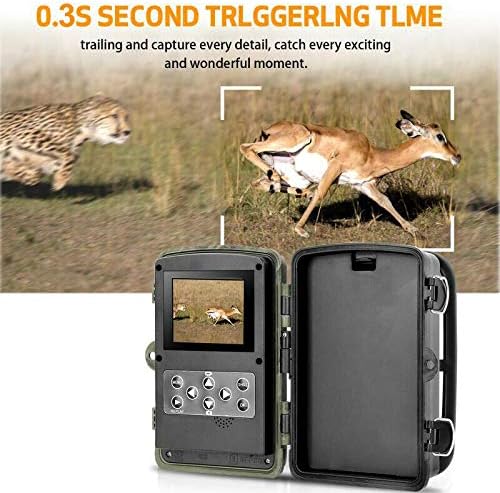
Image: This visual highlights the camera's rapid 0.3-second trigger time, showcasing its ability to capture fast-moving wildlife effectively.
4G Connectivity and Remote Functions
The camera supports 4G/3G/2G networks, allowing for remote transmission of captured media.
- MMS/SMTP Transmission: Configure the camera to send photos and videos to up to 4 phone numbers via MMS or 4 email addresses via SMTP.
- SMS Remote Control: Control certain camera functions remotely via SMS commands.
- GPRS Function: Enables email sending via MMC.
Ọrụ Pụrụ Iche
The camera includes various advanced features for versatile monitoring:
- Multiple Recording: Capture multiple images per trigger.
- Interval Shooting: Set specific time intervals for photo capture.
- Ogologo oge: Capture images over extended periods to create time-lapse sequences.
- Ngụ oge: Schedule specific operating times for the camera.
- Nchedo okwuntughe: Secure your camera settings with a numeric PIN.
- Oge kacha ntaamp: Imprint date and time on captured media.
- Oti mkpu batrị dị ala: Receive alerts when battery levels are low.
- Ndekọ mpaghara: All captured media is stored on the Micro SD card.
Nlekọta
Nhicha
Ịsacha mgbe niile na-enyere aka ịnọgide na-arụ ọrụ nke ọma na ịdị mma nke onyonyo.
- Gently wipe the camera lens and PIR sensors with a soft, lint-free cloth.
- Ejila ihe nchacha abrasive ma ọ bụ ihe mgbaze.
- Ensure the camera casing is free from dirt, dust, and debris, especially around seals, to maintain its IP66 waterproof rating.
Ngbanwe batrị
Replace all 8 AA batteries when the low battery alarm is triggered or when performance degrades. Always use fresh, high-quality batteries.
Njikwa kaadị SD
Periodically check the Micro SD card for storage capacity. It is recommended to format the SD card within the camera's menu settings before first use and after transferring files to a computer, to ensure optimal performance and prevent data corruption.
Nchọpụta nsogbu
If you encounter issues with your HC-800LTE camera, refer to the following common problems and solutions:
| Nsogbu | Ihe nwere ike ime | Ngwọta |
|---|---|---|
| Igwefoto anaghị agba ọkụ | Low or dead batteries; incorrect battery polarity; external power issue. | Replace all 8 AA batteries with new ones, ensuring correct polarity. Check external power connection if used. |
| Edeghị foto/vidiyo ọ bụla | SD card full or corrupted; PIR sensor blocked or sensitivity too low; incorrect trigger interval settings. | Format or replace the Micro SD card. Adjust PIR sensitivity. Check trigger interval settings. Ensure no obstructions in front of the PIR sensor. |
| Connectivity issues (MMS/Email) | No SIM card or incorrect installation; poor network coverage; incorrect APN/SMTP settings. | Ensure SIM card is correctly inserted and activated. Check network signal strength. Verify APN, SMTP, and recipient settings in the camera menu. |
| Ọdịdị foto/vidiyo adịghị mma | Dirty lens; low light conditions; incorrect resolution settings. | Clean the camera lens. Ensure adequate lighting or rely on night vision. Adjust image/video resolution settings to higher quality. |
| Issues saving images to SD card | SD card slot damage; incompatible or faulty SD card. | Try a different, known-good Micro SD card. Ensure the card is inserted correctly and fully. |
Nkọwapụta
| Njirimara | Nkọwa |
|---|---|
| Ụdị | Suntek |
| Nọmba nlereanya | HC-801LTE |
| Ihe mmetụta onyonyo | 5 megapixel agba CMOS |
| Mkpebi onyonyo | 24MP / 20MP / 16MP (selectable) |
| Mkpebi vidiyo | 1080P / 720P / VGA |
| Na-akpali Ọsọ | 0.3 sekọnd |
| Akụkụ nchọpụta PIR | ogo 120 |
| Ogologo nchọpụta PIR | 65ft (mita 20) |
| Oke ọhụụ abalị | 65ft (20 meters) with 42 invisible black IR LEDs |
| Ebe nchekwa | Kaadị Micro SD ruo 64GB (anaghị etinye ya) |
| Ngosipụta ihuenyo | 2.0 inch TFT |
| Njikọta | 4G / 3G / 2G GSM / MMS / SMTP / SMS (Wired, Wireless) |
| Ịnye ọkụ | 8 x AA Batteries (not included) or 6V External DC |
| Voltage | 9 volts |
| Oge Njikere | Ruo ọnwa isii |
| Ọkwa Nguzogide mmiri | IP66 (ihe mgbochi mmiri) |
| Akụkụ (L x W x H) | 13.5 x 9 x 8.6 cm |
| Ibu | 540 grams |
| Eji akwadoro | Game and Trail, Security |
| Atụmatụ pụrụ iche | Local Recording, Multiple Recording, Interval, Time-Lapse, Timer, Password Protection, Timestamp, Low Battery Alarm |
Akwụkwọ ikike na nkwado
Ozi akwụkwọ ikike
Specific warranty details for the Suntek HC-800LTE camera are not provided in this manual. Please refer to the warranty information provided by your retailer at the time of purchase or contact Suntek directly for warranty terms and conditions.
Nkwado ndị ahịa
For further assistance or technical support, please refer to the comprehensive user manual provided on the included Mini CD. If you require additional support, please contact Suntek customer service through their official websaịtị ma ọ bụ ozi kọntaktị enyere na akwụkwọ ngwaahịa gị.


