1. Okwu mmalite
This manual provides essential instructions for the safe operation, maintenance, and troubleshooting of your BLACK+DECKER BDERO600 5-inch Random Orbit Sander and IRWIN QUICK-GRIP 6-inch Mini Bar Clamps. Please read this manual thoroughly before using the products and retain it for future reference.
2. Ozi nchekwa
Always wear appropriate personal protective equipment (PPE) including safety glasses, hearing protection, and a dust mask when operating the sander. Ensure your work area is well-lit and clear of obstructions. Disconnect the sander from the power source before making any adjustments or changing accessories. Keep children and bystanders away from the operating area. Do not operate power tools in explosive atmospheres, such as in the presence of flammable liquids, gases, or dust.
3. Ihe ngwugwu
Chọpụta na ihe niile dị mgbe ị na-ebupụ:
- BLACK+DECKER BDERO600 5-inch Random Orbit Sander
- Akpa nchịkọta uzuzu
- IRWIN QUICK-GRIP 6-inch Mini Bar Clamps (4-pack)
- Sanding Disc (initial)
4. Nhazi
4.1 Na-agbakwunye diski Sanding
The sander uses 5-inch hook-and-loop sanding discs. To attach a disc, align the holes on the sanding disc with the holes on the sander's pad and firmly press the disc onto the pad.
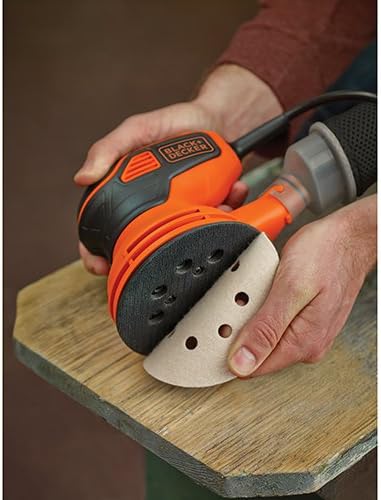
Image: Attaching a sanding disc to the sander's hook-and-loop pad.
4.2 Ịtinye Akpa Nchịkọta Uzuzu
Slide the dust collection bag onto the dust port at the rear of the sander until it is securely in place. Ensure a tight fit to maximize dust collection efficiency.

Image: The BLACK+DECKER random orbit sander with its dust collection bag attached.
4.3 Njikọ ike
Connect the sander's power cord to a standard 120V AC electrical outlet. Ensure the power switch is in the 'OFF' position before plugging in the tool.
5. Ntuziaka ọrụ
5.1 Turning On/Off the Sander
The BDERO600 features a paddle switch for easy activation. To turn on the sander, press down on the paddle switch. To turn it off, release the paddle switch. For continuous operation, some models may include a lock-on button; refer to your specific model's instructions if applicable.
5.2 Usoro Ịsa Ákwà
Place the sander flat on the workpiece before turning it on. Apply light, even pressure and move the sander in overlapping circular motions. Avoid pressing too hard, as this can reduce sanding efficiency and damage the workpiece or sander. The random orbit action helps prevent swirl marks, providing a smooth finish.
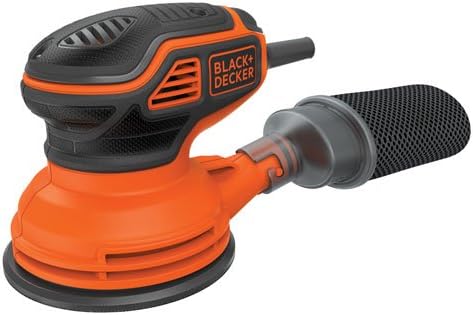
Image: The random orbit sander being used on a wooden surface.
5.3 Using IRWIN QUICK-GRIP Clamps
The IRWIN QUICK-GRIP Mini Bar Clamps are designed for one-handed operation to secure workpieces. To operate, squeeze the trigger to close the jaws and apply clamping pressure. To release, press the quick-release button. The non-marring pads protect your workpiece from scratches and scuffs.

Image: A 4-pack of IRWIN QUICK-GRIP Mini Bar Clamps.

Image: A person demonstrating the use of an IRWIN QUICK-GRIP clamp to hold a workpiece.
6. Nlekọta
6.1 Cleaning the Dust Collection Bag
Regularly empty and clean the dust collection bag to maintain optimal performance and prevent dust buildup. Detach the bag and shake out the accumulated dust. For thorough cleaning, use an air compressor to clear any remaining fine dust particles.
6.2 Replacing Sanding Discs
Replace sanding discs when they become worn or lose their abrasive quality. Simply peel off the old disc and press a new one firmly onto the hook-and-loop pad, ensuring proper alignment of the holes.
7. Nchọpụta nsogbu
- Sander not turning on: Check power connection. Ensure the paddle switch is fully engaged.
- Poor sanding performance: Replace worn sanding disc. Ensure proper pressure is applied. Clean dust collection system.
- Uzuzu gabigara ókè: Ensure dust collection bag is properly attached and not full. Consider attaching to a shop vacuum for improved dust extraction.
- Swirl marks on workpiece: Ensure light, even pressure. Avoid tilting the sander. Use a finer grit sandpaper for final passes.
8. Nkọwapụta
| Ụdị | OJI+DECKER |
| Nọmba nlereanya | BDERO600 |
| Isi Iyi Ike | Igwe ọkụ eletrik |
| Ihe nkwụnye AC ugbu a | 2.4 Amps |
| Dayameta diski | 5 sentimita asatọ |
| Ụdị grit (gụnyere) | Ọmarịcha (Akara 120) |
| Clamps gụnyere | IRWIN QUICK-GRIP Mini Bar, 6-inch, 4-Pack |
9. Akwụkwọ ikike na nkwado
For warranty information, technical support, or to order replacement parts, please refer to the official BLACK+DECKER and IRWIN websites or contact their customer service departments. Keep your purchase receipt as proof of purchase for warranty claims.


