Okwu mmalite
Thank you for choosing the Aiwa ESP-350WT True Wireless Stereo (TWS) Earbuds. This manual provides essential information on how to set up, operate, and maintain your earbuds to ensure optimal performance and longevity. Please read these instructions carefully before use.
Ihe ngwugwu
Biko lelee ngwungwu maka ihe ndị a:
- Aiwa ESP-350WT TWS Earbuds (Left and Right)
- Nchaji case
- USB Charging Cable (braided nylon)
- Silicone Eartips (Sizes S, M, L)
- Akwụkwọ ntuziaka
Ngwaahịa gafereview
The Aiwa ESP-350WT earbuds are designed for a comfortable and secure fit, offering high-quality wireless audio. Each earbud features intuitive touch controls for easy management of music and calls.
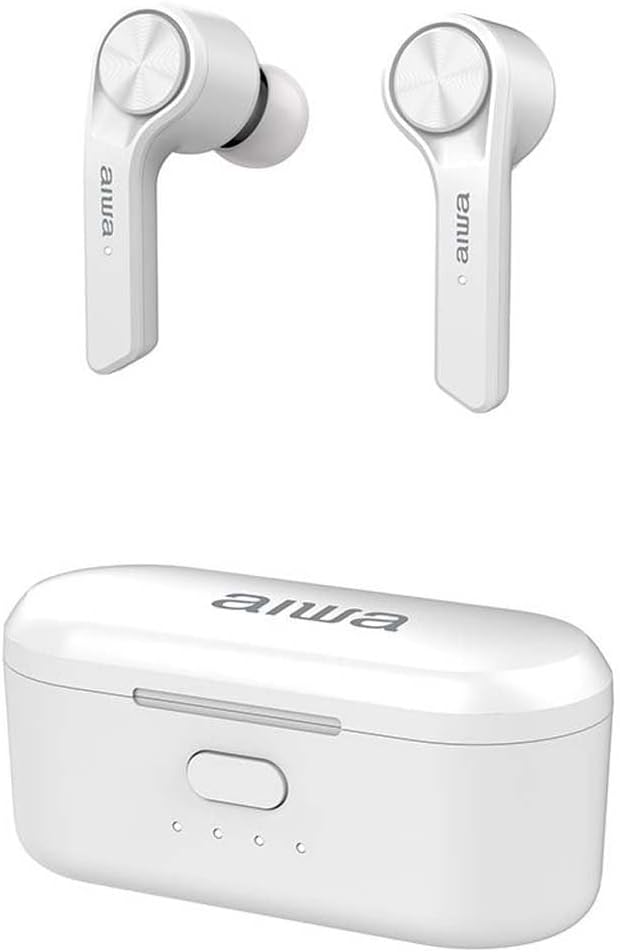
The Aiwa ESP-350WT True Wireless Stereo earbuds are shown alongside their compact white charging case. The earbuds feature a sleek design with the Aiwa logo visible on each stem.
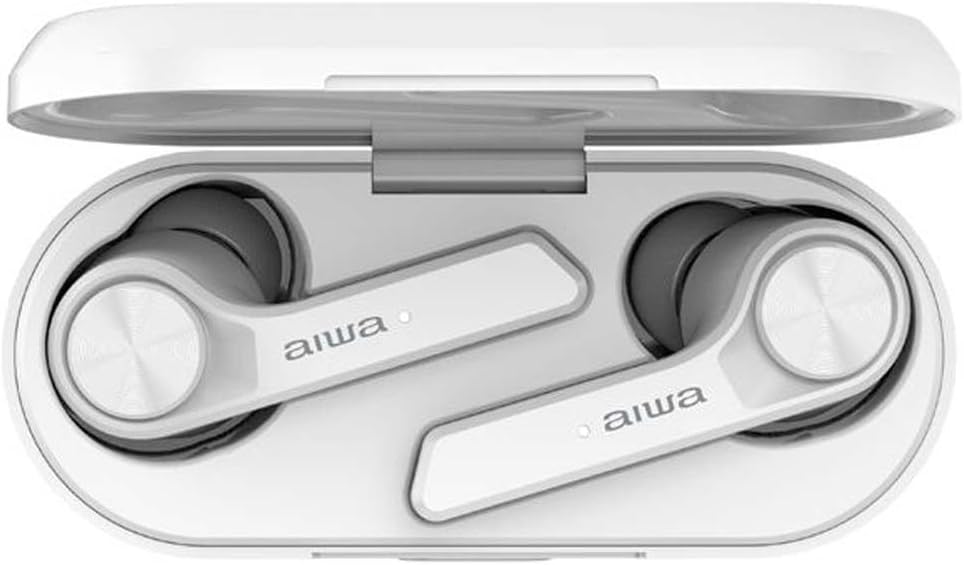
The Aiwa ESP-350WT earbuds are securely placed within their open charging case. This view demonstrates how the earbuds are stored and charged, with the charging contacts visible.
Melite
1. Ịchaji ihe ntị na akpa
Before first use, fully charge the earbuds and the charging case. The charging case provides approximately 12 hours of additional battery life for the earbuds.
- Tinye ekweisi n'ime akpa chaja. Hụ na ha dị n'ọnọdụ ziri ezi n'ebe ha dị (L maka aka ekpe, R maka aka nri).
- Connect the USB charging cable to the charging port on the case and to a compatible USB power source.
- The indicator lights on the charging case will illuminate to show charging status. Once fully charged, the lights may change or turn off.
2. Ijikọ na ngwaọrụ Bluetooth
The earbuds use Bluetooth 5.0 for a stable wireless connection.
- Mepee igbe nchaji. Igwe ntị ga-agbanye na-akpaghị aka wee banye ọnọdụ njikọta.
- Na ngwaọrụ gị (smartphone, tabletị, wdg), gbanye Bluetooth wee chọọ ngwaọrụ dịnụ.
- Select "Aiwa ESP-350WT" from the list of found devices.
- Once connected, you will hear an audible confirmation, and the earbud indicator lights will stop flashing.
- If pairing fails, place the earbuds back into the case, close it, and then repeat the steps.
Ntuziaka ọrụ
The Aiwa ESP-350WT earbuds feature touch controls on both earbuds for convenient operation.
Gbanyụọ/ Gbanyụọ
- Ike Na: Mepee igbe chaja, ma ọ bụ pịa ebe aka dị na ntị abụọ ahụ ruo sekọnd atọ.
- Gbanyụọ: Tinyeghachi ekweisi n'ime akpa chaja ma mechie mkpuchi ahụ, ma ọ bụ pịa ebe aka dị na ekweisi abụọ ahụ ruo sekọnd ise.
Egwu Egwu
- Gwuo/kwụsịtụ: Otu mgbata na ntị ntị.
- Track na-esote: Pịa bọtịnụ ntị aka nri ugboro abụọ.
- Gara aga Track: Kpatụ ntị ugboro abụọ n'akụkụ aka ekpe.
Njikwa Oku
- Azịza/Kwụsị Oku: Otu mgbata na ntị ntị.
- Jụ oku: Long-press the touch area on either earbud for 2 seconds.
Njikwa olu
- Olu elu: Pịa ugboro atọ na ntị ntị aka nri.
- Olu ala: Pịa ugboro atọ na ekwe ntị aka ekpe.
Nlekọta
Nhicha
- Regularly clean the earbuds, especially the eartips and charging contacts, with a soft, dry, lint-free cloth.
- Ejila kemịkalụ siri ike, ihe mgbaze, ma ọ bụ ncha siri ike.
- Hụ na kọntaktị chajị dị na ntị ekwe ntị na akpa ahụ enweghị uzuzu na ihe mkpofu iji mee ka chajị ahụ dị mma.
Nchekwa
- Mgbe ejighị ya, chekwaa earbuds n'ime akpa nchaji ha iji chebe ha ma debe ha ebubo.
- Chekwaa n'ebe dị jụụ, kpọrọ nkụ, pụọ na oke okpomọkụ na ìhè anyanwụ.
Nchọpụta nsogbu
If you encounter any issues with your Aiwa ESP-350WT earbuds, please refer to the following common solutions:
- Igwe ntị anaghị ejikọta: Ensure both earbuds are charged. Place them back in the case, close the lid, wait a few seconds, then open the lid to re-initiate pairing mode. Forget the device from your phone's Bluetooth settings and try pairing again.
- Enweghị ụda sitere na otu ntị ntị: Check if both earbuds are charged. Try resetting the earbuds by placing them in the case and then taking them out. Ensure your device's audio output is set to the earbuds.
- Nsogbu ịchaji: Verify that the charging cable is securely connected to both the case and the power source. Clean the charging contacts on the earbuds and inside the case. Try a different USB cable or power adapter.
- Olu dị ala: Hazie olu na ngwaọrụ gị ejikọtara yana iji njikwa mmetụ aka ntị.
Ọ bụrụ na nsogbu ahụ dịgidere, biko kpọtụrụ nkwado ndị ahịa maka enyemaka ọzọ.
Nkọwapụta
- Aha nlereanya: ESP-350WT
- Akara: Aịwa
- Teknụzụ Njikọta: Ikuku
- Teknụzụ nzikọrịta ozi ikuku: Bluetooth 5.0
- Ihe kpatara ụdị: N'ime ntị
- Mgbochi: 32 ohms
- Atụmatụ pụrụ iche: Lightweight, Touch Control
- Batrị: 1 Lithium-ion battery (rechargeable)
- Ihe: Silicone, Nylon (for cable)
- Agba: Ọcha
Akwụkwọ ikike na nkwado
Aiwa products are manufactured to high-quality standards. For information regarding warranty coverage, technical support, or service, please refer to the warranty card included in your package or visit the official Aiwa websaịtị. Debe ihe akaebe nke ịzụrụ maka akwụkwọ ikike.


