1. Okwu mmalite
Daalụ maka ịzụrụasing the TOPTRO X2 Mini Projector. This manual provides detailed instructions for setting up, operating, and maintaining your projector. Please read this manual thoroughly before use to ensure proper operation and to extend the lifespan of your device. Keep this manual for future reference.
Ozi nchekwa
- Elela anya ozugbo na oghere projector mgbe lamp dị na.
- Gbaa mbọ hụ na ikuku ikuku dị n'akụkụ ihe nrụpụta iji gbochie ikpo oke ọkụ.
- Ewepụla ihe nrụpụta mmiri ozuzo ma ọ bụ mmiri.
- Jiri naanị ihe nkwụnye ike enyere na ihe ngosi ahụ.
- Do not attempt to repair the projector yourself. Contact qualified service personnel for assistance.
- Debe ihe ngosi ahụ ka ọ ghara iru ebe okpomọkụ na anwụ na-acha kpọmkwem.
2. Ihe ngwugwu
Chọpụta na ihe niile dị na ngwugwu gị:
- TOPTRO X2 Mini Projector
- Njikwa anya
- Igwe ọkụ ọkụ
- HDMI USB
- Igwe AV
- Akwụkwọ ntuziaka onye ọrụ
- Lens mkpuchi

Image: The TOPTRO X2 Mini Projector shown with its carrying case and a smartphone displaying projected content. This image illustrates the compact size and portability of the projector, along with its primary function of displaying media.
3. Ngwaahịa gafereview
Projector Layout
Foto: Ihu na akụkụ view of the TOPTRO X2 Mini Projector, highlighting the lens, focus ring, and ventilation grilles. This provides a visual guide to the projector's external components.
Ọdụ ụgbọ mmiri ntinye/mpụta
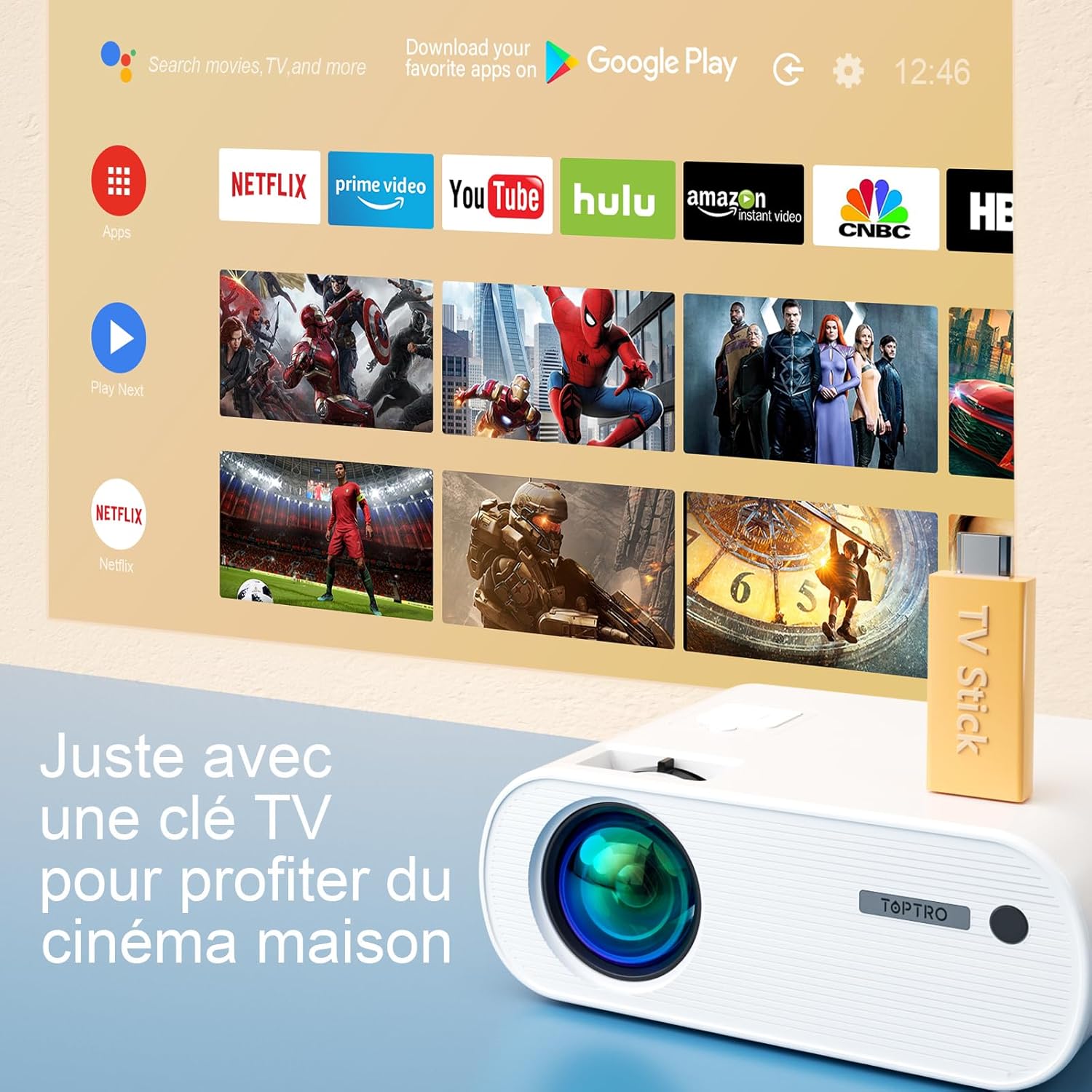
Image: Close-up of the rear panel of the TOPTRO X2 Mini Projector, showing various input/output ports including HDMI, USB, AV, and power input. This helps users identify where to connect their devices.
- Ntinye ike
- HDMI Port
- Ọdụ ụgbọ mmiri USB
- Ọdụ ụgbọ mmiri AV
- Ọdịnihu (3.5mm)
- Port VGA
- Oghere kaadị SD
Ogwe njikwa

Foto: N'elu-ala view of the TOPTRO X2 Mini Projector's control panel, showing navigation buttons and the power button. This image assists users in understanding the on-device controls.
The projector can be controlled using the onboard buttons or the included remote control.
4. Mbido Mbido
4.1 Na-agbanye ike
- Jikọọ eriri ọkụ eletrik ahụ na ntinye ike nke ihe ngosi ahụ wee jikọọ na ebe a na-etinye ọkụ eletrik.
- Pịa bọtịnụ ike dị na projector ma ọ bụ njikwa ime ka ịgbanwuo ngwaọrụ ahụ.
4.2 Ndozi anya
Rotate the focus ring on the projector lens until the projected image is clear and sharp.

Image: A hand adjusting the focus ring on the TOPTRO X2 Mini Projector, with a blurred image on the left and a sharp image on the right, demonstrating the effect of focus adjustment. This visual aid helps users understand how to achieve a clear picture.
4.3 Ndozi isi okwu
The TOPTRO X2 features 4D Keystone Correction (±40° vertical and horizontal) and a 100% X/Y zoom function, adjustable via the remote control. This allows for a rectangular image even if the projector is not perfectly aligned with the screen.

Image: Diagram illustrating the effect of keystone correction, showing a distorted image being corrected into a perfect rectangle. This helps users visualize the function of keystone adjustment.
Ka ịhazie:
- Navigate to the "Keystone Correction" menu using the remote control.
- Adjust the vertical and horizontal parameters until the image is rectangular.
- Use the zoom function (100% X/Y) to adjust the image size without moving the projector.
4.4 Nhọrọ ntinye
The projector can be placed on a table or mounted to the ceiling.

Image: An image showing the TOPTRO X2 Mini Projector in two different setups: on a table and ceiling-mounted. This demonstrates the versatility of installation options for the projector.
5. Ntuziaka ọrụ
5.1 Ịhọrọ Isi Iyi Ntinye
Press the "Source" button on the remote control or projector to select the desired input source (HDMI, USB, AV, VGA, Screen Mirroring).
5.2 Ngwa jikọọ
5.2.1 HDMI Njikọ
Connect your device (e.g., laptop, game console, TV Stick) to the projector's HDMI port using an HDMI cable.

Image: The TOPTRO X2 Mini Projector connected to a TV Stick, displaying various streaming service icons on a projected screen. This illustrates how to connect and use a TV stick for media consumption.
5.2.2 USB njikọ
Fanye draịva USB n'ọdụ ụgbọ mmiri USB iji kpọọ mgbasa ozi files ozugbo. Ihe ngosi ahụ na-akwado ụdị vidiyo dị iche iche, ọdịyo, na onyonyo.
5.2.3 AV njikọ
Use the provided AV cable to connect devices with AV output (e.g., DVD player).
5.2.4 VGA Njikọ
Connect a computer to the VGA port using a VGA cable.
5.2.5 Wireless Connection (WiFi Screen Mirroring)
The TOPTRO X2 supports wireless screen mirroring for Android and iOS devices.

Image: The TOPTRO X2 Mini Projector wirelessly connected to multiple devices (smartphone, tablet, laptop), projecting a scenic image. This demonstrates the projector's WiFi screen mirroring capability for various devices.
- Select "Screen Mirroring" as the input source.
- Follow the on-screen instructions to connect your smartphone or tablet to the projector's WiFi network, then enable screen mirroring on your device.
5.2.6 Bluetooth Audio Connection
Connect external Bluetooth speakers or headphones for enhanced audio experience.

Image: The TOPTRO X2 Mini Projector wirelessly connected via Bluetooth to external speakers and headphones, with sound waves emanating from the projector. This illustrates the projector's Bluetooth audio output feature.
- Ensure your Bluetooth audio device is in pairing mode.
- On the projector, navigate to the Bluetooth settings menu.
- Họrọ ngwaọrụ gị site na ndepụta iji jikọọ.
5.3 Nsorouzọ NchNhr
Use the arrow keys and "OK" button on the remote control or projector to navigate through the on-screen menus for settings such as picture mode, sound mode, and system settings.
6. Nlekọta
6.1 Ihicha oghere
Use a soft, lint-free cloth or lens cleaning paper to gently wipe the projector lens. Avoid using abrasive cleaners.
6.2 Nhicha Nzacha Uzuzu
The TOPTRO X2 features a removable dust filter to prevent dust accumulation and black spots on the projection. Regularly clean the filter to maintain optimal performance.
- Locate the removable dust filter cover on the side of the projector.
- Gently remove the cover and the filter.
- Clean the filter using a soft brush or compressed air.
- Reinsert the filter and close the cover securely.
6.3 Mgba ikuku
Ensure that the projector's ventilation openings are not blocked to allow for proper airflow and prevent overheating. The projector is equipped with a circulation cooling system and three independent smart fans to manage temperature.
7. Nchọpụta nsogbu
| Nsogbu | Ihe nwere ike ime | Ngwọta |
|---|---|---|
| Enweghị onyonyo na ihuenyo | Power not connected; Incorrect input source; Lens cap on | Check power connection; Select correct input source; Remove lens cap |
| Onyonyo edoghi anya | Focus not adjusted; Incorrect projection distance | Adjust focus ring; Adjust projector distance or use zoom function |
| Distorted image (trapezoid shape) | Projector adịghị n'akụkụ ihuenyo | Use keystone correction function |
| Enweghị ụda | Volume too low; Muted; Incorrect audio output selected | Increase volume; Unmute; Check audio settings and connections |
| Njikwa anya anaghị arụ ọrụ | Batteries dead; Obstruction between remote and projector | Replace batteries; Ensure clear line of sight |
| Ịdọ aka ná ntị ekpo oke ọkụ | Blocked ventilation; Prolonged use | Ensure vents are clear; Allow projector to cool down |
8. Nkọwapụta
| Njirimara | Nkọwa |
|---|---|
| Ụdị | TOPTRO |
| Nlereanya | X2 |
| Mkpebi obodo | 1920 x 1080P (Full HD) |
| Mkpebi akwadoro | Up to 4K Ultra HD |
| Icha ọkụ | 6800 Lumens (Note: Marketing claims may vary, e.g., 7000 or 12000 lumens) |
| Ọnụọgụ ọdịiche | 8000:1 |
| Nha amụma | Ruo 300 sentimita asatọ |
| Ogologo amụma | Recommended 3.5m, Max 7m |
| Keystone Ndozi | 4D (±40° Vertical & Horizontal) |
| Ọrụ Mbugharị | 100% X/Y |
| Lamp Ndụ | 90,000 awa (LED) |
| Ndị na-ekwu okwu | Built-in 10W Dual Subwoofer with SRS Sound |
| Njikọta | HDMI, USB, AV, VGA, WiFi, Bluetooth |
| Agba | Agba ntụ |
9. Akwụkwọ ikike na nkwado
Ozi akwụkwọ ikike
Please refer to the warranty card included in your package for detailed warranty terms and conditions. The warranty typically covers manufacturing defects for a specified period from the date of purchase.
Nkwado ndị ahịa
If you encounter any issues or have questions regarding your TOPTRO X2 Mini Projector, please contact TOPTRO customer support. Contact information can usually be found on the official TOPTRO websaịtị ma ọ bụ na kaadị akwụkwọ ikike.
When contacting support, please have your model number (X2) and purchase details ready.


