1. Okwu mmalite
This manual provides instructions for the Powerextra D-Tap Charger, designed for V Mount, V Lock, and Gold Mount batteries. It ensures efficient and safe charging for compatible camera batteries and other devices that utilize a D-Tap port for charging.

Image 1.1: Powerextra D-Tap Charger with its integrated D-Tap cable.
2. Ihe ngwugwu
Chọpụta na ihe niile dị na ngwugwu gị:
- 1 x Powerextra D-Tap Charger
- 1 x 100cm AC Charging Cable
- 1 x Microfiber akwa nhicha

Image 2.1: The D-Tap charger, AC power cable, and microfiber cloth included in the package.
3. Nkọwapụta
| Njirimara | Nkọwapụta |
|---|---|
| Ntinye AC | 100-240V / 0.8A |
| Mmepụta DC | 16.8V-2.0A |
| Mmepụta Voltage | 16.8 volts |
| Ibu Ibu | 8.1 ounces (ihe dị ka 230g) |
| Akụkụ ngwugwu | 6.14 x 3.58 x 1.46 sentimita asatọ |
| Asambodo | CE |
4. Nhazi
Follow these steps to set up your D-Tap Charger:
- Connect the AC Power Cable: Insert the included 100cm AC charging cable into the power input port on the charger unit.
- Tinye n'ime oghere ọkụ: Plug the other end of the AC charging cable into a standard wall power outlet (100-240V).
- Jikọọ na batrị: Insert the D-Tap connector from the charger into the D-Tap port on your compatible V Mount, V Lock, or Gold Mount battery. Ensure a secure connection.

Image 4.1: The D-Tap connector for battery connection.


Foto 4.2: Ọpụamples of compatible V-Mount, Gold Mount, and other D-Tap port batteries.
5. Ntuziaka ọrụ
Once the charger is connected to a power source and a compatible battery, it will begin charging automatically.
- Ngosipụta chaja: The charger features an LED indicator light to show the charging status.
- Ìhè uhie: Na-egosi na batrị ahụ na-achaji ugbu a.
- Ọkụ ndụ ndụ: Na-egosi na batrị chajịrịla ya.
The charger utilizes automatic constant current control to optimize charging speed and prevent overcharging.
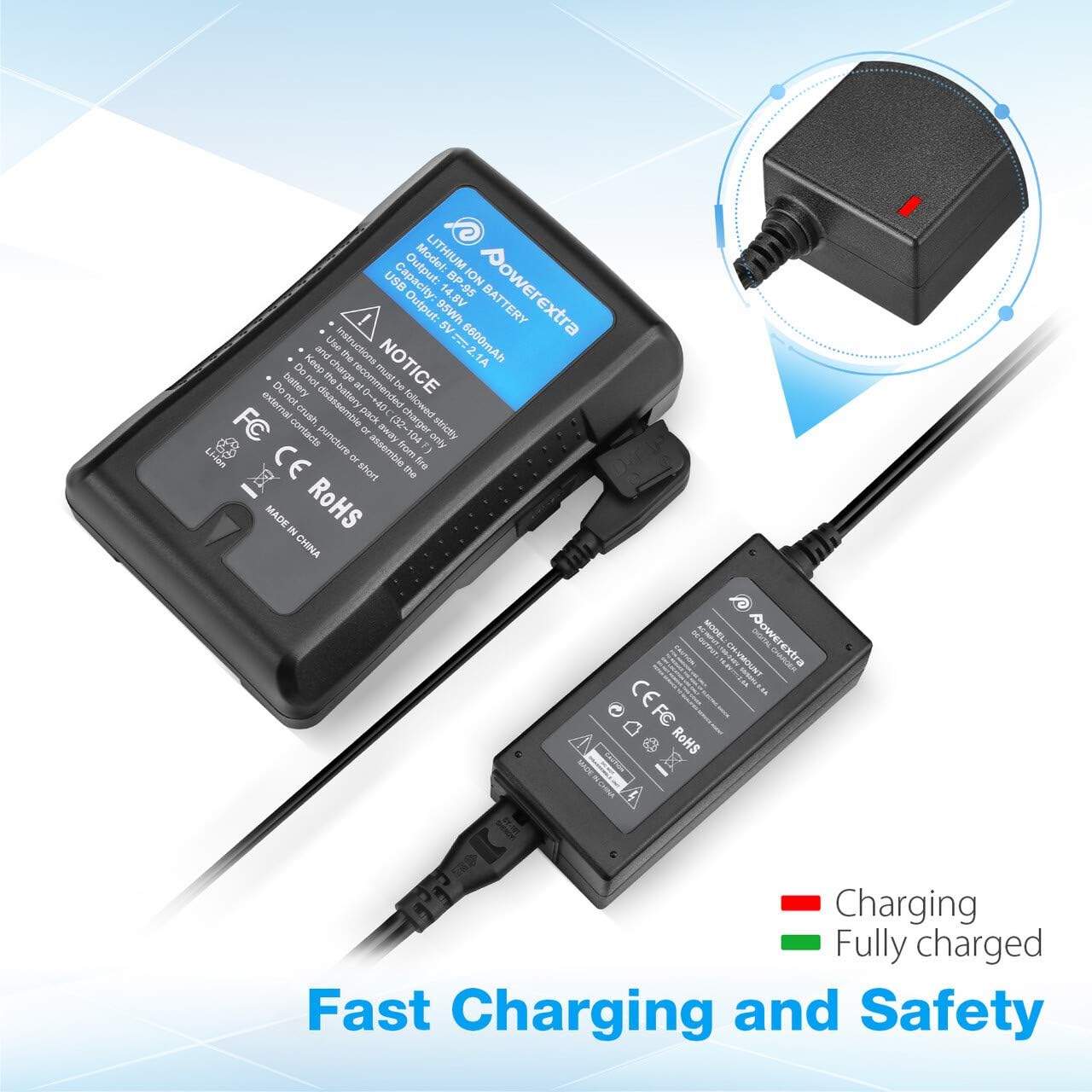
Image 5.1: Charger connected to a battery, with the red LED indicating active charging.
6. Ozi nchekwa
To ensure safe operation and prolong the life of your charger and batteries, please observe the following safety precautions:
- Nchekwa oke ụgwọ: The charger is designed to prevent batteries from overcharging.
- Nchekwa sekit dị mkpụmkpụ: Built-in mechanisms protect against short circuits.
- Karịrị Nchedo Ugbu a: Nchekwa megide oke eruba ugbu a.
- Over Heating Protection: Prevents the charger from overheating during operation.
- Nchedo nfefe karịrị: (Note: This protection is typically a feature of the battery itself, but the charger is designed to work safely with such batteries.)
- Use the charger only with compatible V Mount, V Lock, or Gold Mount batteries.
- Do not expose the charger to moisture, rain, or extreme temperatures.
- Ekwusala ma ọ bụ gbanwee chaja ahụ. Nye ndị ọrụ ruru eru ọrụ niile.
- Debe ebe ụmụaka na-apụghị iru.

Image 6.1: Visual representation of the multi-protection features including short circuit, over discharge, over current, over charge, and over heating protection.
7. Nlekọta
Proper maintenance ensures optimal performance and longevity of your charger:
- Nhicha: Use the provided microfiber cleaning cloth to gently wipe the charger and cables. Do not use liquid cleaners or solvents.
- Nchekwa: Chekwaa chaja n'ebe dị jụụ, kpọrọ nkụ pụọ na ìhè anyanwụ kpọmkwem na oke okpomọkụ mgbe ọ naghị eji ya.
- Nlekọta USB: Avoid bending or crimping the cables excessively. Always grasp the plug, not the cable, when disconnecting.
8. Nchọpụta nsogbu
If you encounter issues with your Powerextra D-Tap Charger, refer to the following common problems and solutions:
- chaja anaghị agba ọkụ:
- Ensure the AC power cable is securely connected to both the charger and the wall outlet.
- Hụ na ihe mkpuchi mgbidi ahụ na-arụ ọrụ site n'iji ngwaọrụ ọzọ nwalee ya.
- Batrị anaghị achaji:
- Check that the D-Tap connector is fully and correctly inserted into the battery's D-Tap port.
- Confirm that the battery is compatible with the charger and is not fully charged already (green LED).
- Inspect the D-Tap cable and connector for any visible damage.
- Indicator Light Not Functioning:
- If the charger is connected and the battery is not fully charged, but the light is off, contact customer support.
If the problem persists after attempting these solutions, please contact Powerextra customer support for further assistance.
9. Akwụkwọ ikike na nkwado
Powerextra provides the following for this D-Tap Charger:
- Akwụkwọ ikike: 12-month hassle-free warranty from the date of purchase.
- Nkwado: Nkwado teknụzụ ndụ oge niile.
For warranty claims, technical assistance, or any product-related inquiries, please contact Powerextra customer service through their official websaịtị ma ọ bụ onye na-ere ahịa ebe a zụrụ ngwaahịa ahụ.


