Okwu mmalite
This manual provides detailed instructions for the operation and maintenance of your GTMEDIA Z3 Portable DAB+/FM RDS Radio. Please read this manual thoroughly before using the device to ensure proper functionality and to maximize your listening experience.
Ozi nchekwa dị mkpa
- Ewepụla ngwaọrụ ahụ na mmiri ozuzo, mmiri mmiri ma ọ bụ oke okpomọkụ.
- Zere idobe ma ọ bụ idobe ngwaọrụ ahụ na mmetụta siri ike.
- Anwala ịkwasa ma ọ bụ rụkwaa unit ahụ n'onwe gị. Kpọtụrụ ndị ọrụ ruru eru ọrụ niile.
- Jiri naanị eriri nchaji akọwapụtara yana nkwụnye ọkụ.
- Debe ebe ụmụaka na-apụghị iru.
Ihe ngwugwu
Gbaa mbọ hụ na ihe niile dị na ngwugwu:
- 1 x GTMEDIA Z3 DAB+/FM Radio
- 1 x eriri USB
- 1 x Akwụkwọ ntuziaka onye ọrụ

Image: The GTMEDIA Z3 radio, its retail box, USB charging cable, and user manual.
Ngwaahịa gafereview
The GTMEDIA Z3 is a portable DAB+/FM RDS radio featuring a 2.4-inch TFT-LCD screen. It supports 60 preset stations for both DAB+ and FM, and includes functions such as clock, alarm, and sleep timer. The device is powered by a rechargeable 18650 lithium battery.
Njikwa ihu ihu na ngosipụta
- Ike/Bọtịnụ njikere: Turns the radio on/off or puts it in standby mode.
- Bọtịnụ nyocha: Initiates station scanning.
- Bọtịnụ DAB/FM: Switches between DAB+ and FM modes.
- Bọtịnụ menu: Na-abanye na menu isi.
- EQ bọtịnụ: Na-edozi ntọala nhazi nhata.
- Bọtịnụ akwadoro: Accesses preset stations.
- Volume/Select Knob: Adjusts volume and navigates/selects menu options.
- 2.4-inch TFT-LCD Display: Na-egosi ozi ọdụ ụgbọ mmiri, oge, na nhọrọ menu.
Rear Panel and Ports
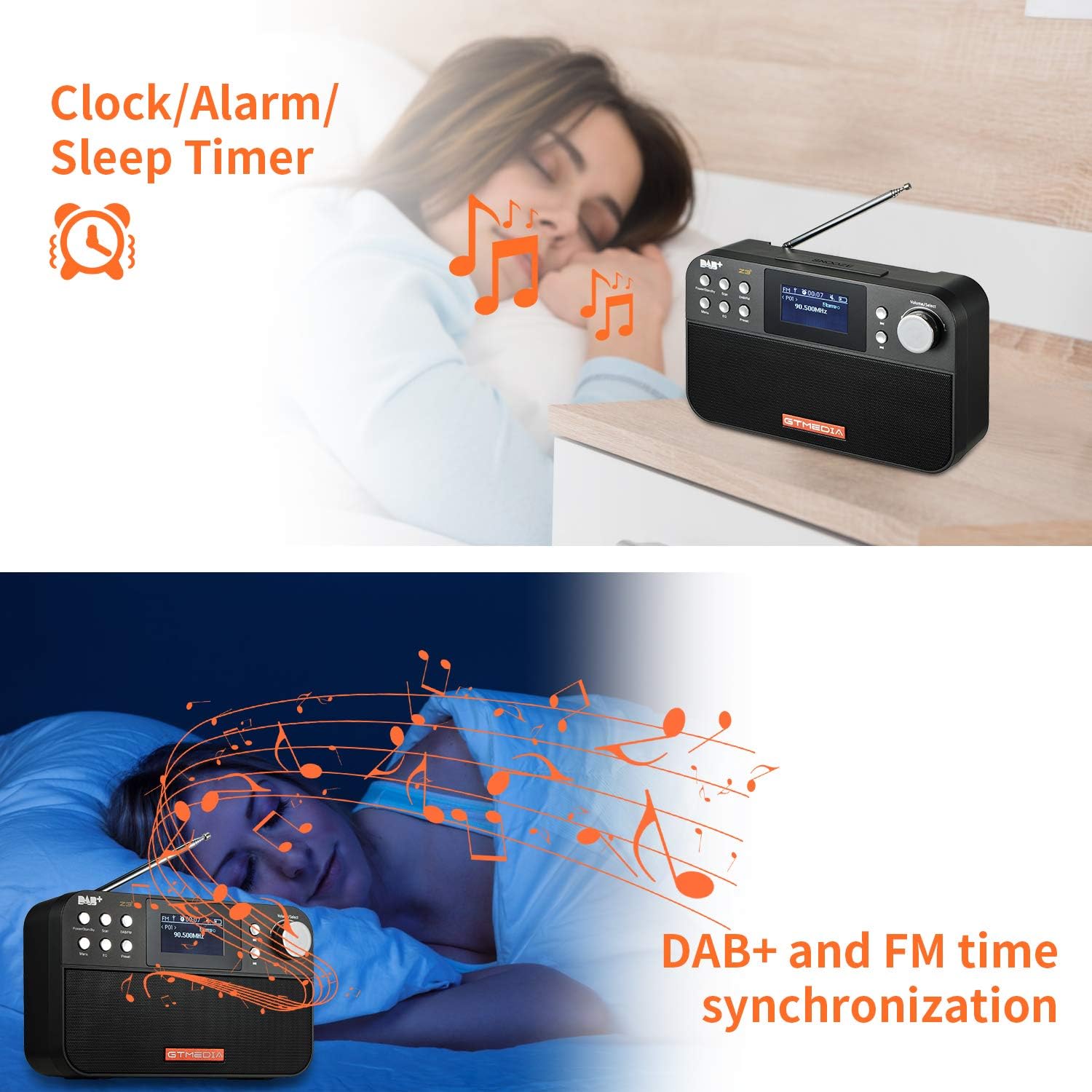
Image: The back of the GTMEDIA Z3 radio, highlighting the 18650 lithium battery compartment and the DC 5V USB charging port.
- 18650 Lithium Battery Compartment: Na-edobe batrị enwere ike ịchaji.
- DC 5V USB Charging Port: Maka ịchaji ngwaọrụ.
Ntuziaka nhazi
1. Ịchaji batrị
- Locate the USB charging port on the rear of the radio.
- Connect the provided USB charging cable to the radio and to a compatible USB power adapter (DC 5V, ≥1500mA) or a computer USB port.
- The battery indicator on the display will show charging status. A full charge typically provides 4-7 hours of operation.
Image: The GTMEDIA Z3 radio's rear panel, illustrating the USB charging port and battery specifications.
2. Nhọrọ Ike Mbụ na Asụsụ
- Pịa ma jide Ike/Njikere bọtịnụ iji gbanye redio.
- Upon first use, you may be prompted to select a language. Use the Volume/Select knob to navigate and press to confirm your choice. English is the default language.
3. Mmekọrịta oge
The clock can be set manually or synchronized automatically with DAB+ or FM signals.
- Mmekọrịta akpaaka: When tuned to a DAB+ or FM station that broadcasts time information, the radio will automatically update its clock.
- Ndozi akwụkwọ ntuziaka: Access the system settings via the NchNhr button to manually set the time and date.
Ntuziaka ọrụ
1. Radio Modes (DAB+/FM)
Ụdị mgbanwe:
Pịa DAB/FM button to switch between DAB+ and FM radio modes.
Scanning for Stations:
- Nyocha Akpaaka (FM): Na ọnọdụ FM, pịa Nyochaa bọtịnụ iji chọọ ma chekwaa ọdụ ndị dị na akpaghị aka.
- Local Scan (DAB+): Na ọnọdụ DAB+, pịa bọtịnụ Nyochaa button to perform a local scan for DAB+ stations. Manual tuning is also supported.
Ebe ndị a na-ahazigharị:
The radio supports 60 preset stations for both FM and DAB+ (10 quick access presets). To save a station:
- Tinyegharịa n'ọdụ ụgbọ mmiri achọrọ.
- Pịa ma jide Ntọala bọtịnụ.
- Jiri ihe Volume/Select knob to choose a preset number and press to confirm.
To recall a preset station, briefly press the Ntọala bọtịnụ ma jiri ya Volume/Select mkpịsị aka ịhọrọ.
FM RDS Station Name Display:
When tuned to an FM station broadcasting RDS (Radio Data System) information, the 2.4-inch TFT-LCD screen will display the station name and other relevant data.
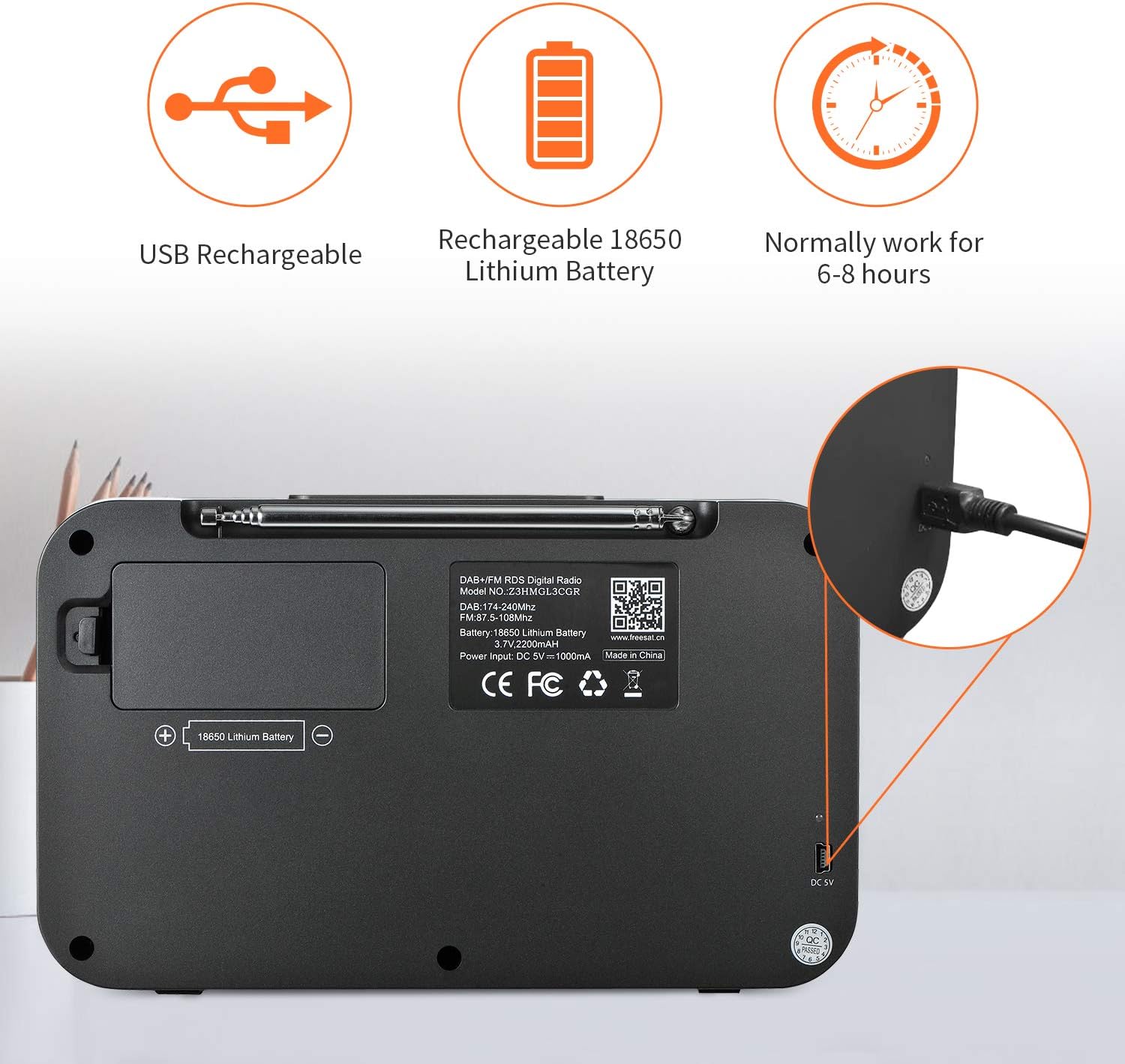
Image: The GTMEDIA Z3 radio's display showing "FM" and "90.500MHz" along with a station name, demonstrating the RDS feature.
2. Clock, Alarm, and Sleep Timer
The GTMEDIA Z3 radio includes integrated clock, alarm, and sleep timer functions for enhanced convenience.

Image: The GTMEDIA Z3 radio with icons representing clock, alarm, and sleep timer functions, depicted in a bedroom setting.
Ịtọ ntọala mkpu:
- Pịa NchNhr button and navigate to the "Alarm" settings.
- Jiri ihe Volume/Select knob to set the alarm time, duration, and alarm source (e.g., buzzer, DAB+, FM).
- Kwenye na ntọala gị.
Ịtọ oge ụra:
- Pịa NchNhr button and navigate to the "Sleep Timer" settings.
- Jiri ihe Volume/Select knob to choose the desired sleep duration (e.g., 15, 30, 60 minutes).
- Redio ga-agbanyụ na-akpaghị aka ka oge edochara.
3. Nghaghachi egwu
The GTMEDIA Z3 supports playback of various music formats including MP3, FLAC, and WAV. Playback modes include single play, repeat, and shuffle. Specific instructions for accessing and controlling music playback are typically found within the device's menu system.
Nlekọta
Nhicha:
- Wipe the radio with a soft, dry cloth.
- Ejila ihe nhicha mmiri ma ọ bụ ihe ndị na-eme ka ihe dị nro mee ihe.
Nlekọta batrị:
- Ka ịgbatị ndụ batrị ogologo, zere ịchaji batrị ugboro ugboro.
- Charge the battery regularly, even if the radio is not in frequent use.
- Chekwaa redio ahụ n'ebe dị jụụ na nkụ mgbe ọ naghị eji ya ogologo oge.
Nchọpụta nsogbu
| Nsogbu | Ihe nwere ike ime | Ngwọta |
|---|---|---|
| Enweghị ike | Agbanyụrụ batrị. | Chajịa batrị site na iji eriri USB enyere. |
| Nnabata redio adịghị mma | Weak signal; antenna not extended. | Extend the telescopic antenna fully. Try repositioning the radio. Perform a new scan for stations. |
| Enweghị ụda | Volume too low; Mute activated. | Mee ka olu site na iji Volume/Select knob. Check if mute is active in settings. |
| Ngosipụta edoghị anya | Ọkụ dị oke ala. | Adjust LCD brightness in the system settings. |
Nkọwapụta
| Njirimara | Nkọwa |
|---|---|
| Ụdị | GTMEDIA |
| Nlereanya | Z3 |
| Nkà na ụzụ Tuner | DAB Plus, FM RDS |
| Ndị otu redio akwadoro | DAB+ (174.92-239.20 MHz), FM (87.5-108 MHz) |
| Ngosipụta | 2.4-inch TFT-LCD (240 x 320 pixels) |
| Ebe atọrọ ụzọ | 60 FM, 60 DAB+ |
| Isi Iyi Ike | Akwanyere batrị |
| Ụdị batrị | 18650 Lithium Battery (3.7V 2200mAh) |
| Oge ọrụ | 4-7 hours (typical) |
| Nchaji ntinye | DC 5V, ≥1500mA (via USB) |
| Teknụzụ Njikọta | USB |
| Njirimara Pụrụ Iche | Portable, Clock, Alarm, Sleep Timer, USB Upgradeable |
| Ibu Ibu | 620 g |
| Akụkụ ngwaahịa | 20 x 5 x 12 cm |
| Okpomọkụ na-arụ ọrụ | 0 ~ + 45 Celsius C |
| Okpomọkụ nchekwa | -10 ~ + 60 Celsius |
| Ụdị egwu | MP3, FLAC, WAV |

Image: Dimensions of the GTMEDIA Z3 radio, showing approximate measurements of 200mm x 120mm x 50mm.
Nkwalite ngwa ngwa
The GTMEDIA Z3 radio supports firmware upgrades via a USB connection to a PC. For the latest firmware and detailed instructions, please visit the official support websaịtị.

Image: The GTMEDIA Z3 radio connected to a laptop via a USB cable, indicating its upgradeable feature.
Akwụkwọ ikike na nkwado
For technical support, warranty information, or any questions regarding your GTMEDIA Z3 radio, please visit the official GTMEDIA support websaịtị:


