1. Introduction to Big Magic PEMF Mat
The MiraMate Big Magic is an advanced Pulsed Electromagnetic Field (PEMF) therapy mat system designed to provide a beneficial PEMF experience. Unlike TENS devices, PEMF technology works by delivering magnetic fields that can penetrate deeply, offering a wide range of wellness benefits including pain reduction, enhanced sleep, and improved energy levels.
This device utilizes a 7.83 Hz (Schumann Resonance) Square Wave and offers two distinct power levels, with a maximum intensity of up to 80 Gauss. Its compact size (approximately 1 foot 11 inches by 7 inches) makes it versatile for application on various body parts such as the back, pelvis, arms, knees, or legs. The bi-directional pulse mechanism ensures continuous cellular stimulation without overcharging, promoting maximum effectiveness.
2. Ihe ngwugwu
Upon opening your MiraMate Big Magic package, please verify that all components are present and in good condition:
- MiraMate Big Magic PEMF Mat
- Ngalaba njikwa
- Ihe nkwụnye ọkụ
- eriri USB (maka ike)
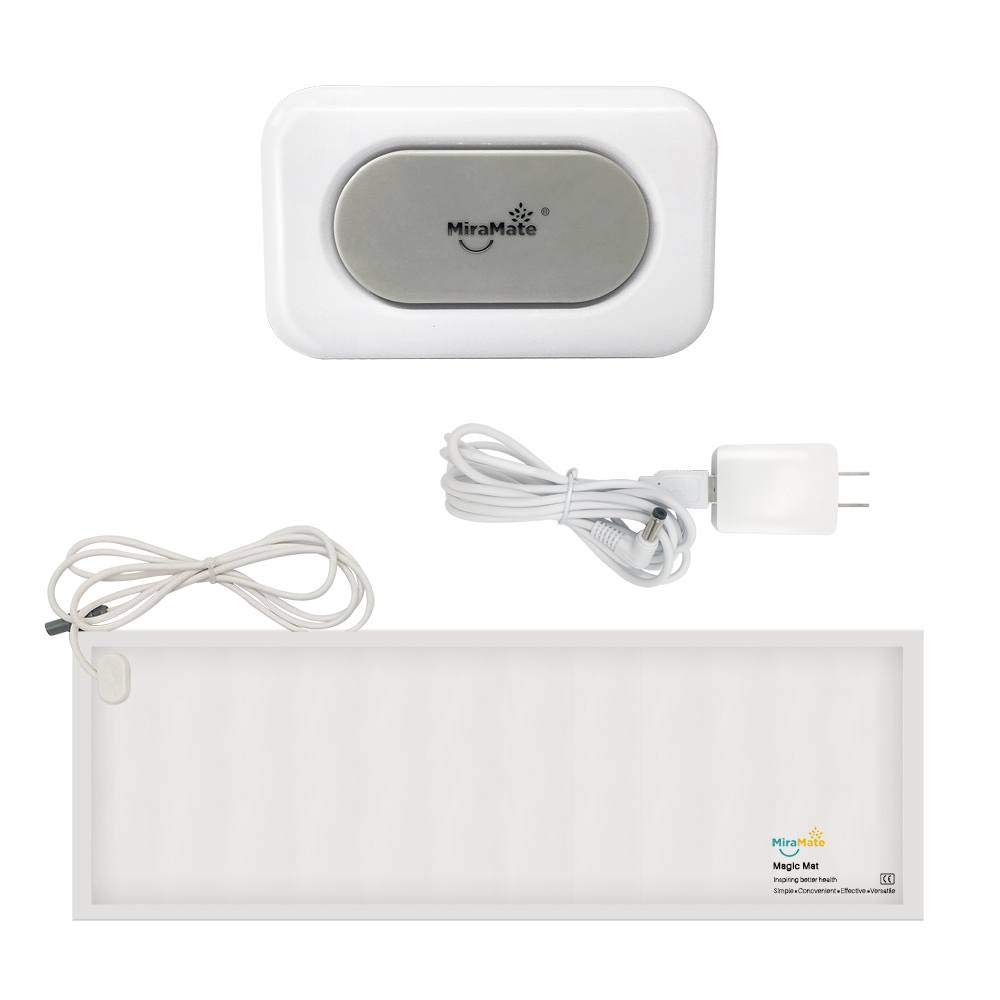
Figure 2.1: All components included with the MiraMate Big Magic PEMF Mat system.
3. Nhazi ntuziaka
Follow these steps to set up your MiraMate Big Magic PEMF Mat:
- Connect the Mat: Locate the connector cable from the Big Magic Mat and plug it securely into the designated port on the control unit.
- Njikọ Ike: Plug the USB cable into the USB port on the control unit. Connect the other end of the USB cable to the provided power adapter, then plug the power adapter into a standard electrical outlet. Alternatively, the USB cable can be connected to any compatible 5VDC USB power source.
- Nkwanye: Place the Big Magic Mat on a flat surface or position it comfortably on the area of your body you wish to treat. Ensure the mat is not folded or creased excessively during use.

Figure 3.1: The control unit with its USB power input and mat connection port.
4. Operating the Big Magic PEMF Mat
The Big Magic Mat is designed for ease of use. Here's how to operate it:
- Ike Na: Once connected to power, locate the power switch on the control unit and slide it to the 'On' position.
- Họrọ Ọkwa Ike: The control unit features a switch to select between two intensity levels. Start with the lower intensity setting (Level I) and gradually increase to the higher intensity (Level II) if comfortable and desired. The Big Magic Mat provides a peak intensity of 80 Gauss.
- Ogologo oge: Typical sessions can range from 30 minutes to several hours, depending on personal preference and desired outcome. The mat can be used before sleep, in the morning, or during an afternoon power nap.
- Gbanyụọ: After your session, slide the power switch on the control unit to the 'Off' position and disconnect the power adapter from the outlet.

Ọgụgụ 4.1: Ọpụample of the Big Magic Mat being used for back support and therapy.
5. Nlekọta na nlekọta
To ensure the longevity and optimal performance of your MiraMate Big Magic PEMF Mat, follow these maintenance guidelines:
- Nhicha: Wipe the mat and control unit with a soft, damp cloth. Do not use harsh chemicals, abrasive cleaners, or immerse the device in water.
- Nchekwa: Store the mat flat or gently rolled in a cool, dry place away from direct sunlight and extreme temperatures. Avoid sharp folds or creases.
- Ijikwa: Handle the mat and control unit with care. Avoid dropping or subjecting them to strong impacts.
6. Nchọpụta nsogbu
If you encounter any issues with your MiraMate Big Magic PEMF Mat, refer to the following common troubleshooting steps:
- Ngwaọrụ anaghị agba ọkụ:
- Ensure the power adapter is securely plugged into a working electrical outlet.
- Verify that the USB cable is firmly connected to both the control unit and the power adapter.
- Check that the power switch on the control unit is in the 'On' position.
- No Sensation During Use:
- PEMF therapy is often subtle and may not produce a strong physical sensation. This is normal.
- Ensure the mat is correctly connected to the control unit.
- Try switching to the higher intensity level (Level II) if you are currently on Level I.
- Mkpọtụ ma ọ bụ isi na-adịghị ahụkebe:
- Immediately discontinue use and disconnect the power. Contact customer support for assistance.
7. Nkọwapụta
| Njirimara | Nkọwa |
|---|---|
| Ụdị | MiraMate |
| Nlereanya | Nnukwu Ime Anwansi PEMF Mat |
| ASIN | B08BNMZ5FS |
| Ugboro ugboro | 7.83 Hz (Schumann Resonance) |
| Waveform | Square Wave |
| Ọkwa ike | 2 (Obere, Elu) |
| Oke kacha ike | Up to 80 Gauss |
| Akụkụ Mat | Approx. 1 ft 11 in x 7 in |
| Ibu Ibu | 3 n'arọ |
| Ntinye ike | 5VDC via USB |
8. Important Information and Legal Disclaimer
Nkwusa iwu: Products, reviews, and any content provided are not intended to be used to diagnose, treat, cure, or prevent any disease. We do not make any medical claims as to the benefits of the PEMF devices presented or sold. These are not medical devices. Please read all contraindications and the user manual thoroughly before use. All product names, trademarks, and registered trademarks are the property of their respective owners.
It is recommended to consult with a healthcare professional before starting any new therapy, especially if you have pre-existing medical conditions or are pregnant.
9. Akwụkwọ ikike na nkwado
For warranty information, technical support, or any inquiries regarding your MiraMate Big Magic PEMF Mat, please contact MiraMate customer service directly. Refer to the product packaging or the official MiraMate websaịtị maka nkọwa kọntaktị kachasị ugbu a.
When contacting support, please have your product model (Big Magic PEMF Mat) and ASIN (B08BNMZ5FS) readily available.


