1. Okwu mmalite
This manual provides essential instructions for the safe and efficient use of your LIFX Color Smart LED Bulb. The LIFX Color bulb offers a wide spectrum of colors and white tones, controllable via Wi-Fi without the need for a separate hub. It is designed to enhance your lighting experience with smart features and energy efficiency.

Image: The LIFX Color Smart LED Bulb alongside its product packaging, highlighting its features.
Akụkụ ndị bụ isi:
- Billions of Colors: Access a vast range of colors and a wide cool-to-warm white spectrum (1500K to 9000K).
- 800 Lumen ihie: Na-enye ample ìhè maka dị iche iche ntọala.
- E26 Edison Screw Base: Standard fitting for easy installation.
- Njikọ Wi-Fi: Connects directly to your 2.4GHz Wi-Fi network, no hub required.
- Njikwa olu: Compatible with Alexa, Apple HomeKit/Siri, and Hey Google.
- Scheduling & Scenes: Customize lighting schedules and create personalized scenes.
2. Ozi nchekwa
Please read and follow these safety guidelines to prevent injury or damage to the product.
- Eji ime ụlọ naanị: This bulb is designed for indoor use in dry locations.
- Nwụnye nke ọma: Hụ na agbanyụrụ ọkụ tupu ị wụnye ma ọ bụ wepụ bọlbụ ahụ.
- Voltage ndakọrịta: Use only within the specified voltage range (AC 100-240V, 50/60 Hz).
- Zenarị ihe ejikọtara: Do not use in fully enclosed luminaires as this may reduce bulb life.
- Mgbanwe dimmer: Do not use with standard dimmer switches. Dimming is controlled via the app or voice assistants.
- mkpofu: Tụfuo ihe mkpofu eletrọniki n'ụzọ kwesịrị ekwesị dịka iwu obodo si dị.
3. Ihe ngwugwu
Your LIFX Color Smart LED Bulb package should contain the following:
- 1 x LIFX Color Smart LED Bulb (E26 Edison Screw)
4. Ntuziaka Nhazi
4.1 Nwụnye anụ ahụ
- Ensure the power to the light fixture is turned off at the switch.
- Carefully screw the LIFX Color Smart LED Bulb into a standard E26 Edison screw socket. Do not overtighten.
- Turn the power back on at the switch. The bulb should illuminate with a default white light.

Image: A visual guide showing the three simple steps for setting up the LIFX bulb: screwing it into a lamp, downloading the app, and enjoying the light.
4.2 Ngwa nbudata na njikọ Wi-Fi
- Download the official LIFX app from the Apple App Store or Google Play Store.
- Open the LIFX app and create an account or log in.
- Follow the in-app instructions to add your new LIFX bulb. This typically involves scanning a QR code on the bulb or its packaging and connecting to your home's 2.4GHz Wi-Fi network.
- Ensure your mobile device is connected to the 2.4GHz Wi-Fi network during the setup process.
4.3 Ntinye aka onye enyemaka olu
The LIFX Color bulb is compatible with popular voice assistants. Follow the instructions within your preferred voice assistant's app to link your LIFX account.
- Amazon Alexa: Enable the LIFX skill in the Alexa app and discover devices.
- Apple HomeKit/Siri: Use the Home app on your iOS device to add the accessory.
- Ndewo Google: Link your LIFX account in the Google Home app.

Image: A collage of logos indicating compatibility with various smart home platforms and voice assistants.
5. Ntuziaka ọrụ
5.1 Controlling Color and Brightness
Use the LIFX app to adjust the bulb's color and brightness. The app features a color wheel and sliders for precise control.
- Open the LIFX app and select your bulb.
- Drag your finger across the color wheel to choose a desired color.
- Adjust the brightness slider to set the light intensity from 1% to 100%.
- For white light, select from the warm to cool white spectrum options.

Image: A smartphone displaying the LIFX app interface, featuring a color wheel for selecting light colors and adjusting brightness.
5.2 Njikwa olu
Once integrated with a voice assistant, you can control your LIFX bulb using simple voice commands.
- "Alexa, gbanye ọkụ ọnụ ụlọ."
- "Hey Google, set the kitchen light to blue."
- "Siri, dim the bedroom light to 50%."
- "Alexa, set the kitchen to 'Frozen'."

Image: A person in a kitchen interacting with a voice assistant to control the lighting, demonstrating hands-free operation.
5.3 Scheduling and Scenes
Automate your lighting to fit your daily routine or create custom ambiances.
- Usoro: In the LIFX app, set specific times for your lights to turn on/off, change color, or adjust brightness. For example, schedule lights to gradually brighten in the morning for a gentle wake-up or dim in the evening for winding down.
- Ihe nkiri: Create and save custom lighting configurations (e.g., "Movie Night," "Relax," "Party"). Activate these scenes with a single tap in the app or via voice command.
- Nchekwa: Use scheduling to make it appear as if someone is home when you are away.

Foto: Mputa view of a house at dusk, illustrating how scheduled lighting can provide added security by making it appear occupied.

Image: A person waking up in bed as a smart light gradually brightens, demonstrating the use of light as an alarm clock replacement.
6. Nlekọta
The LIFX Color Smart LED Bulb requires minimal maintenance.
- Nhicha: Ensure the bulb is cool and the power is off before cleaning. Wipe with a soft, dry cloth. Do not use liquid cleaners or abrasive materials.
- Nchekwa: If storing the bulb, keep it in its original packaging or a protective container in a cool, dry place.
7. Nchọpụta nsogbu
If you encounter issues with your LIFX Color Smart LED Bulb, refer to the following common solutions:
| Nsogbu | Ngwọta enwere ike |
|---|---|
| Bulb not connecting to Wi-Fi/App |
|
| Bulb is unresponsive or offline |
|
| Iwu olu anaghị arụ ọrụ |
|
8. Nkọwapụta
Detailed technical specifications for the LIFX Color Smart LED Bulb (Model: L3A19LC08E26US):
| Njirimara | Nkọwa |
|---|---|
| Aha Nlereanya | LIFX Color - 800 Lumens |
| Nọmba nlereanya | L3A19LC08E26US |
| Ụdị ọkụ | Ikanam |
| Nha Ụdị Bọlbụ | A19 |
| Isi Bulb | E26 |
| Icha ọkụ | 800 Lumen |
| Wattage Jiri | 9.0W at full brightness |
| Incandescent Dị | 60W |
| Voltage Oke | AC 100-240V 50/60 Hz |
| Okpomọkụ agba | 1500K ruo 9000K |
| Ndekọ ngosi agba (CRI) | 80 |
| Angle Beam | 235° |
| Na-ebelata | Software dimming 1% - 100% |
| Wi-Fi | 2.4GHz (WPA, WPA2 Security) |
| Akụkụ (W x H) | 2.36 in x 4.13 in (60mm x 105mm) |
| Ihe onwunwe | Aluminom, plastic |
| Nkezi Ndụ | 206,432 Hours (approx. 22.8 years) |
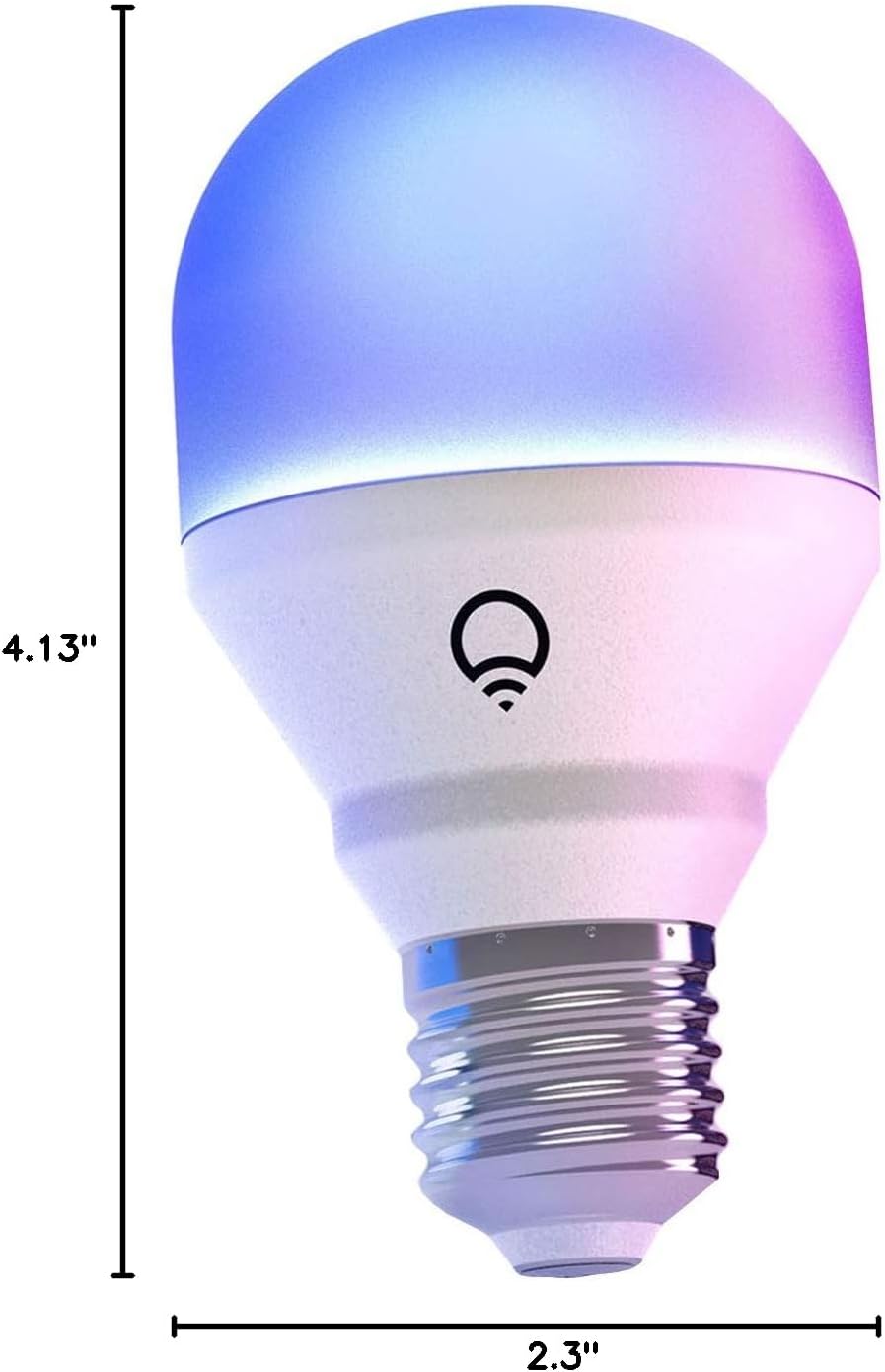
Image: A diagram illustrating the physical dimensions of the LIFX Color Smart LED Bulb.
9. Akwụkwọ ikike Ozi
The LIFX Color Smart LED Bulb comes with a 2-afọ akwụkwọ ikike. Please retain your proof of purchase for warranty claims. For specific terms and conditions, refer to the official LIFX websaịtị ma ọ bụ kpọtụrụ nkwado ndị ahịa.
10. Nkwado
Maka enyemaka ọzọ, nkwado teknụzụ, ma ọ bụ ka view frequently asked questions, please visit the official LIFX support website. You can typically find contact information for customer service on their websaịtị kwa.
Akụrụngwa dị n'ịntanetị:
- LIFX Official Websaịtị: www.lifx.com
- Support Section: Refer to the support or FAQ section on the official website for troubleshooting guides and contact options.


