Okwu mmalite
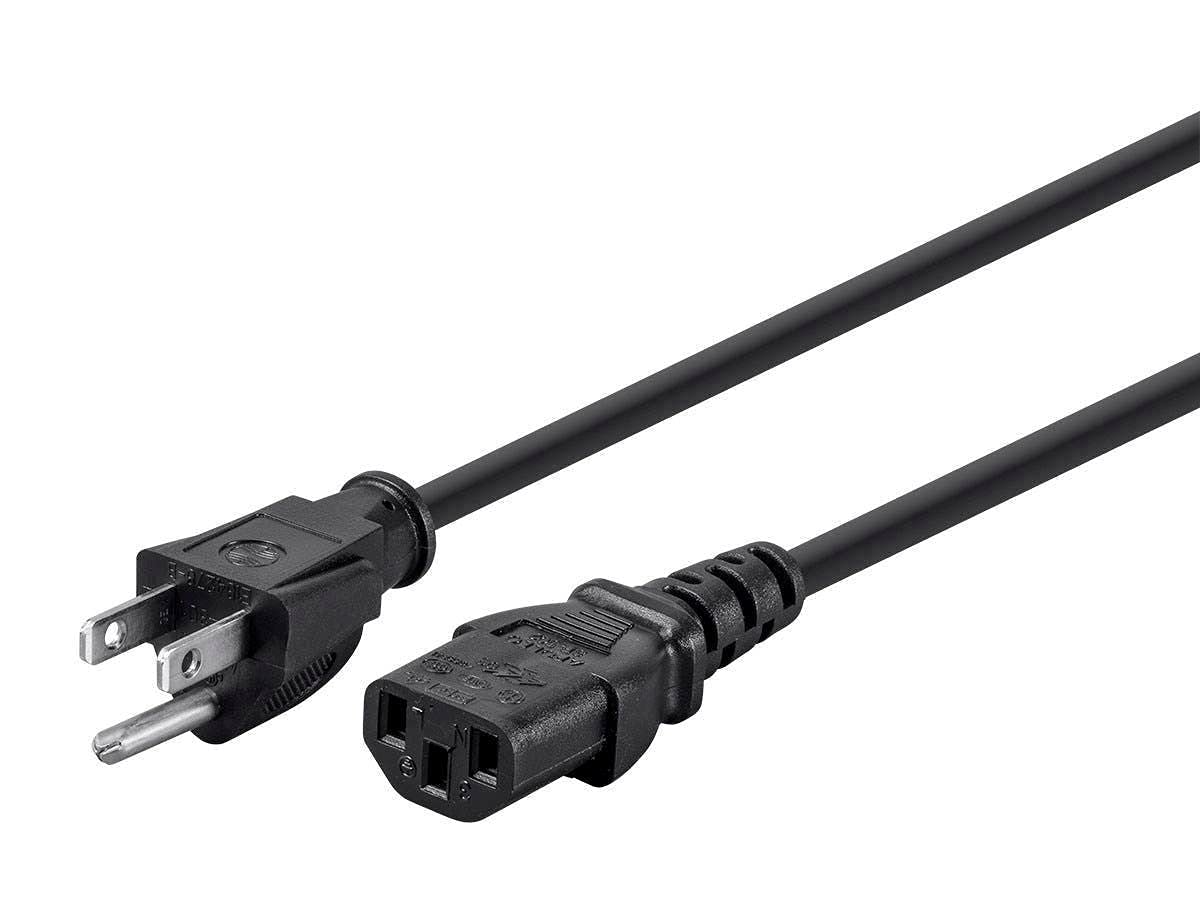
This manual provides essential information for the safe and effective use of your Monoprice 14AWG NEMA 5-15P to IEC 60320 C13 Power Cord. This power cord is designed to connect devices with an IEC 60320 C14 panel connector, such as PCs, monitors, scanners, and printers, to a standard North American AC wall outlet. Its 14AWG construction ensures robust power delivery for demanding applications.
Ozi nchekwa
Please read and understand all safety instructions before using this product. Failure to follow these instructions may result in electric shock, fire, or damage to equipment.
- Do not exceed the maximum current rating: This power cord is rated for a maximum of 15 Amps. Ensure that the total current draw of connected devices does not exceed this limit.
- Proper grounding: The NEMA 5-15P plug is grounded. Always connect it to a properly grounded AC outlet to prevent electrical hazards.
- Zere mmebi: Do not bend, twist, or crimp the power cord excessively. Inspect the cord regularly for any signs of damage, such as cuts, fraying, or exposed wires. Discontinue use if damaged.
- Ime ụlọ jiri naanị: This power cord is intended for indoor use in dry locations. Do not expose it to moisture or extreme temperatures.
- Secure connections: Ensure both the NEMA 5-15P plug and the IEC 60320 C13 connector are fully and securely inserted into their respective ports. Loose connections can cause overheating.
Melite
Follow these steps to properly set up your Monoprice power cord:
- Identify connectors: Locate the NEMA 5-15P (standard 3-prong wall plug) and the IEC 60320 C13 (female connector for devices) ends of the power cord.
- Jikọọ na ngwaọrụ: Insert the IEC 60320 C13 connector into the corresponding male IEC 60320 C14 inlet on your device (e.g., computer power supply, monitor). Ensure a firm connection.
- Jikọọ na isi iyi ike: Plug the NEMA 5-15P end of the power cord into a standard, grounded North American AC wall outlet, UPS, or other compatible AC power source.
For a visual comparison of the cable's thickness and quality, please refer to the video below:
Ntuziaka ọrụ
Once properly connected, the Monoprice power cord will supply power to your device. No further operational steps are required for the cord itself. Ensure your device's power switch is in the 'On' position if applicable.
Nlekọta
To ensure the longevity and safe operation of your power cord, follow these maintenance guidelines:
- Nhicha: Disconnect the power cord from both the device and the wall outlet before cleaning. Wipe the cord with a dry, soft cloth. Do not use liquid cleaners or solvents.
- Nchekwa: When not in use, coil the power cord loosely. Avoid tight coiling or kinking, which can damage the internal wires. Store in a cool, dry place away from direct sunlight.
- Nyocha: Periodically inspect the entire length of the cord, including the plugs and connectors, for any signs of wear, damage, or discoloration.
Nchọpụta nsogbu
If you encounter issues with your power cord, refer to the following table:
| Nsogbu | Ihe nwere ike ime | Ngwọta |
|---|---|---|
| Ngwaọrụ anaghị enweta ike | Njikọ rụrụ arụ | Ensure both ends of the power cord are fully inserted. |
| Ngwaọrụ anaghị enweta ike | Okwu ọpụpụ ike | Test the outlet with another device or check the circuit breaker. |
| Ngwaọrụ anaghị enweta ike | Emebiri ike ụdọ | Inspect the cord for damage. Replace if necessary. |
| Eriri na-ekpo ọkụ | Ibu ibu ma ọ bụ ikuku ikuku na-adịghị mma | Reduce the load on the circuit or ensure adequate airflow around the cord. If the cord is excessively hot, discontinue use immediately. |
Nkọwapụta
| Njirimara | Nkọwa |
|---|---|
| Njikọ 1 | NEMA 5-15P (Male, Grounded) |
| Njikọ 2 | IEC 60320 C13 (Female) |
| Waya | 14 AWG |
| Ogo dị ugbu a | 15 Amps (Max) |
| Voltage Ntụle | 125V |
| Ụdị jaket | SJT (Service Junior Thermoplastic) |
| Agba | Nwa |
| Akụkụ ngwaahịa | 6.5 x 5.5 x 2 inch (nkwakọ ngwaahịa) |
| Ibu Ibu | 2.88 ounces |
| Nọmba nlereanya | 139786 |
| Onye nrụpụta | Monoprice |
Akwụkwọ ikike na nkwado
Monoprice products are designed for reliability and performance. For specific warranty information, please refer to the documentation included with your purchase or visit the official Monoprice website. For technical support or further assistance, please contact Monoprice customer service through their official channels.


