Okwu mmalite
Daalụ maka ịzụrụasing the Altec Lansing AL-5003 Multimedia DJ Trolly Speaker. This speaker is designed to deliver powerful audio for various applications, including parties and surround sound systems. Featuring wireless connectivity, a built-in trolley for portability, and multiple input options, the AL-5003 offers a versatile audio experience. Please read this manual carefully to ensure proper setup, operation, and maintenance of your speaker.
Ntuziaka nchekwa dị mkpa
- Read these instructions thoroughly before operating the speaker.
- Debe akwụkwọ ntuziaka a maka ntụnye aka n'ọdịnihu.
- Ekpughela onye na-ekwu okwu n'ime mmiri ma ọ bụ n'ime mmiri.
- Akwụsịla oghere ikuku ikuku ọ bụla.
- Awụnyela n'akụkụ ebe okpomọkụ ọ bụla dị ka radiators, ndekọ okpomọkụ, stovu, ma ọ bụ ngwa ndị ọzọ (gụnyere amplifiers) nke na-emepụta okpomọkụ.
- Chebe eriri ọkụ ka ị ghara ịgagharị ma ọ bụ tuo ya, ọkachasị na plọg, ebe nchekwa dị mma, na ebe ha si na ngwa ahụ pụta.
- Jiri naanị mgbakwunye / ngwa ndị nrụpụta akọwapụtara.
- Kwupu ngwa a n'oge oke mmiri ozuzo ma ọ bụ mgbe ejighi ya ogologo oge.
- Tụtụ aka n'aka ndị ọrụ ruru eru.
Ihe ngwugwu
Biko lelee ngwungwu maka ihe ndị a:
- Altec Lansing AL-5003 Multimedia DJ Trolly Speaker
- Ụdọ ọkụ
- Njikwa anya
- Akwụkwọ ntuziaka onye ọrụ
- Auxiliary Cable (may vary by region)
Ngwaahịa gafereview
The AL-5003 speaker features a robust design with integrated wheels and a handle for easy transport. It includes a powerful 10-inch speaker and a 1-inch tweeter, providing clear and dynamic sound. The control panel is located on the top of the unit, offering easy access to various functions.
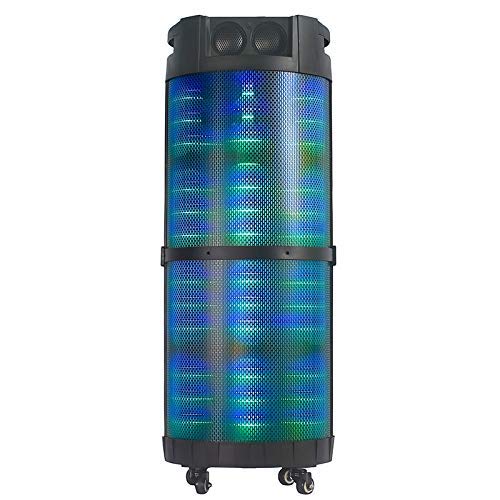
Foto nke 1: N'ihu view of the Altec Lansing AL-5003 speaker, showcasing its cylindrical design and illuminated grille. The speaker features a sturdy build with integrated wheels at the base for portability.
Ogwe njikwa na njikọ
The top panel of the speaker houses the main controls and input/output ports.
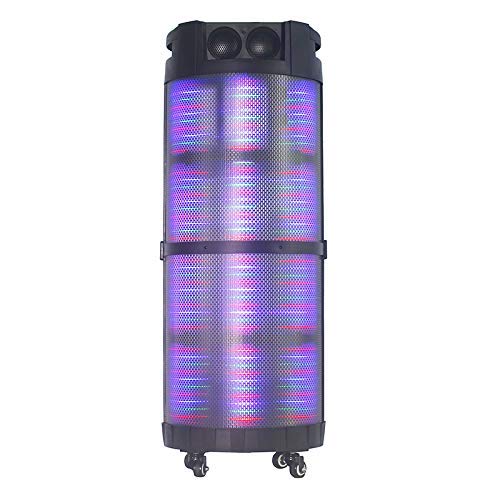
Foto nke 2: Si elu gbadata view of the AL-5003 speaker, highlighting the control panel with various buttons and knobs, along with the top-mounted speakers. This view also shows the integrated handle for easy transport.
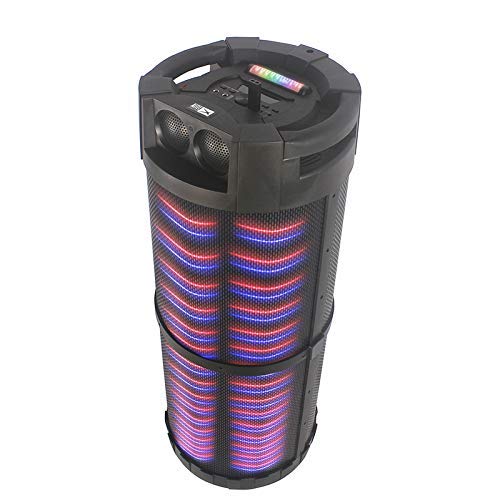
Foto nke 3: N'akuku view of the AL-5003 speaker, providing a perspective of its overall structure, including the side grille and the top control area. The dynamic lighting effects are visible through the mesh.
Common controls include Power, Volume, Mode selection, Play/Pause, Track Skip, and inputs for USB, Auxiliary, and potentially Microphone (if available on the model).
Ntuziaka nhazi
- Iwepu: Jiri nlezianya wepụ igwe okwu na ihe niile dị na ngwugwu ahụ. Debe ngwugwu ahụ maka njem ma ọ bụ nchekwa n'ọdịnihu.
- Nkwanye: Place the speaker on a stable, flat surface. Ensure there is adequate ventilation around the unit. For optimal sound, position the speaker in a central location within the listening area.
- Njikọ ike: Connect the provided power cord to the AC input on the speaker and then plug it into a standard wall outlet (AC 100-240V, 50/60Hz).
- Initial Charge (if applicable): If the speaker has an internal battery (Lead Acid battery mentioned in specs), it is recommended to fully charge it before first use. The charging indicator light will typically show charging status.
- Ike Na: Press the Power button on the control panel or remote control to turn on the speaker.
Ntuziaka ọrụ
1. Ọnọdụ Bluetooth
- Mee ka Bluetooth rụọ ọrụ: Turn on the speaker. Press the "Mode" button on the control panel or remote until "Bluetooth" or "BT" is displayed (or indicated by a blue LED). The speaker will enter pairing mode, indicated by a flashing light or audible prompt.
- Ejikọ ya na ngwaọrụ: On your mobile device (smartphone, tablet, laptop), go to Bluetooth settings and enable Bluetooth. Chọọ maka available devices. You should see "AL-5003" or "Altec Lansing" in the list. Select it to pair.
- Nkwenye njikọ: Once successfully paired, the speaker will emit a confirmation sound, and the Bluetooth indicator light will become solid.
- Nkpọghachi: Start playing audio on your connected device. Use the speaker's volume controls or your device's volume controls to adjust the sound level. Use the Play/Pause, Next, and Previous buttons on the speaker or remote to control playback.
2. Auxiliary (AUX) Mode
- Jikọọ eriri AUX: Insert one end of a 3.5mm auxiliary cable into the AUX input port on the speaker. Connect the other end to the headphone jack or audio output of your external audio device (e.g., MP3 player, laptop).
- Họrọ Ụdị AUX: Press the "Mode" button on the speaker or remote until "AUX" is displayed or indicated.
- Nkpọghachi: Play audio from your connected device. Adjust volume using both the speaker's controls and your device's volume.
3. USB Playback Mode
- Tinye draịvụ USB: Fanye draịva USB nwere ọdịyo MP3 files banye n'ọdụ ụgbọ mmiri USB na ọkà okwu.
- Họrọ Ụdị USB: The speaker may automatically switch to USB mode. If not, press the "Mode" button until "USB" is displayed or indicated.
- Nkpọghachi: The speaker will automatically begin playing audio files from the USB drive. Use the Play/Pause, Next, and Previous buttons to control playback.
4. Karaoke Function (if applicable)
If your AL-5003 model includes a microphone input, you can use it for karaoke:
- Jikọọ igwe okwu: Plug a wired microphone into the designated microphone input jack.
- Gbanwee olu: Use the dedicated Microphone Volume knob (if present) to adjust the microphone's volume.
- Njikwa Echo: Some models may have an Echo knob to add an echo effect to the microphone audio.
5. Remote Control Ọrụ
The included remote control provides convenient access to all major functions:
- Ike: Turn the speaker On/Off.
- Ụdị: Switch between Bluetooth, AUX, USB, and other available modes.
- Mpịakọta +/-: Gbanwee olu ukwu.
- Gwuo/kwụsịtụ: Bido ma ọ bụ kwụsịtụ ịkpọghachi.
- Nke gara aga/ na-esote: Gaa na egwu gara aga ma ọ bụ na-esote.
- EQ: Select different equalizer presets (if available).
- Mechie: Mechie olu gị ma ọ bụ wepụ ụda gị.
Nlekọta
- Nhicha: Jiri akwa dị nro dị nro hichaa mpụta nke ọkà okwu. Ejila ihe na-ehicha mmiri mmiri ma ọ bụ ihe abrasive.
- Nchekwa: Mgbe a naghị eji ya eme ihe ruo ogologo oge, chekwaa ọkà okwu n'ebe dị jụụ, nke kpọrọ nkụ, na-adịghị na ìhè anyanwụ kpọmkwem na oke okpomọkụ.
- Nlekọta batrị: If the speaker has a built-in rechargeable battery, avoid fully discharging it frequently. For long-term storage, charge the battery to approximately 50-70% every few months to prolong its lifespan.
- Igwe ikuku: Gbaa mbọ hụ na egbochighị oghere ikuku iji gbochie ikpo oke ọkụ.
Nchọpụta nsogbu
| Nsogbu | Ihe nwere ike ime | Ngwọta |
|---|---|---|
| Enweghị ike | Power cord not connected; Power outlet not working; Speaker is off; Battery drained. | Ensure power cord is securely connected. Try a different outlet. Press the Power button. Charge the battery. |
| Enweghị ụda | Volume too low; Incorrect mode selected; Device not connected properly; Mute function active. | Increase volume on speaker and source device. Select the correct input mode (Bluetooth, AUX, USB). Reconnect device. Check if mute is active on remote. |
| Ọdịda ijikọ Bluetooth | Speaker not in pairing mode; Device Bluetooth off; Speaker too far from device; Interference. | Ensure speaker is in Bluetooth pairing mode. Turn on Bluetooth on your device. Move device closer to speaker. Turn off other Bluetooth devices nearby. |
| Ntugharị USB anaghị arụ ọrụ | Etinyeghị draịva USB nke ọma; Anaghị ekwekọ file usoro; draịvụ USB mebiri emebi. | Reinsert USB drive. Ensure files are in MP3 format. Try a different USB drive. |
| Njikwa anya anaghị arụ ọrụ | Batteries drained; Obstruction between remote and speaker; Remote not pointed at sensor. | Replace remote control batteries. Remove any obstructions. Point remote directly at the speaker's IR sensor. |
Nkọwapụta
| Njirimara | Nkọwa |
|---|---|
| Aha Nlereanya | Altec Lansing AL-5003 Multimedia DJ Trolly Speaker |
| Ụdị Ọkà Okwu | Gburugburu ụda |
| Njirimara Pụrụ Iche | Ikuku |
| Eji akwadoro | For Surround Sound Systems, Party |
| Ngwa dakọtara | Gaming Console, Karaoke Machine, Laptop, MP3 Player, Smartphone, Tablet |
| Nhazi ọwa ụda gburugburu | 1.0 |
| Usoro njikwa | Ime ime |
| Teknụzụ nzikọrịta ozi ikuku | Bluetooth |
| Nha Ọkà Okwu | 10 sentimita asatọ |
| Isi Iyi Ike | Igwe ọkụ eletrik |
| Dayameta Tweeter | 1 sentimita asatọ |
| Ntinye ọdịyo dakọtara | Enyemaka, USB |
| Njikọ ọnụ okwu | Wired (for power), Wireless (Bluetooth) |
| Audio Wattage | 100 Watt |
| Ngwakọta cell batrị | Acid ndu |
| Ụdị nkwụnye | Ala guzo |
Akwụkwọ ikike na nkwado
Altec Lansing products are manufactured to the highest quality standards. For information regarding warranty coverage, technical support, or service inquiries, please refer to the warranty card included with your product or visit the official Altec Lansing website. Please have your model number (AL-5003) and purchase details ready when contacting support.
Websaịtị: www.edemere.com (This is a generic link, actual link might vary by region)


