1. Ngwaahịa gafereview
The BFT SB-BAT (P125002) is a 24v DC battery backup system designed to ensure continuous operation of your gate opener even during power outages. This kit provides a reliable power source, activating automatically when the main power supply is interrupted and recharging when power is restored.
It is compatible with various BFT gate opener models, including the Deimos BT series, VIRGO - LINX, EOS-SCE, HYDRA N, DEIMOS BT-QSC D-NETTUNO S, SB BAT/SB CARBAT (DEIMOS BT-SB 300), BT BAT 2 (URANO BT ARES 1000 & ARES 1500) NETTUNO B, VENERE D, ARGO, LIBRA C MA - LIBRA C LX.
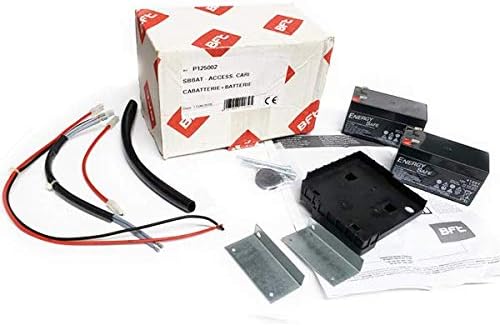
Figure 1: Contents of the BFT P125002 SB-BAT Battery Backup Kit, including batteries, wiring, and mounting hardware.
2. Ntọala na nwụnye
Installation of the BFT SB-BAT kit is designed to be straightforward. It integrates with your existing BFT gate opener system.
2.1. Nchekwa nchekwa
- Ensure the main power to the gate opener is disconnected before beginning installation.
- Yiri akụrụngwa nchedo onwe onye dabara adaba (PPE).
- Refer to your specific gate opener's manual for compatibility and connection points.
2.2. Nzọụkwụ Nwụnye
- Wepu akụrụngwa: Carefully remove all items from the packaging. Verify all components are present as shown in Figure 1.
- Mount the Battery Housing: Securely mount the battery housing unit near your gate opener's control board, ensuring it is protected from environmental elements.
- Jikọọ batrị: Insert the two 12V 1.2Ah batteries into the housing. Connect them according to the wiring diagram provided with the kit (typically in series to achieve 24V DC).
- Connect to Gate Opener: Connect the battery backup system's wiring to the designated battery input terminals on your BFT gate opener's control board. Consult your gate opener's manual for precise terminal locations.
- Ọkụ echekwabara: Ensure all wiring is neatly routed and secured to prevent accidental disconnections or damage.
- Weghachi ike: Once all connections are secure and verified, restore main power to the gate opener. The smart charger board will begin charging the batteries.
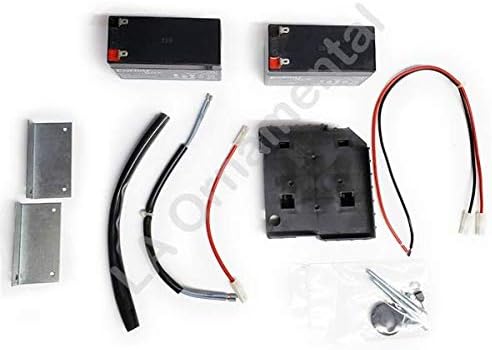
Ọgụgụ 2: A nso view of the battery backup kit components, highlighting the batteries and connection wires.
3. Ọrụ
The BFT SB-BAT battery backup system operates automatically to provide uninterrupted gate functionality.
- Ọrụ nkịtị: When main power is available, the smart charger board continuously charges and maintains the batteries.
- Ike Outage: N'ihe omume nke ike ịtage, the system automatically switches to battery power, allowing the gate opener to continue functioning normally.
- Mweghachi ike: Once main power is restored, the system automatically switches back to main power and resumes charging the batteries.
4. Nlekọta
Regular maintenance ensures the longevity and reliability of your battery backup system.
- Nlele anya: Periodically inspect the batteries and wiring for any signs of damage, corrosion, or loose connections.
- Ịdị ọcha: Keep the battery housing and terminals clean and free of dust or debris.
- Nyocha ahụike batrị: While the system has an intelligent charger, it is advisable to periodically test the battery backup by temporarily disconnecting main power to ensure the gate operates on battery power. Reconnect main power after testing.
- Ngbanwe batrị: Batteries have a finite lifespan. If you notice a significant decrease in backup operation time, it may be time to replace the batteries. Use only recommended replacement batteries (2x 12V 1.2Ah).
5. Nchọpụta nsogbu
This section addresses common issues you might encounter with your BFT SB-BAT battery backup kit.
| Nsogbu | Ihe nwere ike ime | Ngwọta |
|---|---|---|
| Ọnụ ụzọ anaghị arụ ọrụ n'oge ọkụ eletriktage. |
|
|
| Batteries do not seem to be charging. |
|
|
6. Nkọwapụta
Key technical specifications for the BFT SB-BAT (P125002) battery backup system:
- Ụdị: P125002 SB-BAT
- Sistemụ Voltage: 24V DC
- Nchaji Voltage: 27.2V
- Ebo ugbu a: 130mA
- Ike batrị: 2x (12V 1.2Ah)
- Exhausted Battery Protection Threshold: 20.4V
- Oge nchaji batrị: 12-14 awa
- Fiisi: 20A
- Onye nrụpụta: BFT
7. Akwụkwọ ikike na nkwado
For warranty information or technical support, please refer to the documentation included with your purchase or contact BFT customer service directly. Keep your proof of purchase for warranty claims.
You can find more information about BFT products on their official websaịtị ma ọ bụ site na ndị nkesa ikike.


