Sentry Industries Inc. HPXKX200 Gaming Keyboard + Mouse 2 Pack
Model: KX200 User Manual
Okwu mmalite
Daalụ maka ịzụrụasing the Sentry Industries Inc. HPXKX200 Gaming Keyboard and Mouse 2 Pack. This combo kit is designed to enhance your gaming and computing experience with its responsive keyboard and precise mouse. The keyboard features 104 keys with RGB backlighting, while the mouse offers 7200 DPI sensitivity and RGB lighting. Both devices connect via USB for reliable performance.
This manual provides detailed instructions for setup, operation, maintenance, and troubleshooting to ensure optimal use of your new gaming peripherals.
Ihe ngwugwu
- 1 x Sentry HPXKX200 104-Key RGB USB Gaming Keyboard
- 1 x Sentry HPXKX200 7200 DPI RGB Gaming Mouse
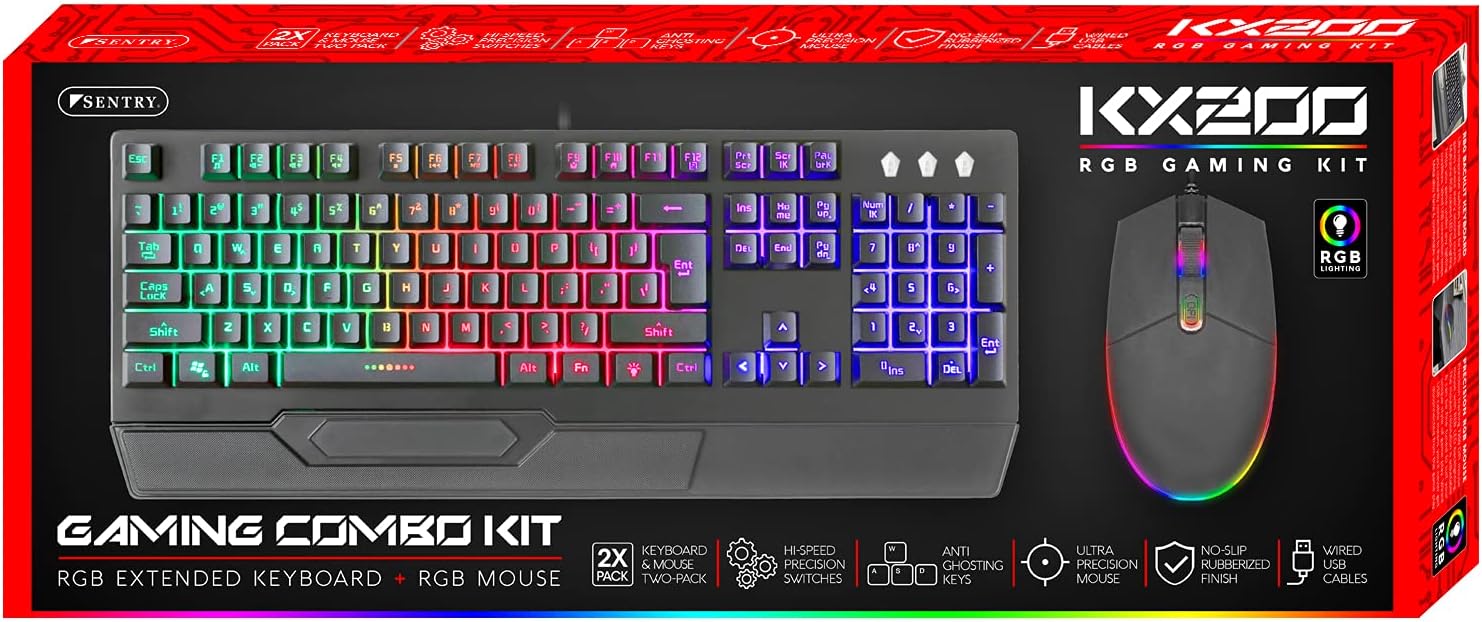
Image: The retail packaging for the Sentry HPXKX200 Gaming Keyboard and Mouse combo kit, showing both devices and key features.
Ntuziaka nhazi
Follow these steps to connect your Sentry HPXKX200 Gaming Keyboard and Mouse to your computer:
- Mepee Ngwaọrụ ndị a: Jiri nlezianya wepụ ahụigodo na òké ahụ n'ime ngwugwu ha.
- Jikọọ ahụigodo: Chọta ọdụ USB dị na kọmputa gị. Tinye njikọ USB nke ahụigodo ahụ nke ọma n'ime ọdụ USB.
- Jikọọ òké: Locate another available USB port on your computer. Insert the USB connector of the mouse firmly into the USB port.
- Nwụnye ọkwọ ụgbọala: Your operating system (e.g., Windows) should automatically detect and install the necessary drivers. This process may take a few moments.
- Nyochaa njikọ: Once drivers are installed, the keyboard and mouse RGB lighting should illuminate, indicating they are ready for use.

Image: The Sentry HPXKX200 Gaming Keyboard, showcasing its full layout and attached USB cable for connection.

Image: The Sentry HPXKX200 Gaming Mouse, highlighting its ergonomic design and attached USB cable.

Foto: A nso nso view of a standard USB-A connector, which is used to connect both the keyboard and mouse to a computer.
Ntuziaka ọrụ
Ojiji ahụigodo
The 104-key layout provides a full range of standard typing and function keys. The RGB backlighting enhances visibility and aesthetics.
- Na-ede: Use the alphanumeric keys for standard text input.
- Igodo ọrụ (F1-F12): These keys perform various functions, often in combination with the 'Fn' key, depending on your operating system and applications.
- Njikwa ọkụ RGB: Specific key combinations (e.g., Fn + Scroll Lock, Fn + Home/End) may cycle through different RGB lighting modes or adjust brightness. Refer to the keyboard's specific key legends for lighting controls.
Ojiji òké
The 7200 DPI RGB mouse offers precise tracking and comfortable use.
- Pịa aka ekpe: Ihe omume bụ isi, nhọrọ.
- Pịa aka nri: Context menu.
- Mpempe akwụkwọ mpịakọta: Scroll through documents and web ibe. Wheel mpịakọta na-arụkwa ọrụ dị ka bọtịnụ ọpịpị etiti.
- Ndozi DPI: The DPI button (often located near the scroll wheel) allows you to cycle through different sensitivity settings (DPI levels) to match your preference for various tasks or games. The mouse supports up to 7200 DPI.
- RGB ọkụ: The mouse features integrated RGB lighting that typically changes based on DPI settings or cycles through colors automatically.

Image: The Sentry HPXKX200 Gaming Keyboard and Mouse side-by-side, illustrating their design and illuminated RGB features.
Nlekọta
Proper care will extend the life of your gaming peripherals:
- Nhicha: Use a soft, dry cloth to wipe down the surfaces of the keyboard and mouse. For stubborn dirt, slightly dampen akwa na mmiri ma ọ bụ dị nwayọọ, na-adịghị abrasive Cleaner. Zere oke mmiri mmiri.
- Mwepụ uzuzu: Use compressed air to remove dust and debris from between the keyboard keys and from the mouse's optical sensor.
- Zere Mmiri mmiri: Do not immerse the devices in water or expose them to excessive liquids.
- Nchekwa: Store the keyboard and mouse in a cool, dry place when not in use.
Nchọpụta nsogbu
If you encounter issues with your Sentry HPXKX200 Gaming Keyboard and Mouse, try the following solutions:
| Nsogbu | Ngwọta enwere ike |
|---|---|
| Ahụigodo/Òké anaghị aza |
|
| RGB ọkụ anaghị arụ ọrụ |
|
| Ihe nrụaka òké na-adịghị arụ ọrụ ma ọ bụ na ọ naghị arụ ọrụ |
|
| Keys not registering on keyboard |
|
Nkọwapụta
| Njirimara | Nkọwa |
|---|---|
| Ụdị | SENTRY |
| Nọmba nlereanya | KX200 |
| Teknụzụ Njikọta | USB (Ejikere) |
| Ụdị ahụigodo | 104-Key RGB USB Keyboard |
| Igwe DPI | 7200 DPI RGB Mouse |
| Agba | Nwa |
| Ndakọrịta sistemụ arụmọrụ | Windows (and generally compatible with other OS supporting USB peripherals) |
| Nha Ngwaahịa (Keyboard) | Ihe dịka 21.65 x 9.84 x 3.15 sentimita asatọ |
| Ibu Ibu | Approximately 2.2 pounds (combined) |
Akwụkwọ ikike na nkwado
Sentry Industries Inc. products are manufactured to high-quality standards. For information regarding warranty coverage, technical support, or service inquiries, please refer to the warranty card included with your product or visit the official Sentry Industries Inc. websaịtị. Biko dowe ihe akaebe nke ịzụrụ ihe maka akwụkwọ ikike.


