1. Okwu mmalite
Thank you for choosing the Xiaomi Mi 55-inch 4K UHD Smart Android TV. This manual provides essential information for the safe and efficient use of your television. Please read it thoroughly before operating the device and retain it for future reference.

Foto 1.1: N'ihu view of the Xiaomi Mi 55-inch 4K UHD Smart Android TV.
2. Ozi nchekwa
Iji hụ na arụ ọrụ nchekwa ma gbochie mmebi, debe ihe ndị a akpachara anya:
- Ewepụla TV na mmiri ozuzo ma ọ bụ mmiri.
- Akwụsịla oghere ikuku.
- Hụ na e tinyere ntọala kwesịrị ekwesị maka plọg ike ahụ.
- Zere idobe TV n'elu ebe anaghị akwụsi ike.
- Keep the TV away from direct sunlight, heat sources, and open flames.
- Kwụpụ TV n'oge oké ifufe ọkụ ma ọ bụ mgbe ejighi ya ogologo oge.
- Tụtụ aka n'aka ndị ọrụ ruru eru.
3. Ihe ngwugwu
Chọpụta na ihe niile dị na ngwugwu:
- 1 × Xiaomi Mi 55-inch TV
- 1 × Remote control with voice control
- 1 × Remote control batteries
- 1 × eriri ọkụ
- 1 × User manual (this document)
- 1 × Support legs
- 4 × Screws for support legs
4. Nhazi
4.1. Nwụnye anụ ahụ
Your TV can be installed on a stand or wall-mounted. The TV is VESA mounting standard compatible.
4.1.1. Guzosie nwụnye
- Jiri nlezianya dobe TV ihu ala n'elu ala dị nro ma dịkwa larịị iji gbochie mmebi ihuenyo.
- Attach the support legs to the designated slots at the bottom of the TV using the provided screws. Ensure they are securely fastened.
- Place the TV on a stable, level surface.
4.1.2. Mgbidi mgbidi (nhọrọ)
If you choose to wall-mount your TV, use a VESA-compatible wall mount kit (sold separately) and follow the instructions provided with the wall mount. Ensure the wall can support the weight of the TV.
4.2. Njikọ Peripherals
Connect your external devices to the TV's ports:
- HDMI: Connect Blu-ray players, game consoles, or set-top boxes to the HDMI ports (3 available). HDMI ARC is supported for audio return channel functionality.
- USB: Connect USB storage devices for media playback (2 available).
- LAN: Maka njikọ ịntanetị ejiri waya mee, jikọọ eriri Ethernet na ọdụ ụgbọ mmiri LAN.
- Ọnụ Ọnụ Dijitalụ (Optical): Connect to an external audio system for high-quality digital sound.
4.3. Ike izizi
- Jikọọ eriri ọkụ na TV wee banye na nkwụnye ọkụ.
- Pịa bọtịnụ ike na njikwa remote ma ọ bụ na TV.
- Soro ntuziaka dị na ihuenyo iji mezue ntọala mbụ, gụnyere nhọrọ asụsụ, njikọ netwọk (Wi-Fi ma ọ bụ Ethernet), na nbanye akaụntụ Google.
5. Ntuziaka ọrụ
5.1. Remote Control
The included remote control allows you to navigate the TV's features. It supports voice control for convenient interaction with Google Assistant.
- Bọtịnụ ike: Gbanyụọ ma ọ bụ gbanyụọ TV.
- Mpempe igodo nsoroụzọ (elu/ala/ekpe/aka nri/OK): Na-agagharị na menu ma họrọ nhọrọ.
- Bọtịnụ olu: Na-edozi ọkwa ụda.
- bọtịnụ ọwa: Na-agbanwe ọwa TV.
- bọtịnụ enyemaka Google: Na-eme ka njikwa olu rụọ ọrụ.
- Bọtịnụ ụlọ: Na-alaghachi na ihuenyo ụlọ Android TV.
- Bọtịnụ azụ: Na-alaghachi na ihuenyo gara aga.
- Bọtịnụ ngwa: Dedicated buttons for popular apps like Netflix and YouTube.
5.2. Atụmatụ TV Smart (Android TV)
Your TV runs on Android TV (version 9), providing access to a wide range of smart features:
- Onye enyemaka Google: Jiri iwu olu ka ịchọọ ọdịnaya, jikwaa ngwaọrụ ụlọ smart, wee nweta ozi.
- Ụlọ ahịa Google Play: Download and install various apps, games, and streaming services.
- Chromecast arụnyere n'ime: Tụgharịa ọdịnaya site na ekwentị mkpanaaka gị, mbadamba gị, ma ọ bụ kọmputa gị ozugbo na TV.
- Ngwa etinyegoro mbụ: Access Netflix, YouTube, and a web nchọgharị ozugbo.
- SmartThings App Support: Integrate with other compatible smart home devices.
5.3. Foto na Ntọala ụda
Hazie foto na ntọala ụda ka ebuli gị elu viewahụmahụ nke:
- Ụdị foto: Select from various presets (e.g., Standard, Vivid, Movie, Game) or customize brightness, contrast, color, and sharpness.
- HDR: The TV supports HDR for enhanced contrast and color with compatible content.
- Ụdị ụda: Choose from presets like Standard, Music, Movie, or customize equalizer settings.
- DTS/Dolby Audio: The TV supports DTS and Dolby audio technologies for immersive sound.
6. Nlekọta
6.1. Nhicha
To clean your TV:
- Kwupuo TV mgbe niile tupu ihicha ya.
- Jiri akwa dị nro dị nro hichaa ihuenyo na kabinet.
- Maka akara ndị isi ike, dị obere dampen akwa na mmiri ma ọ bụ pụrụ iche ihuenyo Cleaner. Efela ihe nhicha ozugbo na ihuenyo.
- Zere iji ihe nhicha ma ọ bụ ihe mgbaze.
6.2. Mmelite ngwanrọ
Periodically check for software updates to ensure your TV has the latest features and performance improvements. Updates can usually be found in the TV's settings menu under 'About' or 'System Update'.
7. Nchọpụta nsogbu
Ọ bụrụ na ị na-enwe nsogbu, rụtụ aka na nsogbu ndị a na-ahụkarị na ngwọta ndị a:
| Nsogbu | Ngwọta enwere ike |
|---|---|
| Enweghị ike | Check if the power cable is securely connected and the power outlet is working. Try a different outlet. |
| Enweghị foto, mana ụda dị | Gbaa mbọ hụ na ahọpụtara isi mmalite ntinye ziri ezi. Lelee njikọ eriri na ngwaọrụ mpụga. |
| Enweghị ụda, mana foto dị | Check volume level and mute settings. Verify audio cable connections. If using external audio, ensure it's powered on and correctly configured. |
| Njikwa anya anaghị arụ ọrụ | Replace batteries. Ensure there are no obstructions between the remote and the TV. Re-pair the remote if it's a Bluetooth remote. |
| Enweghị ike ijikọ na Wi-Fi | Check if the Wi-Fi router is on and working. Re-enter the Wi-Fi password. Try restarting the TV and router. |
| Ngwa na-aga nwayọ ma ọ bụ na-ada ada | Close unused apps. Clear app cache. Restart the TV. Ensure sufficient internet speed. |
Ọ bụrụ na nsogbu ahụ dịgidere, kpọtụrụ nkwado ndị ahịa.
8. Nkọwapụta
| Njirimara | Nkọwa |
|---|---|
| Nọmba nlereanya | L55M5-5ASP |
| Nha ihuenyo | 55 sentimita asatọ |
| Ngosipụta teknụzụ | Ikanam |
| Mkpebi | 3840 x 2160 (4K UHD) |
| Ọnụego ume ọhụrụ | 60Hz |
| Viewna n'akuku | ogo 178 |
| Njirimara vidiyo | Nkwado HDR |
| Sistemụ nrụọrụ | Android TV (Android 9) |
| RAM | 2GB |
| Ike nchekwa | 8GB |
| Mmepụta ọdịyo | 2 x 10W ọkà okwu |
| Teknụzụ ọdịyo | DTS/Dolby Audio |
| Atụmatụ Smart | Google Assistant, Google Play, Web Browser, SmartThings app support, YouTube, Netflix (subscription not included), Chromecast built-in, DVB-T2 + DVB-C tuner |
| Njikọta | 3 x HDMI (with ARC), 2 x USB, 1 x LAN (Ethernet 100Mbps), 1 x Digital Optical Audio Out, Built-in Wi-Fi (2.4G/5G), Bluetooth 4.2 |
| Akụkụ akụkụ | 16:9 |
| Mounting Standard | VESA dakọtara |
| Akụkụ ngwaahịa (W x D x H) | 124.2 x 24.5 x 78 cm (ya na nkwụnye) |
| Ibu ngwaahịa | 13 n'arọ |
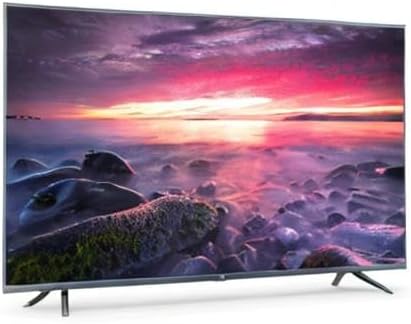
Image 8.1: Energy efficiency label for the Xiaomi Mi 55-inch TV.
9. Akwụkwọ ikike na nkwado
For warranty information, please refer to the warranty card included with your product or visit the official Xiaomi websaịtị maka mpaghara gị. Debe nnata nzụta gị ka ihe akaebe nke ịzụrụ.
For technical support, troubleshooting assistance beyond this manual, or service inquiries, please contact Xiaomi customer service through their official channels.