1. Okwu mmalite
Thank you for choosing the Genesis SEABORG 350 Racing Wheel. This manual provides essential information for setting up, operating, and maintaining your racing wheel to ensure optimal performance and longevity. The SEABORG 350 is designed for an immersive racing experience across multiple platforms, including PC, PlayStation 3, PlayStation 4, Xbox One, Xbox 360, and Nintendo Switch.
2. Ngwaahịa gafereview na akụrụngwa
The Genesis SEABORG 350 Racing Wheel system includes the following main components:
- Ngalaba Wheel Ọsọ
- Ngwa Pedal (ihe na-eme ngwa ngwa na brek)
- Gear Shifter (integrated)
- Ịkwalite Clamp
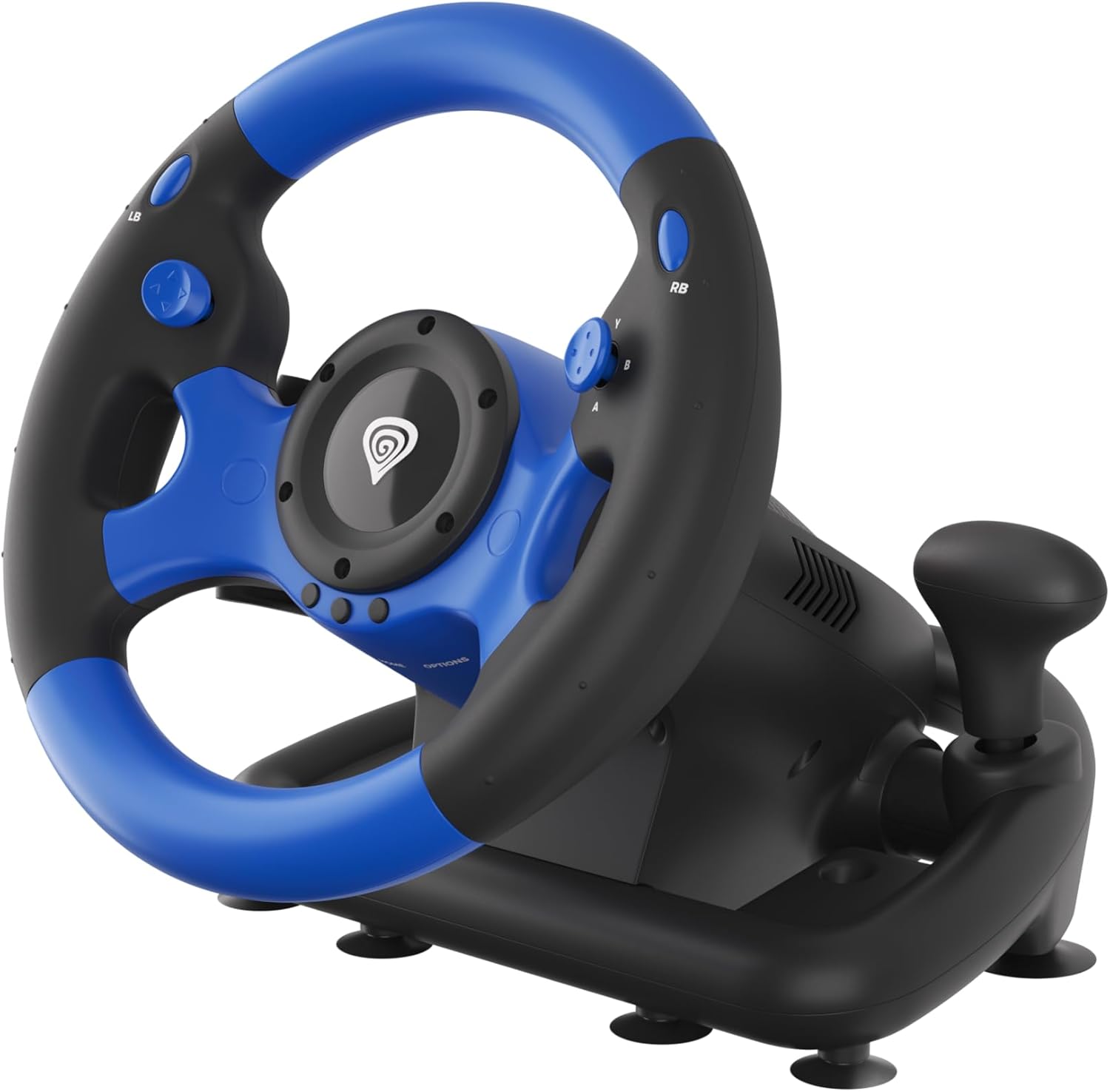
Foto 2.1: The Genesis SEABORG 350 Racing Wheel, featuring a black and blue design with an integrated gear shifter on the right side. The wheel is positioned on its base unit, which includes suction cups for stability.

Foto 2.2: The complete Genesis SEABORG 350 setup, showing the racing wheel unit alongside the separate two-pedal unit (accelerator and brake). Both components are black.

Foto 2.3: A nso-elu view of the black pedal unit, which includes two pedals for acceleration and braking. The unit has a wide base for stability during use.

Foto 2.4: The black mounting clamp accessory, designed to secure the racing wheel to a desk or table. It features a screw mechanism for tightening.

Foto 2.5: A zuru ezu view of the steering wheel's grip area, highlighting the textured black material for secure handling and the blue buttons (LB, RB, X, Y, A, B) and D-pad on the wheel face.
3. Nhazi
3.1 Ijikọ Pedal Unit
Connect the cable from the pedal unit to the designated port on the back of the racing wheel unit. Ensure the connection is secure.
3.2 Ịwụnye wiilị ọsọ
The SEABORG 350 offers two mounting options for stability:
- Iko mmiri ara: The base of the racing wheel unit is equipped with 6 strong suction cups. Place the unit on a clean, smooth, flat surface (e.g., a desk or table) and press down firmly to engage the suction cups.
- Ịkwalite Clamp: For enhanced stability, attach the included mounting clamp to the front underside of the racing wheel unit. Position the clamp over the edge of your desk or table and tighten the screw until the wheel is securely fastened.
3.3 Ijikọ na Sistemụ Gị
The Genesis SEABORG 350 connects via a USB cable. Plug the USB connector from the racing wheel unit into an available USB port on your desired gaming platform.
- PC: Connect the USB cable to any available USB port on your computer. Drivers should install automatically.
- PlayStation 3/4, Xbox One/360, Nintendo Switch: Connect the USB cable to an available USB port on your console. The wheel should be recognized automatically.
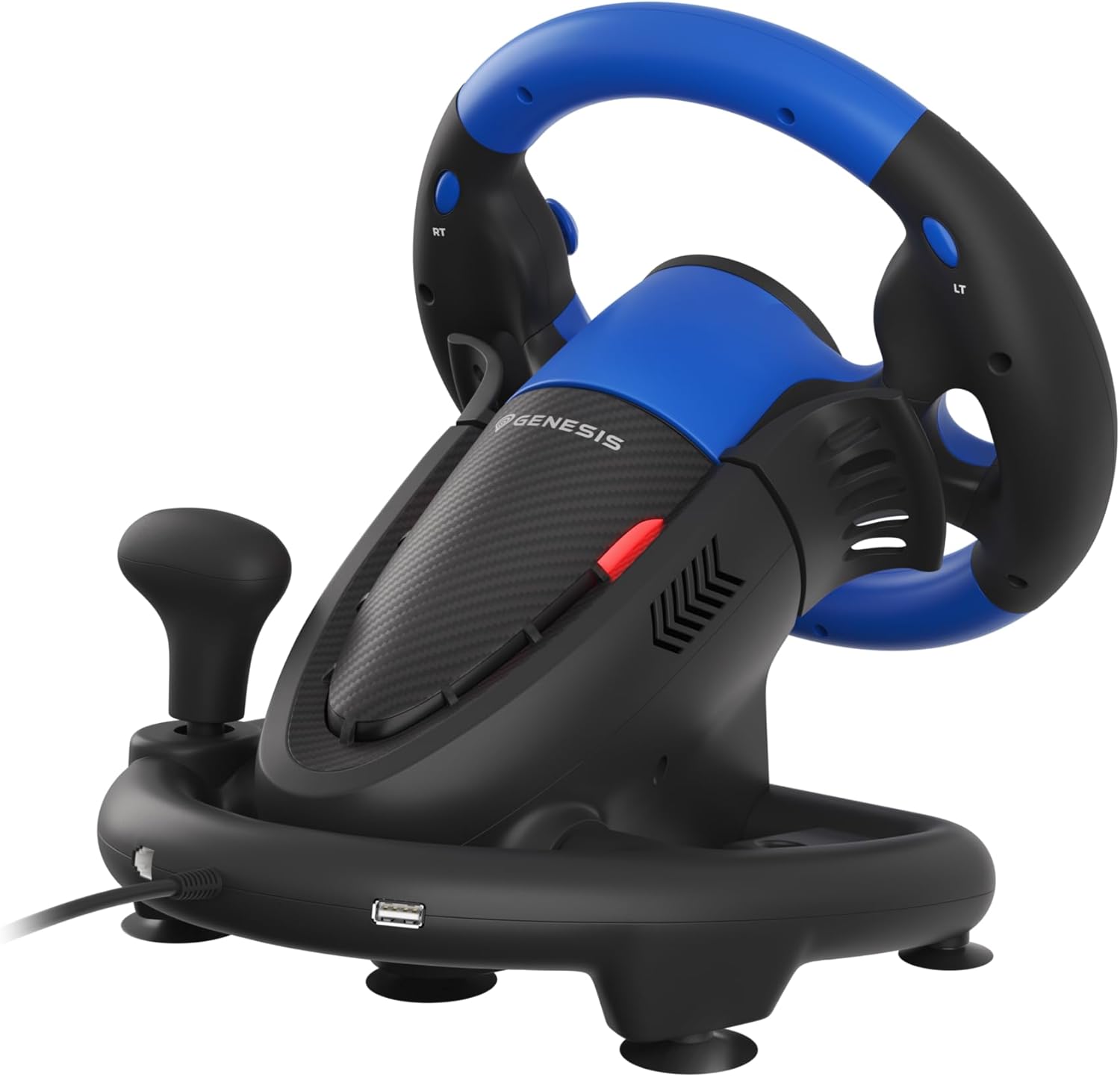
Foto 3.1: Azu view of the racing wheel unit, illustrating the integrated USB cable for connection to gaming platforms and the port for the pedal unit.
4. Ntuziaka ọrụ
4.1 Njikwa ntọala
- Ụgbọ ala: Provides 180 degrees of rotation for precise steering control.
- Pedal: The left pedal functions as the brake, and the right pedal functions as the accelerator. Both pedals offer realistic spring resistance.
- Gear Shifter: Use the integrated gear knob for manual gear changes in compatible games.
4.2 bọtịnụ Ọrụ
The SEABORG 350 features 15 buttons, including an 8-way D-pad, providing comprehensive control for various in-game actions. Button mapping may vary depending on the game and platform.
4.3 Vibration Feedback
The racing wheel is equipped with powerful vibration motors that provide realistic force feedback, simulating road conditions, collisions, and other in-game events. This feature enhances immersion and responsiveness during gameplay.
4.4 Button Configuration
The SEABORG 350 allows for configuration of its buttons to suit your preferences. Refer to your game's control settings or the specific platform's accessory settings for detailed instructions on remapping buttons.
5. Nlekọta
To ensure the longevity and optimal performance of your Genesis SEABORG 350 Racing Wheel, follow these maintenance guidelines:
- Nhicha: Use a soft, dry cloth to wipe down the racing wheel, pedals, and base unit. For stubborn dirt, a slightly damp A pụrụ iji ákwà mee ihe, mana hụ na mmiri adịghị abanye n'ime ihe ndị dị n'ime ya. Zere ihe nhicha ma ọ bụ ihe mgbaze.
- Nchekwa: When not in use, store the racing wheel in a clean, dry place away from direct sunlight and extreme temperatures. Disconnect all cables to prevent damage.
- Nlekọta USB: Avoid bending or kinking cables excessively. Do not pull on the cables to disconnect them; always grasp the plug.
6. Nchọpụta nsogbu
If you encounter issues with your Genesis SEABORG 350 Racing Wheel, refer to the following common problems and solutions:
| Nsogbu | Ihe nwere ike ime | Ngwọta |
|---|---|---|
| Wheel not recognized by system | Loose USB connection, incorrect port, system driver issue. | Ensure USB cable is fully inserted. Try a different USB port. Restart your system. Check for system updates or drivers if on PC. |
| No vibration feedback | Vibration feature disabled in game or system settings, game does not support vibration. | Check in-game settings for force feedback or vibration options. Verify that the game supports vibration. |
| Pedal anaghị aza | Loose pedal unit connection. | Ensure the pedal unit cable is securely connected to the racing wheel unit. |
| Wheel feels unstable | Suction cups not properly engaged, clamp emechieghi ya. | Ensure surface is clean and smooth for suction cups. Tighten the mounting clamp securely to a stable surface. |
7. Nkọwapụta
| Njirimara | Nkọwa |
|---|---|
| Ụdị | Jenesis |
| Aha Nlereanya | SEABORG 350 |
| Nọmba nlereanya | IN-ACT-KSLNATKON0001 |
| Agba | Nwa, Blue |
| Teknụzụ Njikọta | USB |
| Ngwa dakọtara | Nintendo Switch, PlayStation 4, PlayStation 3, Xbox One, Xbox 360, PC |
| Ụdị njikwa | Whegba Ọsọ |
| Ọnụọgụ bọtịnụ | 15 (including 8-way D-pad) |
| Akụkụ (L x W x H) | 31.5 x 27 x 28 cm (12.4 x 10.6 x 11 inch) |
| Ibu | 1 kilogram (2.2 lbs) |
| Isi Iyi Ike | Batrị nwere ike (achọrọ batrị Lithium-ion 1) |
8. Akwụkwọ ikike na nkwado
For information regarding warranty coverage and technical support for your Genesis SEABORG 350 Racing Wheel, please refer to the official Genesis websaịtị ma ọ bụ kpọtụrụ ndị ahịa ha ozugbo. Debe ihe akaebe nke ịzụrụ ihe maka akwụkwọ ikike.


