1. Okwu mmalite
The LAUNCH CRP239 is an intelligent and networkable automotive diagnostic tool designed for passenger cars. It offers comprehensive OBD II full functionality and rapid testing capabilities for four major vehicle systems: Engine, Automatic Transmission (A/T), Anti-lock Braking System (ABS), and Supplemental Restraint System (SRS). Additionally, the CRP239 includes advanced reset functions such as Oil Reset, Steering Angle Reset, Brake-Pad Reset, Battery Matching, Throttle Adaptation, and Diesel Particulate Filter (DPF) Regeneration, catering to the needs of professional technicians and DIY enthusiasts.
2. Ozi nchekwa
Always observe the following safety precautions when operating the LAUNCH CRP239:
- Hụ na agbanyụrụ ọkụ ụgbọala ahụ tupu ijikọ ma ọ bụ wepụ ngwaọrụ nchọpụta ahụ.
- Ejila ngwá ọrụ a na ọnọdụ mmiri mmiri ma ọ bụ nso mmiri mmiri ma ọ bụ gas na-ere ọkụ.
- Wear appropriate personal protective equipment, such as safety glasses, when working on vehicles.
- Rụtụ aka na ntuziaka ọrụ ụgbọ ala maka usoro nchọpụta akọwapụtara na ịdọ aka ná ntị nchekwa.
- Keep the tool away from strong magnetic fields.
- Only use the provided cables and accessories.
3. Ihe ngwugwu
Chọpụta na ihe niile dị na ngwugwu:
- LAUNCH CRP239 Main Unit
- OBD II diagnostic USB
- eriri USB
- Akwụkwọ ntuziaka onye ọrụ
- Akpa na-ebu

Figure 3.1: Contents of the LAUNCH CRP239 package, showing the diagnostic tool, cables, and storage case.
4. Ngwaahịa gafereview
The LAUNCH CRP239 features a robust design with a 5.0-inch 720p touch screen for intuitive navigation. It includes physical buttons for common operations and a durable rubber exterior for protection.

Foto 4.1: N'ihu view of the LAUNCH CRP239, highlighting the touch screen display and navigation buttons.
4.1. Akụrụngwa
- Ihuenyo Mmetụ Aka nke 5.0-inch: High-resolution display for clear data presentation and touch input.
- Bọtịnụ igodo nsoroụzọ: Directional pad, OK button, and Return button for menu navigation.
- Njikọ OBD II: Standard 16-pin connector for vehicle communication.
- Ọdụ ụgbọ mmiri USB: For connecting to a computer for updates or data transfer.
- Ihe ngosi ike: Ọkụ LED na-egosi ọnọdụ ike.
5. Nhazi
Follow these steps for initial setup of your LAUNCH CRP239:
- Chaja ngwaọrụ: Connect the CRP239 to a power source using the provided USB cable to ensure the internal 4000mAh lithium-polymer battery is fully charged before first use.
- Ike Na: Pịa ma jide bọtịnụ ike ka ịgbanwuo ngwaọrụ ahụ.
- Nhọrọ asụsụ: On the initial setup screen, select your preferred language. The device supports multilingual operation.
- Njikọ Wi-Fi: Navigate to the 'Settings' menu and select 'Wi-Fi'. Connect to an available wireless network to enable online updates and diagnostic report sharing.
- Mmelite ngwanrọ: It is recommended to perform a software update immediately after connecting to Wi-Fi to ensure you have the latest features and vehicle coverage. Navigate to the 'Update' section and follow the on-screen prompts.

Figure 5.1: The LAUNCH CRP239 with its diagnostic cable connected, ready for vehicle communication.
6. Ntuziaka ọrụ
The LAUNCH CRP239 provides a comprehensive suite of diagnostic functions. Below are instructions for common operations.
6.1. Ijikọ na Ụgbọala
- Locate the vehicle's 16-pin OBD II diagnostic port (usually under the dashboard).
- Hụ na agbanyụrụ ọkụ ụgbọala ahụ.
- Connect the OBD II diagnostic cable to the vehicle's OBD II port and to the CRP239.
- Turn the vehicle's ignition to the ON position (engine off). The CRP239 will power on automatically.
6.2. Isi Nsorouzọ NchNhr
From the main menu, you can access various functions:
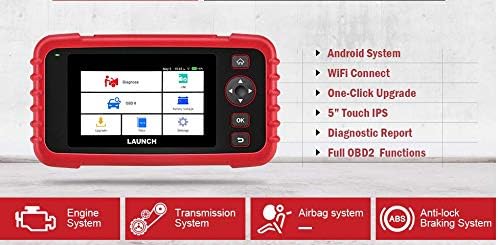
Figure 6.1: The main menu interface of the LAUNCH CRP239, providing access to all primary functions.
- Chọpụta: For full system diagnostics (Engine, A/T, ABS, SRS).
- I/M: Readiness status for emissions.
- OBD II: Standard OBD II functions (read/clear DTCs, live data, freeze frame, O2 sensor test, etc.).
- Tọgharia: Access various maintenance reset functions.
- Batrị Voltage: Displays real-time vehicle battery voltage.
- Mmelite: For software and firmware updates via Wi-Fi.
- Data: Review saved diagnostic data and reports.
- Ntọala: Configure device settings such as language, Wi-Fi, and display.
6.3. Performing a Diagnostic Scan
- Site na isi menu, họrọ "Chọpụta".
- The tool will attempt to automatically identify the vehicle via VIN scan. If unsuccessful, you may need to manually select the vehicle make, model, and year.
- Choose the system you wish to diagnose (e.g., Engine, Transmission, ABS, SRS).
- Họrọ "Read Fault Codes" ka view Diagnostic Trouble Codes (DTCs).
- Họrọ "Clear Fault Codes" to erase DTCs after repairs have been made. Caution: Clearing codes without addressing the underlying issue will result in the codes reappearing.
- Họrọ "Read Data Stream" ka view data ihe mmetụta dị ndụ.
6.4. Using Reset Functions
The CRP239 supports several common maintenance reset functions:
- Ntọghari mmanụ: Na-emegharị ihe ncheta ndụ mmanụ mgbe agbanwere mmanụ.
- Tọgharia akụkụ ụzọ: Resets the steering angle sensor after alignment or component replacement.
- Brake-Pad Reset (EPB): Na-atọgharịa sistemu breeki ebe a na-adọba ụgbọala mgbe ejiri dochie breeki.
- Battery Matching (BMS): Registers a new battery with the vehicle's Battery Management System.
- Mgbanwe trotul: Na-amụtaghachi ọnọdụ trotul ahụ ka emechara ma ọ bụ dochie ya.
- Mmeghari DPF: Initiates the Diesel Particulate Filter regeneration process.
To use a reset function, select "Tọgharịa" from the main menu, then choose the desired function and follow the on-screen instructions.
6.5. Mmelite ngwanrọ
The CRP239 supports one-click Wi-Fi updates for software and vehicle coverage, ensuring you always have the latest diagnostic capabilities.
- Gbaa mbọ hụ na ejikọrọ ngwaọrụ ahụ na netwọk Wi-Fi kwụsiri ike.
- Site na isi menu, họrọ "Update".
- The device will check for available updates. Select the updates you wish to install and confirm.
- Allow the update process to complete without interruption. The device may restart during this process.

Figure 6.2: The update screen on the LAUNCH CRP239, showing available software updates for various vehicle brands.
6.6. Diagnostic Report Generation
The CRP239 can automatically generate diagnostic reports, which can be shared via email.
- After completing a diagnostic session, the tool will prompt you to generate a report.
- Confirm to generate the report.
- Gaa na "Data" menu ka view saved reports.
- Select a report and choose the option to share via email. Ensure your Wi-Fi is connected and email settings are configured in the 'Settings' menu.
7. Nlekọta
Proper maintenance ensures the longevity and optimal performance of your LAUNCH CRP239:
- Nhicha: Jiri akwa dị nro dị nro hichaa ngwaọrụ ahụ. Ejila ihe nchacha abrasive ma ọ bụ ihe mgbaze.
- Nchekwa: Store the device in its carrying case in a cool, dry place when not in use. Avoid extreme temperatures.
- Nlekọta batrị: Charge the battery regularly, even if the device is not in frequent use, to maintain battery health. Avoid fully discharging the battery for extended periods.
- Nyocha USB: Periodically inspect the diagnostic and USB cables for any signs of damage. Replace damaged cables immediately.
8. Nchọpụta nsogbu
This section addresses common issues you might encounter with the LAUNCH CRP239.
| Nsogbu | Ihe nwere ike ime | Ngwọta |
|---|---|---|
| Ngwaọrụ anaghị agbanwu ọkụ. | Low battery; faulty connection to vehicle. | Charge the device fully. Ensure the OBD II cable is securely connected to both the CRP239 and the vehicle. Check vehicle's ignition is ON. |
| Cannot communicate with vehicle. | Incorrect vehicle protocol; faulty OBD II port; damaged cable. | Verify vehicle compatibility. Check the vehicle's OBD II port for power. Try a different vehicle or cable if available. Ensure vehicle ignition is ON. |
| Mmelite ngwanrọ agaghị arụ ọrụ. | Unstable Wi-Fi connection; insufficient storage. | Ensure a strong and stable Wi-Fi connection. Check available storage space on the device. Restart the update process. |
| Ihuenyo anaghị anabata. | Software glitch; physical damage. | Perform a soft reset by holding the power button until the device restarts. If the issue persists, contact customer support. |
9. Nkọwapụta
| Njirimara | Nkọwa |
|---|---|
| Nlereanya | CRP239 (CREADER PROFESSIONAL 239) |
| Ngosipụta | 5.0-inch 720p Touch Screen |
| Batrị | 4000mAh Rechargeable Lithium Polymer (included) |
| Njikọta | OBD II, Wi-Fi, USB |
| Mkpuchi ụgbọ ala | Domestic, Asian, European vehicles (1996 and newer OBD2) |
| Sistemụ akwadoro | Engine, Automatic Transmission (A/T), ABS, SRS |
| Ọrụ Pụrụ Iche | Oil Reset, Steering Angle Reset, Brake-Pad Reset (EPB), Battery Matching (BMS), Throttle Adaptation, DPF Regeneration |
| Akụkụ | 32.4 x 25.4 x 8 cm (Ngwugwu) |
| Ibu Ibu | 560 g |
| Ihe Mpụga | Rubber |
10. Akwụkwọ ikike Ozi
The LAUNCH CRP239 comes with a standard manufacturer's warranty. For specific warranty terms and conditions, please refer to the warranty card included in your product package or visit the official Launch websaịtị. Debe nnata nzụta gị dị ka ihe akaebe nke ịzụrụ maka nkwupụta ikike.
Extended warranty options may be available from third-party providers. For example, 1-Year and 2-Year Extended Warranties by Salama Care are offered for this product.
11. Nkwado
For technical assistance, product inquiries, or support, please contact Launch customer service through their official website or the contact information provided in your product documentation. Ensure you have your product model number (CRP239) and serial number ready when contacting support.
Maka akụrụngwa ndị ọzọ, gaa na Launch Official Websaịtị.