1. Okwu mmalite
Welcome to the user manual for your Nokia 216 Dual SIM mobile phone. This guide provides essential information to help you set up, operate, and maintain your device. The Nokia 216 (RM-1187) is a classic feature phone designed for reliable communication, featuring dual SIM capability, a 2.4-inch display, and a VGA camera.
Please read this manual carefully to ensure proper use and to get the most out of your phone.
2. Ihe ngwugwu
Gbaa mbọ hụ na ihe niile dị na ngwugwu ngwaahịa gị:
- Nokia 216 Dual SIM Mobile Phone (RM-1187)
- Batrị
- Ihe nkwụnye ọkụ
- eriri USB
3. Ngwaọrụ gafereview
Familiarize yourself with the key components of your Nokia 216 phone.
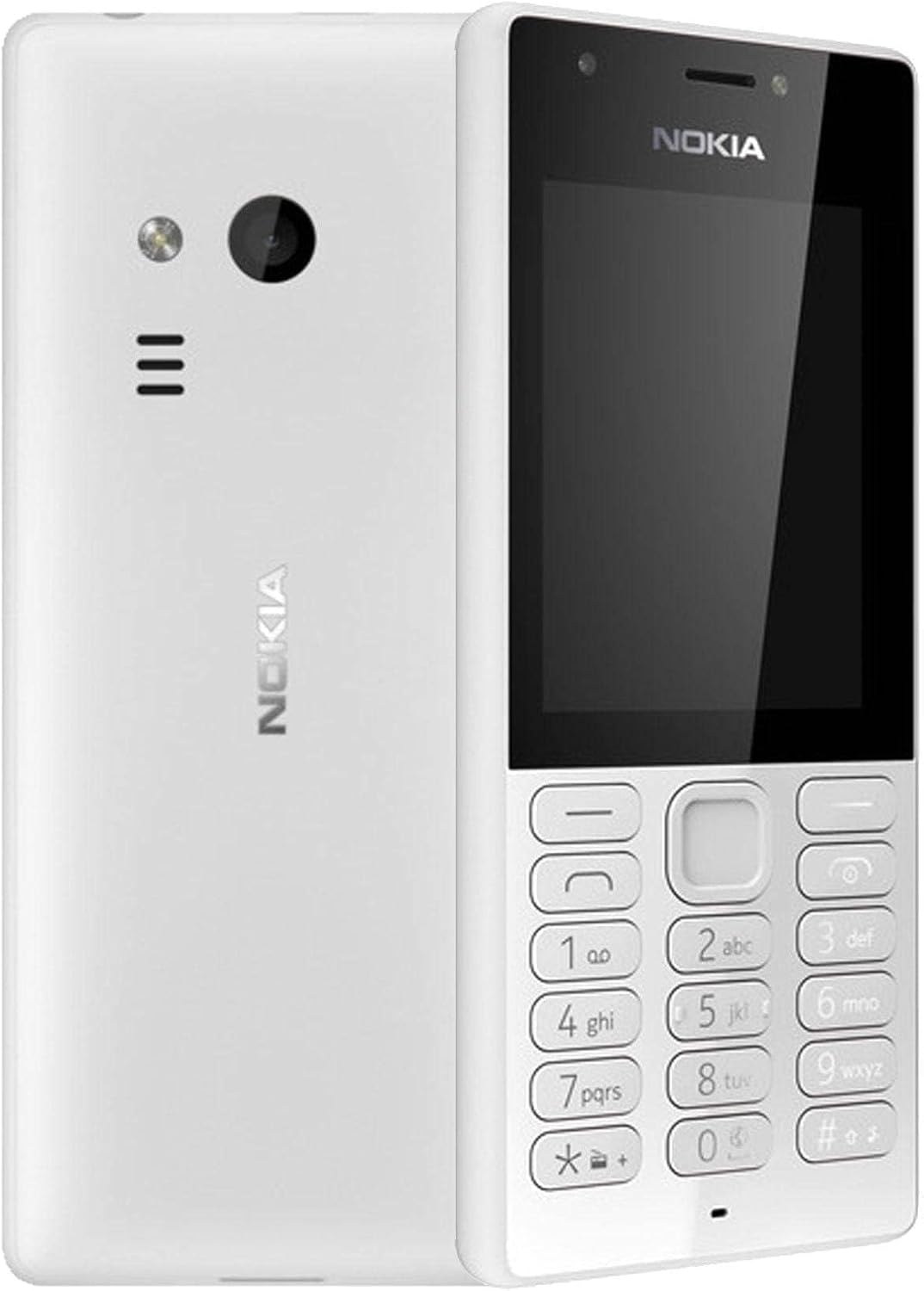
Foto 3.1: Ihu na azụ view of the Nokia 216 Dual SIM mobile phone. The front shows the display, earpiece, and numeric keypad. The back features the rear camera, LED flash, and loudspeaker grille.

Foto 3.2: N'ihu view of the Nokia 216 Dual SIM mobile phone. This image highlights the 2.4-inch display, the navigation keys, and the alphanumeric keypad for dialing and text input.

Foto 3.3: Azu view of the Nokia 216 Dual SIM mobile phone. This view shows the rear VGA camera lens, the LED flash, and the Nokia branding.
Isi ihe:
- Ngosipụta: 2.4-inch QVGA screen.
- Igodo: Alphanumeric keypad for dialing and text entry, with navigation keys.
- Igwefoto azụ: VGA camera with LED flash.
- Igwe okwu: For audio playback and hands-free calls.
- Igwe okwu: For voice input during calls and recordings.
- Jack Audio: 3.5mm Maka ekweisi ma ọ bụ ọkà okwu mpụga.
- Nchaji ọdụ ụgbọ mmiri: Micro-USB port for charging and data transfer.
4. Nhazi
4.1. Insert SIM Card(s)
- Turn off the phone and disconnect any charger.
- Carefully remove the back cover by prying it open from the notch.
- Ọ bụrụ na batrị dị, bulite ya.
- Insert the SIM card(s) into the designated slot(s) with the gold contacts facing down. For dual SIM models, ensure both SIMs are correctly seated.
- If applicable, insert a microSD card into its slot for additional storage.
- Dochie batrị.
- Align the back cover and press it firmly until it clicks into place.
4.2. Chajịa batrị
- Jikọọ ihe nkwụnye ọkụ na oghere mgbidi.
- Plug the micro-USB end of the cable into the phone's charging port.
- The battery indicator on the screen will show the charging status.
- Once fully charged, disconnect the charger from the phone and then from the wall outlet.
5. Ntuziaka ọrụ
5.1. Gbanyụọ / gbanyụọ
- Iji gbanye: Pịa ma jide igodo ike (nke na-abụkarị igodo 'End Call' uhie) ruo mgbe ekwentị ahụ ga-ama jijiji ma akara Nokia apụta.
- Iji gbanyụọ: Press and hold the power key until the 'Power off' option appears on the screen, then select it.
5.2. Ịkpọ oku
- From the home screen, enter the phone number using the numeric keypad.
- Press the green 'Call' key to initiate the call.
- To end a call, press the red 'End Call' key.
5.3. Sending Text Messages (SMS)
- Gaa na NchNhr > Ozi > Mepụta ozi.
- Jiri ahụ igodo pịnye ozi gị.
- Tinye nọmba ekwentị onye nnata ma ọ bụ họrọ na kọntaktị.
- Họrọ Ziga.
5.4. Iji igwefoto
- Gaa na NchNhr > Igwefoto.
- Mepụta ogbunigwe gị site na iji ngosi.
- Press the center navigation key to take a photo.
6. Nlekọta na nlekọta
To ensure the longevity and optimal performance of your Nokia 216, follow these care guidelines:
- Keep the device dry: Moisture can damage electronic circuits.
- Use original accessories: Only use batteries, chargers, and accessories approved by Nokia.
- Jiri nwayọọ dị ọcha: Use a soft, clean, dry cloth to clean the surface of the device.
- Zere oke okpomọkụ: Do not expose your device to very high or low temperatures.
- Jiri nlezianya jikwaa: Zere idobe ma ọ bụ idobe ngwaọrụ ahụ na mmetụta siri ike.
7. Nchọpụta nsogbu
If you encounter issues with your Nokia 216, try these common troubleshooting steps:
| Nsogbu | Ngwọta |
|---|---|
| Ekwentị anaghị agbanwuo | Gbaa mbọ hụ na agbagoro batrị. Jikọọ chaja wee nwaa ọzọ. Lelee ma etinyere batrị nke ọma. |
| Enweghị mgbama netwọkụ | Lelee ma etinyere kaadị SIM nke ọma. Gaa na mpaghara nwere mkpuchi netwọkụ ka mma. Malitegharịa ekwentị ahụ. |
| Batrị anaghị achaji | Ensure the charger is properly connected to both the phone and the power outlet. Try a different power outlet or charger. Check for any damage to the charging port. |
| Enweghị ike ịkpọ ma ọ bụ nata oku | Check network signal. Ensure your SIM card is active and has sufficient credit/plan. Verify that call barring is not enabled. |
8. Nkọwapụta
| Njirimara | Nkọwa |
|---|---|
| Ụdị | Nokia |
| Aha Nlereanya | RM-1187 |
| Sistemụ nrụọrụ | Symbian 9.1 (Series 30) |
| Nha ihuenyo | 2.4 sentimita asatọ |
| Mkpebi ihuenyo | 240 x 320 pikselụ |
| Ọnụego ume ọhụrụ | 90 Hz |
| Ogo RAM arụnyere | 256 MB |
| Ike Nchekwa ebe nchekwa | 3.9 GB (Internal, likely for system/apps, expandable via microSD) |
| Ụdị CPU | A10 |
| Teknụzụ ekwentị | 2G |
| Teknụzụ nzikọrịta ozi ikuku | Cellular |
| Teknụzụ Njikọta | USB, Bluetooth, Wi-Fi |
| GPS | A-GPS |
| Primary Device User Interface | Buttons, Numeric Keypad, Microphone |
| Atụmatụ igwefoto ndị ọzọ | Rear Camera (VGA) |
| Jack ọdịyo | 3.5 mm |
| Ụdị Ihe | Omuma |
| Agba | Agba ntụ |
| Oge Okwu | Ruo awa iri abụọ |
| Ibu Ibu | 339 grams |
| Akụkụ ngwugwu | 13.4 x 12.6 x 3.6 cm |
| Kedu ihe dị na Igbe ahụ | Ihe nkwụnye ọkụ, eriri USB |
9. Akwụkwọ ikike na nkwado
For warranty information, please refer to the warranty card included in your product package or visit the official Nokia website. If you require further assistance or technical support, please contact Nokia customer service through their official channels.
Debe nnata nzụta gị dị ka ihe akaebe nke ịzụrụ maka nkwupụta ikike.


