1. Okwu mmalite
Daalụ maka ịzụrụasing the TWS i17 Dual Earbuds. This manual provides essential information for setting up, operating, and maintaining your new wireless earbuds. Please read this manual thoroughly before use to ensure optimal performance and longevity of your device.
2. Ozi nchekwa
To prevent damage to your earbuds or injury to yourself or others, please observe the following precautions:
- Ekpughela ihe mkpuchi ntị ma ọ bụ ihe mkpuchi chaja n'ebe okpomọkụ dị oke elu, iru mmiri, ma ọ bụ mmiri mmiri dị.
- Zere ịda, ime ka ihe ghara ịdị mma, ma ọ bụ ịgbasa ngwaọrụ ahụ.
- Do not use abrasive cleaners or solvents. Clean with a soft, dry cloth.
- Gee ntị n'ogo olu na-agafeghị oke iji gbochie mmebi ntị.
- Debe ebe ụmụaka na-apụghị iru.
- This product is not water resistant. Avoid exposure to water or excessive moisture.
3. Ihe ngwugwu
Chọpụta na ihe niile dị na ngwugwu gị:
- TWS i17 Dual Earbuds (Left and Right)
- Nchaji case
- Igwe nchaji USB
- Akwụkwọ ntuziaka onye ọrụ

Image: The TWS i17 Dual Earbuds, with one earbud partially removed from its charging case, showcasing imewe ojii mara mma.
4. Nhazi
4.1 Ịchaji ntị na akpa
Tupu ojiji nke mbụ, chajie nke ọma ekwe ntị na akpa nchaji.
- Place both earbuds into the charging case. Ensure they are properly seated.
- Connect the USB charging cable to the charging port on the bottom of the case and the other end to a USB power source (e.g., computer, wall adapter).
- The indicator light on the case will show charging status. It will turn off or change color when fully charged.
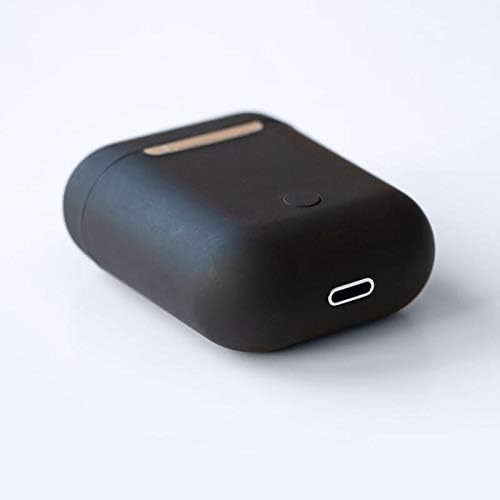
Foto: A nso nso view of the bottom of the TWS i17 charging case, highlighting the USB charging port and a small button.
4.2 Jikọọ na ngwaọrụ gị
The i17 earbuds use Bluetooth for wireless connection.
- Gbaa mbọ hụ na ebubo na ekwe ntị.
- Mepee igbe nchaji. Igwe ntị ga-abanye na ọnọdụ njikọta na-akpaghị aka (ọkụ ọkụ ga-enwu).
- On your mobile phone or Bluetooth-enabled device, go to Bluetooth settings and turn Bluetooth on.
- Chọọ maka available devices. Select "i17" from the list.
- Once connected, the indicator lights on the earbuds will stop flashing. You are now ready to use your earbuds.

Image: The TWS i17 Dual Earbuds resting inside their open charging case, ready for pairing or use.
5. Ntuziaka ọrụ
5.1 Gbanyụọ ma ọ bụ gbanyụọ
- Ike Na: Take the earbuds out of the charging case. They will automatically power on and connect to the last paired device.
- Gbanyụọ: Place the earbuds back into the charging case. They will automatically power off and begin charging.
5.2 Nghaghachi egwu
- Gwuo/kwụsịtụ: Kpatụ ntị ntị otu ugboro.
- Track na-esote: Kpatụ ntị ntị aka nri ugboro abụọ.
- Gara aga Track: Kpatụ ntị ntị aka ekpe ugboro abụọ.
5.3 Njikwa oku
- Azịza/Kwụsị Oku: Kpatụ ntị ntị otu ugboro.
- Jụ oku: Pịa ma jide otu ntị ntị maka sekọnd 2.
5.4 Onye enyemaka olu
- Mee ka onye enyemaka olu rụọ ọrụ (Siri/onye enyemaka Google): Kpatụ ihe ekwe ntị ugboro atọ.
6. Nlekọta
Proper maintenance ensures the longevity of your earbuds:
- Nhicha: Use a soft, dry, lint-free cloth to clean the earbuds and charging case. Do not use liquids or sprays.
- Nchekwa: Mgbe ejighị ya, chekwaa earbuds n'ime akpa nchaji ha iji chebe ha ma debe ha ebubo. Chekwaa n'ebe dị jụụ, kpọrọ nkụ.
- Nlekọta batrị: To prolong battery life, avoid fully discharging the earbuds frequently. Charge them regularly.

Image: The TWS i17 Dual Earbuds securely stored within their closed charging case, ready for transport or charging.
7. Nchọpụta nsogbu
| Nsogbu | Ihe nwere ike ime | Ngwọta |
|---|---|---|
| Igwe ntị anaghị ejikọta ọnụ | Low battery; Out of range; Not in pairing mode; Bluetooth off on device. | Charge earbuds; Move closer to device; Ensure case is open for pairing; Turn on Bluetooth on device. |
| Naanị otu earbud na-arụ ọrụ | One earbud not charged; Earbuds not properly synced. | Ensure both earbuds are charged; Place both earbuds back in case, close, then reopen to re-sync. |
| Enweghị ụda | Volume too low; Not connected; Media paused. | Increase volume on device; Reconnect earbuds; Check media playback status. |
| Nchaji anaghị akwụ ụgwọ | Faulty cable/adapter; Loose connection. | Try a different USB cable or power adapter; Ensure cable is securely plugged in. |
8. Nkọwapụta
| Njirimara | Nkọwa |
|---|---|
| Nọmba nlereanya | i17 |
| Ụdị | TWS |
| Teknụzụ Njikọta | Ikuku (Bluetooth) |
| Ụdị ekweisi | N'ime ntị |
| Igwe okwu gụnyere | Ee |
| Ịkagbu mkpọtụ | Mba |
| Dakọtara na | Ekwentị mkpanaaka |
| Agba | Nwa |
| Ihe onwunwe | Plastic |
| Njirimara USB | Enweghị eriri |
| Ọkwa Nguzogide mmiri | Ọ bụghị mmiri na-eguzogide |
| Akụkụ Mbupu | 12.6 x 8.8 x 3.6 cm |
| Ibu | 96 grams |
| Ụbọchị mbụ dị | Jenụwarị 15, 2020 |
9. Akwụkwọ ikike na nkwado
For warranty information and customer support, please refer to the contact details provided on the product packaging or the official TWS websaịtị. Debe ihe akaebe nke ịzụrụ maka akwụkwọ ikike.
For further assistance, please contact TWS customer service.