1. Okwu mmalite
This manual provides comprehensive instructions for the installation, operation, and troubleshooting of the MZHOU 7-Port USB 3.0 PCIe Expansion Card. It details the card's features, specifications, and compatibility, ensuring users can effectively integrate and utilize the additional USB 3.0 ports for enhanced connectivity and data transfer speeds.
The MZHOU USB 3.0 PCIe Expansion Card adds multiple SuperSpeed USB 3.0 ports to your desktop computer, including both rear panel and front panel connectivity. This allows for faster data transfer rates and expanded peripheral support.
2. Ihe ngwugwu
Biko chọpụta na ihe niile dị na ngwugwu gị:
- 1 x MZHOU 7-Port USB 3.0 PCIe Expansion Card
- 1 x USB 3.0 Front Panel Connector (with 2 USB 3.0 ports)
- 1 x SATA 15-pin to 4-pin power cable
- 1 x Driver CD (for older Windows versions)
- Ịkwanye kposara

Figure 1: MZHOU 7-Port USB 3.0 PCIe Expansion Card with included front panel connector and cables.
3. Ntọala na nwụnye
Before proceeding, ensure your computer is powered off and unplugged from the wall outlet. It is recommended to wear an anti-static wrist strap to prevent electrostatic discharge (ESD) damage to components.
3.1 System chọrọ
- Available PCI Express (PCI-E) x1, x2, x4, x8, or x16 slot.
- Available SATA power connector from your power supply.
- Standard tower case (not compatible with mini-PCs).
- Operating System: Windows XP/Vista/7 (driver required), Windows 8/8.1/10 (no driver required), Linux Kernel 2.4 & 2.6.

Nyocha 2: N'eluview of compatible operating systems, including Windows and Linux.
3.2 Ntinye ngwaike
- Mepee akpa kọmputa: Wepu akụkụ akụkụ nke ikpe kọmputa gị iji nweta motherboard.
- Chọta oghere PCIe: Identify an available PCI Express slot (x1, x2, x4, x8, or x16).
- Insert PCIe Card: Carefully align the MZHOU USB 3.0 PCIe card with the chosen slot and press firmly until it is securely seated.
- Kaadị echedoro: Use a screw to secure the metal bracket of the PCIe card to the computer case.
- Njikọ Ike: Connect the provided SATA 15-pin power cable from your power supply to the SATA power connector on the PCIe card. This is crucial for stable operation, especially with multiple connected devices or high-power USB devices.
- Install Front Panel (Optional): If using the front panel connector, install it into an available 3.5-inch or 5.25-inch drive bay (adapter may be required for 5.25-inch). Connect the internal USB 3.0 header cable from the front panel to the corresponding header on the PCIe card.
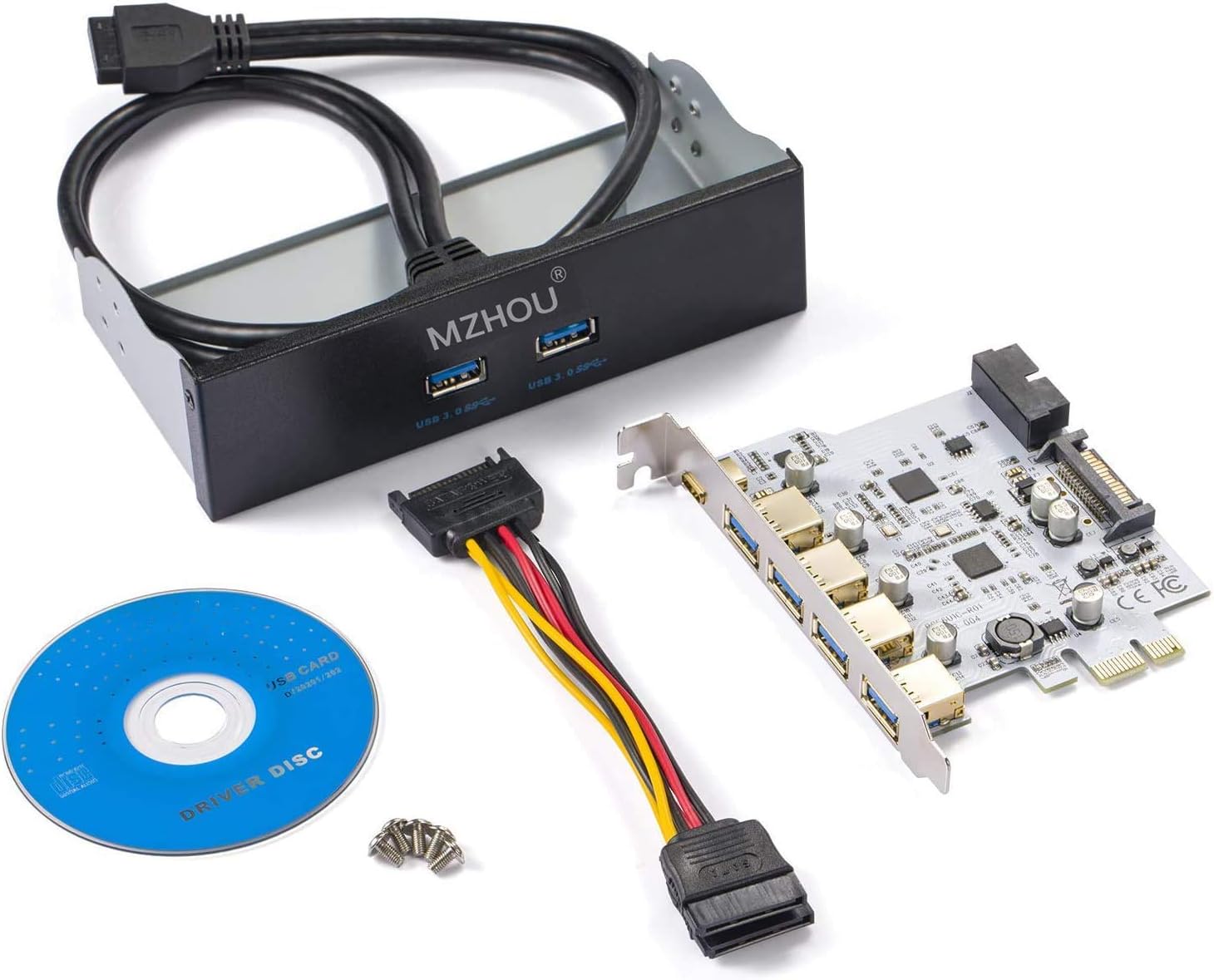
Figure 3: The MZHOU USB 3.0 PCIe card correctly installed in a PCI Express slot on a motherboard.

Figure 4: The MZHOU USB 3.0 front panel connector integrated into a desktop computer case.
3.3 Nwụnye ọkwọ ụgbọala
- Windows 8/8.1/10: No additional drivers are required. The operating system will automatically detect and install the necessary drivers.
- Windows XP/Vista/7: Insert the provided driver CD into your optical drive. Follow the on-screen instructions to install the drivers. If you do not have an optical drive, drivers can typically be downloaded from the MZHOU support websaịtị.
- Linux: Drivers are generally integrated into the Linux kernel (2.4 & 2.6 and newer). No manual installation is usually needed.
4. Ọrụ
Once the card is installed and drivers (if necessary) are in place, you can begin using the new USB 3.0 ports.
- Ngwa njikọ: Simply plug your USB 3.0, USB 2.0, or USB 1.1 devices into any of the available ports on the rear of the card or the front panel.
- Hot-Swap Functionality: The card supports hot-swapping, allowing you to connect and disconnect USB devices without needing to restart your computer.
- Nnyefe Data SuperSpeed: USB 3.0 offers data transfer rates up to 5 Gbps, which is significantly faster than USB 2.0 (480 Mbps). Actual speeds may vary depending on the connected device and system configuration.
- Nkwado UASP: The card supports the USB Attached SCSI Protocol (UASP), which can further accelerate read and write speeds for SSDs and other UASP-enabled storage devices, providing up to 70% faster performance compared to traditional USB 3.0.

Figure 5: Visual representation of USB 3.0 (5 Gbps) versus USB 2.0 (0.48 Gbps) transfer speeds.
5. Nlekọta
The MZHOU USB 3.0 PCIe Expansion Card requires minimal maintenance. To ensure optimal performance and longevity:
- Keep your computer's interior clean and free of dust to prevent overheating of components.
- Ensure all cable connections (PCIe slot, power, internal USB header) remain secure.
- Regularly update your operating system to ensure the latest USB drivers and compatibility.
6. Nchọpụta nsogbu
If you encounter issues with your MZHOU USB 3.0 PCIe Expansion Card, refer to the following common solutions:
| Nsogbu | Ihe kpatara/ Ngwọta nwere ike ime |
|---|---|
| Card not detected or not functioning |
|
| Achọpụtaghị ngwaọrụ USB |
|
| Slow data transfer speeds |
|
| System instability or crashes |
|
7. Nkọwapụta
| Njirimara | Nkọwa |
|---|---|
| Ụdị | MZHOU |
| Nọmba nlereanya | Mzhou-7 usb |
| Interface | Nweta PCI Express x1 |
| Ọdụ ụgbọ mmiri mpụga | 4 x USB 3.0 Type-A (on rear bracket) |
| Isi nke ime | 1 x 20-pin USB 3.0 Header (supports 2 front panel USB 3.0 ports) |
| Total Physical USB 3.0 Ports | 6 (4 rear, 2 front via header) |
| Ọnụego mbufe data | Ruo 5 Gbps (SuperSpeed USB 3.0) |
| Njikọ ọkụ | 15-pin SATA Power Connector |
| Mmepụta ugbu a | 5V / 1A MAX per USB port |
| Chipset | NEC uPD720201 |
| Ndakọrịta | USB 3.0, USB 2.0, USB 1.1 devices |
| Sistemu eji arụ ọrụ | Windows XP/Vista/7/8/8.1/10, Linux |
| Ụdị Ihe | Standard height PCIe card (not for mini-PCs) |
| UPC | 778197602313, 779283106982 |
8. Akwụkwọ ikike na nkwado
MZHOU products are designed for reliability and performance. For specific warranty details, please refer to the documentation included with your purchase or contact MZHOU customer support.
Nkwado ndị ahịa:
If you require technical assistance or have questions regarding your MZHOU 7-Port USB 3.0 PCIe Expansion Card, please visit the official MZHOU websaịtị ma ọ bụ kpọtụrụ ngalaba ọrụ ndị ahịa ha site na ụlọ ahịa ebe azụrụ ngwaahịa ahụ.


