1. Okwu mmalite na gafereview
The OSD Audio MX1680 GEN2 is a high-performance, multi-channel amplifier designed for distributed audio systems. This Class D amplifier provides 16 channels across 8 independent zones, delivering 80 Watts per channel into 4 Ohms or 50 Watts per channel into 8 Ohms. It is suitable for both residential and commercial audio installations, serving as a main amplifier for multi-room audio or integrating into home theater systems.
Key features include front-panel on/off buttons for each zone, efficient Class D amplification for low distortion, and built-in protection circuitry against thermal overload and short circuits. Its slim, 2U rack-mountable design (hardware included) allows for flexible installation.

Foto 1.1: Ihu na azụ view of the OSD Audio MX1680 GEN2 Multi-Zone Digital Ampna -emegharị ihe.
2. Ozi nchekwa
Please read and understand all safety instructions before operating this device. Retain this manual for future reference.
- Isi mmalite ike: Jikọọ amplifier only to the type of power source indicated on the unit. Ensure the voltage ziri ezi maka mpaghara gị.
- Igwe ikuku: Do not block any ventilation openings. Install in accordance with the manufacturer's instructions. Maintain adequate space around the unit for proper airflow.
- Mmiri na mmiri: Etinyela ihe ndị e ji mmiri mee, dị ka ite, n'elu ihe a.
- Okpomọkụ: Awụnyela n'akụkụ ebe okpomọkụ ọ bụla dị ka radiators, ndekọ okpomọkụ, stovu, ma ọ bụ ngwa ndị ọzọ (gụnyere amplifiers) nke na-emepụta okpomọkụ.
- Nda ala: This appliance must be grounded. Ensure the power cord is connected to a properly grounded outlet.
- Ije ozi: Anwala ịnye ngwaahịa a n'onwe gị. Tụtụ aka n'aka ndị ọrụ ruru eru.
- Nhicha: Unplug the unit from the power outlet before cleaning. Use a dry cloth for cleaning.
3. Ntọala na nwụnye
3.1 Nwepu
Jiri nlezianya wepu amplifier from its packaging. Verify that all components listed in the 'What's in the Box' section are present. This includes the MX1680 GEN2 amplifier and the Quick Start Guide.
3.2 Ntinye
The MX1680 GEN2 is designed for rack mounting (2U height) or placement on a flat, stable surface. Ensure adequate ventilation around the unit to prevent overheating. Avoid placing it near other heat-generating equipment.
3.3 Njikọ
Refer to the rear panel diagram for all input and output connections.
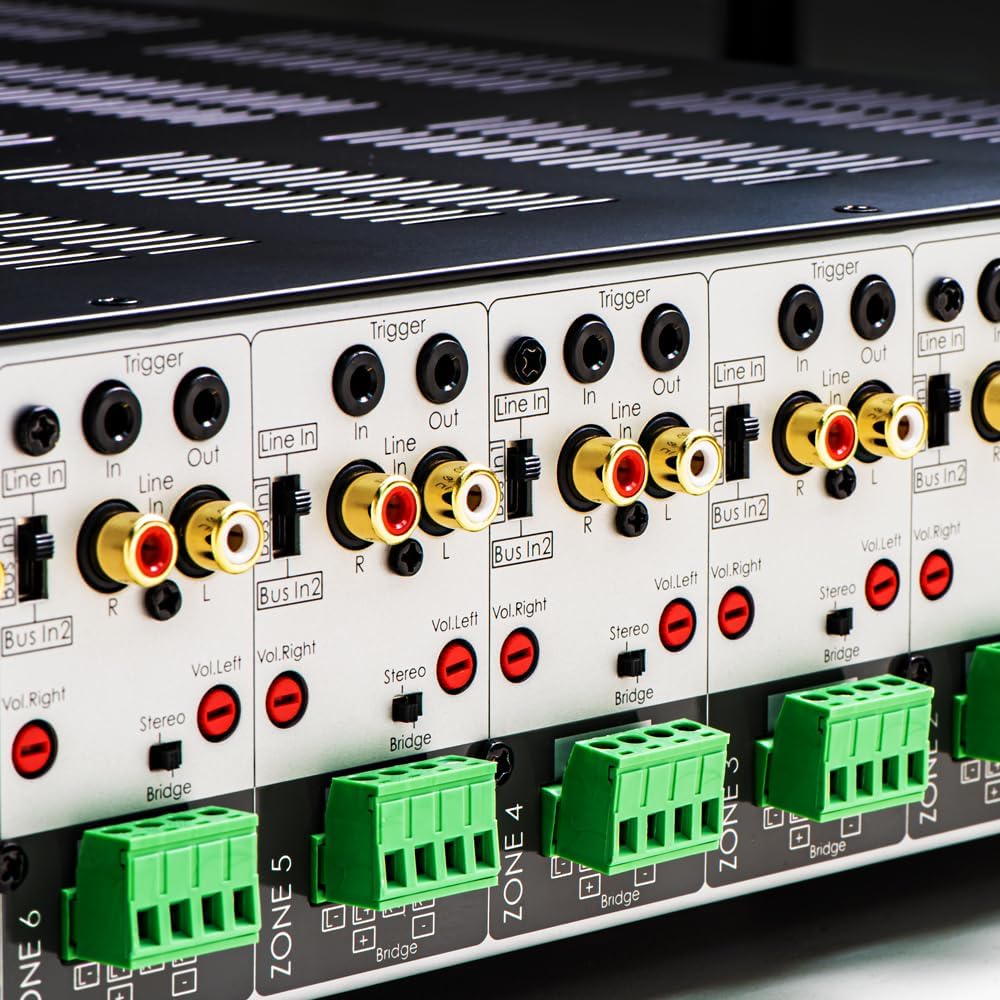
Foto 3.1: Zuru ezu view of the rear panel input and output connections.
- Mpụta okwu: Connect your speakers to the corresponding zone terminals. Ensure correct polarity (+ to + and - to -). The amplifier supports both 4-ohm and 8-ohm speakers. For bridged mode operation, refer to section 4.3.
- Line Inputs (RCA): Each zone has a dedicated stereo RCA Line In. Connect your audio sources (e.g., pre-amplifier, media player) to these inputs.
- Bus Inputs (RCA): Nke amplifier features two stereo Bus Inputs (Bus In 1, Bus In 2). These allow a single audio source to be distributed to multiple zones.
- Mpụta akara (RCA): Each zone also has a stereo RCA Line Out, allowing the audio signal from that zone to be passed to another ampngwa ọkụ ma ọ bụ ngwaọrụ ọdịyo.
- Na-akpali ịbata/Ọpụpụ: The 12V Trigger In allows the amplifier to be turned on/off by an external device. The 12V Trigger Out can be used to control other devices.
- Ntinye ike AC: Connect the supplied power cord to the AC IN receptacle and then to a suitable wall outlet.

Foto 3.2: Zuru ezu view of Bus inputs and Trigger connections on the rear panel.
4. Ntuziaka ọrụ
4.1 Gbanyụọ ma ọ bụ gbanyụọ
Press the main power button on the front panel to turn the amplifier on or off. A red LED indicator will illuminate when the unit is powered on.

Image 4.1: Front panel power button.
Njikwa mpaghara 4.2
Each of the 8 zones has a dedicated button on the front panel. Pressing a zone button will activate or deactivate that specific audio zone. The corresponding LED will indicate the zone's status.

Image 4.2: Front panel zone selection buttons.
4.3 Input Selection and Volume Adjustment
On the rear panel, each zone features switches for input selection and rotary controls for volume adjustment:
- Ntinye Nhọrọ: A slide switch allows you to select the audio input for each zone: Ahịrị Na (dedicated input for that zone), Bus In 1, ma ọ bụ Bus In 2.
- Njikwa olu: Separate rotary controls for Left and Right channels (Vol. Left, Vol. Right) allow for precise volume balancing within each zone.
- Stereo/Bridge Switch: A switch allows you to configure the zone for stereo operation or bridged mono operation. In bridged mode, two amplifier channels combine to deliver higher power to a single speaker. Ensure the speaker impedance is appropriate for bridged mode (typically 8 ohms minimum).
4.4 Audio Sensing
Nke amplifier incorporates an audio sense feature that automatically activates a zone when an input signal is detected and turns it off after a period of no signal. This helps conserve power and prolong the unit's lifespan.

Foto 4.3: Ọpụample of multi-zone audio distribution with the ampna -emegharị ihe.
5. Nlekọta
The OSD Audio MX1680 GEN2 amplifier requires minimal maintenance. Follow these guidelines to ensure optimal performance and longevity:
- Nhicha: Periodically wipe the exterior surfaces with a soft, dry cloth. Do not use liquid cleaners or aerosol sprays, as they may damage the finish or internal components.
- Igwe ikuku: Ensure that the ventilation openings on the top and sides of the unit remain clear of dust and obstructions. Dust accumulation can impede airflow and lead to overheating.
- Njikọ: Occasionally check all cable connections to ensure they are secure and free from corrosion. Loose connections can lead to signal loss or degradation.
- Nchekwa: Ọ bụrụ na-echekwa ampihe na-eme ka ihe na-agbapụta ọkụ ruo ogologo oge, wepụ ya na ọkụ eletrik ma debe ya n'ebe dị jụụ ma kpọọ nkụ, ebe anwụ na-acha kpọmkwem na oke okpomọkụ dị oke njọ.
6. Nchọpụta nsogbu
If you experience issues with your MX1680 GEN2 amplifier, consult the following troubleshooting guide. For problems not resolved here, please contact OSD Audio support.
| Nsogbu | Ihe nwere ike ime | Ngwọta |
|---|---|---|
| Enweghị ike | Power cord disconnected; Power outlet faulty; Amplifier fuse blown | Check power cord connection; Test outlet with another device; Contact service for fuse replacement. |
| No sound from a zone | Zone not activated; Incorrect input selected; Source device off/muted; Speaker wires loose/incorrectly connected; Volume too low | Press the zone button on the front panel; Verify input selector switch position; Check source device; Inspect speaker connections; Adjust zone volume controls. |
| Ụda agbagọ | Input signal too high; Speaker impedance mismatch; Faulty speaker cable; Amplifier oke ọkụ | Reduce source device output level; Ensure correct speaker impedance (4 or 8 ohms, or 8 ohms for bridged); Check speaker cables; Ensure proper ventilation. |
| Amplifier shuts off unexpectedly | Overheating; Short circuit in speaker wiring; Protection circuit activated | Ensure proper ventilation; Check all speaker wiring for shorts; Allow unit to cool down before restarting. |
7. Nkọwapụta
| Njirimara | Nkọwapụta |
|---|---|
| Nọmba nlereanya | MX1680-GEN2 |
| Ọwa | 16 Channels (8 Zones) |
| Mpụta ike (4 Ohms) | 80 Watts per channel (1KHz) |
| Mpụta ike (8 Ohms) | 50 Watts per channel (1KHz) |
| AmpKlas liifier | Klas D |
| Akụkụ ngwaahịa (L x W x H) | 16.81 x 16.14 x 3.46 sentimita asatọ |
| Ibu Ibu | 23 pound |
| Rack Mountable | Yes (2U, hardware included) |
| Onye nrụpụta | OSD Audio |
| Ụbọchị mbụ dị | Jenụwarị 31, 2020 |
8. Akwụkwọ ikike Ozi
Warranty information for the OSD Audio MX1680 GEN2 amplifier is typically provided with your purchase documentation or can be found on the official OSD Audio websaịtị. Biko rụtụ aka na akụrụngwa ndị a maka nkọwa gbasara mkpuchi mkpuchi, usoro na ọnọdụ.
9. Nkwado
For technical assistance, product inquiries, or service requests, please contact OSD Audio customer support. You can typically find contact information, including phone numbers and email addresses, on the official OSD Audio websaịtị:
Please have your model number (MX1680-GEN2) and purchase details ready when contacting support.