1. Okwu mmalite
This manual provides detailed instructions for the installation, operation, and maintenance of your SONOFF Zigbee Smart Plug S31 Lite. Please read this manual thoroughly before using the product to ensure proper function and safety.
Akụkụ ndị bụ isi:
- Simple Setup and Use: Easy pairing with a compatible Zigbee hub.
- Njikwa smart: Control connected appliances via smartphone app and set schedules.
- Njikwa olu: Dakọtara na Amazon Alexa na Google Home maka ọrụ aka na-enweghị aka.
- Zigbee Repeater Function: Extends your Zigbee network range.
- ETL kwadoro: Ensures product safety and quality.
- Nhazi kọmpat: Does not obstruct adjacent outlets.

Image 1.1: The SONOFF S31 Lite Zigbee Smart Plug in a standard wall outlet.

Foto 1.2: Zuru ezu view of the SONOFF S31 Lite Smart Plug, showing its components and safety features.
2. Nhazi ntuziaka
The SONOFF S31 Lite Zigbee Smart Plug requires a compatible Zigbee hub (e.g., SmartThings, Amazon Echo Plus) for smart functionality.
2.1 Ijikọ na Zigbee Hub
- Plug the SONOFF S31 Lite Smart Plug into a standard wall outlet.
- Ensure your Zigbee hub is powered on and in pairing mode. Refer to your hub's manual for specific instructions on enabling pairing mode.
- Mepee ngwa eWeLink na ama gị.
- Pịa akara ngosi "+" dị n'akụkụ aka nri elu iji tinye ngwaọrụ ọhụrụ.
- Follow the on-screen instructions to discover and add the SONOFF S31 Lite Smart Plug to your network. This typically involves selecting the Zigbee device type and confirming the pairing process.
- Once successfully paired, the device will appear in your eWeLink App and be controllable through your Zigbee hub.

Image 2.1: Visual guide for adding a device using the eWeLink app.
2.2 Hub Compatibility
The SONOFF S31 Lite is designed to work with various Zigbee hubs, including:
- SmartThings Hub
- Amazon Echo Plus
- Amazon Echo Show (2nd Gen)
- Amazon Echo Studio

Image 2.2: Compatibility diagram for the SONOFF Zigbee Smart Plug.
3. Ntuziaka ọrụ
3.1 Njikwa ngwa
Once paired, you can control the smart plug and connected devices through the eWeLink app:
- Njikwa ngbanwu/ gbanyụọ: Tap the power icon in the app to toggle the connected appliance on or off.
- Ịhazi oge: Set custom schedules, timers, or countdowns for automatic operation.
- Nleba anya ike: View real-time power consumption (if supported by your specific model and app version).

Image 3.1: Controlling a device via the eWeLink app interface.

Foto 3.2: Ọpụample of setting a schedule for an appliance.
3.2 Njikwa olu
Integrate your SONOFF S31 Lite with Amazon Alexa or Google Home for convenient voice commands. Ensure your Zigbee hub is linked to your voice assistant account.
- Amazon Alexa: After linking your eWeLink or SmartThings account to Alexa, you can use commands like "Alexa, turn on the [device name]" or "Alexa, turn off the [device name]."
- Ụlọ Google: Similar integration allows commands such as "Hey Google, turn on the [device name]."
Video 3.1: Demonstration of controlling SONOFF devices using Alexa voice commands.
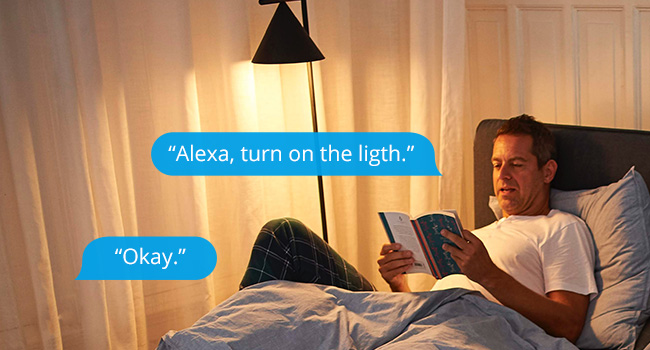
Foto 3.3: Ọpụample of using Alexa to control a light connected to the smart plug.
3.3 Njikwa akwụkwọ ntuziaka
The smart plug features a physical button on its side. Press this button to manually toggle the power of the connected appliance on or off. This action will also update the status in your app.

Image 3.4: The SONOFF S31 Lite Smart Plug used with a lamp, illustrating its versatility.
4. Nlekọta
To ensure the longevity and optimal performance of your SONOFF Zigbee Smart Plug S31 Lite:
- Debe ngwaọrụ ahụ ọcha na enweghị ntụ. Jiri akwa kpọrọ nkụ dị nro maka nhicha.
- Zere ikpughe ngwaọrụ ahụ na oke mmiri ma ọ bụ oke okpomọkụ.
- Anwala ịkwasa ma ọ bụ rụkwaa ngwaọrụ n'onwe gị. Kpọtụrụ nkwado ndị ahịa maka enyemaka.
- Ensure the connected appliance's power consumption does not exceed the smart plug's maximum rating (15 Amps).
5. Nchọpụta nsogbu
If you encounter issues with your SONOFF Zigbee Smart Plug S31 Lite, consider the following:
- Ngwaọrụ anaghị aza:
- Check if the smart plug is properly plugged into the outlet and receiving power.
- Verify that your Zigbee hub is online and functioning correctly.
- Ensure the smart plug is within range of your Zigbee hub or another Zigbee repeater.
- Try re-pairing the device with your Zigbee hub.
- Okwu Njikọta ngwa:
- Jide n'aka na ekwentị gị nwere njikọ ịntanetị kwụsiri ike.
- Restart the eWeLink app.
- Lelee maka mmelite ngwa.
- Njikwa olu anaghị arụ ọrụ:
- Ensure your Zigbee hub is correctly linked to your voice assistant (Alexa/Google Home) account.
- Verify the device name used in voice commands matches the name in your app.
- Check your voice assistant's settings for any connectivity issues.
If problems persist, please refer to the official SONOFF support resources or contact customer service.
6. Nkọwapụta
| Njirimara | Nkọwa |
|---|---|
| Nọmba nlereanya | S31 Lite zb |
| Akụkụ ngwaahịa | 1.57 x 3 x 1.3 sentimita asatọ |
| Ibu Ibu | 3.21 ounces |
| Ogo dị ugbu a | 15 Amps |
| Ihe onwunwe | Copper (internal components), PC V0 (shell) |
| Njikọta | Zigbee Protocol (Hub Required) |
| Ndakọrịta | SmartThings, Amazon Echo Plus, Alexa, Google Home |
| Ụdị nkwụnye | Nkwụnye-N'Ugwu |
7. Akwụkwọ ikike na nkwado
Maka ozi gbasara akwụkwọ ikike, nkwado teknụzụ, ma ọ bụ enyemaka ndị ọzọ, biko gaa na SONOF gọọmentị website or contact their customer service department. Details can typically be found on the product packaging or the SONOFF official websaịtị.


