Okwu mmalite
Ndị Wampler Terraform is a multi-modulation guitar effects pedal designed to provide a wide range of modulation effects in a compact unit. It features 11 distinct effect blocks, stereo and mono routing options, MIDI control, and expression pedal integration. This manual provides detailed instructions for setting up, operating, and maintaining your Terraform pedal.
Melite
Ihe achọrọ ike
The Terraform pedal requires a 9-18V DC power supply, center negative, with a minimum current draw of 100mA. Ensure your power supply meets these specifications to prevent damage and ensure optimal performance.
Njikọ
The pedal offers versatile connectivity options for integration into various guitar rigs.
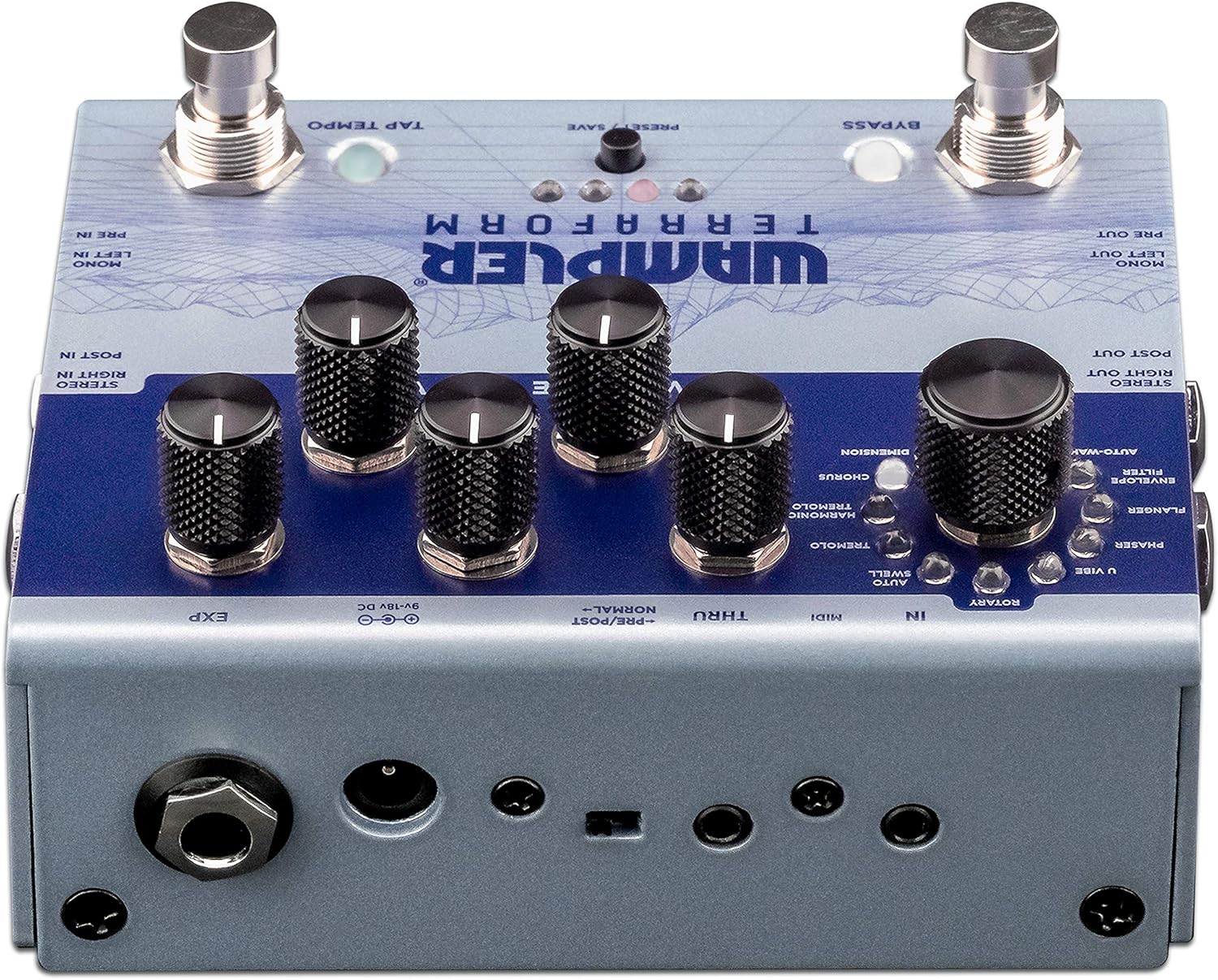
Figure 1: Rear panel connections of the Wampler Terraform pedal.
- Power Input (9-18V DC): Connect your compatible power supply here.
- Mono Left In / Pre In: Standard mono input for your guitar signal.
- Mono Left Out / Pre Out: Standard mono output.
- Stereo Right In / Post In: Input for stereo operation or for effects placed after drive pedals.
- Stereo Right Out / Post Out: Output for stereo operation.
- MIDI In/Thru: Connect MIDI devices for control and synchronization. The pedal includes 3.5mm to 5-pin DIN adapters.
- EXP (Expression Pedal): Connect an expression pedal for real-time control over various parameters.
Ike mbido
After connecting power and your instrument, the pedal will power on. The LEDs will illuminate, indicating its current state and selected preset.
Ntuziaka ọrụ
The Terraform pedal features a user-friendly interface with dedicated knobs and footswitches for intuitive control.

Nyocha 2: N'eluview nke Wampler Terraform pedal controls.
Njikwa
- Effect Selector Knob: This large knob allows you to choose between the 11 available modulation effects. The effects include: Dimension, Chorus, Harmonic Tremolo, Tremolo, AutoSwell, Rotary, U-Vibe, Phaser, Flanger, Envelope Filter, and AutoWah.
- Rate Knob: Adjusts the speed or rate of the selected modulation effect.
- Igwe Omimi: Controls the intensity or depth of the modulation.
- Blend Knob: Mixes the wet (effected) signal with the dry (unaffected) signal.
- Variable Knob: This control's function changes depending on the selected effect, offering additional parameter adjustment specific to each modulation type.
- Mpịakọta Mpịakọta: Adjusts the overall output volume of the pedal.

Figure 3: Detail of the effect selection knob.

Figure 4: Detail of the Rate, Depth, and Blend control knobs.
Ụkwụ ụkwụ
- Gafere Footswitch: Engages or disengages the effect.
- Tap Tempo Footswitch: Allows you to tap in the desired tempo for time-based effects.
Ntọala
The Terraform pedal can store up to 8 presets. These presets can be recalled via the front panel button, the footswitches, or through MIDI commands. Refer to the full manual for detailed instructions on saving and recalling presets.
Expression Pedal Functionality
An external expression pedal can be connected to control any of the five main control parameters (Rate, Depth, Blend, Variable, Volume). You can also set the heel and toe points for precise control over the parameter range.
Stereo and Mono Routing
The pedal supports both mono and full stereo operation. Additionally, it allows for splitting the mono signal to route certain effects before your drive pedals or amplifier gain, while other effects follow in your amplifier's effects loop.
Njikwa MIDI
The Terraform pedal is fully MIDI mappable, allowing for external control of parameters, preset changes, and synchronization with other MIDI-enabled gear.
Nlekọta
Nhicha
To clean the pedal, use a soft, dry cloth. Avoid using abrasive cleaners or solvents, as these can damage the finish and internal components.
Power Supply Care
Always use a regulated power supply that matches the pedal's voltage and current requirements. Consider using a power surge protector to safeguard your equipment from electrical fluctuations and ground noise.
Nchekwa
Store the pedal in a dry environment, away from extreme temperatures and direct sunlight, when not in use.
Nchọpụta nsogbu
Enweghị ụda ma ọ bụ ụda na-adịte aka
- Check all cable connections (input, output, power) to ensure they are secure.
- Verify that the power supply is correctly connected and providing the specified voltage na ugbua.
- Hụ na ngwaọrụ gị na amplifia na-arụ ọrụ nke ọma.
- Check the pedal's bypass status.
Unwanted Noise or Hum
- Ensure you are using a high-quality, isolated power supply.
- Lelee maka mgbagọ ala n'ime agbụ mgbama gị.
- Nwalee ya site na iji waya dị iche iche.
Pedal Not Responding to Controls
- Verify the pedal is powered on.
- If using MIDI, ensure MIDI connections are correct and the pedal is receiving the expected commands.
- If using an expression pedal, ensure it is properly connected and calibrated.
If issues persist, consult the Wampler support resources or contact customer service.
Nkọwapụta
| Njirimara | Nkọwa |
|---|---|
| Ụdị | Wampler |
| Aha Nlereanya | Terraform |
| Nọmba nlereanya | WAMTERRAFORM |
| Akụkụ ngwaahịa (L x W x H) | 7" x 6" x 4" |
| Ibu Ibu | 1.41 pound |
| Voltage | 9-18 Volts DC (Center Negative) |
| Ampoge | 100 ndeamps (minimum) |
| Mmetụta Mbupụ Ọdịyo | Dimension, Chorus, Harmonic Tremolo, Tremolo, AutoSwell, Rotary, U-Vibe, Phaser, Flanger, Envelope Filter, AutoWah |
| Ụdị njikwa | Knob, Footswitch |
| Isi Iyi Ike | DC Power Tụkwasịnụ |
| Ngwaọrụ Akụrụngwa | 1/4-inch Audio, 3.5mm MIDI, Expression Pedal |
| Ụdị mgbaàmà | Analọg |
Akwụkwọ ikike & Nkwado
Ozi akwụkwọ ikike
Ndị Wampler Terraform Multi-Modulation Guitar Effects Pedal comes with a 5-afọ akwụkwọ ikike covering parts and labor from the date of purchase. This warranty covers defects in materials and workmanship under normal use. Please retain your proof of purchase for warranty claims.
Nkwado ndị ahịa
For technical assistance, troubleshooting, or warranty service, please visit the official Wampler website or contact their customer support team. Detailed contact information can typically be found on the Wampler websaịtị ma ọ bụ na nkwakọ ngwaahịa.


