Okwu mmalite
The Perel EDIN305N is a 230V 16A 3600W DIN-rail mount digital weekly timer designed for indoor use. This device allows for precise, programmable control of electrical circuits, enabling automatic switching ON and OFF of connected appliances or lighting systems over a weekly cycle. It features a clear digital display and multiple programming options to suit various scheduling needs.
Akpachara anya maka nchekwa
Ịdọ aka ná ntị: Electrical installation should only be performed by a qualified electrician. Incorrect wiring can lead to electric shock, fire, or damage to the device and connected equipment. Always disconnect power at the main circuit breaker before installation or maintenance.
- Ensure the power supply matches the device's specifications (230V~50Hz).
- Ekwela ka ikike ibu kachasị elu nke 16A / 3600W gafere.
- This device is designed for indoor use only. Avoid exposure to moisture, dust, or extreme temperatures.
- Anwala imeghe ma ọ bụ rụkwaa ngwaọrụ n'onwe gị. Kpọtụrụ ndị ọrụ ruru eru ọrụ niile.
- Debe ebe ụmụaka na-apụghị iru.
Ngwaahịa gafereview
The Perel EDIN305N digital timer consists of a main body with a digital display, control buttons, and terminal blocks for electrical connections. A transparent cover protects the display and buttons.
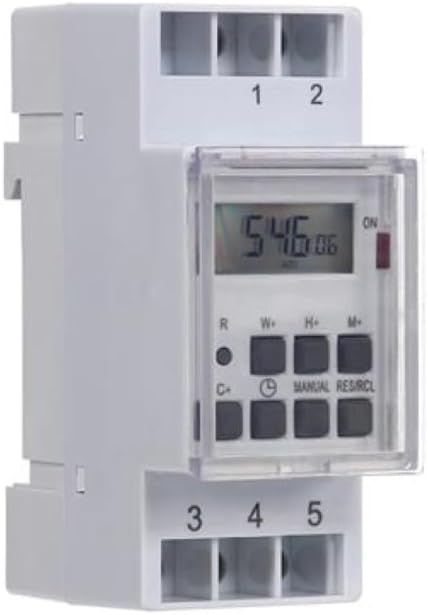
Foto 1: N'ihu view of the Perel EDIN305N Digital Weekly Timer. The image displays the LCD screen, control buttons (R, W+, H+, M+, C+, Clock, Manual, RES/RCL), and numbered terminal blocks (1, 2 at the top, 3, 4, 5 at the bottom).
bọtịnụ njikwa:
- R: Reset button (recessed).
- W+: Weekday setting.
- H+: Ntọala elekere.
- M+: Minute setting.
- C+: Clear program.
- Akara ngosi elekere: Used to set current time and day, and to exit programming mode.
- Akwụkwọ ntuziaka: Manual override for ON/AUTO/OFF modes.
- RES/RCL: Reset/Recall program.
Mgbochi ọnụ:
- 1, 2: Power supply input (N, L).
- 3, 4, 5: Output terminals for controlled circuit (Common, Normally Open, Normally Closed).
Nkọwa nka nka
| Oke | Uru |
|---|---|
| Nọmba nlereanya | EDIN305N |
| Voltage | 230V ~ 50Hz |
| Oke. Ugbu a | 16A |
| Oke. Ike | 3600W |
| Ọnụọgụ nke Ntọala | 7 (ON/OFF programs) |
| Ụdị nkwụnye | DIN-okporo ígwè |
| Akụkụ (L x W x H) | 2.36 x 3.54 x 1.57 sentimita (60 x 90 x 40 mm) |
| Ibu | 0.12 n'arọ (4.2 ounces) |
| Ihe onwunwe | Plastic |
| Agba | Ọcha |
| Batrị achọrọ | No (internal battery for memory backup) |
Nwụnye
1. Ịkwanye
The Perel EDIN305N is designed for DIN-rail mounting. Securely attach the timer to a standard 35mm DIN-rail within an electrical enclosure. Ensure sufficient space for wiring and ventilation.
2. Ihe nkedo
Mkpa: Ensure power is disconnected at the main circuit breaker before proceeding with wiring. Follow local electrical codes and regulations.
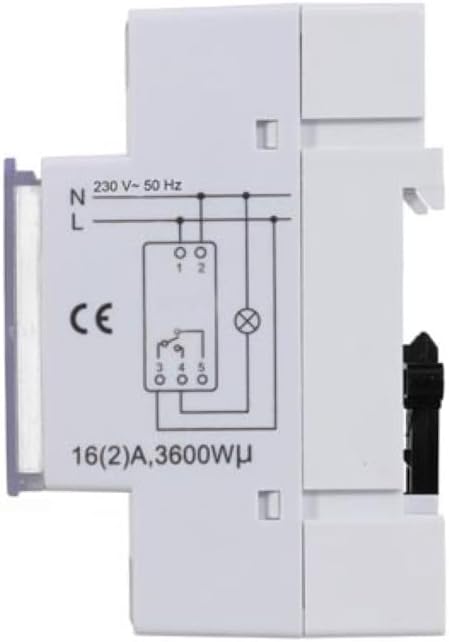
Foto 2: Akụkụ view of the Perel EDIN305N Digital Weekly Timer showing the electrical wiring diagram. It illustrates connections for Neutral (N), Live (L), and the output contacts (1, 2, 3, 4, 5) for controlling a load.
Refer to the wiring diagram (Figure 2) and the terminal block labels on the device:
- Connect the Neutral (N) wire of your 230V AC supply to terminal 1.
- Connect the Live (L) wire of your 230V AC supply to terminal 2.
- For the controlled circuit:
- Terminal 3: Common contact for the relay output.
- Terminal 4: Normally Open (NO) contact. The circuit connected here will be ON when the timer is active.
- Terminal 5: Normally Closed (NC) contact. The circuit connected here will be OFF when the timer is active.
- Connect the load (e.g., light, appliance) between the Live (L) supply and either terminal 4 (for NO operation) or terminal 5 (for NC operation), with terminal 3 connected to the Live (L) supply. Alternatively, connect the load between terminal 4 or 5 and the Neutral (N) supply, with terminal 3 connected to the Live (L) supply. Consult a qualified electrician for specific load wiring configurations.
Mbido na arụ ọrụ
1. Power On and Reset
After wiring and restoring power, the display will illuminate. If the display is blank or shows erratic characters, press the recessed R (Reset) button using a pointed non-metallic object (e.g., a pen tip). This will clear all settings and restore default values.
2. Setting Current Time and Day
- Pịa ma jide Akara ngosi elekere bọtịnụ.
- Mgbe ị na-ejide Akara ngosi elekere bọtịnụ, pịa W+ to set the current day of the week (1=Monday, 7=Sunday).
- Mgbe ị na-ejide Akara ngosi elekere bọtịnụ, pịa H+ to set the current hour (0-23).
- Mgbe ị na-ejide Akara ngosi elekere bọtịnụ, pịa M+ to set the current minute (0-59).
- Hapụ ya Akara ngosi elekere button. The time and day are now set.
3. Programming ON/OFF Cycles
The timer supports up to 7 ON/OFF programs. Each program consists of an ON time and an OFF time.
- Pịa Akara ngosi elekere button once to enter programming mode. The display will show "1 ON".
- Pịa W+ to select the day(s) for this program. You can choose a single day, a block of days (e.g., Mon-Fri), or all days.
- Pịa H+ to set the ON hour for program 1.
- Pịa M+ to set the ON minute for program 1.
- Pịa Akara ngosi elekere button again. The display will show "1 OFF".
- Repeat steps 2-4 to set the OFF day(s), hour, and minute for program 1.
- To set additional programs (2-7), press the Akara ngosi elekere button to cycle through "2 ON", "2 OFF", etc., and repeat the setting process.
- Mgbe ịtọchara mmemme niile achọrọ, pịa Akwụkwọ ntuziaka button to exit programming mode and return to the current time display.
4. Ntugharị akwụkwọ ntuziaka
Pịa Akwụkwọ ntuziaka button repeatedly to cycle through the operating modes:
- NA: The output is continuously ON, overriding all programs.
- UTgbọala: The timer operates according to the programmed ON/OFF cycles.
- Gbanyụọ: The output is continuously OFF, overriding all programs.
Hụ na atọrọla ihe nhazi oge ahụ ka ọ dị AUTO for programmed operation.
5. Clearing Programs
To clear a specific program:
- Tinye ọnọdụ mmemme site na ịpị bọtịnụ mmemme Akara ngosi elekere button until the desired program number (e.g., "3 ON") is displayed.
- Pịa C+ button. This will clear both the ON and OFF times for that specific program.
- Tinyegharịa maka mmemme ndị ọzọ dịka ọ dị mkpa.
- Pịa Akwụkwọ ntuziaka ka ịpụ na usoro mmemme.
To clear all programs and reset the device, use the recessed R (Reset) button.
Nlekọta
- Jiri akwa dị nro hichaa ngwaọrụ ahụ. Ejila ihe nchacha abrasive ma ọ bụ ihe mgbaze.
- Ensure the transparent cover is closed to protect the display and buttons from dust and splashes.
- Regularly check electrical connections for tightness, especially in high-vibration environments.
Nchọpụta nsogbu
| Nsogbu | Ihe nwere ike ime | Ngwọta |
|---|---|---|
| Ngosipụta bụ oghere. | No power supply; internal battery depleted. | Check power connections (terminals 1 & 2). Ensure main power is ON. If power is present, press the R (Reset) button. The internal battery recharges when connected to power. |
| Timer not switching ON/OFF as programmed. | Incorrect program settings; timer in manual ON/OFF mode. | Verify program settings (time, day, ON/OFF). Ensure the timer is in AUTO mode site na ịpị Akwụkwọ ntuziaka bọtịnụ. |
| Connected appliance not receiving power. | Incorrect wiring; appliance fault; timer fault. | Check wiring according to Figure 2. Test the appliance directly. If wiring and appliance are fine, the timer may be faulty. |
| Buttons unresponsive or display erratic. | Software glitch; low internal battery. | Pịa ihe e tinyere n'ime akpa ahụ R (Reset) button. Ensure the timer has been connected to power for at least 24 hours to fully charge the internal battery. |
mkpofu
Do not dispose of this product with general household waste. This electronic device contains materials that can be recycled. Please dispose of it at a designated collection point for electrical and electronic equipment waste, in accordance with local regulations.
Akwụkwọ ikike na nkwado
Perel products are manufactured to high quality standards. For warranty information, technical support, or service inquiries, please refer to the documentation provided with your purchase or contact your local Perel distributor or retailer. Please have your model number (EDIN305N) and purchase details ready when contacting support.


