1. Okwu mmalite
This manual provides essential information for the safe and efficient operation of your Nilox NXGCLI20002X9V2 Line Interactive Uninterruptible Power Supply (UPS). Please read this manual thoroughly before installation and use, and retain it for future reference. The UPS is designed to protect your electronic equipment from power outages, surges, and sags, ensuring continuous operation and data integrity.
2. Ntuziaka nchekwa dị mkpa
- Nchekwa Eletriki: Ngalaba a nwere voltages. Do not attempt to disassemble the UPS. Servicing should only be performed by qualified personnel.
- Nda ala: The UPS must be connected to a grounded AC power outlet. Do not remove the grounding prong from the power cord.
- gburugburu: Install the UPS in a well-ventilated area, away from direct sunlight, heat sources, and excessive moisture. Avoid placing it near flammable liquids or gases.
- Ibu ibu: Do not overload the UPS. Ensure the total power consumption of connected equipment does not exceed the UPS's rated capacity.
- Batrị: The UPS contains sealed lead-acid batteries. Do not dispose of batteries in a fire, as they may explode. Follow local regulations for battery disposal.
- Mmiri mmiri: Do not allow any liquid to enter or spill onto the UPS.
3. Ihe ngwugwu
Carefully unpack the UPS and check the contents. The package should contain:
- Nilox NXGCLI20002X9V2 UPS Unit
- Ụdọ Ike
- USB nkwurịta okwu
- Akwụkwọ ntuziaka (akwụkwọ a)
Ọ bụrụ na ihe ọ bụla na-efu ma ọ bụ mebie, biko kpọtụrụ onye na-ere gị ozugbo.
4. Ngwaahịa gafereview
4.1. UPS Unit
The following images illustrate the Nilox NXGCLI20002X9V2 UPS unit.

Foto 4.1: N'ozuzu view of the Nilox NXGCLI20002X9V2 Line Interactive UPS. This image shows the compact, tower-style design of the black UPS unit, highlighting its ventilation grilles and the front panel with indicators and power button.
4.2. Ogwe Ihu

Foto 4.2: Front panel of the Nilox NXGCLI20002X9V2 UPS. This image details the front of the UPS, showing the LED indicators (red, orange, blue) and the circular power button, along with the Nilox brand logo at the bottom.
The front panel features LED indicators and a power button:
- Ihe ngosi LED: These lights provide status information about the UPS operation, battery level, and potential warnings. Refer to the 'Operating' section for detailed explanations.
- Bọtịnụ ike: Used to turn the UPS ON or OFF.
4.3. Ogwe azụ
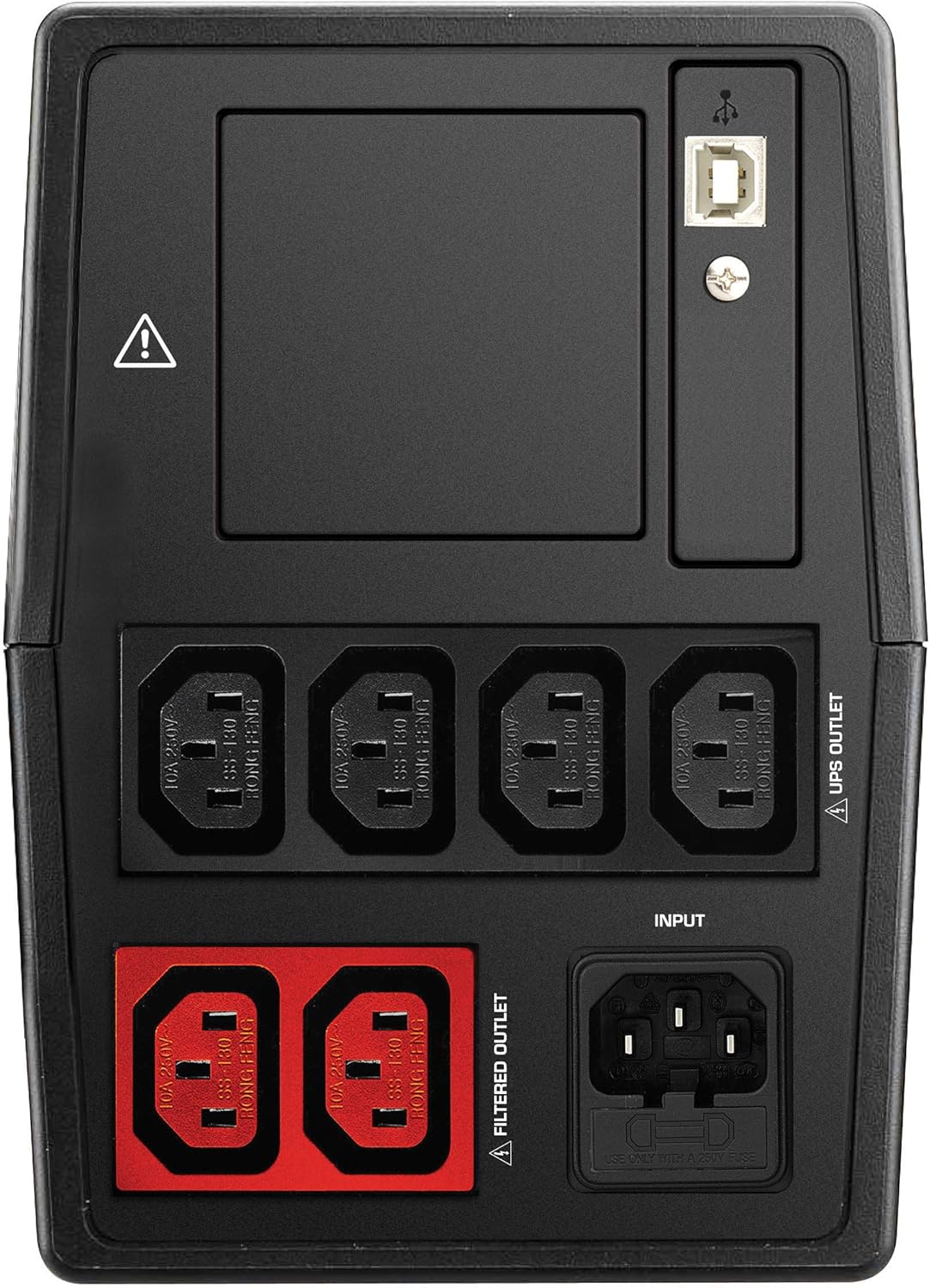
Foto 4.3: Rear panel of the Nilox NXGCLI20002X9V2 UPS. This image displays the back of the UPS, showing the various input and output ports, including the main power input, UPS-protected outlets, filtered outlets, and USB communication ports.
The rear panel includes various connection ports:
- Ntinye AC: Connects the UPS to the main power supply.
- UPS Outlets: Provides battery backup and surge protection for connected devices.
- Ọpụpụ agbachapụrụ: Provides surge protection only (no battery backup).
- ọdụ ụgbọ mmiri USB: For connecting to a computer for monitoring and management software.
5. Nhazi
5.1. Ntinye
Place the UPS on a flat, stable surface in a clean, dry, and well-ventilated area. Ensure there is adequate space around the unit for proper airflow. Avoid placing the UPS near windows or areas with high humidity or dust.
5.2. Nchaji mbụ
Before initial use, connect the UPS to a standard AC power outlet and allow it to charge for at least 8 hours. This ensures the internal batteries are fully charged and ready to provide optimal backup time.
5.3. Ngwa njikọ
- Connect your critical equipment (e.g., computer, monitor) to the UPS Ugboro on the rear panel. These outlets provide battery backup during power outages.
- Connect non-critical equipment (e.g., printer, scanner) to the Mpempe akwụkwọ nzacha. These outlets provide surge protection but no battery backup.
- Connect the UPS power cord to a grounded AC wall outlet.
- Optionally, connect the USB communication cable from the UPS to your computer for monitoring software functionality.
6. Na-arụ ọrụ UPS
6.1. Agbanye / Gbanyụọ
- Ka ịgbanwuo: Press and hold the power button on the front panel for approximately 3 seconds until you hear a beep and the indicators light up.
- Ịgbanyụ: Press and hold the power button for approximately 3 seconds until the indicators turn off.
6.2. LED egosi
The LED display provides real-time status information:
- Green/Blue LED: Indicates normal operation and AC power availability.
- Oroma ikanam: Indicates battery mode (UPS is providing power from its batteries).
- Red ikanam: Indicates a fault, overload, or low battery warning. Consult the troubleshooting section if this LED illuminates.
6.3. Battery Backup Function
N'ihe omume nke ike ịtage, the UPS will automatically switch to battery mode, providing power to connected equipment. An audible alarm may sound to indicate battery operation. The duration of battery backup depends on the load connected and the battery charge level.
7. Nlekọta
7.1. Nlekọta batrị
- Fanye: Always recharge the UPS immediately after a discharge.
- Nchekwa: If storing the UPS for an extended period, recharge it every 3 months to prolong battery life.
- Ndochi: Batteries have a limited lifespan. If the backup time significantly decreases, the batteries may need replacement. Contact qualified service personnel for battery replacement.
7.2. Nhicha
Disconnect the UPS from the AC power outlet before cleaning. Use a soft, dry cloth to wipe the exterior of the unit. Do not use liquid or aerosol cleaners.
8. Nchọpụta nsogbu
If the UPS is not functioning correctly, refer to the following table for common issues and solutions:
| Nsogbu | Ihe nwere ike ime | Ngwọta |
|---|---|---|
| UPS anaghị agbanyụ | No AC input power; Low battery | Check power cord connection; Charge UPS for 8 hours |
| Short backup time | Batteries not fully charged; Overload; Old batteries | Charge UPS for 8 hours; Reduce connected load; Consider battery replacement |
| Constant alarm sound | Overload; Battery mode; Fault | Reduce connected load; This is normal in battery mode; Contact support if fault persists |
| Uhie uhie agbanyere | Overload; Battery fault; Internal fault | Reduce connected load; Contact support for battery or internal fault |
9. Nkọwapụta
| Njirimara | Nkọwa |
|---|---|
| Nlereanya | NXGCLI20002X9V2 |
| Ike (VA/W) | 2000 VA / 1400 W |
| Nkà na ụzụ | Line Interactive |
| Ntinye Voltage | 234 Volt |
| Mmepụta Voltage | 234 Volt |
| Ụdị batrị | Sealed Lead-Acid (2 x 9 Ah) |
| Oge nchaji batrị | Awa 8 |
| Oge Ndabere A Na-ahụkarị | 7 Minutes (at average load) |
| Akụkụ (L x W x H) | 39 x 27.5 x 19 cm |
| Ibu | 8.6 n'arọ |
| Ụdị Ihe | Ụlọ elu |
| Agba | Nwa |
| ọdụ ụgbọ mmiri USB | 4 x USB 2.0, 2 x USB 3.0 |
| Ụdị nkwụnye | Schuko |
10. Akwụkwọ ikike na nkwado
Nilox products are manufactured to high-quality standards. This product is covered by a standard manufacturer's warranty. For specific warranty terms and conditions, please refer to the warranty card included with your product or visit the official Nilox websaịtị.
For technical support, troubleshooting assistance, or service inquiries, please contact your local Nilox dealer or authorized service center. When contacting support, please have your product model number (NXGCLI20002X9V2) and serial number available.


