1. Okwu mmalite
Thank you for choosing the Kaidi KD-750 Bluetooth Headphones. This manual provides essential information for the proper setup, operation, and maintenance of your device. Please read it thoroughly before use to ensure optimal performance and longevity of your headphones.
2. Ihe ngwugwu
Chọpụta na ihe niile dị na ngwugwu gị:
- 1 x Kaidi KD-750 Bluetooth Headphones
- 1 x eriri USB
- 1 x Reinforced 3.5mm Audio Cable with Microphone (P2 Cable)
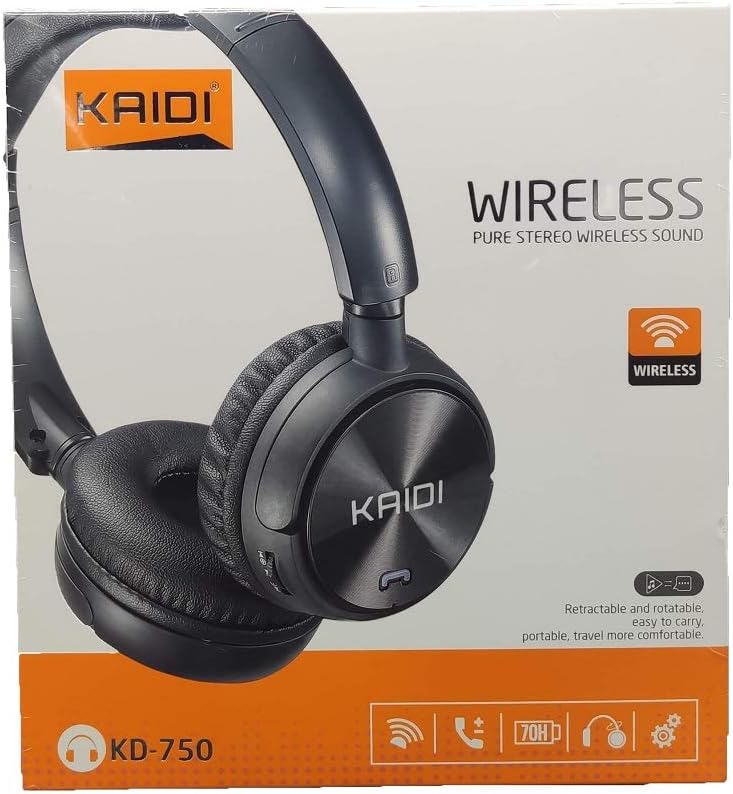
Foto: N'ihu view of the Kaidi KD-750 retail packaging, showing the headphones and branding.
3. Ngwaahịa gafereview
Familiarize yourself with the various parts and controls of your Kaidi KD-750 headphones.

Foto: N'ihu view of the Kaidi KD-750 Bluetooth Headphones, showcasing the earcups with Kaidi logo and the adjustable headband.
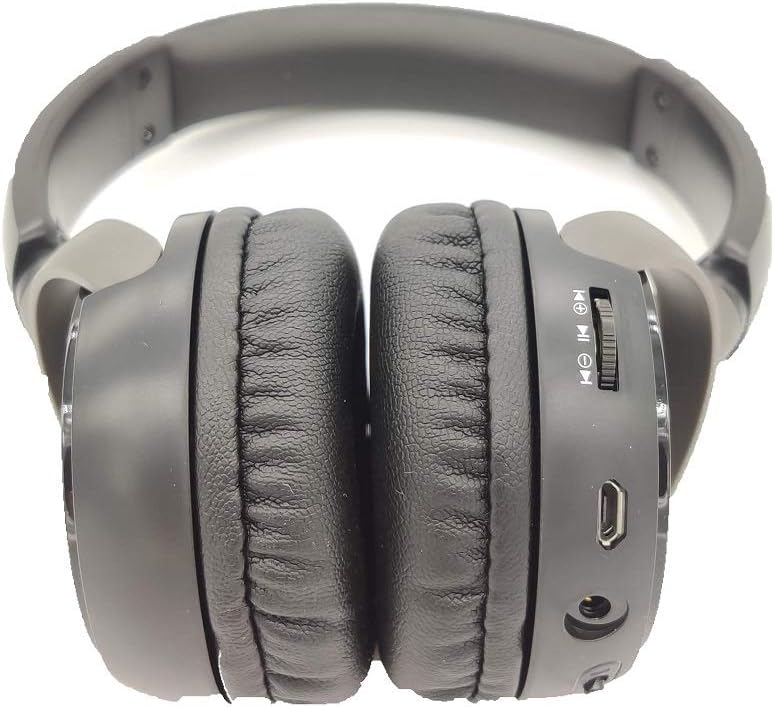
Foto: Akụkụ view of the Kaidi KD-750 Bluetooth Headphones, highlighting the control buttons, charging port, and audio jack on the earcup.

Image: Back of the Kaidi KD-750 retail box, featuring a diagram of the headphone controls and key product features.
3.1. Njikwa na Ọdụ Ụgbọ Mmiri
- Bọtịnụ Ike / Bọtịnụ Ọrụ Dị Iche Iche: Power On/Off, Play/Pause, Answer/End Call.
- Bọtịnụ egwu na-esote: Short press for Volume Up, Long press for Next Track.
- Mpịakọta nke ala / bọtịnụ egwu gara aga: Short press for Volume Down, Long press for Previous Track.
- Bọtịnụ Ụdị (M): Switch between Bluetooth, FM Radio, and SD Card modes.
- Ọdụ USB Nchaji Port: Maka ịchaji ekweisi.
- Ntinye AUX 3.5mm: Maka njikọ wired na-eji eriri ọdịyo agụnyere.
- Oghere kaadị Micro SD: Maka ịkpọ egwu ozugbo site na kaadị Micro SD.
- Igwe okwu: Maka oku na-enweghị aka.
4. Nhazi
4.1. Ịchaji ekweisi
Tupu iji nke mbụ, chajịa ekweisi gị nke ọma.
- Connect the Micro USB end of the charging cable to the charging port on the headphones.
- Jikọọ njedebe USB-A nke eriri nchaji na ihe nkwụnye ọkụ USB (anaghị etinye ya) ma ọ bụ ọdụ ụgbọ USB nke kọmputa.
- The LED indicator will illuminate (usually red) during charging.
- Once fully charged (approximately 2 hours), the LED indicator will change color or turn off (refer to specific LED behavior in the specifications).
Mara: Ndụ batrị dị ihe dịka awa 5 na chaja zuru oke.
4.2. Njikọ Bluetooth
Pair your headphones with a Bluetooth-enabled device.
- Gbaa mbọ hụ na agbanyụrụ ekweisi.
- Press and hold the Power Button for approximately 3-5 seconds until the LED indicator flashes blue and red alternately, indicating pairing mode.
- Na ngwaọrụ gị (smartphone, tabletị, kọmpụta), mee ka Bluetooth nwee ike wee chọọ ngwaọrụ dị.
- Select "KD-750" from the list of found devices.
- Once paired, the LED indicator will typically flash blue slowly or remain solid blue.
- If a password is required, enter "0000".
The effective Bluetooth range is approximately 10 meters (33 feet).
5. Ntuziaka ọrụ
5.1. Gbanyụọ / gbanyụọ
- Ike Na: Press and hold the Power Button for 2-3 seconds until the LED indicator lights up.
- Gbanyụọ: Press and hold the Power Button for 3-4 seconds until the LED indicator turns off.
5.2. Music Playback (Bluetooth Mode)
- Gwuo/kwụsịtụ: Obere pịa bọtịnụ Ike.
- Track na-esote: Pịa bọtịnụ Mpịakọta Elu ruo ogologo oge.
- Gara aga Track: Pịa bọtịnụ Mbelata Olu ruo ogologo oge.
- Olu elu: Pịa obere bọtịnụ Mpịakọta Elu.
- Olu ala: Pịa obere bọtịnụ Mbelata Olu.
5.3. Oku ekwenti
- Oku azaa: Short press the Power Button when an incoming call rings.
- Oku ngwụcha: Short press the Power Button during a call.
- Jụ oku: Long press the Power Button when an incoming call rings.
- Nọmba Ikpeazụ emegharịgharịrị: Double-press the Power Button.
5.4. Mode Switching (FM Radio / SD Card / AUX)
Pịa Ụdị bọtịnụ (M). to cycle through available modes: Bluetooth, FM Radio, and SD Card playback.
5.4.1. Ọnọdụ redio FM
- Switch to FM mode using the Mode (M) Button.
- Long press the Power Button to automatically scan and save available FM stations.
- Short press the Volume Up/Down buttons to adjust volume.
- Long press the Volume Up/Down buttons to switch between saved stations.
5.4.2. Mkpọghachi Kaadị Micro SD
- Insert a Micro SD card (with MP3 files) into the SD card slot.
- Switch to SD Card mode using the Mode (M) Button. The headphones will automatically begin playing music from the card.
- Use the Play/Pause, Volume Up/Down, and Next/Previous Track controls as in Bluetooth mode.

Foto: nso nso view of the Micro SD card slot on the Kaidi KD-750 headphones.
5.4.3. AUX Wired Mode
- Connect one end of the included 3.5mm audio cable to the AUX input on the headphones.
- Jikọọ nsọtụ nke ọzọ na mmepụta ọdịyo 3.5mm nke ngwaọrụ gị.
- The headphones will automatically switch to AUX mode.
- In AUX mode, controls on the headphones (volume, track control) may not function; use your connected device for control.
6. Nlekọta na nlekọta
- Jiri ákwà dị nro ma kpọọ nkụ hichaa ekweisi gị. Ejila ihe nhicha ma ọ bụ ihe mgbaze.
- Zere ikpughe ekweisi na oke okpomọkụ, iru mmiri, ma ọ bụ ìhè anyanwụ kpọmkwem.
- Eminyela ekweisi n'ime mmiri ma ọ bụ mmiri ọ bụla ọzọ.
- Chekwaa ekweisi n'ebe dị jụụ, kpọrọ nkụ mgbe anaghị eji ya.
- Charge the headphones regularly, even if not used for extended periods, to maintain battery health.
7. Nchọpụta nsogbu
7.1. Headphones do not power on.
Ngwọta: The battery may be depleted. Connect the headphones to a power source using the USB charging cable and allow them to charge for at least 30 minutes before attempting to power on again.
7.2. Cannot pair with a Bluetooth device.
- Ngwọta 1: Ensure the headphones are in pairing mode (LED flashing blue and red alternately).
- Ngwọta 2: Make sure Bluetooth is enabled on your device and it is within 10 meters of the headphones.
- Ngwọta 3: Turn off Bluetooth on your device, then turn it back on and try searching again.
- Ngwọta 4: If previously paired, try "forgetting" or "unpairing" the headphones from your device's Bluetooth list and then re-pairing.
7.3. No sound or low volume.
- Ngwọta 1: Lelee ọkwa olu na ma ekweisi yana ngwaọrụ ejikọrọ.
- Ngwọta 2: Ensure the headphones are properly connected via Bluetooth or the 3.5mm AUX cable.
- Ngwọta 3: If using AUX mode, ensure the cable is fully inserted into both the headphones and the audio source.
7.4. FM radio reception is poor.
Ngwọta: Move to an open area away from obstructions or electronic interference. The 3.5mm audio cable can sometimes act as an antenna; try connecting it even if not using AUX mode for improved reception.
8. Nkọwapụta
| Ụdị Bluetooth: | v4.2 |
| Usoro ogbugba akwadoro: | AVRCP1.3, A2DP1.0, HFP1.5, HSP1.0 |
| Oke dị irè: | 10 mita (33 ụkwụ) |
| Ugboro arụ ọrụ: | 2.402GHz - 2.480GHz |
| Ụdị batrị: | Batrị Lithium 300mAh arụpụtara n'ime ya |
| Nchaji Voltage: | DC 4.2V - 5.5V |
| Oge nchaji: | Ihe dị ka awa 2 |
| Ogologo oge batrị: | Approximately 5 hours (playback) |
| Mgbochi Ọkà Okwu: | 32 ohms |
| Njikwa mkpọtụ: | Nkagbu mkpọtụ mkpọtụ |
| Teknụzụ Njikọta: | Bluetooth, 3.5mm Jack |
| Ngwa dakọtara: | Any device supporting Bluetooth connectivity |
| Arọ ngwaahịa: | 190 g |
| Agba: | Nwa |
9. Akwụkwọ ikike na nkwado
The Kaidi KD-750 Bluetooth Headphones come with a standard manufacturer's warranty against defects in materials and workmanship. Please refer to the warranty card included with your purchase for specific terms and conditions, including the warranty period.
For technical support, troubleshooting assistance, or warranty claims, please contact your retailer or the official Kaidi customer service. Contact information can typically be found on the product packaging or the official Kaidi websaịtị.
Biko dowe ihe akaebe nke ịzụrụ ihe maka ebumnuche ikike.


